How to Set Up an Internet Store for Regulated Goods
Learn how to set up an internet store with WooCommerce, focusing on regulated products. Our guide covers compliance, shipping rules, legal needs, and launch.
Generic advice on how to set up an internet store usually assumes a simple catalog and a simple checkout. That approach creates avoidable risk for a firearms retailer. If your store accepts an order that cannot legally ship to the buyer's location, the problem started long before fulfillment.
Analysts widely project continued growth in eCommerce over the next several years. That growth matters less than store fit. In regulated retail, success depends on whether your setup can screen orders correctly at the cart and checkout stage, not just whether the site looks polished or loads a little faster.
I have seen new dealers lose weeks rebuilding stores that were configured like standard retail sites. WooCommerce can handle a firearms catalog, but a default setup will not cover the shipping rule complexity that regulated products require. State restrictions are only part of the job. County, city, ZIP-level limits, carrier constraints, FFL routing, and product-specific exclusions all need to be reflected before an order is placed.
That is the difference between a store that merely takes orders and a store you can operate with confidence.
Automate Shipping Compliance
Block orders to restricted states automatically. 3-day free trial.
Start Free TrialWhy Most Internet Store Guides Fail You
Most internet store advice is written for merchants who can ship nearly anything to nearly anyone. That is the wrong model for a firearms retailer.
A standard guide treats checkout as a convenience feature. In regulated retail, checkout is a control point. If the store lets a customer place an order that cannot legally ship, the mistake happened in configuration, not in fulfillment.
That gap is why so many first builds fail. The tutorials are not wrong. They are written for apparel, home goods, supplements, and other categories where broad shipping zones and basic payment rules are usually enough. Firearms, ammunition, magazines, and parts create a different set of requirements. Your store has to evaluate location restrictions, product-level limits, carrier constraints, and transfer workflows before money changes hands.
Generic setup advice misses the real failure point
The weak spot is almost always shipping logic.
WooCommerce's default shipping tools work well for general retail. They do not give a new firearms dealer enough control for county bans, city restrictions, ZIP-based exclusions, adult signature requirements, FFL routing, or product-specific shipping rules. New merchants often assume they can patch those issues later with notes on product pages or manual order review. That approach breaks down fast.
What standard WooCommerce setup handles well:
- Broad regions: Country, state, or simple rate tables
- Basic checkout flow: Cart, shipping selection, payment capture
- General catalog rules: Weight, dimensions, carrier price logic
What regulated retail usually needs on top of that:
- Granular destination screening: State, county, city, and ZIP checks
- Product-specific restrictions: Ammunition, magazines, frames, and other items can each follow different rules
- Order routing controls: FFL handling, hold steps, and exception logic before fulfillment
- Testing before launch: A shipping restriction testing environment for WooCommerce stores helps catch bad rule combinations before a customer finds them first
Here is the practical test I use. If staff have to read the order, look up the address, cross-check the item, and then decide whether the sale was allowed, the store is doing too little at checkout.
Ordinary settings create legal and operational problems
New dealers usually expect risk to come from obvious places, such as product pages or age verification. More often, the trouble starts inside ordinary store settings. An address field that accepts the wrong format. A payment setting that captures funds too early. A shipping method shown to buyers who should never see it. A store can look polished and still be misconfigured in ways that create refunds, compliance headaches, and customer service problems.
I have seen merchants spend time picking themes and polishing navigation while leaving the hard logic for later. Then launch week turns into a cleanup project. Orders get flagged manually. Staff call customers to explain why an item cannot ship. Refunds stack up. The store trains buyers not to trust availability.
Free Shipping Compliance Audit
We'll review your WooCommerce store's shipping compliance for free.
A firearms store is not just a catalog with a cart attached. It is a rule-based system that has to accept, block, route, and document orders correctly. Generic internet store guides fail because they treat those controls as edge cases. In this category, they are part of the core build.
Building Your Store on a Secure and Fast Foundation
Before adding products, install the platform on infrastructure you trust. New merchants often rush into theme customization and leave the basics for later. That's backwards. Security and performance problems are much easier to solve before plugins, products, and live traffic complicate the stack.
According to Tommy George's WooCommerce setup guidance, 42% of new WooCommerce stores launch with critical security vulnerabilities from misconfigured HTTPS redirects. The same source notes that neglecting the WooCommerce System Status Report can lead to 25% higher page load times and 18% lower mobile conversion rates due to suboptimal server environments.

Start with hosting, location, and HTTPS
Choose hosting that can support WooCommerce cleanly, then verify the environment before you install extra plugins. For regulated retailers, the site isn't just a brochure. Customers move from product questions to checkout quickly, and support tickets rise when pages hesitate or redirect inconsistently.
Use this order:
- Choose a server location close to your core buyers. If your main customers are in one region, host near them.
- Install SSL immediately. Don't wait until checkout is ready.
- Force HTTPS sitewide. Product pages, account pages, cart pages, and every variant of the site need the same secure behavior.
- Run the Qualys SSL Server Test. Don't assume the certificate is enough.
- Review WooCommerce System Status before theme work. Fix environment issues while the store is still simple.
A clean way to validate this setup is to keep a separate WooCommerce testing environment for shipping restrictions before you expose real customers to the store.
Catch the boring problems early
Most launch headaches aren't glamorous. They're redirect loops, mixed secure and insecure page behavior, missing PHP extensions, and memory limits that only show up when the cart is under load.
A useful pre-build check looks like this:
| Area | What to verify | Why it matters |
|---|---|---|
| HTTPS behavior | Every page resolves to the secure version | Customers and browsers shouldn't hit insecure product URLs |
| System Status | Required extensions, memory, environment health | WooCommerce instability often starts here |
| Theme baseline | Default theme loads correctly before customization | Helps isolate server issues from design issues |
| Plugin discipline | Only install what you need | Extra plugins create conflicts early |
Stores rarely fail because the owner forgot a homepage headline. They fail because the technical base was shaky and the team noticed too late.
Build for clean operations, not just launch day
A firearms retailer doesn't need the fanciest stack. You need predictable behavior. That means fewer plugins, controlled testing, documented settings, and no mystery customizations that nobody can troubleshoot later.
If you handle the foundation properly, everything else gets easier. Payment troubleshooting becomes clearer. Theme optimization stays manageable. Restriction logic is easier to test because the platform itself isn't introducing noise.
Configuring WooCommerce for Products and Payments
Once the environment is stable, WooCommerce becomes an operations tool, not just a storefront builder. The setup wizard is fine for basic inputs, but regulated sellers should treat every default as a draft. Product structure, payment setup, and mobile behavior all need deliberate review.
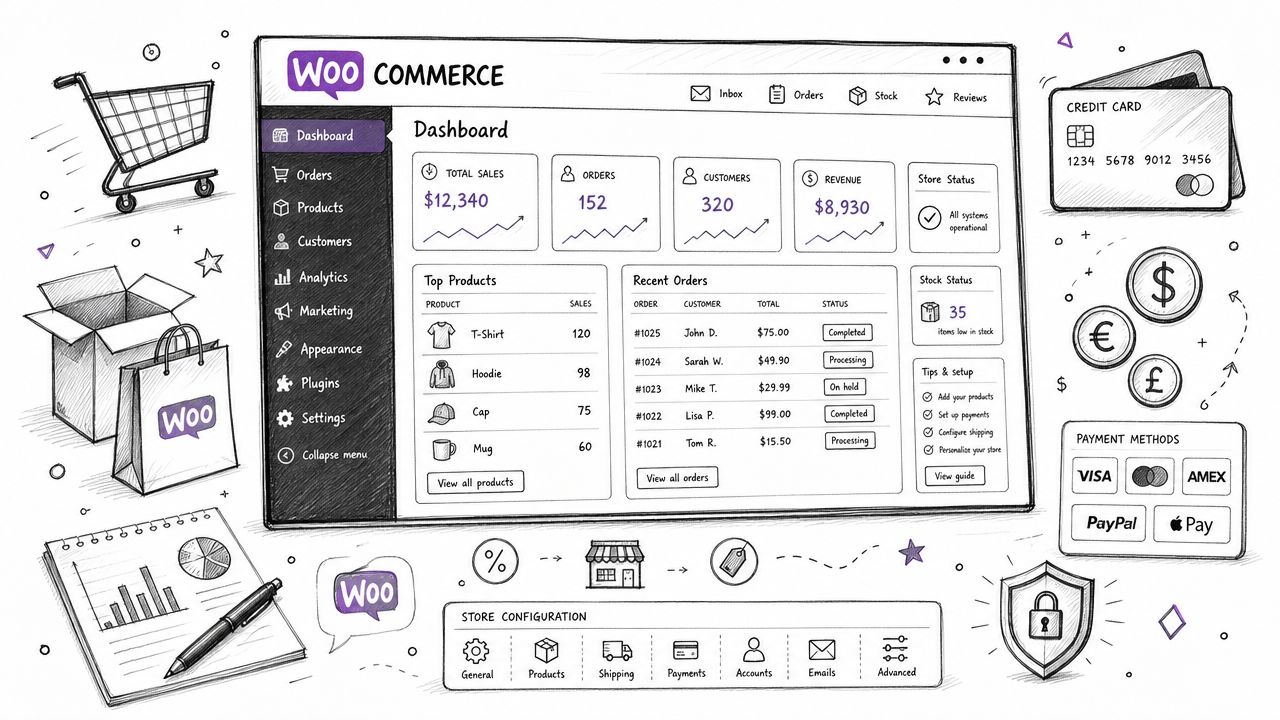
The mobile side matters more than many new merchants expect. Flowlu's ecommerce statistics roundup states that mobile commerce accounts for nearly 59% of all online retail sales, and almost 80% of retail website visits come from smartphones. For regulated products, that means every validation step, age-related notice, checkout field, and shipping restriction message has to work cleanly on a small screen.
Set up products for clarity, not marketing fluff
The first product upload is where many stores start sounding vague. That's a mistake in a high-risk category. Customers need precise information, and your staff needs product data that supports order review.
Focus on:
- Clear product naming: Use consistent naming conventions for variants and regulated categories.
- Specific descriptions: State what the item is, what it includes, and any fulfillment conditions.
- Policy visibility: If transfer, documentation, or destination restrictions apply, say so before checkout.
- Image discipline: Use images that reduce support questions instead of forcing shoppers to guess details.
For regulated goods, product pages should answer operational questions early. If the page leaves room for interpretation, the customer service inbox pays for it later.
Choose payment providers with your risk profile in mind
A standard payment stack can become a bottleneck if the provider isn't comfortable with your category. That's why gateway selection shouldn't be based on fee assumptions alone. Ask blunt questions before integrating anything: Do they support your product type? What triggers review? What documentation will they ask for if volume changes?
If you need a grounded overview of this issue, review payment gateway restrictions for regulated products in WooCommerce.
Things that usually work better than chasing the fastest setup:
- Category disclosure upfront: Be explicit about what you sell.
- Written approval where possible: Don't rely on a verbal green light.
- Test mode first: Run end-to-end transactions before exposing customers to live payments.
- Operational fallback: Know what your team will do if a gateway pauses or reviews transactions.
Later in the build, this walkthrough can help your team visualize the WooCommerce flow before final polish:
<iframe width="100%" style="aspect-ratio: 16 / 9;" src="https://www.youtube.com/embed/lIZhguzf9Lo" frameborder="0" allow="autoplay; encrypted-media" allowfullscreen></iframe>Mobile-first isn't a design preference
A regulated store often adds friction on purpose. Notices, restricted-shipping messages, account verification steps, and legal disclosures are part of the process. On desktop, merchants can get away with clumsy layouts. On mobile, weak layout decisions break trust immediately.
Check these elements on an actual phone, not just a browser preview:
- Checkout fields: They should be easy to tap and complete.
- Restriction notices: They must be visible without overwhelming the page.
- Cart edits: Customers should be able to adjust items without losing context.
- Policy links: Terms, shipping details, and return conditions must be accessible.
If a shopper can't understand a restriction message on a phone, the issue isn't the shopper. It's the store setup.
Mastering Shipping Compliance for Regulated Products
Shipping is where many regulated stores become legally exposed.
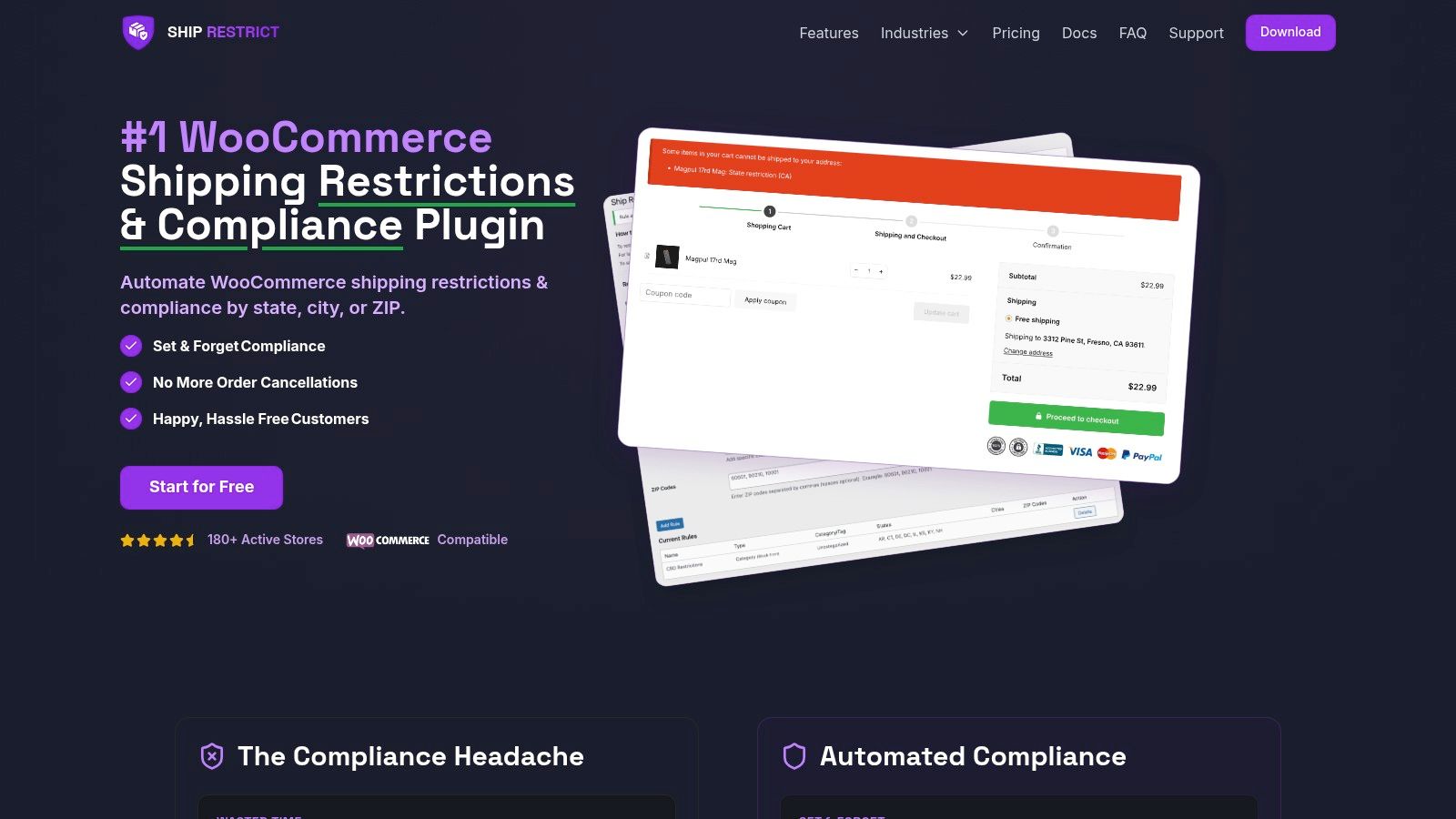
A standard WooCommerce setup can quote rates and assign zones. It cannot reliably decide whether a specific regulated item may go to a specific address under a rule set that changes by state, county, city, or ZIP code. For a firearms retailer, that gap matters immediately. If your store accepts an order it should have blocked, the problem is not "shipping configuration." It is failed compliance control.
That is why generic internet store guides miss the mark here. They treat shipping as a fulfillment task. In regulated commerce, shipping also functions as a gatekeeper. The store has to evaluate destination rules before the customer pays, not after your staff notices a bad order in the queue.
Why WooCommerce's built-in tools aren't enough
WooCommerce handles ordinary catalogs well. Restricted products need more precise logic than its default shipping zones and classes were designed to provide.
Common gaps include:
- Address precision: State-level rules are often too broad. Some restrictions depend on county, city, or ZIP code.
- Item-level enforcement: One cart can contain products with different legal shipping rules.
- Checkout blocking: The store should stop the transaction before payment is completed.
- Clear notices: Customers need a direct explanation of why delivery is unavailable.
If your team reviews restricted orders by hand after checkout, you have already allowed the risky part of the transaction to happen. I see new dealers make this mistake because manual review feels cautious. In practice, it creates inconsistency, refund work, and preventable exposure.
What a workable restriction system looks like
A usable setup starts with rule mapping. Each regulated product needs to be assigned to the correct restriction group so the store knows which logic to apply at checkout. If you sell firearms, ammunition, magazines, or parts with different destination rules, lumping them into one broad shipping policy creates mistakes.
From there, configure location-based controls at the level your category requires. In many regulated stores, state rules are only the first filter. ZIP-based or locality-based logic is often necessary to prevent false approvals and false blocks. This guide to WooCommerce location-based shipping restrictions shows the kind of rule structure standard zone settings do not cover on their own.
Then add checkout enforcement. The store should block the order before payment completion if the cart and destination do not match the active rule set. Do not rely on a follow-up email, a back-office note, or a staff member catching the problem later that day.
Customer messaging matters too. "Shipping unavailable" is weak. A better notice explains that the destination cannot receive that product under the store's shipping rules and, where appropriate, tells the buyer whether removing the item or using a different delivery address would solve the issue.
The trade-off new firearms retailers usually get wrong
New firearms sellers often worry that automated restrictions will reject good orders. That concern is fair. Poorly configured rules can cost sales.
But manual review has a cost as well. It slows fulfillment, produces different decisions between staff members, and turns legal judgment into an inbox task. That is a bad system for any regulated catalog.
The better approach is tighter rule design with clear testing:
-
Map products carefully
Assign each restricted item to the right rule group from day one. -
Use the narrowest location logic you need
If state-level control is too broad, configure county, city, or ZIP rules. -
Block before capture
Prevent invalid orders at checkout instead of cleaning them up later. -
Write customer-facing notices in plain language
Tell buyers what is blocked and why. -
Document exceptions for staff
Your team should be able to explain why an order was accepted, rejected, or flagged.
For regulated goods, shipping setup is part of compliance operations. Treat it that way from the start, especially if you are building your first firearms store on WooCommerce.
Your Pre-Launch and Final Launch Checklist
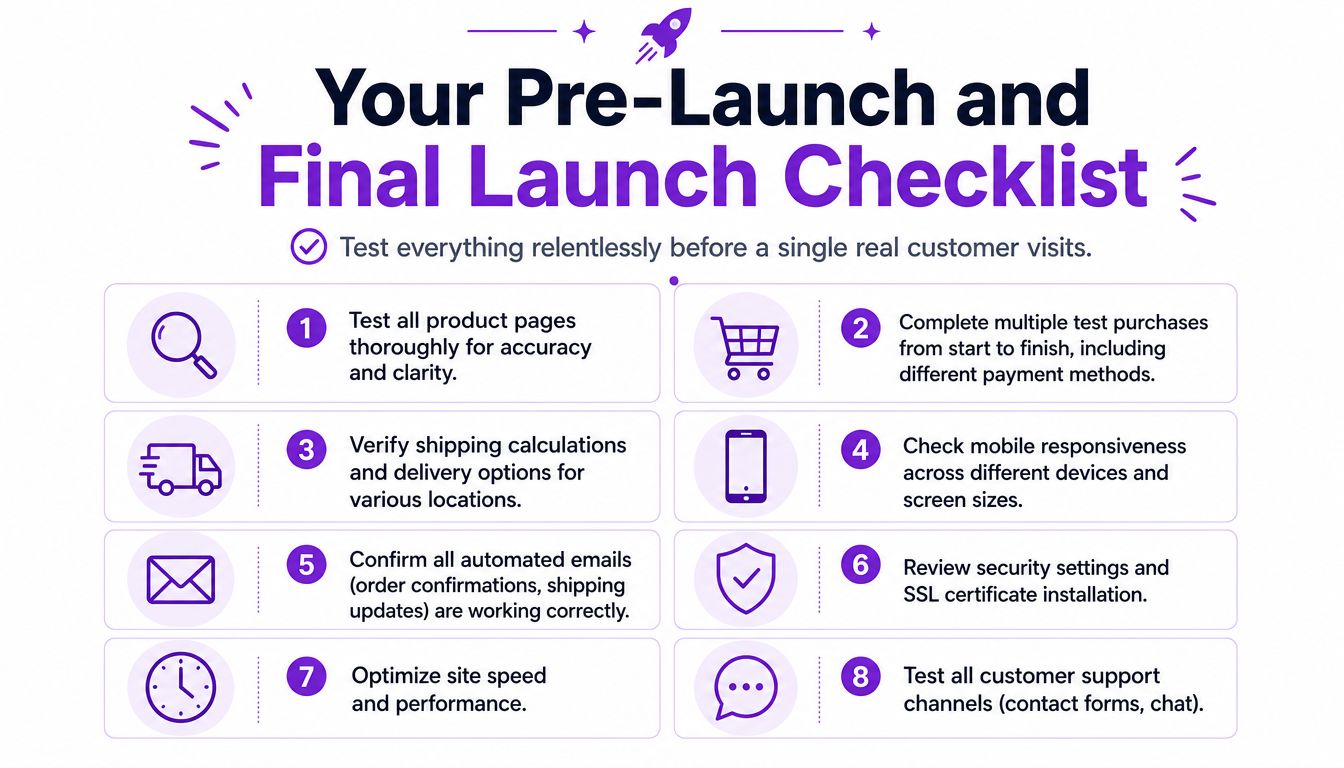
Most stores don't fail because the owner forgot one major feature. They fail because nobody tested ordinary paths with enough discipline. A regulated store should go live only after you verify customer paths, compliance paths, and failure paths.
Run scenarios, not just page checks
Don't settle for clicking around the homepage and assuming the rest is fine. Build test cases that resemble real customer behavior. Include valid orders, restricted orders, abandoned carts, and payment failures.
Use this checklist before launch:
- Product review: Confirm every regulated item has the right description, images, and policy notes.
- Checkout testing: Complete test purchases from product page through confirmation page.
- Restriction verification: Enter multiple shipping destinations to confirm invalid orders are blocked correctly.
- Payment gateway testing: Use test mode and verify the order status behavior your team expects.
- Email confirmation: Make sure order emails, failed-order notices, and customer notifications are arriving.
- Policy review: Read privacy, terms, shipping, and return pages as if you were a first-time customer.
- Mobile inspection: Test all major customer flows on a real phone.
- Support path check: Submit your contact form and confirm response handling.
Review the store like an operator
Founders often test like owners. Customers don't. Staff don't either. Review the store from three perspectives:
| Perspective | What to look for |
|---|---|
| Customer | Can I understand what I'm buying, what happens next, and why an order might be blocked? |
| Fulfillment staff | Can I tell what needs review, what can ship, and what policy applies? |
| Compliance operator | Can I confirm that restricted destinations are stopped before completion? |
Launch standard: If you haven't tested a scenario, assume it can fail in production.
Freeze changes before going live
One of the worst habits in ecommerce is tweaking settings on launch day. Last-minute theme edits, plugin installs, and checkout text changes often create the exact bugs you were trying to avoid.
Set a change freeze. Test the final version. Then launch the version you tested, not the version you improvised after midnight.
Frequently Asked Questions on Legal and Operational Next Steps
The hard part starts after launch. A firearms store can accept orders on day one and still be exposed on day two if its shipping rules, customer notices, and internal review process do not match the products being sold.
Generic ecommerce advice breaks down here because standard WooCommerce setups are built to collect orders, not to interpret regulated-product shipping rules at the state, county, city, and ZIP level. That gap is where new retailers get into trouble. The store looks functional. The operation behind it is still incomplete.
How do I legally ship across multiple U.S. jurisdictions?
Treat shipping rules as a maintained compliance system, not a one-time setup task. Product restrictions change by destination, carrier policy changes, and your own catalog changes. A rule that worked for one SKU or one state can fail the moment you add a new item type or expand where you advertise.
I advise merchants to keep three things current at all times: the restriction logic inside the store, a written explanation of why each rule exists, and a review process for updates. If an order is blocked, staff should be able to explain the reason clearly. If an order goes through, the team should know why it was allowed.
What should I keep reviewing after launch?
Review the places where software and policy meet. Those are the failure points.
- Restriction rules: Check whether destination-based blocks still match current product and shipping requirements.
- Payment processing: Watch for gateway warnings, reserve changes, payout delays, or policy questions tied to your category.
- Customer-facing notices: Read every error message and blocked-order notice. Customers need a plain-language explanation, not a vague checkout failure.
- Manual exceptions: Track every order your staff has to stop, edit, or review by hand. Repeated exceptions usually mean the store logic is missing a rule.
One pattern matters more than the rest. If the same issue appears more than once, fix it in the system instead of training staff to work around it.
Do I need a lawyer involved if the site is already working?
Yes.
A working checkout proves only that the software processed a transaction. It does not confirm that your disclosures are adequate, your procedures are defensible, or your shipping workflow matches the legal limits tied to your products. Counsel should review your policies, fulfillment flow, recordkeeping, and any state-specific restrictions that affect how you sell and ship.
The cleanest setup is straightforward. Counsel defines the boundaries. Your store enforces them. Your staff follows documented procedures when an order falls outside the normal path.
What should customers be able to find without contacting support?
Customers should be able to answer the practical questions that drive abandoned carts: where you ship, what you will not ship, what happens after purchase, what documentation may be required, and how returns or cancellations are handled.
A good reference point is our shipping and return policy. It shows the level of clarity customers expect before they place an order. In regulated retail, policy pages are part of compliance operations, not just support content. Clear policies reduce chargebacks, cut repetitive support tickets, and give staff something concrete to point to when a customer disputes a restriction.
When should I change tools or processes?
Change them when the same manual review keeps showing up in your queue. If staff repeatedly check addresses by hand, explain the same destination restriction, or override orders that WooCommerce should have stopped earlier, the process is underbuilt.
I see this often with firearms retailers using a standard WooCommerce stack. The catalog is live, the checkout works, and the merchant assumes the hard work is done. Then the team discovers that ordinary shipping zones and flat-rate rules cannot handle regulated-product restrictions with enough precision. At that point, adding another checklist is not the answer. The store needs better rule enforcement.
Launching once is easy. Operating cleanly, with compliant shipping decisions happening before checkout completion, is what separates a workable firearms store from a liability.
If you're running WooCommerce in a regulated category, Ship Restrict helps automate location-based shipping compliance before checkout completes. It gives firearms retailers a practical way to enforce state, county, city, and ZIP-based restrictions without relying on slow manual checks.
Automate Shipping Compliance
Stop worrying about restricted states. Ship Restrict handles it automatically.

Cody Yurk
Founder and Lead Developer of ShipRestrict, helping e-commerce businesses navigate complex shipping regulations for regulated products. Ecommerce store owner turned developer.
Automate Shipping Compliance
- Block restricted states
- No more cancellations
- Set and forget
3-day free trial · Card required