A Guide to Your WooCommerce Testing Environment
Learn to build a safe testing environment for your WooCommerce store with Ship Restrict. Follow our step-by-step guide to clone, test, and validate compliance.
If you run a WooCommerce firearms store, you already know the feeling. A plugin update is available. A shipping rule needs to change. A county restriction was revised. None of those tasks look dangerous on their own, but any one of them can break checkout logic in a way that costs money fast.
The problem isn't only site stability. It's compliance stability. A store can look fine on the front end and still approve an order that should have been blocked, hide a valid shipping method from a legitimate buyer, or send the wrong customer message at the worst possible point in checkout. That's why a proper testing environment matters so much in regulated eCommerce. It gives you one place to prove your rules before live customers find the holes for you.
Why Untested Updates Are a Ticking Time Bomb
The most expensive WooCommerce mistakes usually start as “small” changes. A payment plugin gets updated. A theme override touches checkout fields. A shipping rule is added for one ZIP range. Someone assumes the logic is isolated, pushes it live, and moves on.
That assumption is what causes trouble in firearms eCommerce. The checkout flow is where product rules, address data, shipping methods, taxes, user roles, and legal restrictions all collide. If you test only the happy path, you miss the exact cases that create exposure.
Automate Shipping Compliance
Block orders to restricted states automatically. 3-day free trial.
Start Free TrialAccording to Urban Institute research referenced for regulated screening tool gaps, 63% of merchants report shipping violations specifically due to untested restriction rules. For a firearms retailer, that should end the debate about whether a testing environment is optional.
What goes wrong in real stores
A live store can fail in quiet ways:
- Rules conflict unexpectedly: A ZIP-level restriction might not override a broader state rule the way you intended.
- Updates shift behavior: A WooCommerce or extension update can change checkout hooks, shipping package handling, or validation timing.
- Messages confuse buyers: The rule may block correctly, but the customer sees a generic error instead of a useful explanation.
- Admin teams lose confidence: When nobody trusts rule changes, every update gets delayed or avoided.
Practical rule: If a rule affects whether you can legally ship an order, it deserves its own test case before it reaches production.
A testing environment is insurance, but it's also an operating discipline. It lets you verify that restrictions fire at the right moment, for the right products, with the right address inputs, without exposing the business to a live mistake.
Building Your Foundation Staging vs Local Environments
A firearms retailer updates checkout logic on a Tuesday, tests a few carts on a developer laptop, and deploys before close of business. By Wednesday morning, customers in restricted ZIP codes are getting rates they should never see. That failure usually starts with the wrong test environment.
Before you validate shipping compliance rules, decide where each kind of testing belongs. Local and staging both have a job. The mistake is treating them as interchangeable.
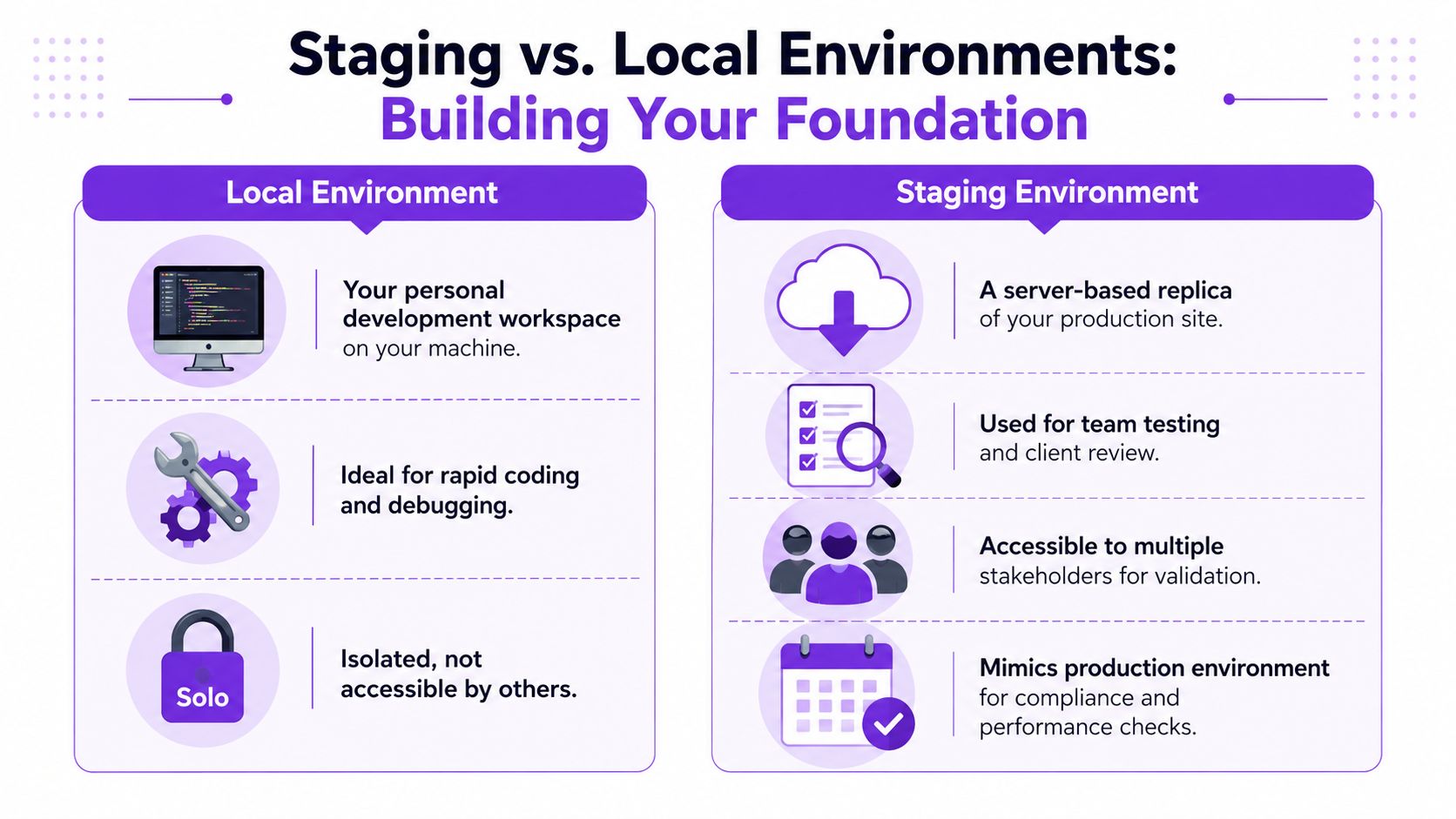
Local is for rule development and fast troubleshooting
Use a local environment when you need speed. It is the right place to inspect plugin conflicts, step through hooks, test a draft rule set, or roll the database back after a bad import. LocalWP, Docker, and a standard PHP/MySQL stack all work if they match your WooCommerce version and plugin set closely enough to reproduce the issue you are chasing.
For Ship Restrict work, local is useful early. You can confirm that a rule saves correctly, that a product condition matches the right SKU set, or that custom checkout code is not short-circuiting restriction logic.
It is also limited.
Free Shipping Compliance Audit
We'll review your WooCommerce store's shipping compliance for free.
A laptop does not reproduce production hosting, object cache behavior, server-level email handling, third-party security layers, or the exact request flow your live checkout uses. If the rule depends on shipping methods, tax settings, address normalization, or another plugin modifying packages at checkout, local testing can give you a false pass.
Staging is for final compliance validation
Staging should be a private copy of production with the same theme, plugin stack, WooCommerce settings, checkout customizations, shipping methods, and restriction rules. In this setting, compliance testing becomes credible, because you are validating the full checkout path instead of isolated pieces of it.
For firearms stores, that difference matters. A rule that works in local but fails in staging usually points to a real dependency. It may be a cached shipping package, a missing plugin setting, a checkout field customization, or a role-based condition that only appears with production-like data. Those are the issues that create legal exposure and chargeback risk if they slip into live checkout.
Use staging to answer the questions that matter:
- Does the restriction fire for the right state, ZIP, or product combination?
- Does the blocked order show the correct customer-facing message?
- Do mixed carts behave correctly when only part of the order is restricted?
- Do admins, support staff, and managers see the same result when they test the same scenario?
Local vs Staging Environment Comparison
| Factor | Local Environment | Staging Environment |
|---|---|---|
| Primary use | Fast coding, debugging, plugin conflict checks | Full checkout validation, team review, pre-launch testing |
| Speed of setup changes | Very fast | Slower than local, but closer to live behavior |
| Team access | Usually only one developer | Shared with admins, QA, and stakeholders |
| Infrastructure realism | Limited | Much closer to production hosting and workflow |
| Best fit for compliance checks | Early rule logic checks | Final validation of address, cart, and checkout behavior |
What to clone into either environment
Copying files is not enough. Compliance rules depend on store state, and missing store state is one of the main reasons teams approve changes that later fail under real checkout conditions.
Clone or recreate the parts of the store that affect shipping decisions:
- Products and variations: Include restricted firearms, ammunition, accessories, bundles, and mixed-cart combinations.
- Customer data structure: Preserve roles, tax treatment, account logic, and any workflow tied to prior orders or account type.
- Shipping zones and methods: Include flat rate, live rate, conditional methods, hidden methods, and carrier settings that affect availability.
- Checkout customizations: Bring over field edits, validation hooks, geolocation logic, and message overrides.
- Restriction settings: Recreate every Ship Restrict rule and verify that imports, priorities, and conditions match production.
A weak staging copy does more harm than a missing one. It gives the team confidence without proving anything.
If you need a repeatable setup process, use Ship Restrict's testing guide for WooCommerce shipping restriction validation as the baseline.
Configuring Your Sandbox for Compliance Testing
A copied site still isn't ready to use. The sandbox has to behave like a store while staying isolated from real customers, real money, and real notifications. That's where most rushed setups fail.
Lock down anything that can escape
Start with the obvious risk points. Outbound email, payment gateways, and any carrier integrations should be treated as unsafe until proven otherwise.
Use this checklist:
- Put payment gateways in sandbox or test mode. Stripe, PayPal, and similar providers all support non-live transactions. Use their test credentials only in the sandbox.
- Disable or redirect store email. Order confirmations, shipment notices, and account emails should never go to real customers from a testing environment.
- Restrict indexing and access. Password-protect staging and block search engines.
- Mark the site visually. Add a clear admin bar notice or banner so nobody mistakes staging for production.
Match the logic that affects checkout
This is the part many stores underbuild. If your shipping restrictions depend on address fields, product classes, shipping methods, or checkout filters, those dependencies must exist in the sandbox exactly as they do in production.
Review these areas one by one:
- WooCommerce shipping zones: Confirm the same zones, methods, labels, and sort order.
- Tax and address settings: State, county, city, and ZIP handling can change rule outcomes.
- Coupon behavior: Promotions sometimes alter shipping method visibility or cart composition.
- User role logic: Wholesale, dealer, and staff accounts may follow different checkout paths.
- Plugin stack: Any plugin that modifies cart, checkout, or product eligibility belongs in the sandbox too.
Keep test-only guardrails in place
I prefer adding friction in staging on purpose. That includes fake branding in the header, test order prefixes, and admin notices that show environment name and database source. It slows nobody down, but it prevents expensive confusion.
Field note: The best sandbox is realistic in behavior and unrealistic in consequences.
If your team uses live shipping carriers for rate estimates, decide in advance whether you need production-like rate behavior or fixed test methods. For compliance work, the rule result matters more than the exact freight number. In many cases, a simplified shipping setup makes failures easier to spot.
Populating Realistic Test Data for Ship Restrict
A firearms store usually fails compliance testing for one reason. The test data is too clean.
Production orders are messy. Customers use guest checkout, type counties differently, ship mixed carts, and enter ZIP codes that sit right on a rule boundary. If Ship Restrict only gets tested against a single sample SKU and one obvious blocked state, the first real edge case shows up after launch, when an unlawful shipment or a lost sale is already on the table.
Build customer records that match real checkout paths
Create test users that mirror the ways people buy from your store. That means more than a default customer account.
Start with these profiles:
- Retail buyer: Standard shopper with no special pricing or permissions.
- Dealer or wholesale account: For stores with role-based products, rates, or checkout logic.
- Law enforcement or exempt buyer: Only if your policy and documentation support separate handling.
- Guest checkout user: A required case, because many rule failures happen before account creation matters.
Keep the data fake but believable. Use realistic address formats, phone lengths, and naming patterns so validation, checkout fields, and fraud tools behave the way they do under live traffic.
Maintain an address library tied to rule outcomes
Random addresses waste time. A useful sandbox has a maintained set of addresses where the expected result is already known.
I usually group them like this:
- Allowed addresses: Orders that should clear with no restriction notice.
- Blocked addresses: State, county, city, or ZIP combinations that must stop checkout.
- Boundary addresses: ZIPs near restricted regions, county lines, and cities with inconsistent formatting.
- Conflict cases: Addresses where a broad rule allows shipment but a more specific rule should block it.
That last group matters most for firearms compliance. Jurisdictional errors rarely come from the obvious cases. They come from overlapping ZIP coverage, county-specific restrictions, municipality exceptions, and customer-entered variations that still resolve to the same destination.
Seed products that create rule collisions
Address data alone is not enough. You also need products built to trigger the hard cases.
Create test SKUs for restricted firearms, unrestricted accessories, ammunition if applicable to your policy, and bundles or mixed carts where one item should block the shipment for the entire order. Include products assigned to the exact categories, tags, shipping classes, and custom attributes your live rules depend on.
Multi-item carts are where weak test data gets exposed. Zinc's Multi Product Ordering API is useful context because it reflects how quickly order combinations multiply once customers stop buying one item at a time.
A practical data set looks like this:
| Data type | What to include | Why it matters |
|---|---|---|
| Users | Retail, wholesale, exempt, guest | Triggers different checkout and restriction paths |
| Addresses | Allowed, blocked, boundary, conflicting | Verifies jurisdiction logic under realistic inputs |
| Products | Restricted, unrestricted, mixed-cart items | Tests item-level rules and cart-level blocking |
| Orders | Saved carts or repeatable scenarios | Speeds regression checks after rule changes |
If you manage a large rule set, keep Ship Restrict's guide on bulk importing shipping restrictions from CSV close by. It makes it much faster to load and retest the same jurisdiction data without rebuilding cases by hand.
Designing Test Cases to Validate Every Rule
A testing environment becomes useful only when you run structured tests inside it. Random clicking won't give you confidence. You need named scenarios, expected outcomes, and a clear pass or fail decision.
Environmental testing is about evaluating something under the conditions it's likely to face so weaknesses show up before service. Grand View Research defines environmental testing in that broader sense, and the same logic applies to software checkout flows where customer actions and regulatory scenarios have to be simulated to prevent costly compliance errors in operation, as outlined in its U.S. environmental testing market overview.
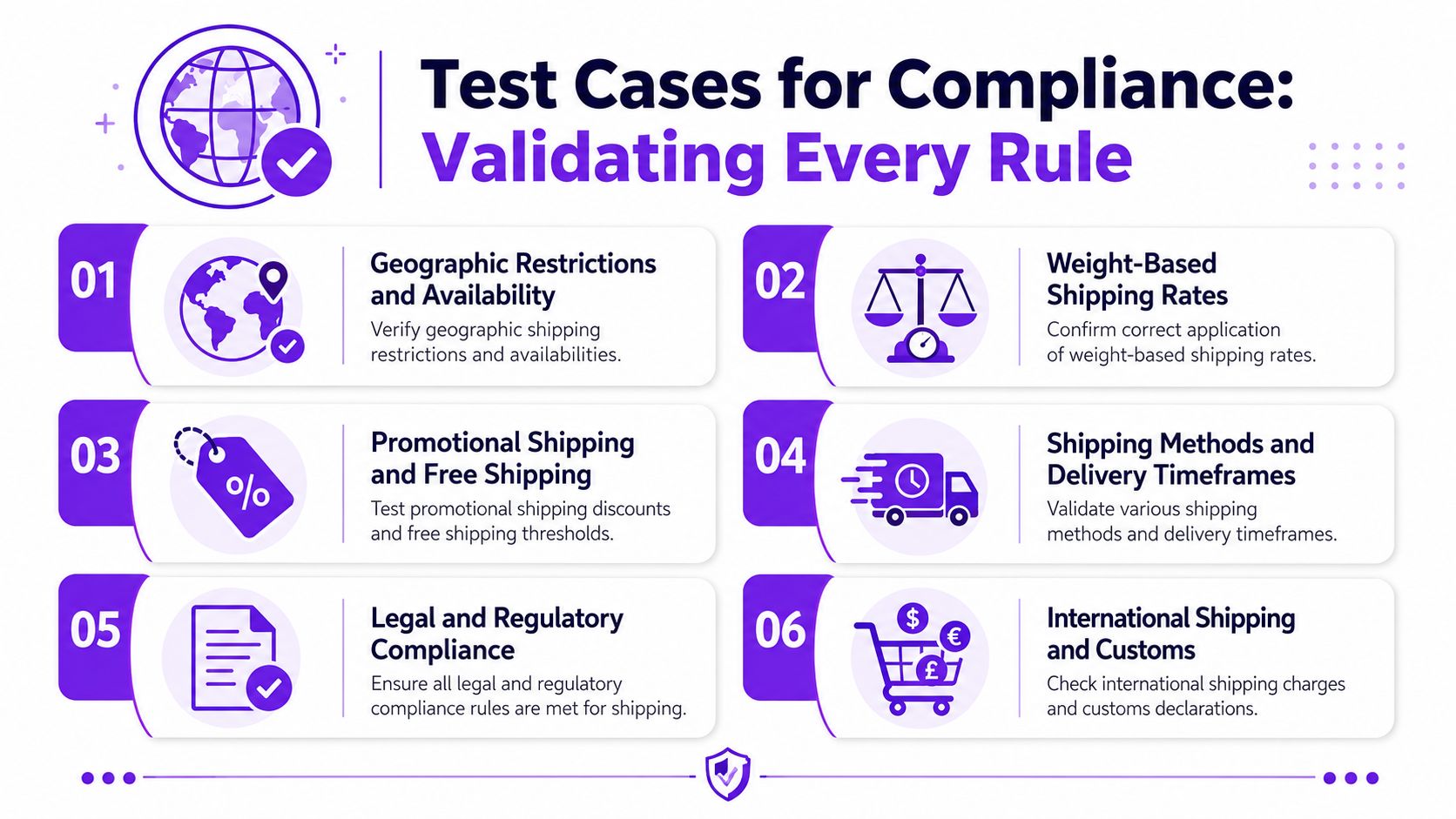
The six scenarios I'd always run
Use these as a baseline for a firearms WooCommerce store.
-
Allowed product to allowed address
Confirm the clean path works. If you can't pass a basic lawful order, the rest of the suite doesn't matter. -
Restricted product to blocked state
Add a product you know should fail and verify the block appears before the customer can complete checkout. -
Restricted product to blocked county inside an otherwise allowed state
This catches stores that stop testing at the state level and miss the finer rule layer. -
Restricted product to blocked ZIP inside an allowed county or state
ZIP overrides are where many rule stacks become brittle. -
Mixed cart with one restricted item and one allowed item
Decide what should happen and verify it consistently happens. Should the whole order fail, or should the customer be forced to remove the item? -
Customer message validation
The logic can be correct while the communication is wrong. Test what the buyer sees.
What each test case should record
Don't rely on memory. For each scenario, log:
- Input details: Product, quantity, user role, shipping address, shipping method.
- Expected result: Allowed, blocked, hidden method, or warning message.
- Actual result: What the store did.
- Evidence: Screenshot, screen recording, or order note.
- Retest status: Whether the issue stayed fixed after the next update.
If a team can't state the expected outcome before clicking checkout, they're not running a test case. They're improvising.
Don't forget the notifications layer
Compliance testing shouldn't stop at cart logic. If the store sends customer emails, admin alerts, or internal order notices based on rule outcomes, test those too. A practical companion resource is this guide on how to send test emails with Robotomail, especially when you need to review messaging safely without touching live recipients.
A compact regression checklist
| Test area | Example question |
|---|---|
| State rule | Does a blocked state reject the order every time? |
| County rule | Does the county rule override the broader allowance correctly? |
| ZIP rule | Does the narrowest restriction win when rules conflict? |
| Product rule | Does the restriction apply only to the intended SKUs or categories? |
| Mixed cart | Does one restricted item affect the whole order as expected? |
| Message output | Does the customer see a clear, accurate reason for the block? |
Advanced Strategies Automation Rollbacks and Monitoring
Manual testing catches obvious issues. It doesn't scale well once your store changes every week. At some point, the bigger risk is assuming a human will remember every critical path after each plugin update, rule edit, and checkout tweak.
That's where automation, rollback planning, and monitoring start paying for themselves.
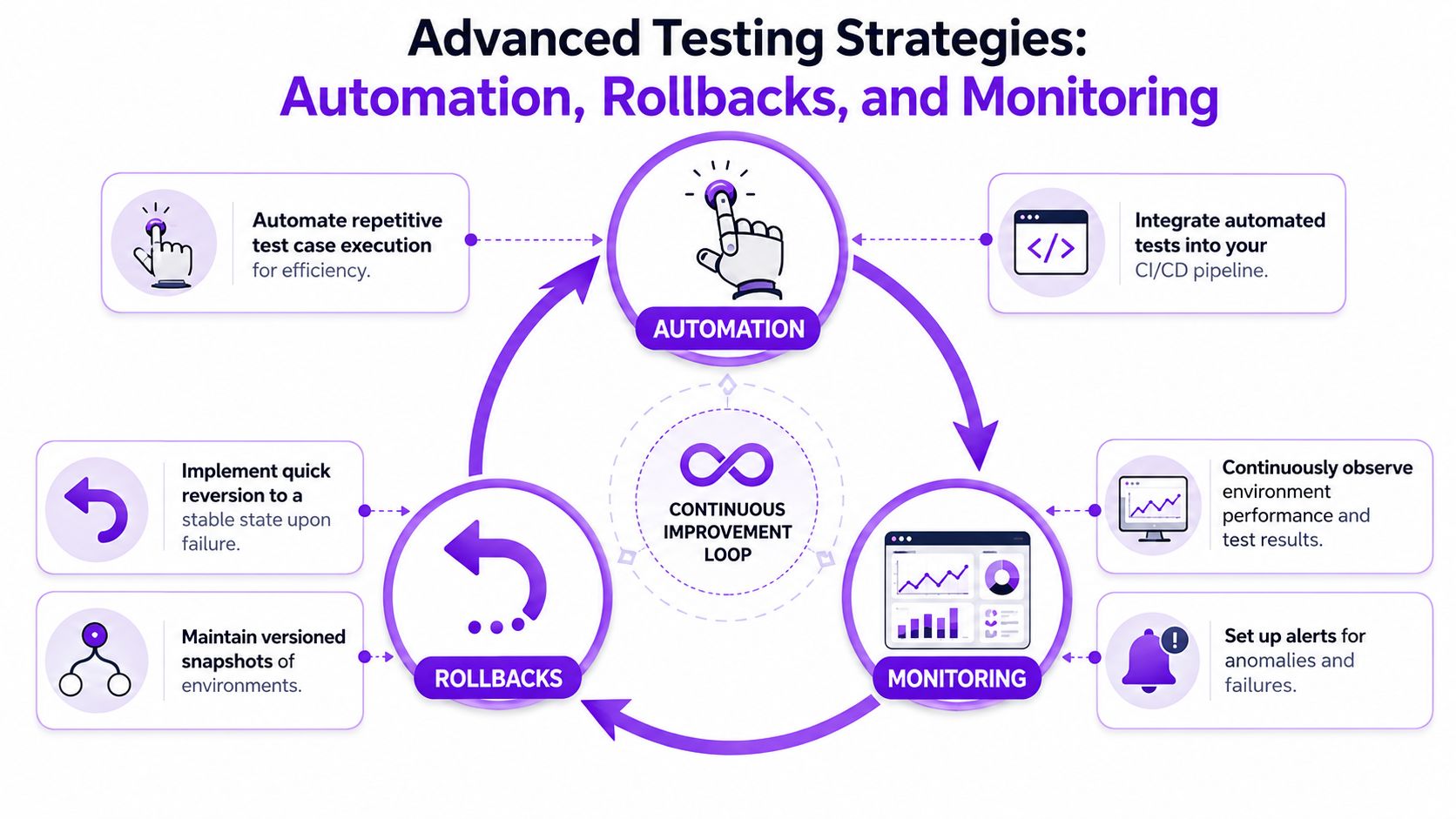
Add automation to the highest-risk paths
You don't need a giant QA program to get value. Start by automating the handful of checkout scenarios that would hurt the most if they failed. That usually means blocked-state tests, ZIP override tests, mixed-cart tests, and message checks.
Then add a rollback routine. Keep a known-good backup, a deployment checklist, and a fast path to restore prior plugin versions or database state if a release behaves differently than expected.
Use monitoring and controlled failure
Staging should also tell you when something drifts. Watch checkout errors, failed requests, and unexpected changes in shipping method availability after deployments.
For teams ready to go further, controlled failure testing is worth considering. LaunchDarkly's guidance on chaos engineering in test environments says organizations using it reduce production incident severity by 60% and identify system weaknesses with 92% higher efficacy than traditional testing methods alone. In a WooCommerce context, that can mean deliberately breaking an API response, simulating timeout behavior, or testing how checkout reacts when a dependency returns incomplete data.
If you're tightening your process around repeatable compliance checks, Ship Restrict's article on automated shipping compliance for WooCommerce stores is a helpful operational reference.
Frequently Asked Questions
Do I need both a local and staging testing environment
If you change code, yes. Local is better for debugging and quick iteration. Staging is better for validating real checkout behavior with the rest of the plugin stack and store settings in place.
If you don't develop custom code, staging is usually the minimum.
How often should I test shipping rules
Test any time you change WooCommerce, your theme, a checkout-related plugin, shipping settings, tax settings, or restriction logic. Also retest after importing products in bulk or changing category assignments for regulated items.
For high-risk stores, a short regression pass before every release is safer than relying on memory.
What's the biggest mistake merchants make
They test with unrealistic data. One clean address and one sample product won't expose county-level conflicts, ZIP exceptions, mixed-cart behavior, or role-based differences.
The second biggest mistake is letting staging drift away from production until the results stop meaning anything.
Should staging use real customer and order data
Use only what your policies and legal obligations allow. In most cases, sanitize or replace personal data before moving it into a testing environment. You want structural realism, not exposure.
A fake but realistic dataset is usually enough for compliance validation.
What if a rule passes in staging and fails live
Start with environment differences. Compare plugin versions, shipping settings, tax options, checkout customizations, and any server-side caching or security layers. Most “mystery” failures come from one missing dependency or one setting that didn't match.
Document the issue as a named test case once you fix it. If it broke once, it can break again.
If you want a simpler way to enforce shipping restrictions in WooCommerce without relying on manual address checks, Ship Restrict is built for regulated stores that need state, county, city, and ZIP-based control before checkout. It helps firearms retailers reduce compliance risk, prevent restricted orders, and make rule management easier to maintain as regulations change.
Automate Shipping Compliance
Stop worrying about restricted states. Ship Restrict handles it automatically.

Cody Yurk
Founder and Lead Developer of ShipRestrict, helping e-commerce businesses navigate complex shipping regulations for regulated products. Ecommerce store owner turned developer.
Automate Shipping Compliance
- Block restricted states
- No more cancellations
- Set and forget
3-day free trial · Card required