How to Improve Accuracy: Master Regulated Shipping Workflows
Discover how to improve accuracy in regulated shipping. Implement automated rules, QA tests, monitor metrics, and ensure customer messaging for 2026 success.
A customer places an order at 10:14 p.m. The address looks fine. The payment clears. The warehouse prints the label the next morning. Then someone notices the destination ZIP sits inside a restricted pocket your store's spreadsheet didn't catch. Now the order is frozen, support is answering an angry email, and your team is deciding whether to cancel, refund, or eat the return cost after a carrier rejection.
That's how shipping accuracy usually breaks in regulated eCommerce. Not through dramatic failures. Through small misses that slip through normal work, especially when restrictions change faster than a manual process can keep up.
For firearms retailers on WooCommerce, accuracy isn't just about cleaner operations. It protects compliance, customer trust, and your ability to fulfill orders without last-minute scrambling. If you want to know how to improve accuracy, the answer starts before fulfillment. It starts at checkout, where state, county, city, and ZIP-level rules should already be doing the hard work.
Understanding common accuracy challenges
Most stores don't struggle because nobody cares. They struggle because the workflow was built for ordinary merchandise, then stretched to handle regulated products.
Automate Shipping Compliance
Block orders to restricted states automatically. 3-day free trial.
Start Free TrialA typical pattern looks like this. The store relies on a mix of shipping tables, internal notes, and one staff member who “knows the rules.” Orders that look questionable get flagged manually. Everything else moves forward. That works until a county-level restriction changes, a temporary local rule expires, or a customer enters an address format your team didn't anticipate.
The expensive part is the cascade. One bad destination decision can trigger a failed label, a carrier exception, a cancellation, a refund conversation, and a support ticket that turns into a public complaint. In regulated categories, the same miss can also create compliance exposure that's far more serious than a routine shipping error.
Where teams usually lose accuracy
Three weak spots show up over and over:
- Manual address review: Staff members are forced to interpret destination rules on the fly. That slows order flow and creates inconsistency between shifts.
- Outdated restriction logic: Rules may be correct when entered, then become stale because nobody updates them fast enough.
- Poor customer messaging: The store blocks or cancels an order without clearly explaining why, so the customer thinks the business made a mistake.
The biggest shipping mistakes usually happen before the package exists. Once a label is printed, you're already paying for a decision that should have been blocked earlier.
Another issue is granularity. Many merchants have broad state rules but no practical way to handle county, city, or ZIP exceptions. That gap matters most in regulated goods, where legality can change inside the same state.
If you're dealing with repeated order holds, inconsistent overrides, or support friction around denied destinations, you don't have a fulfillment problem first. You have an accuracy problem upstream.
Diagnosing the roots of shipping errors
Before changing tools or adding automation, inspect the order path from product page to label creation. Shipping accuracy problems rarely come from one dramatic flaw. They come from several smaller gaps that line up.
Start with the handoff points
Look closely at every place where data changes hands:
- Customer input at checkout
- Store rule evaluation
- Admin review or override
- Order export into fulfillment
- Final label generation
If a team member has to “double-check” an address outside the system, that's a signal the system itself isn't trusted. In practice, those workarounds become the root of inconsistent outcomes.
Free Shipping Compliance Audit
We'll review your WooCommerce store's shipping compliance for free.
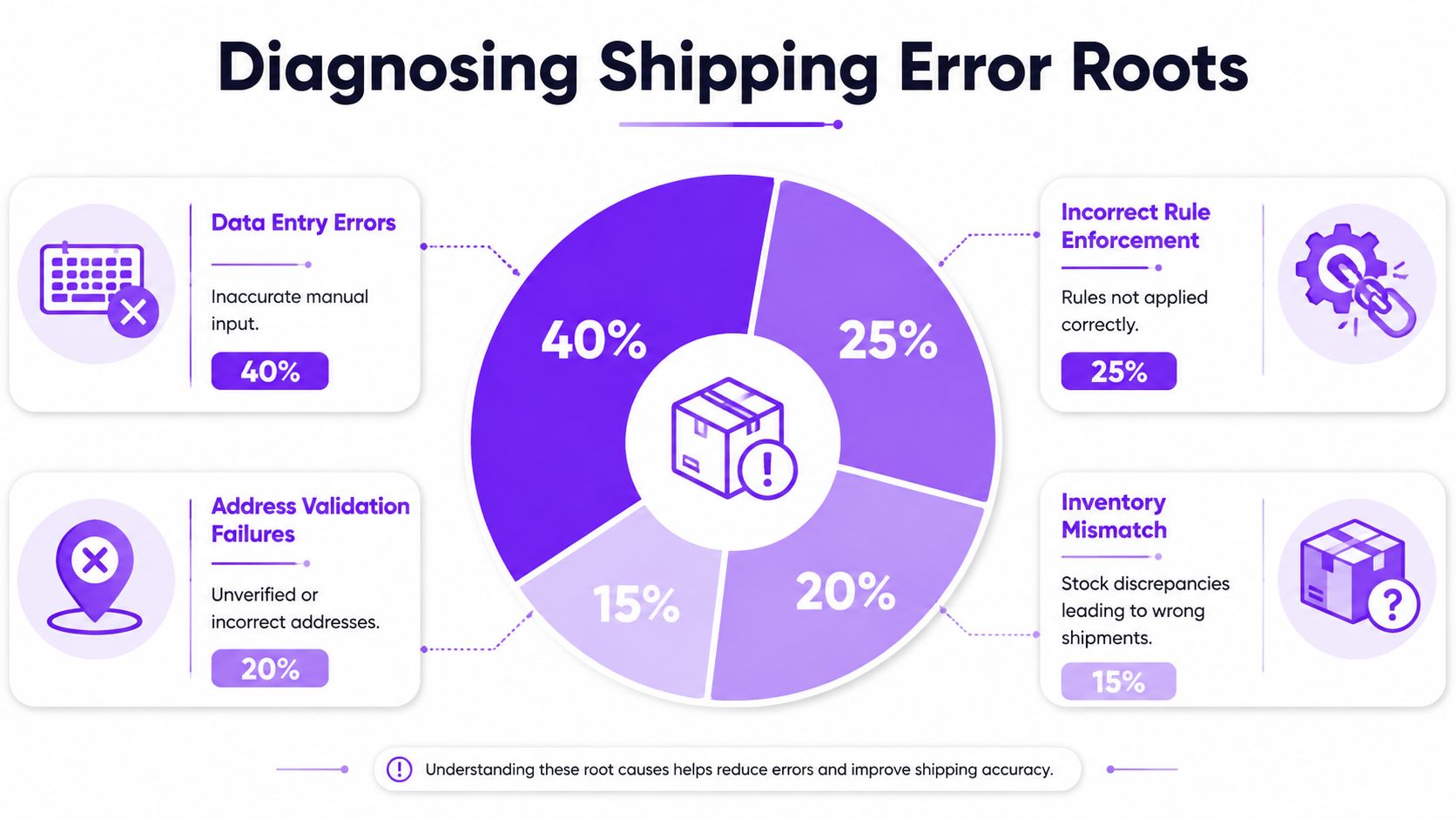
The most overlooked issue in regulated shipping is pre-checkout geographic granularity. Most guidance stays broad, but research on shipping compliance failures in eCommerce notes that 78% of shipping compliance failures stem from misclassified or restricted goods shipped to prohibited jurisdictions. That's exactly why state-only blocking isn't enough for firearms and similar products.
Common error types and impacts
| Error Type | Impact on Accuracy |
|---|---|
| Manual data entry mistakes | Wrong destination details enter the workflow and force later review or cancellation |
| Missing local restriction rules | Orders pass checkout even though the destination should have been blocked |
| Address validation failures | Incomplete or malformed addresses make rule matching unreliable |
| Inventory mismatch | Teams substitute or split shipments in ways that create avoidable compliance checks |
A technical team can also tighten this diagnosis work with better data handling. If you're mapping order events, rule matches, and exceptions, understanding Python for logistics improvement is a useful reference for structuring operational analysis without turning it into a massive rebuild.
What a real diagnosis looks like
A solid review usually uncovers patterns like these:
- A county rule exists in policy docs but not in checkout enforcement
- A ZIP exception was added manually for one event, then never removed
- Staff override denied orders differently depending on who was working
- Customer addresses were accepted in formats that weakened matching logic
Practical rule: If your compliance process depends on memory, screenshots, or weekly spreadsheet checks, you haven't really enforced the rule. You've only documented it.
You'll know the diagnosis is honest when it points to specific failure points, not vague complaints like “human error.” Human error is usually the symptom. The root cause is a workflow that asks people to do rule engine work by hand.
Automating validation with Ship Restrict best practices
Automation helps when it blocks bad orders early and consistently. It hurts when a store automates messy data and assumes the problem is solved. That's why the first goal isn't speed. It's reliable enforcement at checkout.
Industry guidance on automation and validation reports that automation of repetitive or complex tasks reduces human error likelihood by up to 70–80% compared to manual processes, and that combining automated validation tools with inconsistency detection can push error rates below 1%. In regulated shipping, those gains matter most when the validation happens before an order enters fulfillment.
Build rules at the most specific level you need
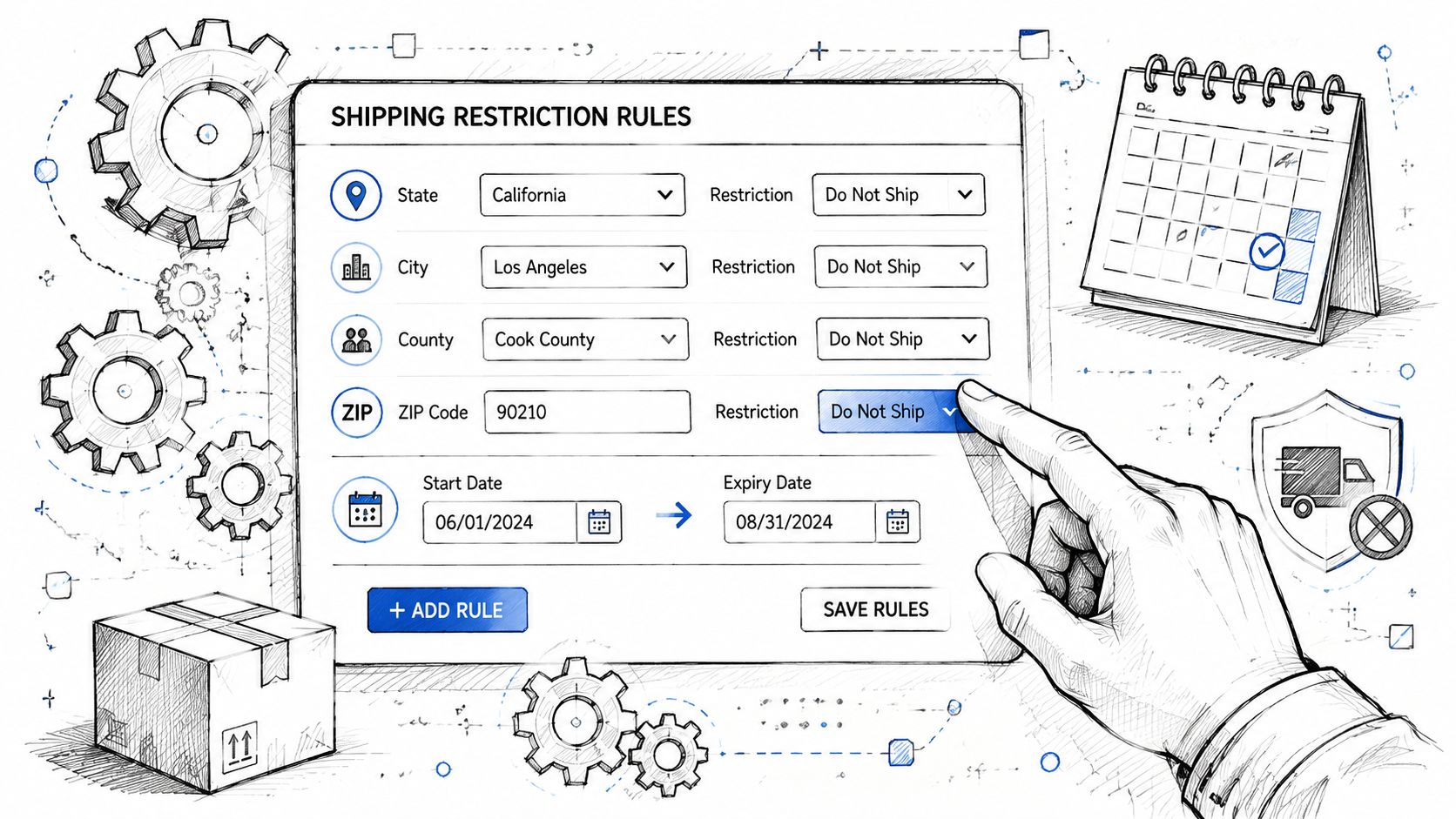
For regulated goods, broad rules are a starting point, not a finished system. Configure restrictions by:
- State when the rule applies everywhere in that state
- County when local carveouts matter
- City for municipal limitations or event-based restrictions
- ZIP code when that's the cleanest way to enforce a narrow boundary
Real orders don't arrive labeled “safe” or “restricted.” They arrive as customer-entered addresses with all the messiness that implies. The more precisely your rules mirror reality, the fewer judgment calls your staff has to make later.
Use dates and bulk updates instead of one-off edits
A practical setup often includes permanent rules and temporary ones together. For example, a store might need a municipal restriction around a scheduled event, then have that restriction expire automatically. Date-based control prevents the common mistake of leaving a temporary block active long after it should be removed.
Bulk import matters for another reason. If your team is entering large rule sets one line at a time, the process itself creates accuracy risk. Standardized imports are boring, and that's exactly what you want. Boring systems are easier to trust.
For a deeper operational walkthrough, implementation best practices for shipping restrictions are worth reviewing before rollout.
Pair enforcement with customer-facing explanations
A blocked order without context creates friction. A blocked order with a clear explanation reduces support load and protects trust.
Good checkout messaging should answer three questions:
- Why is this order restricted
- Is the issue product-specific or destination-specific
- What can the customer do next
If your team also wants to improve the follow-up after a blocked or partially restricted order, A complete guide to building automated email flows is useful for designing customer notifications that explain restrictions clearly instead of forcing support to rewrite the same response.
Here's a simple pattern that works:
This item can't be shipped to the entered destination because local shipping restrictions apply. Please review your address or contact support if you believe this is an error.
That message is short, direct, and less likely to escalate into confusion.
A quick demo can help teams visualize how a rule-driven workflow should behave in practice:
<iframe width="100%" style="aspect-ratio: 16 / 9;" src="https://www.youtube.com/embed/IRcZHE2hhzI" frameborder="0" allow="autoplay; encrypted-media" allowfullscreen></iframe>The trade-off with automation is obvious. You lose some flexibility for ad hoc exceptions. That's a good thing in compliance work. If every edge case becomes a custom judgment call, the store never achieves stable accuracy.
Testing workflows to ensure order accuracy
A restriction rule isn't finished when it's created. It's finished when it survives testing against real edge cases.
The stores that improve accuracy consistently treat shipping rules like production logic. They don't assume a rule works because it saved correctly in the admin. They verify how it behaves against live-like order scenarios, including the ugly ones.
What to test first
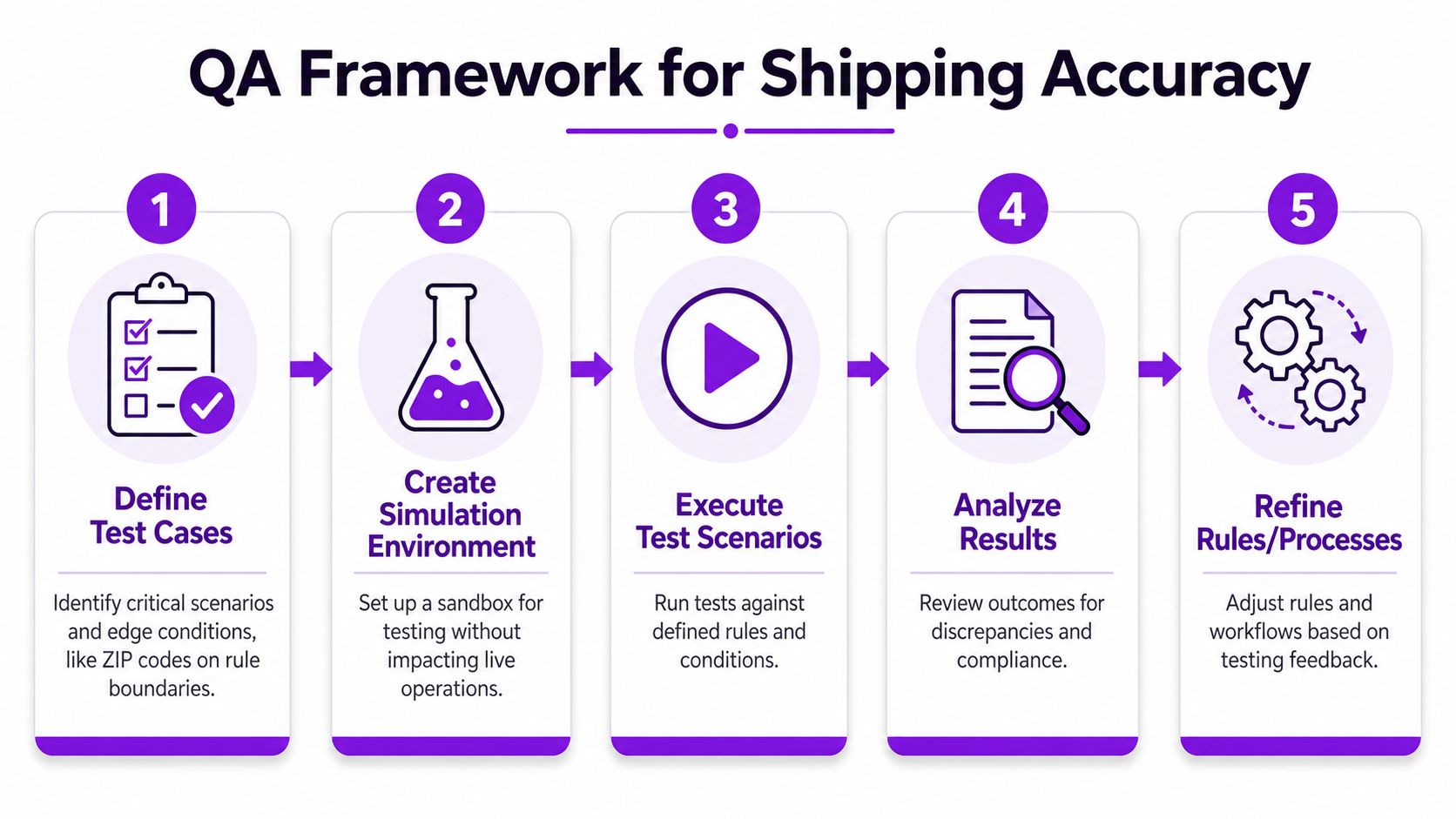
Focus your first QA pass on cases that tend to break quietly:
- Boundary ZIPs: Test addresses that sit right on the edge of an allowed and blocked area.
- Expired rule scenarios: Confirm a temporary restriction stops applying when its end date passes.
- Conflicting rules: Check which rule wins when a broad state allowance collides with a narrow local block.
- Malformed addresses: See how the system handles abbreviations, missing unit data, or unusual formatting.
- Manual override logging: Verify that exceptions are recorded in a way compliance staff can review later.
A good staging setup makes this much easier. If you need a clean process for isolating tests before deployment, testing shipping restrictions in a dedicated environment is the right place to start.
Audit the results, not just the setup
Guidance on structured data audits recommends audit sample sizes of at least 10–15% of total records and a discrepancy threshold of less than 2%, noting that this discipline can save approximately 15–20% on operational costs. That benchmark fits shipping QA well because the point isn't to inspect everything manually. It's to inspect enough to catch drift before it spreads.
In practice, that means reviewing a meaningful sample of:
- blocked orders
- approved orders in sensitive regions
- recent rule changes
- staff overrides
Test the rule you meant to build, then test the order behavior you actually created. Those aren't always the same thing.
A repeatable QA rhythm
Nightly or scheduled test runs help after plugin updates, checkout changes, or rule imports. The exact cadence depends on order volume and regulatory volatility, but the principle is fixed. Every change should face the same test discipline, whether it's one ZIP edit or a large rule update.
Keep the log simple. Track the scenario, expected result, actual result, and whether the issue came from rule logic, address formatting, or workflow design. That record becomes far more valuable than memory when someone asks why a blocked order slipped through last month.
Monitoring metrics and reducing cancellations with messaging
Testing tells you whether the workflow can work. Monitoring tells you whether it's still working under daily pressure.
Most compliance teams watch outcomes too late. They notice trouble after a cancellation spike, a batch of manual reviews, or a support queue full of confused buyers. The stronger approach is to monitor leading indicators inside the order flow and connect them to customer communication.
Metrics that expose drift early
Track operational signals that show where the workflow is weakening:
- Blocked order rate by geography: Useful for spotting sudden changes tied to one state, county, or ZIP cluster.
- Manual override frequency: If overrides keep climbing, your rule coverage or address matching probably needs work.
- Address correction rate: A rise here often means customers don't understand how the store expects location data to be entered.
- Restriction-message abandonment: If buyers leave checkout after a message appears, review the wording for clarity.
There's a practical reason to move beyond periodic review. Current analysis of shipping accuracy and compliance workflows notes that only 12% of e-commerce retailers use live regulatory feeds or automated rule validation to prevent non-compliant orders at checkout, and that API-first rule engines can reduce manual review time by 65%. That's why weekly audits alone don't hold up well once destination rules start changing frequently.
For system-level ideas on what to watch, monitoring shipping restriction performance is a useful companion to your internal dashboard setup.
Messaging that prevents avoidable cancellations
A lot of cancellations happen because the store communicates too late or too vaguely. “Order cannot be processed” is accurate in the narrowest sense, but it doesn't help the buyer or support team.
Use messages in two places:
At checkout
Keep the language specific and calm.
- Destination-based message: This product can't be shipped to the entered location because local restrictions apply.
- Rule-review message: Your address requires an additional compliance review before this order can proceed.
- Alternative-action message: Please remove the restricted item or contact support to discuss eligible options.
After order submission
If your workflow includes holds or manual review, send a follow-up that explains the status in plain English. Customers handle bad news better when it sounds deliberate instead of broken.
A clear restriction notice can preserve trust even when the order doesn't go through. Silence usually does the opposite.
Turn support friction into rule improvements
Support tickets are one of the best monitoring tools you have. If customers keep asking why a specific area is blocked, the message may be unclear. If staff keeps overriding the same type of order, the rules may be too broad or poorly mapped.
The useful habit is closing the loop. Move repeated issues from inboxes and chat logs back into your rulebook, your address validation logic, and your checkout copy. That's how messaging stops being cosmetic and starts improving accuracy.
Maintaining accuracy with an ongoing checklist and conclusion
Teams that stay accurate treat compliance as a recurring operating discipline, not a one-time setup. That matters because analysis of automated compliance programs reports that organizations using automated compliance systems see error reductions of up to 90% and 70–80% less time spent on compliance-related tasks, while programs without active governance can decay within 18 months.
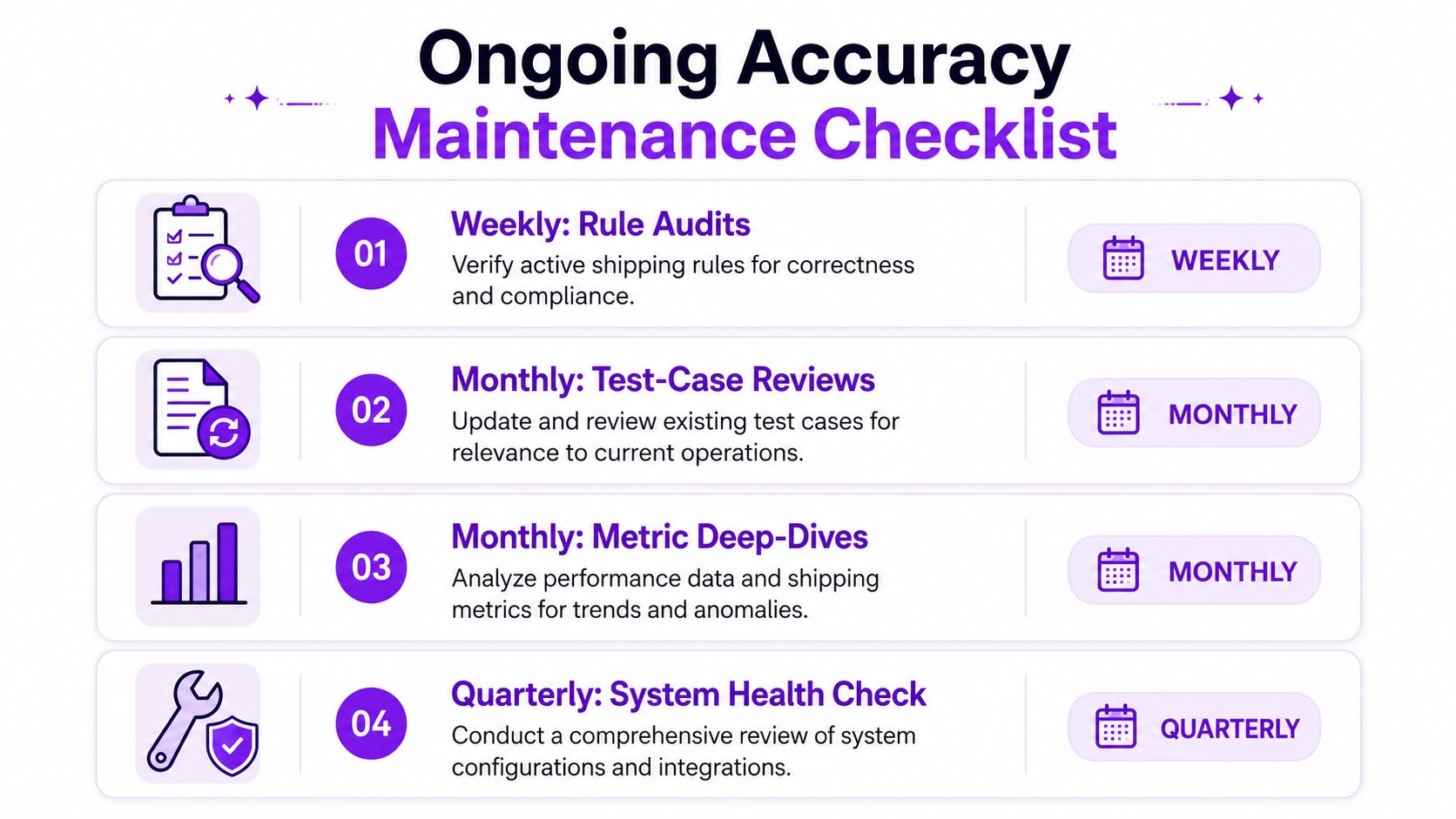
A workable checklist is simple enough to repeat:
- Weekly rule audits: Review active restrictions, recent overrides, and any temporary rules that should expire.
- Monthly test-case reviews: Add new edge cases based on support tickets, failed orders, and rule changes.
- Monthly metric deep-dives: Look for geographic spikes, unusual block patterns, and messaging friction.
- Quarterly system health checks: Verify integrations, staging practices, and ownership for compliance decisions.
Assign names to each task. If everybody owns it, nobody does.
How to improve accuracy in regulated shipping comes down to a few habits done consistently. Enforce restrictions before checkout. Test the edge cases. Watch for drift. Explain restrictions clearly to customers. Then keep governing the system so it doesn't slide back into manual patchwork.
If you want a practical way to enforce shipping restrictions before checkout in WooCommerce, Ship Restrict is built for regulated products and granular destination rules. It helps firearms retailers block restricted orders by state, county, city, or ZIP, reduce manual address checks, and give customers clear messaging at the moment it matters.
Automate Shipping Compliance
Stop worrying about restricted states. Ship Restrict handles it automatically.

Cody Yurk
Founder and Lead Developer of ShipRestrict, helping e-commerce businesses navigate complex shipping regulations for regulated products. Ecommerce store owner turned developer.
Automate Shipping Compliance
- Block restricted states
- No more cancellations
- Set and forget
3-day free trial · Card required