WooCommerce Monitoring System Performance: 2026 Compliance
Ensure WooCommerce compliance with optimal monitoring system performance. Our 2026 guide covers key metrics, tools, & optimization for regulated products.
You check a few orders, the server looks fine, and checkout still feels unreliable. That's a bad place to be in any WooCommerce store. In a regulated catalog, it's worse. A slow validation, a delayed rule check, or a timeout during address screening can turn a routine performance issue into a compliance problem.
That's why monitoring system performance for regulated eCommerce has to start with a different question. Not “Is the site fast?” Ask “Can the store enforce restrictions consistently under load?” Speed matters, but only because slow systems make mistakes. In firearms and other restricted product categories, that mistake can happen at checkout, inside a plugin, or in the gap between app logic and infrastructure.
Essential Performance Metrics for Compliance
Most store owners start with uptime and page speed. Those matter, but they aren't enough when checkout logic enforces shipping restrictions. You need a performance baseline first. Foundational monitoring works by establishing that baseline right after pilot acceptance or full deployment, then capturing standard metrics such as CPU utilization, memory consumption, database I/O activity, and web server statistics so you know what normal looks like under test conditions, as described in ScienceDirect's overview of performance baselining.
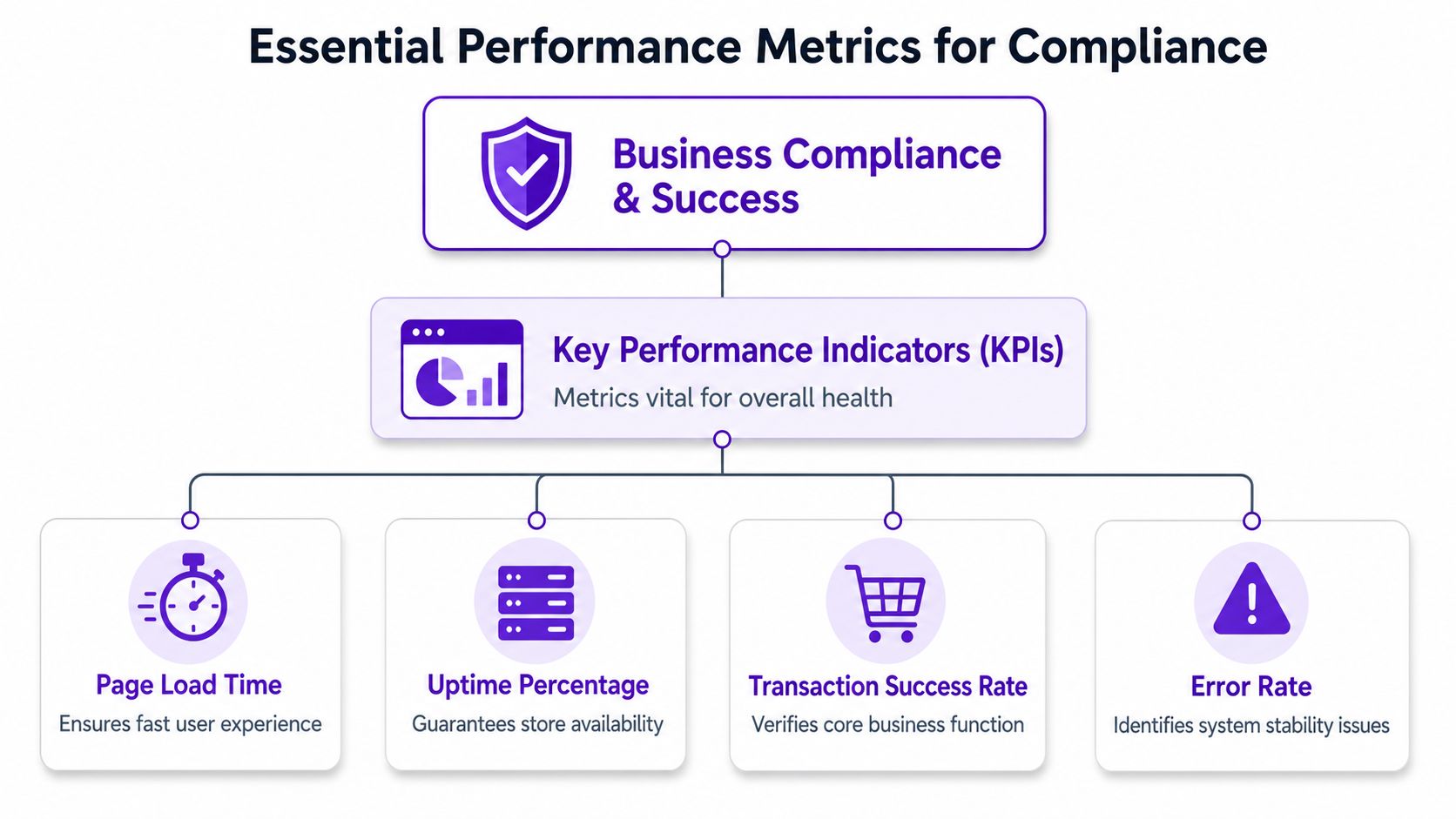
If you don't have that baseline, every incident turns into guesswork. You won't know whether today's checkout delay is a new problem, a hosting issue, a plugin regression, or your store's normal behavior during peak traffic.
Automate Shipping Compliance
Block orders to restricted states automatically. 3-day free trial.
Start Free TrialStart with the metrics that affect decisions
For a high-stakes WooCommerce store, five metrics deserve attention before anything else:
- Server response time: This tells you whether the application stack is answering requests promptly enough for shoppers to move through cart and checkout without delay.
- Database query performance: WooCommerce stores lean heavily on the database. Rule-heavy extensions, order lookups, customer session writes, and shipping logic can all slow down when queries stack up.
- Validation latency: This is the one many generic guides ignore. If a restriction check takes too long, checkout may stall, retry, or fail in a way that leaves staff uncertain about whether the order was screened.
- Error rate: You need to know when requests fail, not just when they slow down. A fast failure can still be a compliance failure.
- Throughput: This shows how many requests or transactions the store can handle before things degrade.
Practical rule: If a metric doesn't help you answer “could this allow a restricted order through or block a legitimate one,” it isn't a priority metric for compliance monitoring.
Tie each metric to a business risk
The useful shift is to stop treating monitoring data as purely technical. A slow product page is annoying. A slow restriction check at checkout is operationally dangerous.
Consider what each metric means in practice:
| Metric | What it tells you | Why it matters in regulated checkout |
|---|---|---|
| Response time | How fast the app answers requests | Slow responses increase abandonment and make support teams trust the system less |
| DB performance | Whether queries are becoming a bottleneck | Delayed reads and writes can hold up cart totals, shipping logic, and order validation |
| Validation latency | How long compliance checks take | This directly affects whether restrictions are enforced in time |
| Error rate | How often requests fail | Failed validation calls create ambiguity around order status |
| Throughput | How much traffic the system handles before degrading | Peak demand often exposes hidden problems in checkout logic |
There's also a merchant operations angle. If your checkout degrades, payment authorization can get messier, customer support volume rises, and approval workflows become harder to trust. Teams thinking through payment quality may also find this guide for higher merchant approvals useful, especially when checkout friction starts affecting transaction outcomes.
Baselines beat assumptions
A baseline isn't a spreadsheet you create once and forget. It's the reference point that lets you spot drift. If CPU, memory, database I/O, and web server behavior were stable after deployment, but validation latency now rises during address checks, you've got a lead. If throughput hasn't changed but error rate rises only during restricted-product orders, that's another lead.
That's how monitoring system performance becomes useful. Not by collecting everything, but by measuring the parts of WooCommerce that can subtly turn a slowdown into a compliance gap.
Your WooCommerce Monitoring Toolkit
A small team doesn't need every monitoring product on the market. It needs the right mix of visibility. The wrong stack creates noise, duplicate data, and extra cost. The right stack helps you answer one question quickly: where is checkout breaking down?
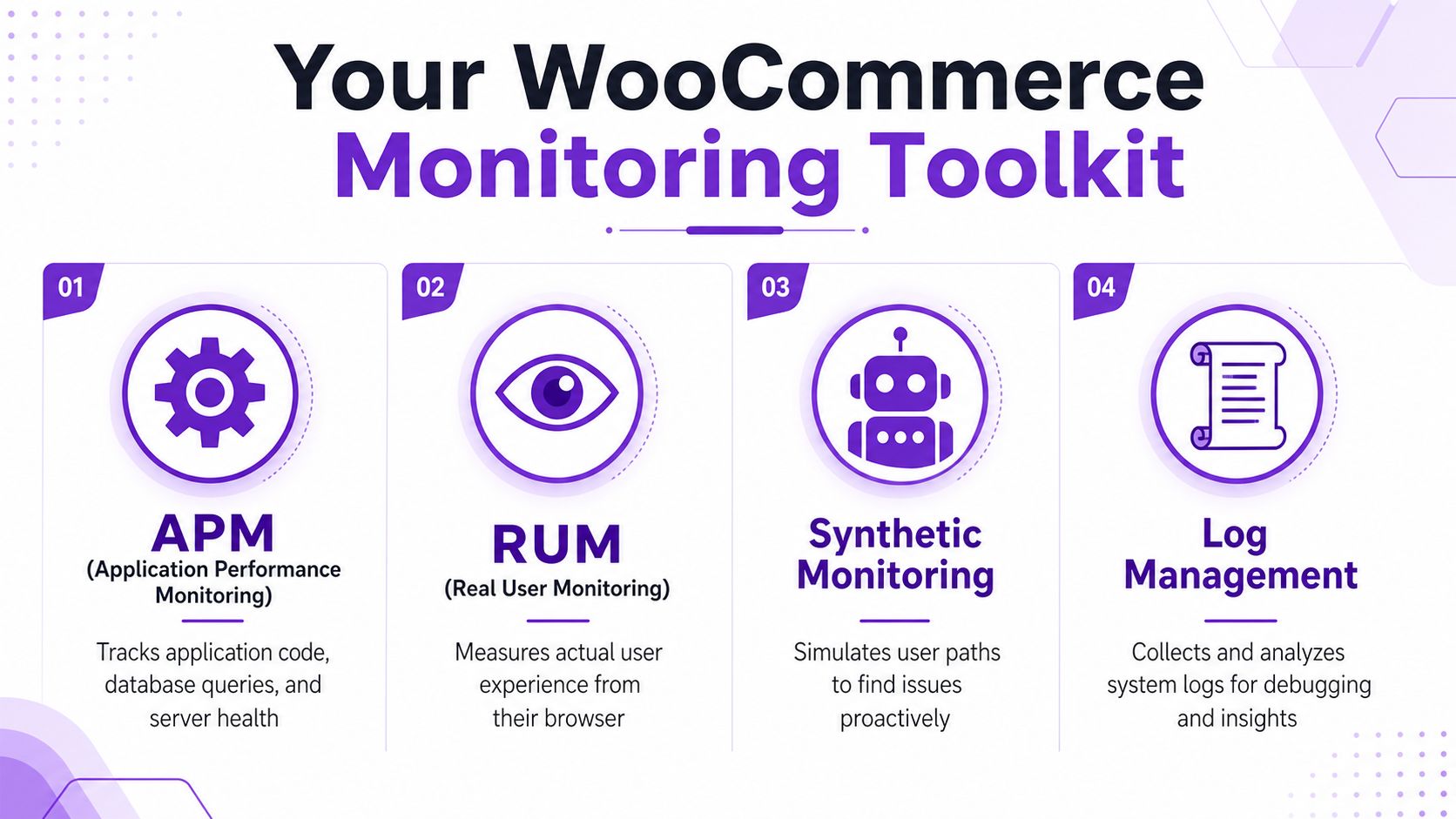
The broad categories are straightforward. Infrastructure monitoring watches server health and resource usage. APM shows what the application code and database are doing. Log management captures what happened. Real User Monitoring shows what customers experienced. Modern infrastructure tools can monitor components across data centers, edge systems, and cloud environments while collecting real-time health data and historical trends across servers, containers, databases, hypervisors, and storage, according to HG Insights' summary of performance monitoring.
Free Shipping Compliance Audit
We'll review your WooCommerce store's shipping compliance for free.
What each tool type is good at
Here's the practical version.
| Tool type | Best use | What it won't tell you on its own |
|---|---|---|
| Server and infrastructure monitoring | CPU, memory, disk, I/O, uptime trends | Which specific checkout function is slow |
| APM | Slow transactions, PHP execution paths, database bottlenecks | What users in different locations actually felt in the browser |
| RUM | Real browser timing, front-end delays, regional user pain | Why the backend caused the delay |
| Log management | Errors, warnings, order events, plugin failures | Whether the issue is isolated or part of a broader performance pattern |
| Synthetic monitoring | Scheduled test journeys through cart and checkout | How real customers with real devices experienced the flow |
If you're trying to identify the exact query, hook, or function making checkout drag, use APM. If your concern is whether shoppers in one region are seeing slower tax, shipping, or validation steps, use RUM. If your team gets “order blocked” complaints but can't line them up with infrastructure stress, your logging is incomplete.
Build the stack in layers
Budget matters, so start with the minimum useful stack:
- Infrastructure metrics first. Watch CPU, memory, disk I/O, and database load.
- Add centralized logs next. You need application events and checkout errors in one place.
- Bring in APM when checkout gets opaque. This is usually the point where plugin interactions and query timing start hiding the root cause.
- Use synthetic tests for checkout paths. Scheduled runs catch breakage before customers do.
Don't buy three tools that all tell you CPU is high. Buy one tool that shows CPU, one that shows why checkout code slowed down, and one that proves what the customer actually saw.
A staging environment matters too. You need a safe place to test monitoring overhead, rule changes, and checkout behavior before touching production. For that workflow, this guide to a WooCommerce shipping restrictions testing environment is worth reviewing.
Teams that are still shaping their infrastructure stack may also want a broader operational view from this resource on Proactive IT infrastructure monitoring. It's a useful complement if you're trying to decide how much visibility belongs at the server layer versus the application layer.
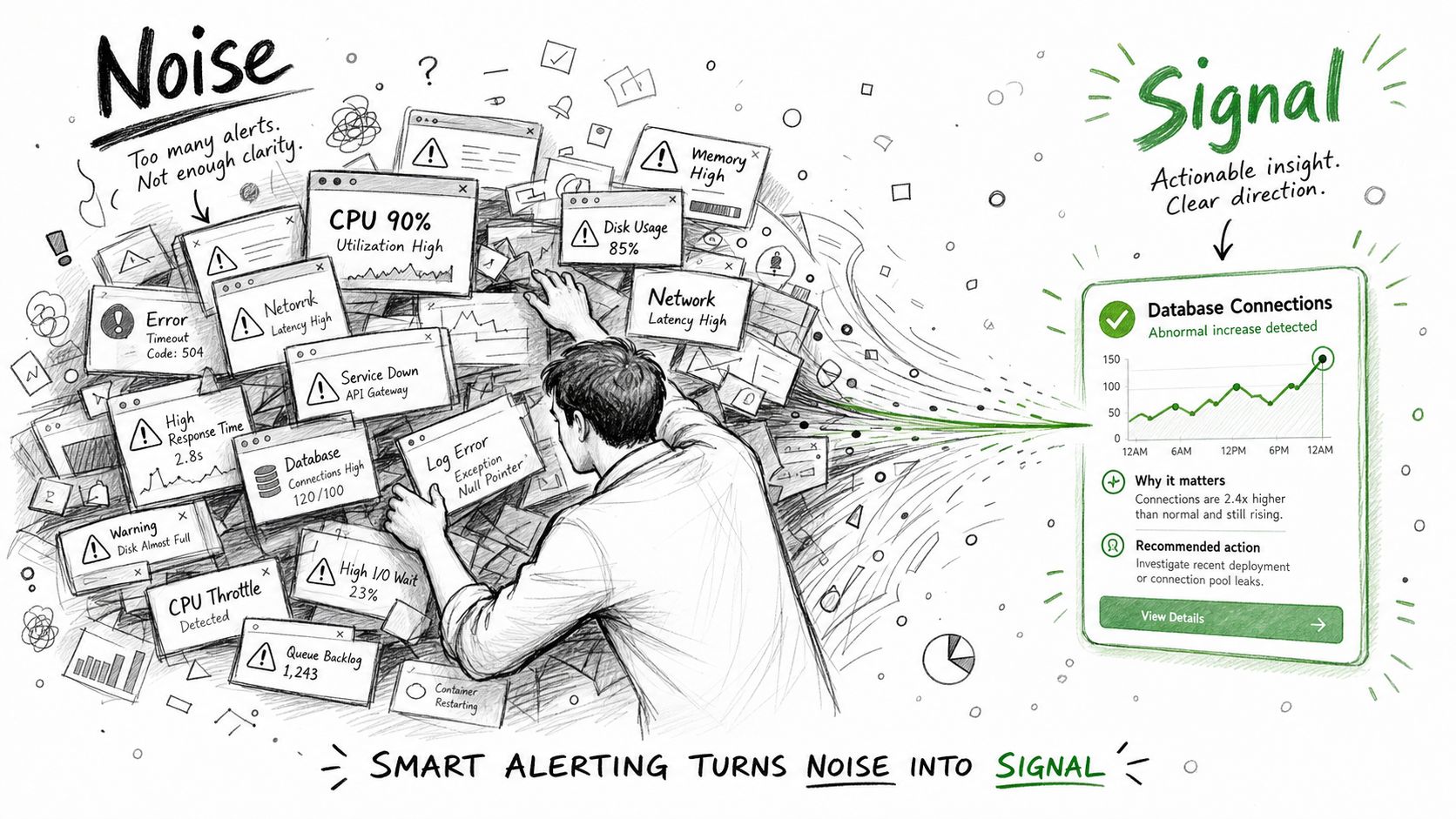
From Noise to Signal with Smart Alerting
At 2:13 a.m., the alert that matters is not "CPU hit 85%." The alert that matters is "checkout validation timed out for restricted orders in California, and customers may have bypassed the rule or been blocked incorrectly." In a regulated WooCommerce store, alerting has to point to customer harm and compliance exposure fast, or the team burns time on noise while the underlying problem keeps happening.
Generic threshold alerts rarely give enough context to make that call. A short CPU spike might come from a backup, a product import, or normal cache churn. None of those facts tell the on-call engineer whether age checks stalled, shipping restrictions failed open, or the checkout flow dropped the event you need for an audit trail.
Generic alerts don't match checkout risk
Useful alerts start with the transaction, not the server. Set conditions around the parts of checkout that can create legal or operational exposure:
- validation requests that exceed the time budget for checkout
- restriction checks that error out without showing a clear customer-facing failure
- blocked orders that do not produce a matching application log or order note
- third-party verification calls that degrade enough to threaten order accuracy
That approach changes the response. Instead of asking, "Is the box under load?" the team asks, "Did checkout handle a restricted order correctly, and do we have proof?"
This is also where percentiles matter more than averages. If the median validation request looks fine but the 95th or 99th percentile spikes during peak traffic, a small but expensive slice of orders is already at risk. For stores that need a tighter testing process around those thresholds, this guide to performance benchmarking for WooCommerce restrictions and checkout flows is a useful companion to alert tuning.
Watch the tail where compliance failures hide
Average response time hides the exact requests that cause chargebacks, support escalations, and bad compliance decisions. A store can show an acceptable average while the slowest validation calls time out under concurrency or when one plugin adds extra database work.
Prometheus documentation recommends histograms when teams need to measure latency distributions and alert on percentiles instead of simple averages, because buckets expose tail behavior that summary numbers smooth over (Prometheus histogram and summary practices). That matters for WooCommerce checkout. A percentile alert can catch the slow end of restriction validation before it turns into inconsistent order handling.
Primary alerts should fire on failed validations, degraded checkout latency, missing audit events, and elevated error rates on regulated order paths. Infrastructure metrics still matter, but they belong in diagnosis and correlation.
A practical alerting model
A clean alert setup usually has three levels, with each one tied to a specific response path:
- Warning: Validation latency is drifting above normal, but checkout still completes and logs are intact.
- Action: Restriction checks or verification calls are slow enough to threaten checkout correctness, and someone needs to investigate now.
- Critical: Validation failures, missing compliance logs, repeated checkout exceptions, or fail-open behavior create immediate compliance risk.
Each alert payload should answer three questions without opening another dashboard:
- What failed?
- Which store path, rule set, or dependency is affected?
- What should the on-call engineer check first?
If the alert cannot answer those questions, it is still noise.
One more rule helps keep signal quality high. Route alerts by ownership. Database saturation belongs with whoever handles MySQL performance. Failed age verification callbacks belong with the application owner who can inspect plugin logic, retries, and fallback behavior. Shared channels are fine for visibility, but accountability should stay specific. That is how teams keep alert volume manageable and avoid the expensive mistake of treating a compliance incident like a routine slowdown.
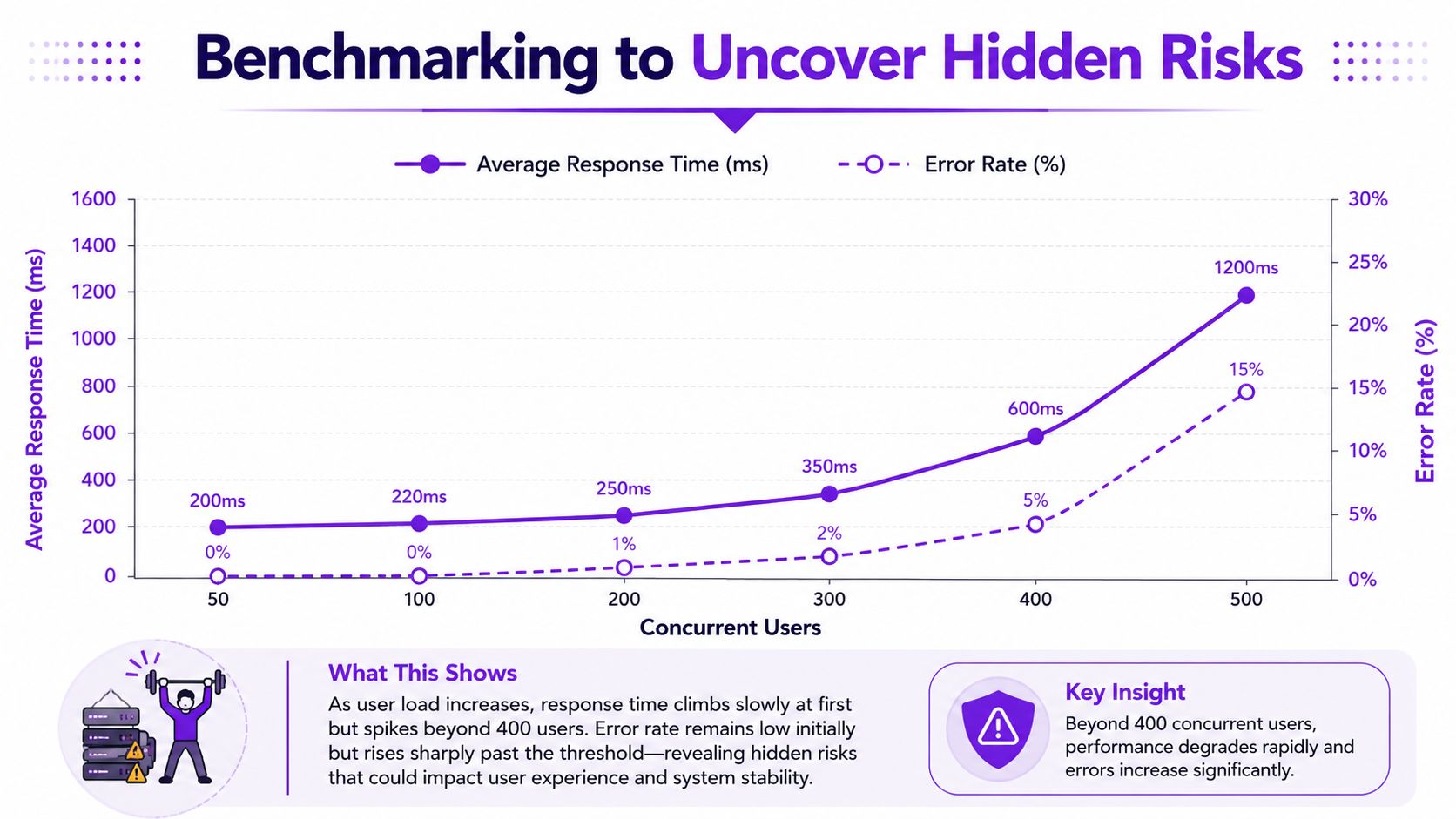
Benchmarking to Uncover Hidden Risks
A regulated store can pass routine health checks all week, then fail under a Saturday traffic spike when address validation, shipping restrictions, and order submission all compete for the same resources. That is the gap benchmarking exposes. For firearms and other restricted catalogs, the risk is not limited to slower checkout. It includes delayed or skipped controls on orders that should never pass without a clean validation trail.
Why percentiles reveal the real problem
Average response time hides the part of the distribution that creates expensive failures. A checkout flow with a decent mean can still have a bad p95 or p99 once restriction logic, tax calculation, fraud checks, and third-party verification calls stack up on the same request. Those tail requests are where timeouts happen, audit events get dropped, and customers retry orders in ways that complicate compliance records.
Google's SRE guidance recommends using latency distributions and histograms instead of averages because aggregates can hide the outliers operators need to see under load. In practice, that means benchmark reports should focus on percentile latency, error rate by endpoint, and the traffic level where those two start to rise together.
A useful benchmark report should show four things:
- Typical latency: median or p50 for the normal path
- Tail latency: p95 and p99 for the slowest regulated requests
- Failure threshold: the concurrency level where slowdowns become timeout errors or missed callbacks
- System correlation: whether the bottleneck comes from PHP workers, MySQL, external APIs, or plugin logic
What to benchmark in WooCommerce
Benchmark the workflows that can create legal exposure, not just the pages marketing cares about.
That usually means testing:
- Add to cart with restricted SKUs and mixed carts
- Checkout with address checks, shipping rule evaluation, and tax calculation
- Order submission during concurrent traffic
- Back-office activity running at the same time, including imports, rule changes, and scheduled jobs
Use production-like data. Real rule sets, real address patterns, and realistic plugin combinations matter here. A clean staging store with ten products and one simple restriction rule will miss the expensive lookups and hook contention that show up in a live catalog.
If you need a baseline process, this guide to performance benchmarking for shipping restrictions lays out the right test conditions for stores that depend on rule-heavy checkout logic.
One more caution. Do not treat load testing as a design exercise where teams tweak flows to make the benchmark look cleaner. The goal is to expose failure points, then fix them. Teams that later validate checkout changes with controlled experiments should still follow A/B testing best practices so performance wins do not come at the cost of correctness on regulated order paths.
How to read the results
Look for the point where behavior changes.
Sometimes response time rises in a straight line until the store hits a general capacity ceiling. Sometimes p99 latency stays flat, then jumps once concurrent checkouts begin contending on a shared table or a plugin starts making blocking calls. Those patterns matter more than a single pass or fail number because they show how close the store is to a compliance-breaking condition.
| Pattern in the benchmark | Likely issue |
|---|---|
| Response times rise steadily | Capacity limit in app or database tier |
| Tail latency jumps at moderate load | Query contention, locking, or expensive plugin hooks |
| Errors appear after latency spikes | Worker exhaustion, request timeouts, or dependency delays |
| Admin tasks degrade checkout | Poor isolation between customer traffic and back-office jobs |
The practical question is simple. At what traffic level does the store stop applying compliance logic reliably? Benchmarking answers that before a promotion, product drop, or seasonal rush answers it for you.
Practical Optimization for High-Stakes Checkout
A regulated checkout can look healthy right up to the moment it fails the one step that matters. The page loads. The cart updates. Then age checks, shipping restrictions, tax rules, or address validation stall under load, and the store starts accepting orders it should block or blocking orders it should accept. That is a performance problem with legal cost attached.
Start with the parts of checkout that directly affect order validity. In most WooCommerce stores, the expensive work is not the theme or the product grid. It is repeated rule evaluation, plugin hooks that fire more than once, external validation calls, and background jobs competing with live traffic. Teams often waste time tuning pages that are already fast enough while the compliance path stays fragile.
One avoidable source of drag is tool sprawl. Earlier evidence in this article showed that overlapping monitoring collectors can slow database work on large WooCommerce rule sets. The fix is operational, not architectural. Keep one source of truth for each metric type, cut duplicate scrapes, and move any noncritical collection off the request path.
Fix the bottlenecks that put order validity at risk
Work through checkout in this order:
- Remove duplicate collectors: If multiple tools poll the same database, queue, or PHP metrics, consolidate them.
- Trim hot monitoring data: Keep recent data fast to query. Archive older logs and metrics that do not need immediate access.
- Push noncritical logging to background jobs: Request-time logging should cover what you need to investigate failures, not every possible event.
- Inspect repeated lookups: Watch for postmeta reads, broad option table queries, and restriction plugins that recalculate the same rule several times in one request.
- Isolate admin work: Imports, catalog syncs, reports, and rule refreshes should not contend with checkout workers or the primary database during peak traffic.
- Review third-party calls: Payment, fraud, address, and compliance services need timeouts, retries, and fallbacks that fail safely.
That last point matters more in regulated stores than in standard retail. If a carrier restriction lookup hangs for three seconds, the customer sees delay. If the store skips the lookup to keep checkout moving, the business can ship an order it was required to stop.
Cache around the decision, not through it
Caching still helps. It just needs tighter boundaries.
Cache stable inputs such as catalog fragments, reference tables, and location data that rarely changes. Be careful with anything tied to customer identity, cart contents, destination, product restrictions, or rule timing. A stale shipping eligibility result is not a harmless speed issue. It can produce the wrong legal outcome.
For stores tightening this layer, these WooCommerce caching strategies are a useful starting point because they separate general performance gains from logic that must stay fresh at checkout.
Correlate failures with the system state at the same moment
Incident response gets expensive when teams have logs in one place, infrastructure graphs in another, and no request-level trail through checkout. A spike in CPU does not explain whether the problem came from a blocked-order check, a slow API dependency, or a plugin update that changed query behavior. Application logs alone are not enough either, because they show the symptom without showing whether PHP workers, database connections, or I/O saturation caused it.
Good correlation shortens the time between "checkout feels wrong" and "this hook, query, or dependency is responsible." In a regulated store, that shorter path matters because it reduces the period where support, operations, and compliance staff are making decisions without confidence in checkout behavior.
Optimize for correct checkout under pressure. A faster storefront does not offset a delayed or incorrect compliance check.
After each change, validate the result with production-like traffic and a narrow success criterion. Did the change reduce query count on restricted-product checkout? Did it cut validation time without changing block rates? If the update also changes messaging, layout, or friction, test it with discipline. Teams running experiments on regulated order paths should still follow A/B testing best practices so they do not trade correctness for a cosmetic speed win.
Performance Monitoring FAQ
How often should I benchmark a regulated WooCommerce store?
Run a benchmark after meaningful changes to checkout, hosting, plugins, or rule logic. That includes WooCommerce updates, payment gateway changes, new restriction workflows, and changes to how shipping eligibility is calculated.
You should also benchmark before predictable high-pressure periods. Seasonal traffic, promotions, and product launches all change the shape of your workload. Waiting for production traffic to reveal limits is expensive.
Can a small team do this without a dedicated performance engineer?
Yes, but the team has to stay focused. Small teams get into trouble when they install too many tools and monitor everything equally. Start with a baseline, infrastructure metrics, centralized logs, and one method for tracing checkout behavior. That's enough to catch a lot of serious issues.
The harder part isn't collecting data. It's deciding what deserves attention. In regulated eCommerce, the answer is simple. Prioritize anything that affects validation speed, order blocking, checkout completion, or operational certainty.
What's the difference between APM and RUM?
APM tells you what happened inside the application. It helps you find slow PHP execution, expensive queries, or a plugin hook that drags down checkout.
RUM tells you what the customer saw in the browser. It helps you spot location-specific slowness, front-end rendering issues, or device-level pain that backend metrics may miss.
Use APM when you need root cause inside the stack. Use RUM when you need to verify customer experience. Most serious stores benefit from both because one explains the system and the other verifies the outcome.
Which metric should I watch first if checkout feels inconsistent?
Start with validation latency for the restricted-product checkout path. Generic site speed metrics can look healthy while a specific compliance-related step degrades. If that path slows down, compare it against database behavior and application errors. That usually tells you whether the issue is logic, data access, or infrastructure saturation.
If you don't yet have validation-specific instrumentation, add it. Blind spots at the plugin or rule-engine layer are common.
Are server metrics enough for monitoring system performance?
No. Server metrics are necessary, but they don't explain customer-facing logic. High CPU and memory usage tell you the machine is busy. They don't tell you whether checkout validation succeeded, whether a rule lookup timed out, or whether a blocked order message appeared correctly.
You need a layered view. Infrastructure shows pressure. Logs show events. APM shows transaction behavior. Synthetic or user-side monitoring confirms whether customers could complete checkout.
How should I handle monitoring overhead?
Be conservative. Monitoring that distorts the system is worse than incomplete monitoring. Microsoft guidance cited in the verified data recommends a white-box baseline with internal counters and running the monitoring agent on a standalone server so overhead stays below 1%, because frequent logging can increase disk I/O and distort latency metrics if not isolated (reference)). The same guidance warns that failing to separate monitoring from the workload can inflate measured response times by 15% to 20%.
That's why production-safe monitoring matters. Don't turn observability into the bottleneck.
What should an on-call person see when an alert fires?
They should see the failing path, the likely system involved, and the first diagnostic step. “Checkout latency high” isn't enough. “Restricted-product validation latency increasing, database query time rising, errors appearing on order submission” is useful.
A good alert reduces ambiguity. It should help the responder decide whether to pause risky order processing, investigate infrastructure, review plugin behavior, or inspect recent changes.
If your store sells regulated products on WooCommerce, you need compliance controls that stay dependable under real checkout load. Ship Restrict helps merchants automate shipping restrictions with granular rules by state, county, city, or ZIP code, so teams can reduce manual checks and keep enforcement consistent as their catalog and traffic grow.
Automate Shipping Compliance
Stop worrying about restricted states. Ship Restrict handles it automatically.

Cody Yurk
Founder and Lead Developer of ShipRestrict, helping e-commerce businesses navigate complex shipping regulations for regulated products. Ecommerce store owner turned developer.
Automate Shipping Compliance
- Block restricted states
- No more cancellations
- Set and forget
3-day free trial · Card required