Caching Strategies for WooCommerce Speed & Safety
Learn key caching strategies to speed up your web app or WooCommerce store. Our guide covers types, invalidation, and how to cache safely with dynamic rules.
A customer lands on a product page, adds an item to the cart, then waits. The cart updates slowly, shipping options hesitate, and the checkout page feels like it's thinking too hard. That customer doesn't see a database query or an overloaded PHP worker. They see a store that feels risky.
For WooCommerce stores, speed isn't just a technical metric. It shapes trust. Fast pages feel organized, reliable, and ready to take an order. Slow ones create doubt at the exact moment you need confidence.
That's why caching matters. At its simplest, caching means doing work once and reusing the result instead of rebuilding the same answer for every visitor. Used well, it makes a store feel sharp. Used carelessly, it can show the wrong content, hide rule changes, or break checkout logic. That trade-off matters even more when your store depends on dynamic restrictions, availability rules, and shipping compliance that can't be treated like static brochure content.
Why a Slow Store Is a Silent Business Killer
A slow store usually loses sales subtly.
Automate Shipping Compliance
Block orders to restricted states automatically. 3-day free trial.
Start Free TrialNobody emails to say, “Your cart took too long, so I bought from someone else.” They just leave. The product page may have looked fine, but friction shows up later when the customer changes a quantity, enters a ZIP code, or waits for shipping logic to catch up. In eCommerce, the most expensive performance problems often happen close to checkout.
Store owners often treat speed as a developer concern. It isn't. It affects how quickly shoppers can move from interest to payment, how search engines experience your site, and how stable the store feels during peak demand. If you want a solid non-technical overview of the business side of this problem, Rebus' guide to website speed is a useful companion read.
Where the damage actually happens
The problem isn't only page load. It's repeated work.
If your server rebuilds the same menus, product fragments, prices, and related content over and over, every shopper pays for that wasted effort. Caching cuts that waste by storing results that can be reused safely. That means fewer expensive trips back to the database and less processing on every request.
Slow stores don't always fail dramatically. They leak intent one impatient click at a time.
Cart abandonment rises for many reasons, but performance friction is one of the most fixable. If you're reviewing the broader issue, this breakdown on how to reduce cart abandonment gives the store-owner view of where hesitation starts.
Why caching is a business decision
Good caching strategies do three practical things:
- They protect the buying flow: Product pages, category pages, and assets load faster when the server reuses prepared responses.
- They reduce infrastructure stress: Fewer repeated queries means less pressure on your database and application stack.
- They create room for dynamic logic: When static and semi-static parts of the store are served efficiently, the system has more headroom for the requests that must stay live.
The catch is simple. Not every part of a WooCommerce store should be cached the same way. Static assets can be aggressive. Cart and checkout logic can't. Stores with rule-based restrictions need an even stricter boundary between what can be reused and what must be validated fresh.
Understanding the Six Layers of Web Caching
Think of caching like a retail stockroom system. You don't keep every item in the farthest warehouse. The fastest-selling items sit closest to the point of use. Web caching works the same way. The closer the stored result is to the shopper, the faster the response usually feels.
Free Shipping Compliance Audit
We'll review your WooCommerce store's shipping compliance for free.
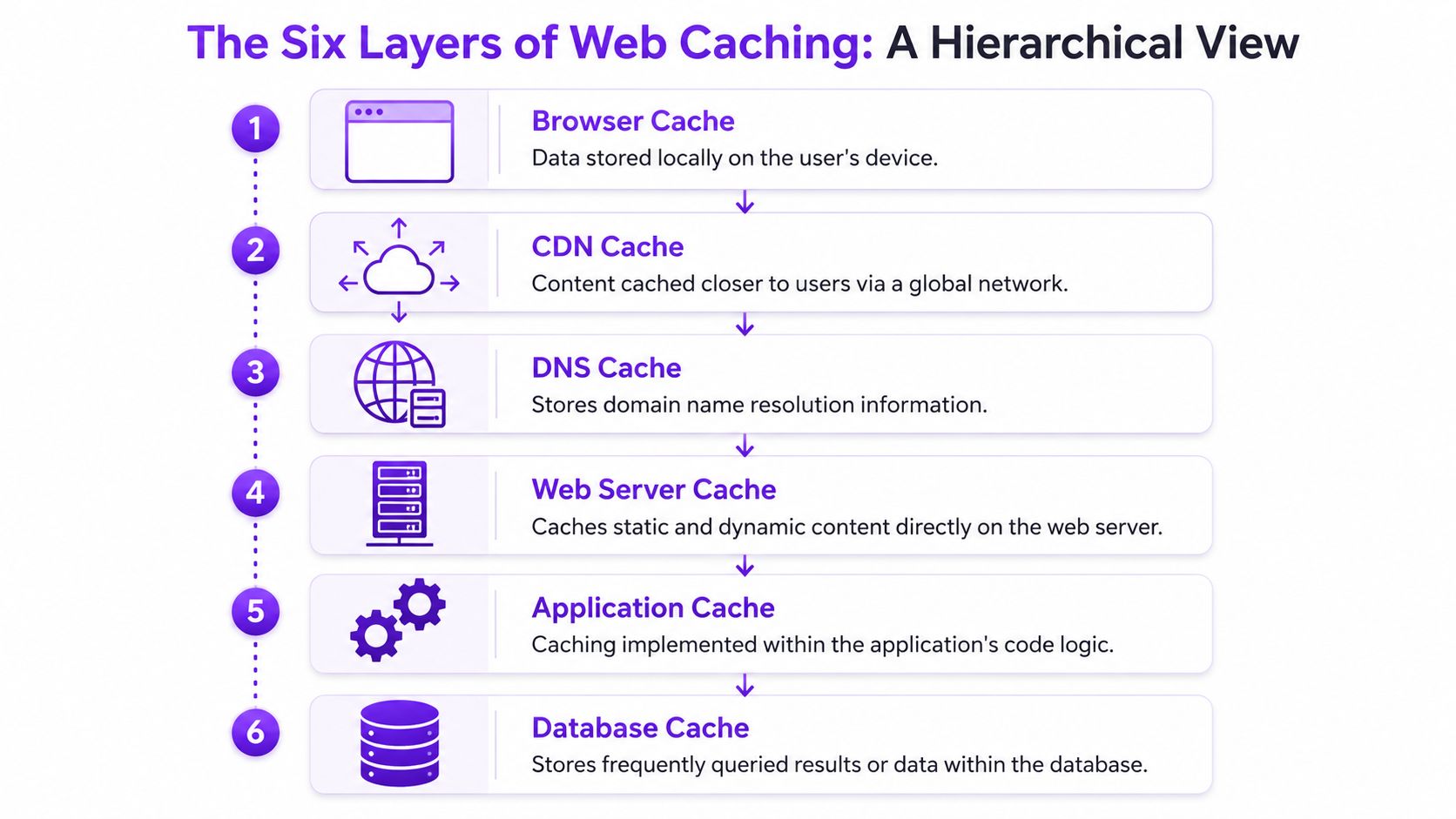
Browser cache
This is the shopper's own device remembering files it has already downloaded.
Logos, fonts, stylesheets, and scripts often belong here. When a returning visitor loads another page, the browser can reuse those files instead of downloading them again. That cuts repeated transfer and makes the site feel more responsive. Browser caching is one of the easiest wins because it works well for assets that rarely change.
CDN cache
A CDN stores copies of static content closer to users in different locations.
Instead of making every visitor fetch the same image or script from your origin server, the CDN serves those assets from a nearby edge location. This reduces distance and offloads work from your store. For media-heavy product catalogs, this matters a lot because image requests can pile up quickly.
DNS cache
DNS caching sits earlier in the request path. It remembers domain name lookups.
Most store owners won't manage this directly, but it affects perceived speed. If a user's system or network has already resolved your domain recently, it can skip that lookup step. DNS isn't where most WooCommerce tuning happens, but it is part of the broader chain.
Practical rule: The fastest request is the one your stack never has to process again.
Web server cache
This layer lives on the server handling the request.
It can store generated responses so your web server doesn't have to rebuild the same page each time. Reverse proxy tools often operate here. If you want a grounded overview of this layer in action, the Varnish proxy cache guide from PageSpeed Plus is worth reading because it shows how server-side caching changes request flow.
Application cache
Your app stores reusable computed data.
In WooCommerce, this could include assembled objects, query results, transients, or logic outputs that are safe to reuse for a period of time. This layer is where developers gain flexibility, because the application can decide what should be cached, for how long, and under what conditions it must be cleared.
Database cache
The database can also cache frequently used information or repeated query results.
This doesn't replace proper application design, but it can reduce repeated database work. It's lower in the stack than the browser or CDN, so it's not the first layer a shopper benefits from. Still, it can support the whole system when repeated reads hit the same hot data.
Why these layers work best together
No single layer solves store performance alone. They stack.
- Browser and CDN caching help with assets and repeated delivery.
- Web server caching can accelerate pages that don't need user-specific logic.
- Application and database caching reduce repeated backend work.
- DNS caching trims request overhead before the page even begins to render.
A healthy WooCommerce setup usually uses several of these at once. The skill isn't turning all of them on. The skill is deciding which store content belongs in which layer.
Core Caching Patterns and Expiration Policies
Caching layers tell you where data can live. Caching patterns decide how your store fills, updates, and clears that data.
For an eCommerce store, that choice affects more than speed. It affects whether shoppers see the right stock status, the right price, and the right shipping options at the moment they place an order. That matters even more if your store uses rule-based logic such as location-based restrictions, product exclusions, or checkout conditions. A fast page that serves the wrong rule is still a business problem.
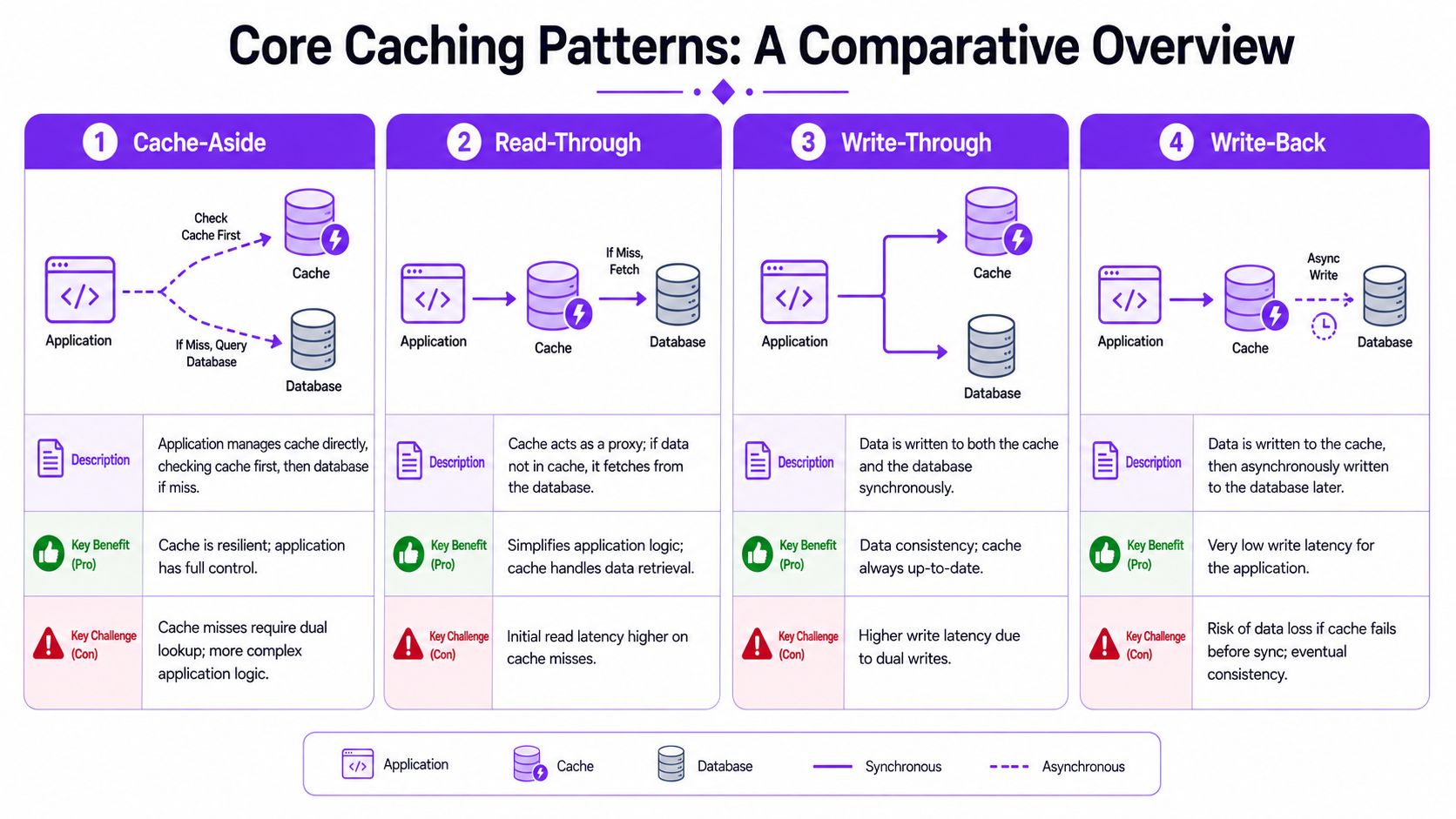
Cache-aside
Cache-aside is the default pattern I recommend for most WooCommerce stores. The application checks the cache first. On a miss, it fetches from the database, returns the result, and stores that result in cache for the next request.
It works well because it is simple to reason about and easy to apply selectively. You can cache product queries, category data, assembled page fragments, and other read-heavy outputs without forcing the whole application into one caching model. For stores comparing WooCommerce shipping restriction plugins for rule-heavy setups, that selective control matters. Shipping logic rarely deserves the same cache policy as catalog content.
The trade-off is stale data. If a product changes, a promotion starts, or a shipping rule is updated, the cache does not correct itself unless you clear the right keys or keep TTLs short enough to limit the damage. On a store with dynamic restrictions, that risk is the main design constraint.
Read-through and write-through
Read-through pushes more responsibility into the cache layer. The application asks the cache for data, and the cache loads missing items from the source system. That can reduce duplicate fetch logic in the app, but it also makes the cache layer harder to operate and debug.
For WooCommerce, that extra abstraction is not always worth it. It can be useful in systems with a dedicated caching service and strict data-access patterns. In plugin-heavy stores, it often adds another moving part without solving the core problem, which is deciding what must never be reused across shoppers.
Write-through keeps cache and database updates in sync by writing to both at the same time. The upside is predictable freshness on reads. The downside is slower writes and more pressure during bursts such as inventory syncs, flash sale updates, or bulk admin changes.
That makes write-through a reasonable choice for small sets of data where stale reads would be expensive, but a poor default for every write path in a busy store.
Use write-through for data where serving an old value creates more risk than adding a little write latency.
Write-behind and where it breaks down
Write-behind, also called write-back, updates the cache first and saves to the database later.
That lowers apparent write latency, which sounds attractive until the store has to defend data accuracy. If the queue fails, the cache is evicted, or the process crashes before the database write finishes, you now have a consistency problem. In eCommerce, that can show up as incorrect inventory, outdated customer state, or rule results that no longer match what the database says.
I rarely treat write-behind as a fit for compliance-sensitive logic. It can make sense for low-risk aggregates, counters, or analytics-style workloads. It is a poor fit for shipping restrictions, checkout conditions, and anything you may need to justify later.
Expiration policy decides whether a pattern is safe
Pattern choice matters. Expiration policy usually matters more.
A cache entry is only useful while it is still trustworthy. In practice, most store owners need three expiration tools:
- TTL caching: Set a fixed lifetime. This works for data that changes on a known cadence, such as category listings or some merchandising blocks.
- Event-driven invalidation: Clear entries when a product, setting, coupon, or rule changes. This is usually the safest approach for dynamic store logic.
- Stale-while-revalidate: Serve slightly older content for a short period while the system refreshes it in the background. This helps pages stay fast under load, but only where brief staleness is harmless.
For dynamic, rule-based stores, event-driven invalidation usually does the heavy lifting. TTL alone is often too blunt. If a shipping restriction changes at 2:03 PM and your cache lives for 15 minutes, shoppers can still see outdated eligibility until 2:18 PM. That is a performance decision with compliance consequences.
Practical fit for WooCommerce
| Pattern or policy | Best use case | Main risk |
|---|---|---|
| Cache-aside | Product data, catalog queries, reusable fragments | Stale data after updates |
| Read-through | Centralized data-fetching architectures | More operational complexity |
| Write-through | Data that must stay aligned across reads | Slower write operations |
| Write-behind | Low-risk, high-volume write workflows | Lost or delayed persistence |
| TTL | Content with predictable change windows | Freshness can drift from reality |
| Event invalidation | Product, pricing, and rule changes | Missed purge logic leaves bad data |
For most WooCommerce stores, the practical center is cache-aside plus targeted invalidation. The exception is rule-based checkout logic. Shipping restrictions, address-based rules, hazardous goods checks, and similar decisions should be treated as dynamic by default, then cached only if you can prove the invalidation path is accurate. That is the line between a faster store and a store that serves the wrong outcome faster.
Choosing the Right Caching Mix for Your Store
The right answer for WooCommerce is almost never one cache setting. It's a mix.
A store contains different kinds of content with different risk levels. Your homepage hero image, a category archive, a cart total, and a shipping restriction check don't belong under one blanket policy. Strong caching strategies sort content by how often it changes and how dangerous stale output would be.
Start by classifying your pages
Ask one question first: if this page or fragment is slightly out of date, what breaks?
If the answer is “not much,” cache more aggressively. If the answer is “a customer could place the wrong order,” treat it as dynamic.
| Caching Type | What It Caches | Best For | WooCommerce Consideration |
|---|---|---|---|
| Browser cache | Static files on the shopper's device | Fonts, CSS, JS, logos | Safe for most theme and asset files |
| CDN cache | Static assets at edge locations | Images, scripts, stylesheets | Great for product media libraries |
| Full-page cache | Entire HTML responses | Blog posts, static pages, some category pages | Avoid on cart, checkout, and account-specific views |
| Fragment cache | Parts of a page | Menus, badges, reusable page sections | Useful when one section changes more often than the rest |
| Object cache | Query results and computed objects | Product queries, settings, reusable data objects | Needs careful invalidation after updates |
| Opcode cache | Compiled PHP code | Application execution speed | Usually safe and should stay enabled |
A practical decision framework
- Mostly static content: Blog posts, evergreen landing pages, and support pages can use browser, CDN, and full-page caching.
- Catalog content: Product and category pages often benefit from full-page caching plus object caching, but only if personalized or rule-sensitive elements are carved out.
- Session-driven pages: Cart, checkout, and account pages should stay out of page cache.
- Rule-dependent output: Anything driven by destination, role, product combination, or compliance logic should be validated live or cached only in tightly controlled fragments.
A lot of plugin decisions come down to how flexible your stack is around those exclusions. If you're comparing tools in the WooCommerce ecosystem, this roundup of the best WooCommerce plugins is a practical place to review broader compatibility considerations.
Measure what the cache is actually doing
Don't judge a cache by whether it's enabled. Judge it by behavior.
Watch for:
- Hit rate: Are repeated requests being served from cache?
- Miss patterns: Do misses cluster after expirations or content updates?
- Bypass conditions: Are logged-in users, carts, and dynamic routes excluded correctly?
- Freshness failures: Does a page remain fast while showing outdated state?
A fast wrong answer is worse than a slower correct one. That's the line that should guide every caching choice in a store with dynamic rules.
The Danger Zone Caching and Compliance Collide
A customer adds a regulated product to the cart from a state where you cannot legally ship it. Your server already knows the restriction. The cached page does not. That gap is where fast stores create expensive problems.

For a typical content site, stale output is usually a UX issue. For a compliance-sensitive WooCommerce store, stale output can misstate availability, shipping eligibility, hazmat rules, age-gated access, or destination restrictions. The page loads fast, the customer gets the wrong answer, and your team inherits the fallout.
When stale data becomes a legal and operational problem
The risky part is not the cached HTML by itself. The risky part is caching a decision that depends on current facts.
Shipping restrictions often change based on destination, cart contents, product combinations, carrier rules, or merchant settings. If that decision gets frozen inside a page cache, the store can tell one shopper a product is allowed while your live rules engine would block the order seconds later. That creates support tickets at best. At worst, it creates compliance exposure and a checkout flow that teaches customers not to trust what they see.
I have seen stores focus on page speed scores while missing the core question. Is the cached response still truthful for this shopper, in this session, under the current rule set?
Compliance logic belongs in live evaluation paths, not in broad page-cache snapshots.
Stampedes turn a performance feature into an outage trigger
The other danger shows up under load. A popular page expires, hundreds of requests arrive together, and all of them regenerate the same data at once. That is a cache stampede.
Redis documents this failure pattern in its discussion of cache invalidation and stampede prevention, including mutex locking and stale-while-revalidate techniques: https://redis.io/glossary/cache-invalidation/ . On a store, the symptoms are familiar. Product pages slow down during a promotion, PHP workers stack up, database reads spike, and the team starts blaming hosting when the issue is expiration policy with no protection against concurrent misses.
This matters even more on stores that run dynamic restriction checks. If a hot page and a live rule lookup both hit the backend at the same time, the traffic surge lands on the exact part of the stack you need to stay accurate.
Security review and compliance review belong together
A bad caching decision can expose more than stale copy. It can leak session-specific state, show the wrong shipping options, or preserve messages that should have changed after a rules update. That is why I treat cache design as part of risk control, not just performance tuning. This article on a security audit as a growth accelerator makes the same business point from the security side.
Failure patterns that show up repeatedly in WooCommerce
These are the mistakes I see most often on regulated or rule-heavy stores:
- Rule results cached inside full pages: Destination warnings, shipping restrictions, or blocked-product notices stay frozen after the underlying rule changes.
- Session bleed: A shopper sees output shaped by another visitor's context, cookie state, or cart path.
- Checkout state lag: Shipping methods, fees, or restriction messages fail to update after address or cart changes.
- Weak invalidation: Product edits, taxonomy changes, or rule updates do not clear the fragments that depend on them.
- Synchronized expirations: Large groups of cache entries expire together and push traffic back to PHP and MySQL at the worst possible moment.
The dangerous setup is a store that caches reusable presentation and live compliance decisions in the same layer. Stores using Ship Restrict need a cleaner boundary. Keep assets and stable presentation fast. Keep restriction checks, destination-sensitive messaging, and cart-driven eligibility live or isolated in tightly controlled fragments.
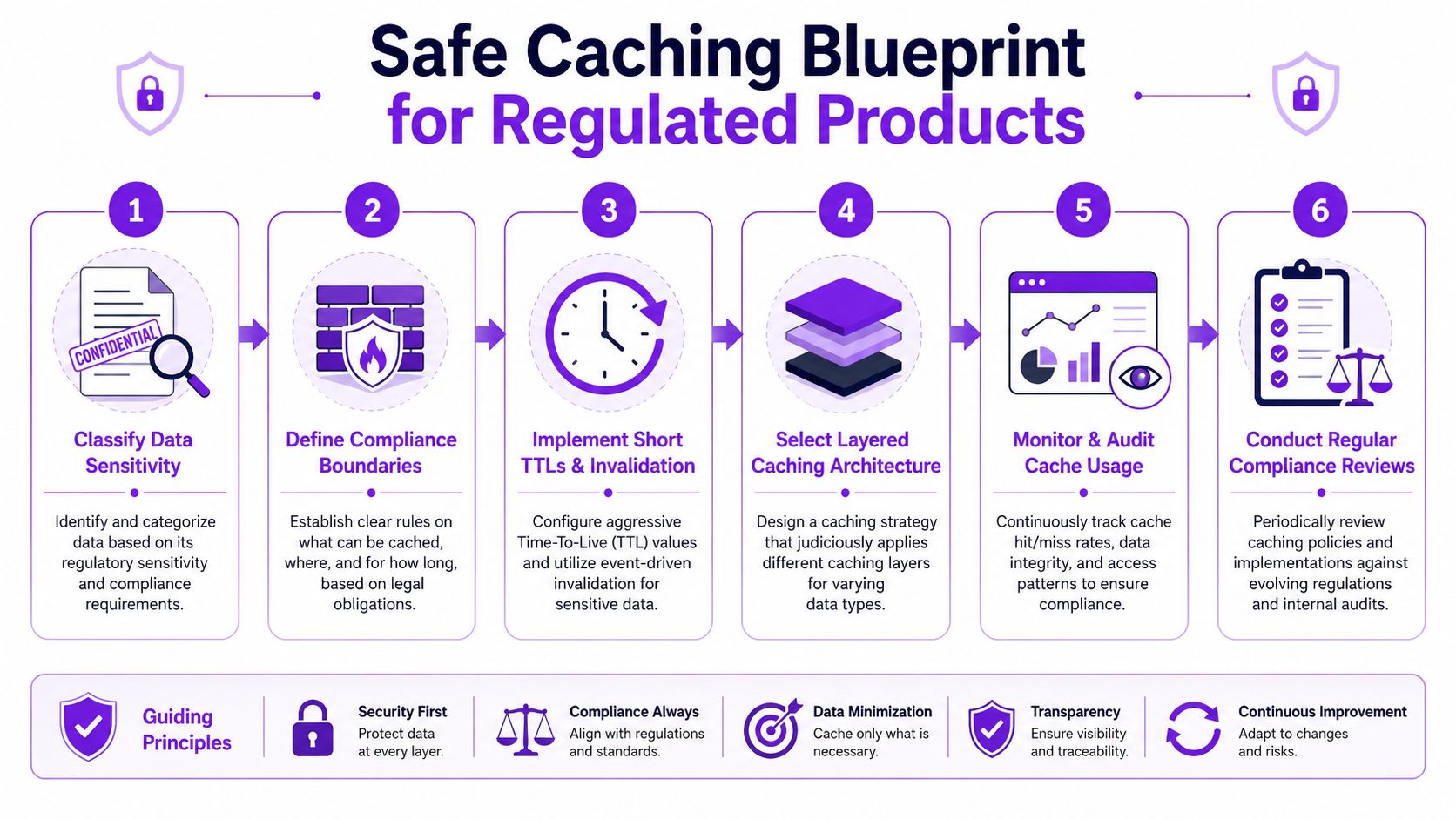
The Safe Caching Blueprint for Ship Restrict
A shopper in a restricted state lands on a product page, adds an item to cart, and heads to checkout. If your cache serves an old restriction message or a stale shipping option, the page feels fast right up until it creates a compliance problem.
That is the line to protect with Ship Restrict. The goal is fast delivery of reusable storefront content, while every shipping restriction, destination check, and cart-driven decision stays current.
Start with decision risk, not page type
Before touching cache settings, map your store by what can change the answer shown to the customer.
- Cache aggressively: Theme files, fonts, images, blog posts, help pages, and other static content.
- Cache with controls: Product data, archive queries, related products, and fragments that change after catalog or settings updates.
- Keep live: Cart, checkout, account areas, shipping rate requests, restriction notices, and any output tied to address, cart contents, login state, or active rules.
Stores usually go wrong when they treat a product page as one thing, even though half the page may be stable and the other half depends on destination, product mix, or current policy.
Cache the shell. Run Ship Restrict checks outside it.
On many WooCommerce stores, the safe pattern is straightforward. Cache the product or category page layout, but keep restriction logic out of the cached HTML.
That means the page shell can come from page cache, while Ship Restrict validation runs separately through AJAX, fragment refresh, or another uncached request path. The customer gets a fast first render. Your store still checks the live rule set before showing shipping eligibility, warnings, or blocked purchase paths.
For rule-heavy stores, that boundary matters more than the cache hit rate.
Cache presentation. Validate restrictions in real time.
Build exclusions first
Speed tuning should come after protection rules are in place.
Set cache exclusions for core transactional routes, custom endpoints tied to order state, and any request that changes based on cookies, session data, cart state, or destination input. Apply the same caution to AJAX handlers and background validation calls. If a restriction check can be served stale, it eventually will be.
I also recommend testing exclusions with actual shopper paths instead of plugin defaults. A cache plugin may exclude /cart/ and /checkout/, but still cache a custom endpoint or fragment added by another WooCommerce extension.
Use object cache for expensive reads, with short TTLs and clear invalidation
Object caching helps when the backend keeps rebuilding the same data. Product metadata, taxonomies, reusable rule sets, and repeated query results are common candidates.
The trade-off is freshness. If a merchant updates a shipping rule, changes a restricted destination list, or edits a product that affects eligibility, those cached objects need to clear immediately. TTL helps limit damage, but it does not replace event-based invalidation.
For Ship Restrict stores, short-lived object caching usually beats long-lived persistence. You keep database pressure down without letting outdated rule data hang around longer than it should.
Choose write policies based on what must stay in sync
Admin-side writes need the same discipline. A stricter write policy can keep cache and storage aligned, but it also adds overhead during updates. A looser policy reduces write cost, but it creates more room for stale data after rule changes.
The practical choice is to reserve immediate synchronization for data that affects compliance or checkout behavior, then use lighter patterns for lower-risk content. If you are reviewing that trade-off, this guide to performance benchmarking for WooCommerce decisions helps frame the test in business terms instead of guesswork.
Operating rules that keep the cache safe
Safe caching is an operating habit, not a one-time configuration.
- Test real combinations: restricted and unrestricted destinations, guest and logged-in users, simple carts and mixed carts.
- Warm only stable pages: product shells, category pages, and informational content after deploys or catalog updates.
- Watch bypass behavior: a cache that is technically on can still fail if the wrong requests are cached and the right ones are skipped.
- Review extension behavior: WooCommerce plugins often add cookies, fragments, and endpoints that change cache safety.
The best setup does not chase maximum cache coverage. It protects the parts of the store that can be reused safely, and it leaves Ship Restrict free to make the live decisions that keep checkout accurate and compliant.
From Strategy to Success Your Next Steps
Caching works when you treat it like a policy, not a switch.
The smart approach for WooCommerce is layered and selective. Cache assets aggressively. Use page cache where content is stable. Apply object caching where repeated backend work is expensive. Keep transactional and compliance-sensitive decisions live. That balance is what turns caching strategies into a business advantage instead of a support headache.
If you're evaluating your current setup, start with an audit. List every page type, identify what changes by user, cart, location, or rule set, then review whether your cache behavior matches that reality. This guide to what performance benchmarking means in practice can help frame that review so you're not guessing.
A faster store isn't automatically a better store. The better store is the one that stays fast while still giving customers the correct answer at the exact moment they need it.
If your WooCommerce store needs to enforce shipping rules without relying on manual checks, Ship Restrict helps automate restriction logic for regulated products while preserving a smoother buying experience. It's built for merchants who need speed, accuracy, and fewer costly compliance mistakes.
Automate Shipping Compliance
Stop worrying about restricted states. Ship Restrict handles it automatically.

Cody Yurk
Founder and Lead Developer of ShipRestrict, helping e-commerce businesses navigate complex shipping regulations for regulated products. Ecommerce store owner turned developer.
Automate Shipping Compliance
- Block restricted states
- No more cancellations
- Set and forget
3-day free trial · Card required