How to Reduce Cart Abandonment: A 2026 Retail Playbook
Learn how to reduce cart abandonment on your WooCommerce store. Our 2026 playbook helps regulated product retailers fix compliance friction & improve checkout
A customer adds a rifle, a magazine, and a case to the cart. They click checkout, enter an address, and then hit a dead end. One item can't ship to their state. Another requires an FFL transfer they didn't expect. The cart doesn't fail because your store was hard to use. It fails because the customer learned the rules too late.
That pattern is common in regulated eCommerce, and it doesn't respond well to generic advice. If you run a WooCommerce store for firearms or related products, learning how to reduce cart abandonment starts with a different question than most retailers ask. You don't begin with button color or coupon timing. You begin with where compliance friction first appears, and whether customers see it before they commit time and intent.
The Hidden Cost of Checkout Friction for Regulated Products
Cart abandonment is already a major retail problem. In 2026, the average global shopping cart abandonment rate remains at 70.19%, based on Baymard Institute data aggregated from 49 sources and summarized by Digital Applied's cart abandonment analysis. For most stores, that points to familiar issues like cost surprises, weak checkout design, or limited payment options.
For firearms retailers, those causes still matter. But they're not the whole story.
Automate Shipping Compliance
Block orders to restricted states automatically. 3-day free trial.
Start Free TrialA regulated goods store deals with a second layer of friction that general eCommerce advice usually ignores. State rules differ. County restrictions change. ZIP-level exclusions matter. FFL transfer requirements complicate fulfillment. Age-sensitive products, magazine limits, ammunition restrictions, and local ordinances all shape whether an order can move forward.
That creates a more expensive kind of abandonment. The customer's hesitation isn't superficial. They're running into a compliance reality that should have been surfaced much earlier.
Practical rule: If a customer learns a shipping restriction at the same moment they're asked for payment, the store has already waited too long.
I see this most often when stores treat compliance as a back-office step instead of a front-end experience. The result is avoidable frustration, preventable support tickets, and manual order cleanup. Worse, some merchants still absorb the operational cost of reviewing orders that never had a legitimate path to fulfillment in the first place.
Retailers in other high-stakes industries have learned the same lesson in a different form. Teams working on healthcare accessibility know that critical requirements have to be built into the user journey early, not bolted on after the user commits. Compliance-heavy commerce works the same way.
If you've been handling restrictions manually or revealing them late, the operational downside goes beyond lost carts. It also creates exposure that's easy to underestimate, especially when staff members make one-off decisions under pressure. That's why many merchants start by looking closely at the hidden costs of non-compliance in regulated product shipping.
Diagnosing Your Unique Abandonment Problem
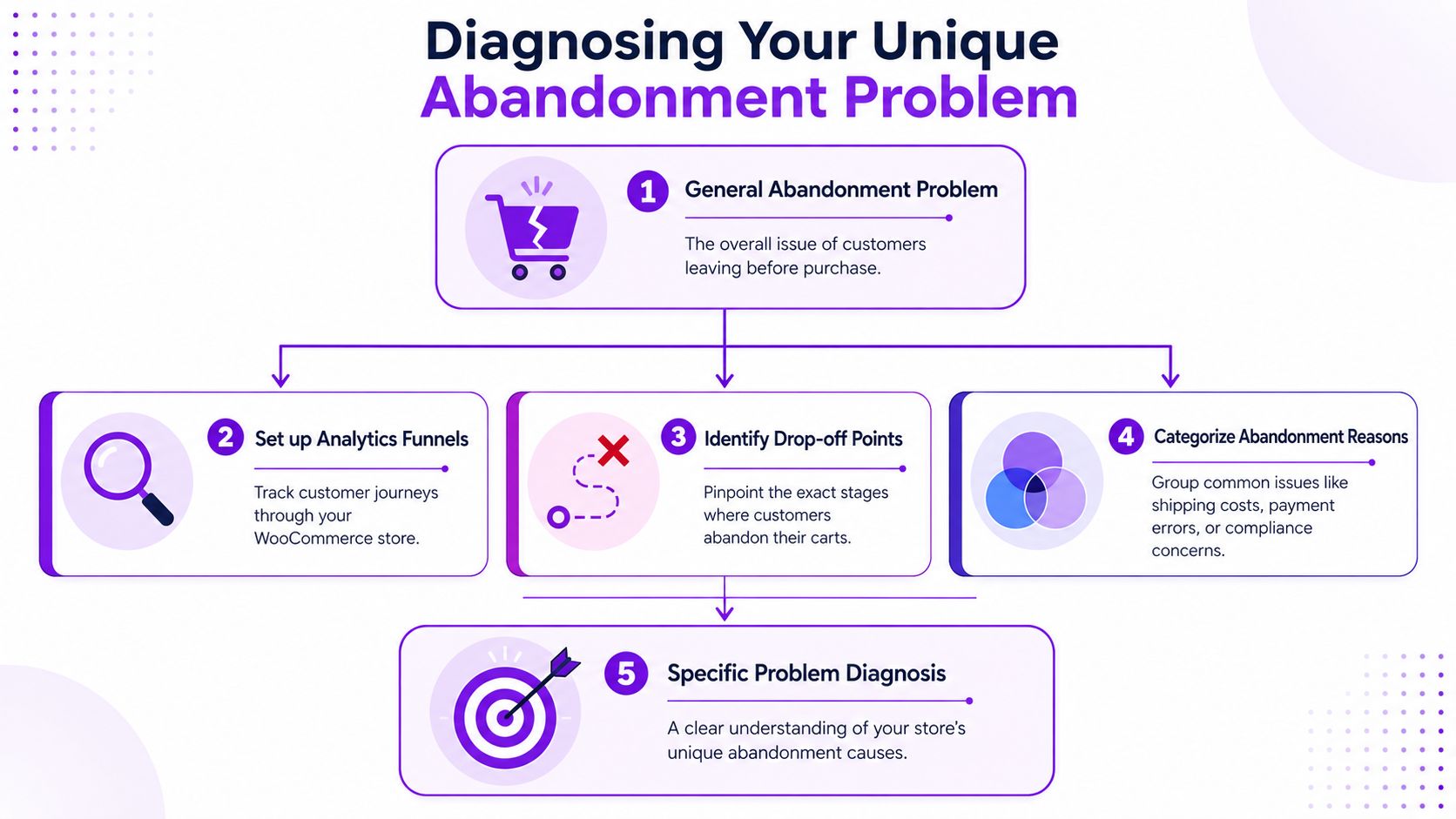
Most stores look at abandonment as one number. That's the wrong level of detail for regulated goods. You need to know where the customer leaves and what they had already learned before they left.
Start with the funnel, not the opinion
Set up a checkout funnel in Google Analytics or Mixpanel and map the customer path with enough detail to separate product view, cart, address entry, shipping method, payment attempt, and order confirmation. WooCommerce gives you the basic transaction structure. Your analytics stack should tell you where the handoff breaks.
Don't stop at generic funnel stages. Add events tied to your regulated workflow, such as:
Free Shipping Compliance Audit
We'll review your WooCommerce store's shipping compliance for free.
- Address submitted: Track when a shopper enters a shipping destination.
- Restriction message displayed: Record when the store tells the customer an item can't ship or requires transfer handling.
- FFL selection started: Watch whether the user begins the transfer-related process.
- Mixed-cart conflict triggered: Flag carts where one compliant item and one restricted item create friction.
- Manual review handoff: Note when an order needs staff intervention before payment or fulfillment.
That event layer is what separates ordinary UX issues from compliance-driven abandonment.
Watch what happens after address entry
For a firearms retailer, the most important diagnostic breakpoint is simple. Does abandonment spike before the customer enters a location, or immediately after?
If drop-off rises after shipping details are entered, you may not have a design problem first. You may have a transparency problem. The shopper is discovering that their state, county, or ZIP code changes what they can buy. If that information appears late, they feel blindsided.
That pattern matters because a 2025 National Firearms Association study summarized here found that 42% of firearm cart abandons occur when customers realize their location is restricted or requires complex FFL transfer. That is a very different abandonment cause than “checkout felt too long.”
Stores that lump compliance friction into a general checkout bucket usually fix the wrong thing first.
Separate common friction from regulated friction
You need a diagnosis model that distinguishes between normal retail leakage and regulated-product leakage. A simple working table helps.
| Abandonment pattern | Likely cause | What to inspect |
|---|---|---|
| Cart drop before checkout begins | Price sensitivity, browsing behavior, uncertainty | Product page clarity, shipping expectations, item eligibility messaging |
| Drop after login prompt | Forced account creation or poor flow | Guest checkout visibility, account requirement logic |
| Drop after address entry | Restriction discovery, transfer complexity | State/ZIP rules, item-level restriction messaging, FFL path |
| Drop at shipping method stage | Incomplete fee disclosure or unsupported destinations | Shipping labels, fee visibility, transfer cost language |
| Drop at payment | Payment trust, gateway fit, unresolved compliance questions | Payment methods, error handling, order summary clarity |
Data-informed design is useful, especially when it focuses on observed behavior instead of assumptions. Teams that want a sharper framework for interpreting journey data can borrow from Uxia's insights on product design, particularly the discipline of tying interface changes to actual user behavior.
Read support tickets alongside analytics
Funnels show where users leave. Support messages often tell you why.
Look for repeated phrases in chat logs, abandoned-cart replies, and order notes. “Can't ship here.” “Do I need to send this to an FFL?” “Why did this fail at checkout?” “Why wasn't this listed earlier?” Those aren't random objections. They're signals that the store delayed an important truth.
When you diagnose abandonment this way, the next move becomes clearer. You don't just streamline checkout. You move compliance visibility forward.
Stopping Abandonment Before It Starts with Pre-Checkout Validation
The best fix for compliance-driven abandonment is not a better apology at checkout. It's preventing the bad surprise in the first place.
Show eligibility early
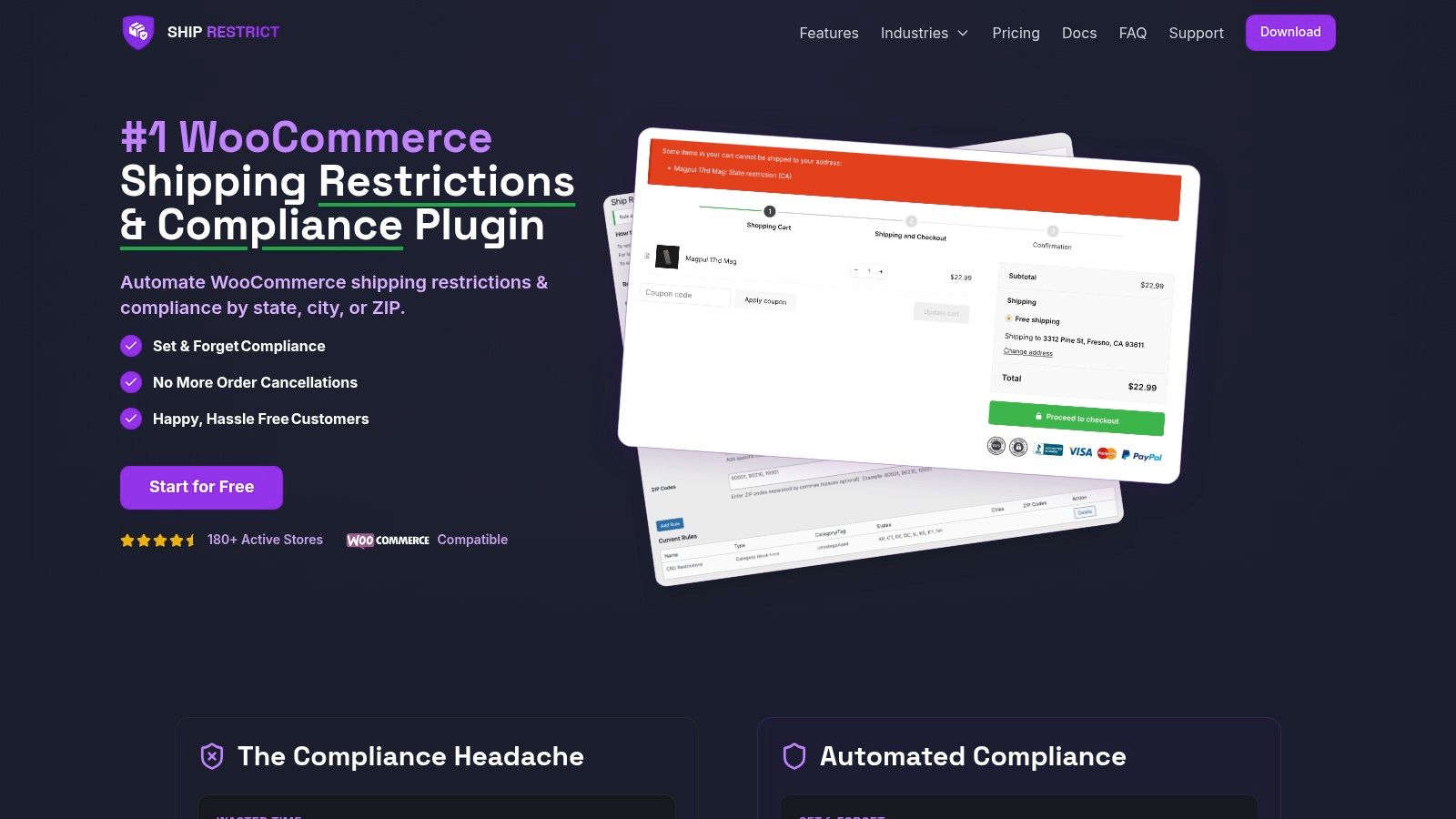
When a store waits until the last step to enforce shipping restrictions, it turns compliance into a penalty. The customer has already invested time, chosen products, and started the purchase mentally. A late block feels arbitrary, even when the rule is valid.
Pre-checkout validation changes the tone. Instead of saying “you can't continue,” the store says “here's what applies to your location before you go further.” That's a better customer experience and a cleaner operational model.
For firearms merchants, this usually means validating by state, county, city, or ZIP code as early as possible in the journey. It can happen on the product page, in the cart, or as soon as the customer provides a destination. The exact placement can vary. The principle should not.
Field note: Necessary friction is easier for customers to accept when it shows up early and explains the next step.
A good implementation does three things at once:
- Prevents false starts: Customers don't spend ten minutes checking out only to get rejected.
- Protects staff time: Your team isn't manually untangling orders that were never shippable.
- Builds trust through candor: Customers may not like every rule, but they respond better when the store is upfront.
If you're handling this inside WooCommerce, a practical reference is this guide on blocking non-compliant orders before checkout in WooCommerce.
Replace hard stops with guided paths
Not every restricted order should end with a dead end. Some should become a guided branch.
For example, if a firearm requires transfer to a local FFL, the message shouldn't stop at rejecting the cart. It should explain that the item requires transfer handling and point the buyer toward the next valid action. If a magazine can't ship to a certain state, say that clearly and suggest removing the restricted item while preserving the rest of the cart.
That's the difference between enforcement and guidance. The first blocks. The second helps the customer understand what's still possible.
Common examples of useful pre-checkout logic include:
- Item-level restriction checks for products with different legal treatment.
- Mixed-cart validation when one item is lawful for a destination and another isn't.
- Destination prompts early in the buying path, before checkout form fatigue sets in.
- Contextual messaging that explains whether the issue is state law, local restriction, or transfer requirement.
Later in the journey, video can help staff and agencies align on implementation details and shopper experience:
<iframe width="100%" style="aspect-ratio: 16 / 9;" src="https://www.youtube.com/embed/izI_pivZr_c" frameborder="0" allow="autoplay; encrypted-media" allowfullscreen></iframe>What doesn't work
Retailers often try partial fixes that only move the problem around.
A generic disclaimer in the footer won't do it. A policy page that customers have to hunt down won't do it. A note buried in product tabs won't do it. Manual review after order placement definitely won't do it.
Those approaches satisfy internal process more than customer understanding. They might help you say the rule existed somewhere. They don't help the shopper make a valid buying decision at the right moment.
If you want to know how to reduce cart abandonment in a regulated category, this is the core move. Surface compliance before checkout turns into commitment.
Optimizing the WooCommerce Checkout and Shipping Flow
Once you've moved compliance checks forward, you can clean up the rest of the checkout experience. At this point, standard conversion work still matters. It just needs to respect the realities of regulated fulfillment.
Keep the checkout path short and obvious
Long checkouts don't feel more professional. They feel risky.
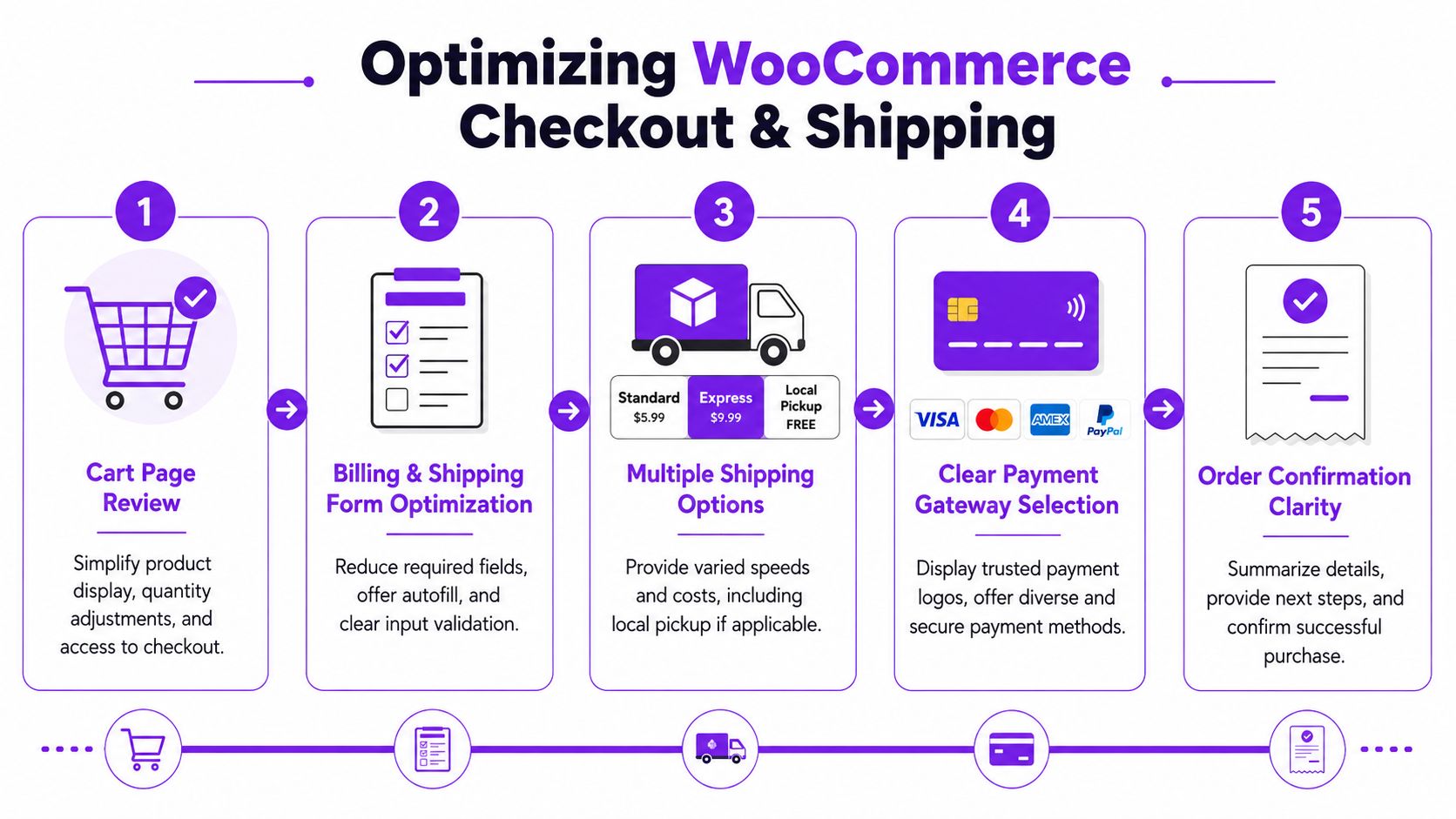
The practical target is a checkout flow that asks only for information needed to fulfill the order, comply with the category, and complete payment. Anything else should be removed, delayed, or made optional. Inline validation helps because it catches errors while the shopper is still engaged, instead of after a failed submission.
A general optimization framework from TrueLayer's checkout guidance is useful here. It recommends auditing drop-off points, reducing steps, removing optional fields, offering guest checkout prominently, displaying total costs upfront, supporting multiple payment methods, designing mobile-first, and sending the first recovery email within a short window after abandonment. That same source also notes common pitfalls, including hiding shipping costs until late in checkout, which causes 42% of abandonments, and forcing account creation, which contributes to 18%.
For firearms retailers, those pitfalls can hit harder because buyers are already processing transfer rules, destination restrictions, and documentation expectations. Don't add form clutter on top of that.
A regulated-store checkout checklist
Use this as a working standard for WooCommerce.
-
Make guest checkout the default
Don't force account creation before purchase intent is confirmed. If the customer wants an account later for order history, invite them after checkout.
-
Cut fields aggressively
Remove anything not required for fulfillment, age-sensitive handling, or transfer coordination. If your team “likes having it,” that's not a good enough reason.
-
Validate inline
Name, address, and contact errors should appear immediately. Delayed error handling creates a perception that the store is unstable.
-
Show total cost early
If shipping costs, taxes, or transfer-related charges may apply, surface them as early as your setup allows. Ambush pricing kills confidence.
-
Support the payment methods your buyers expect
If your approved processor supports mobile wallets or alternate methods, present them clearly. Don't make buyers guess what will work.
Shipping clarity matters more than most stores realize
For regulated goods, “shipping” isn't just a delivery speed choice. It often signals whether the store understands the product's legal path.
That means the shipping section should answer practical questions quickly:
- What ships directly: Make it obvious which items can go to the customer's address.
- What requires transfer handling: Explain when an FFL is part of the process.
- What happens with mixed carts: Tell the buyer if one restricted item changes the entire order path.
- What fees are known now: Show available cost information before the final payment step.
- What comes next: Set expectations for confirmation, dealer coordination, and follow-up.
A lot of merchants hide this behind vague labels. “Standard shipping” is fine for apparel. It's weak for a regulated cart with legal conditions attached.
If the buyer has to interpret your shipping language, your shipping language is doing too much work.
Don't treat mobile as a trimmed desktop version
A large share of abandonment pain shows up on phones because small screens amplify every extra field, every unclear label, and every awkward validation error. In firearms eCommerce, mobile friction is worse when customers are also trying to understand restrictions or transfer steps.
Keep buttons large. Keep labels plain. Keep instructions near the field where the user needs them. Don't send people hunting through accordions for essential details.
Merchants serving cross-border or multi-market buyers can also learn from broader work on checkout design for global businesses. The broader lesson applies even in domestic regulated commerce. Checkout works better when the interface reduces ambiguity instead of assuming the user already understands the process.
One small but meaningful test worth running is button clarity. Ambiguous calls to action create hesitation at the worst time. This guide on checkout button wording and placement is a useful reminder that the last click should tell the buyer exactly what happens next.
Crafting Clear Messaging and Effective Recovery Tactics
Compliance language can calm a buyer or drive them away. Most regulated stores lose that battle in the wording.
Replace blunt restriction notices with useful guidance
A lot of stores still use system-style error copy that reads like a rejection notice. That language may be technically accurate, but it doesn't help the customer recover.
Here's the difference.
| Weak message | Better message |
|---|---|
| Cannot ship to your location | This item is restricted for the shipping address entered. Remove the item or choose a valid transfer option if available. |
| Order blocked | This product can't be sent directly to your address. Review the transfer requirements before continuing. |
| Invalid destination | Some products in your cart have location-based restrictions. Update your address or edit the cart to proceed. |
The better version does three things. It explains the problem, names the scope of the issue, and offers a next step.
That doesn't mean the message has to be long. It means it has to be actionable.
Write for support reduction, not legal theater
Many merchants overcorrect and write messages that sound like internal compliance memos. Customers don't need a lecture on statutory nuance in the cart. They need enough clarity to make the next valid decision.
Use plain language. Name the product category if needed. Tell them whether the issue affects one item or the full cart. If a transfer process applies, say that directly. If there is no valid path, say that without sounding punitive.
“Your restriction message should answer the buyer's next question before they ask it.”
A useful internal test is this: if a customer reads the message and your support team still gets the same follow-up question, the message failed.
Recovery emails should be helpful, not pushy
Abandoned-cart email still has a place in regulated commerce, but tone matters. A generic “you forgot something” message can feel tone-deaf if the customer left because they hit a restriction or got confused about transfer handling.
Use recovery messaging that reflects the likely cause of abandonment. Good options include:
- Clarification emails: Explain why the order may not have completed and what the customer can do next.
- Process emails: Walk through the transfer requirement in plain language.
- Cart-edit prompts: Invite the customer to return and remove restricted items if that would make the order valid.
- Support-led follow-up: Offer a contact path for destination or eligibility questions.
Keep the email grounded in service, not pressure. The right message is often, “Here's how to complete this correctly,” not “Hurry back before the deal ends.”
A simple recovery framework
If you're building flows in WooCommerce or your email platform, a practical structure looks like this:
-
Subject line with clarity
Mention the order or cart, not a gimmick. -
Opening line that acknowledges interruption
Don't assume forgetfulness. The purchase may have stalled for a legitimate reason. -
Short explanation of likely issue
Mention shipping restriction, transfer step, or checkout interruption in plain language. -
Single next action
Return to cart, review transfer requirements, or contact support. -
Human fallback
Give the customer a clear way to get an answer.
That style won't recover every cart. It will recover the right carts without creating new compliance or trust problems.
Building a Compliant High-Conversion Sales Funnel
A firearms retailer doesn't win by removing every obstacle. That's not realistic, and in some cases it would be irresponsible. The better goal is to separate necessary friction from avoidable friction.
Necessary friction includes destination validation, transfer requirements, and restriction messaging tied to the product and the buyer's location. Those aren't conversion problems to eliminate. They're compliance realities to manage well.
Avoidable friction is everything you control around those realities. Delayed disclosure. Bloated forms. Weak shipping language. Forced accounts. Confusing button labels. Recovery emails that sound like generic retail automation instead of useful guidance.
That distinction changes how you think about how to reduce cart abandonment. You stop chasing broad “checkout optimization” as if every store has the same funnel. You build a funnel that tells the truth earlier, keeps the valid path clear, and removes clutter from every step after that.
A strong regulated sales funnel usually has these traits:
- Early rule visibility: Customers learn location-based limits before they invest heavily in checkout.
- Guided alternatives: Restricted orders don't always hit a dead end. They branch into valid next steps where possible.
- Lean checkout design: The form asks for what the order needs, not what the business might find nice to have.
- Clear operational language: Shipping, transfer handling, and follow-up expectations are stated plainly.
- Support-aware recovery: Email and on-site messages help the buyer complete a lawful order, not just return to a cart.
The stores that convert best in regulated commerce usually aren't the ones hiding complexity. They're the ones organizing it. They make the rules visible, the process understandable, and the next action obvious.
That's what a compliant high-conversion funnel looks like in practice.
If you run WooCommerce and need to stop non-compliant orders before they create support headaches, Ship Restrict is built for that job. It helps firearms retailers apply shipping rules by state, county, city, or ZIP code before checkout, so customers see restrictions earlier and your team spends less time cleaning up invalid orders.
Automate Shipping Compliance
Stop worrying about restricted states. Ship Restrict handles it automatically.

Cody Yurk
Founder and Lead Developer of ShipRestrict, helping e-commerce businesses navigate complex shipping regulations for regulated products. Ecommerce store owner turned developer.
Automate Shipping Compliance
- Block restricted states
- No more cancellations
- Set and forget
3-day free trial · Card required