Shipping Restriction Implementation Best Practices for 2026
Follow these implementation best practices for shipping restriction controls in WooCommerce. A complete guide from planning to maintenance for regulated goods.
You're probably dealing with one of two situations right now. Either your team is still checking orders manually against a patchwork of state rules, county restrictions, ammo limits, and carrier policies, or you already tried to automate it and realized the hard part isn't installation. It's getting the rules right, making checkout understandable, and keeping everything current after launch.
That's where most stores get burned. A restriction system can look finished in staging and still fail the first time a customer orders a restricted SKU to an edge-case ZIP code, or when a warehouse picker receives an order that should've been blocked before payment. In firearms eCommerce, implementation best practices aren't abstract project advice. They're the difference between a clean queue and a compliance mess.
Laying the Foundation for Airtight Compliance
A customer places an order for a restricted SKU at 10:42 p.m. The cart clears, payment goes through, the warehouse prints the pick ticket at open, and only then does someone notice the destination should have been blocked. That is how a preventable rules problem turns into a refund, a support ticket, a chargeback risk, and a compliance review.
Planning decides whether your restriction system prevents that failure or just documents it after the fact.
Automate Shipping Compliance
Block orders to restricted states automatically. 3-day free trial.
Start Free TrialThat pattern is not unique to firearms eCommerce. Approximately 55% to 75% of ERP implementation projects fail to meet their original objectives, largely because of inadequate planning and unclear business goals, according to RAND Group's review of ERP implementation failure rates. In regulated sales, the same breakdown happens when teams rush into plugin setup before they define what must be blocked, who approves rule logic, and how the business will handle exceptions without confusing customers or the warehouse.
Start with the operating model, not the plugin settings
In our experience, failed compliance rollouts usually trace back to the same mistake. The team configures software around current habits instead of defining a process that can stand up to FFL requirements, state restrictions, carrier rules, and order-volume pressure.
If the current workflow depends on tribal knowledge, spreadsheet notes, and a warehouse lead who “usually catches it,” automation will reproduce those weak points at scale. Fix the decision path first.
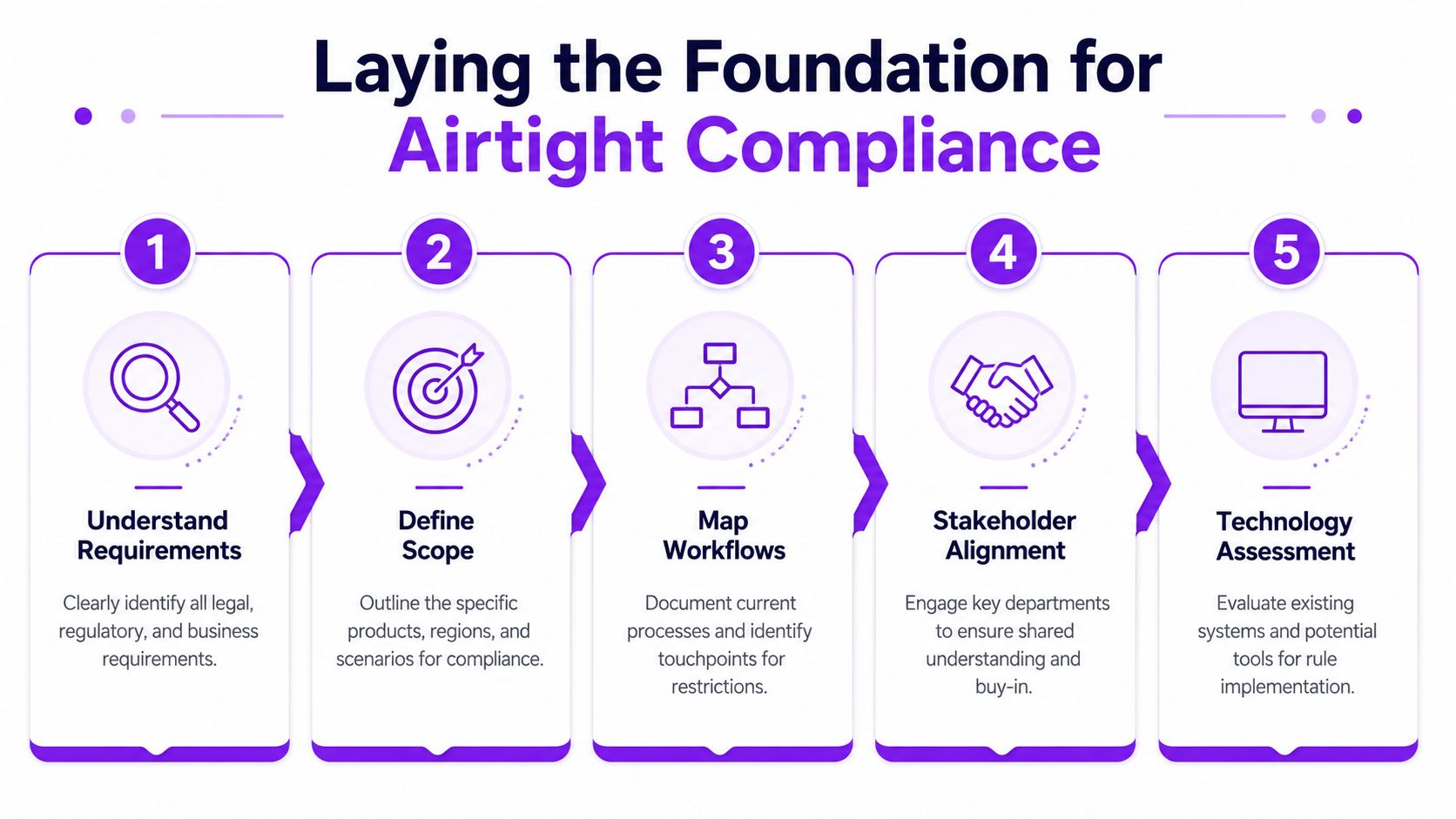
Map four things before anyone touches rules:
-
Which SKUs carry restrictions
Separate firearms, serialized frames or receivers, magazines, ammunition, parts kits, and accessories. A broad “restricted items” bucket creates bad blocks and missed blocks because those categories do not follow the same rules. -
Which jurisdictions affect fulfillment
State-level logic is only the first layer. Some restrictions need county, city, or ZIP-level handling, especially when local ordinances and carrier policies do not line up cleanly. -
Where the restriction is enforced
Decide whether validation happens on the product page, in the cart, at checkout, before payment capture, or during fulfillment review. For regulated goods, the cheapest place to stop a bad order is before the customer pays. -
Who owns final decisions
Compliance, operations, development, customer service, and legal all have different pieces of the rule set. One named owner must approve the rule matrix and exception process.
Free Shipping Compliance Audit
We'll review your WooCommerce store's shipping compliance for free.
A simple test works well here. If the team cannot explain a restriction in plain English, it is too early to encode it.
Build requirements from real order failures
Start with the orders that already cause friction. Look at support tickets, manual review logs, carrier rejects, canceled orders, and warehouse holds. Those examples show where the process breaks in ways customers feel.
That matters because a good compliance system is not just a legal filter. It also needs to keep the storefront understandable, give customer service clear answers, and keep fulfillment from inheriting preventable mistakes.
The right people need to be in the room early:
| Role | What they should contribute |
|---|---|
| Compliance or legal | Restricted product definitions, jurisdiction logic, exception handling |
| Warehouse or fulfillment | Where bad orders surface, what causes relabeling or order holds |
| Customer service | What customers ask when an item can't ship |
| Developer or agency | Data structure, SKU tagging, checkout behavior, integration limits |
| Store manager | Priorities, rollout scope, escalation path |
A formal compliance risk assessment for shipping restrictions helps at this stage because it forces the team to rank exposure before legal, technical, and operational issues get mixed together in a generic implementation backlog.
Define a first release your team can actually control
Broad rollouts sound efficient. In firearms compliance, they often create expensive ambiguity.
A tighter first release usually works better. Pick one product group, document its restrictions, confirm how blocked orders will be messaged to the customer, and make sure the storefront, customer service team, and warehouse are all working from the same logic. If those three groups interpret the rules differently, the system is not ready.
I have seen teams lose weeks because they tried to launch firearm, ammo, magazine, and accessory logic at once, with no shared exception process for FFL shipments or local restrictions. A narrower release takes more discipline up front, but it produces cleaner data, fewer support escalations, and fewer “why did this pass checkout?” surprises after launch.
The foundation is straightforward. Know your SKUs. Know your jurisdictions. Know your owners. Know how an exception is reviewed before it becomes a shipment problem.
Building Your Granular Rule Engine
Once the foundation is set, the next job is turning legal and operational logic into rules a store can enforce. During this step, many teams go from a manageable spreadsheet to chaos because they build exceptions first, not structure first.
The strongest model is validation before queue. Pacejet describes the most effective methodology as a three-step workflow: connect the eCommerce platform to shipping software, define granular SKU-based rules, and use real-time carrier policy updates to block restricted ZIP codes before payment is processed in its guide to shipping compliance best practices. That approach matters because a blocked order is cheap at checkout and expensive in fulfillment.
Build from broad geography to narrow geography
A durable rule engine starts with the largest jurisdiction and narrows only where needed. That keeps the system readable and lowers the odds of contradictory rules.
A practical build sequence looks like this:
-
Set state-level defaults
Start with the broadest restriction you can justify. If a product category can't ship to a state, encode that first. -
Layer county or city exceptions
Add narrower restrictions only when the law or carrier rule requires more precision. -
Use ZIP codes for edge cases
ZIP-based logic is useful, but it can become brittle if you use it as the primary structure for everything. -
Tie rules to SKU groups, not free-text product names
SKU-based classification is cleaner, easier to test, and safer when catalogs change.
Use different logic for different product types
The costly mistake firearms stores often make is creating a single “restricted products” category and expecting one ruleset to govern everything. That rarely holds up.
A firearm component and ammunition often need different handling. A magazine restriction may depend on capacity and destination. A serialized item may trigger FFL-specific workflow decisions that don't apply to non-serialized accessories.
Consider the difference:
- Ammunition might require destination-based restrictions plus carrier-specific handling.
- A firearm component might be allowed in one jurisdiction where ammo isn't, or vice versa.
- An accessory may be unrestricted in most places but blocked in narrow local zones.
That's why SKU classification comes first. If the product taxonomy is sloppy, the rule engine will be sloppy.
Don't write rules around catalog guesswork. Write rules around explicit product classes your team can maintain.
Avoid one-off edits when the law changes
If your admin has to open dozens of records to update one state restriction, the system won't stay current. It'll drift.
The better pattern is bulk rule management plus scheduling. Create reusable rule groups for product classes and jurisdictions. Apply effective dates when a law is about to change. Expiry dates matter too, especially for temporary restrictions or carrier policy changes.
A short decision framework helps:
| Situation | Better approach | Worse approach |
|---|---|---|
| New statewide restriction | Bulk update one state rule group | Edit individual SKUs one by one |
| Temporary carrier ban | Set start and end dates | Add a note for staff to remember manually |
| Mixed cart with restricted and unrestricted items | Validate entire cart before payment | Let order through and flag later |
| New product launch | Assign product to existing compliance class | Build custom logic from scratch |
If your platform supports multiple restriction levels, keep the rule taxonomy documented in one place. A clean restriction types reference for WooCommerce stores reduces confusion between developers, ops staff, and compliance reviewers.
Connect rule logic to actual checkout behavior
A rule engine isn't complete when the admin panel looks tidy. It's complete when the storefront responds correctly.
That means checking three outcomes for every rule:
- Block when shipment is prohibited.
- Allow when the address and SKU are valid.
- Explain the result in language the customer can understand.
The explanation piece matters more than teams expect. That's what keeps compliance from feeling arbitrary.
Enhancing the Customer Experience with Clear Messaging
Customers can accept a restriction. They usually won't accept silence, confusion, or a generic error that makes your store look broken.

A blunt “shipping not available” message creates two problems at once. First, it loses trust because the buyer doesn't know whether the problem is legal, technical, or temporary. Second, it shifts work to your support team because confused customers will email, call, or abandon the cart without understanding what happened.
That's why customer messaging belongs inside implementation best practices, not as an afterthought. Research highlighted in the IJCAT paper on participatory approaches notes that solutions co-created with beneficiaries are “far more resilient and trusted.” That principle applies directly to regulated eCommerce. If the checkout experience feels hostile, customers interpret compliance as poor service.
Replace dead-end errors with useful guidance
A restriction message should answer three questions:
- What happened
- Why it happened
- What the customer can do next
Compare the difference:
“This item can't be shipped to your address because local restrictions apply.”
That's already better than “Unavailable.” Better still is adding a next step:
“This item can't be shipped to your address because local restrictions apply. Please remove the restricted item, choose a different shipping destination where lawful, or contact support if you believe this is an error.”
The message doesn't need to cite statutes in checkout. It needs to be clear, calm, and specific enough that a legitimate buyer understands the issue.
Design messages with support and compliance together
Customer service usually sees the consequences of bad messaging before the compliance team does. If support agents keep answering the same questions, your storefront language is probably too vague.
A simple review process works well:
| Message element | What good looks like |
|---|---|
| Reason | States that a legal or carrier restriction applies |
| Product reference | Identifies the affected item or category |
| Location context | Indicates that destination affects eligibility |
| Next step | Tells the customer what to change or who to contact |
| Tone | Neutral, respectful, not accusatory |
If you need language examples, these customer service scripts for explaining shipping restrictions are useful for aligning checkout copy with how your staff already talks to customers.
A short walkthrough helps illustrate how message choices affect the experience:
<iframe width="100%" style="aspect-ratio: 16 / 9;" src="https://www.youtube.com/embed/7mXt86kT8nk" frameborder="0" allow="autoplay; encrypted-media" allowfullscreen></iframe>Co-design reduces friction
The best restriction messaging usually comes from listening to real users. Ask support what language triggers arguments. Ask warehouse staff where buyers seem surprised. Ask a few customers to review your checkout wording if you can.
A compliant checkout doesn't need to feel punitive. It needs to feel predictable.
That shift matters. In firearms retail, trust is part of the transaction. When a buyer sees clear restrictions explained early, they're more likely to view your store as disciplined and professional, not arbitrary.
Executing a Rigorous Testing and QA Protocol
Friday afternoon is a common failure window. A buyer in a restricted ZIP places an order for a magazine, checkout lets it through, the warehouse picks it, and support learns about the problem after payment has cleared. By then, the issue is no longer a rule configuration problem. It is a customer service problem, an operations problem, and potentially an FFL compliance problem.
Testing has to reflect that reality. A firearms restriction system should be approved only after it has been exercised by the people and processes that will carry the risk if it fails.
Test the rule logic, then test the business process
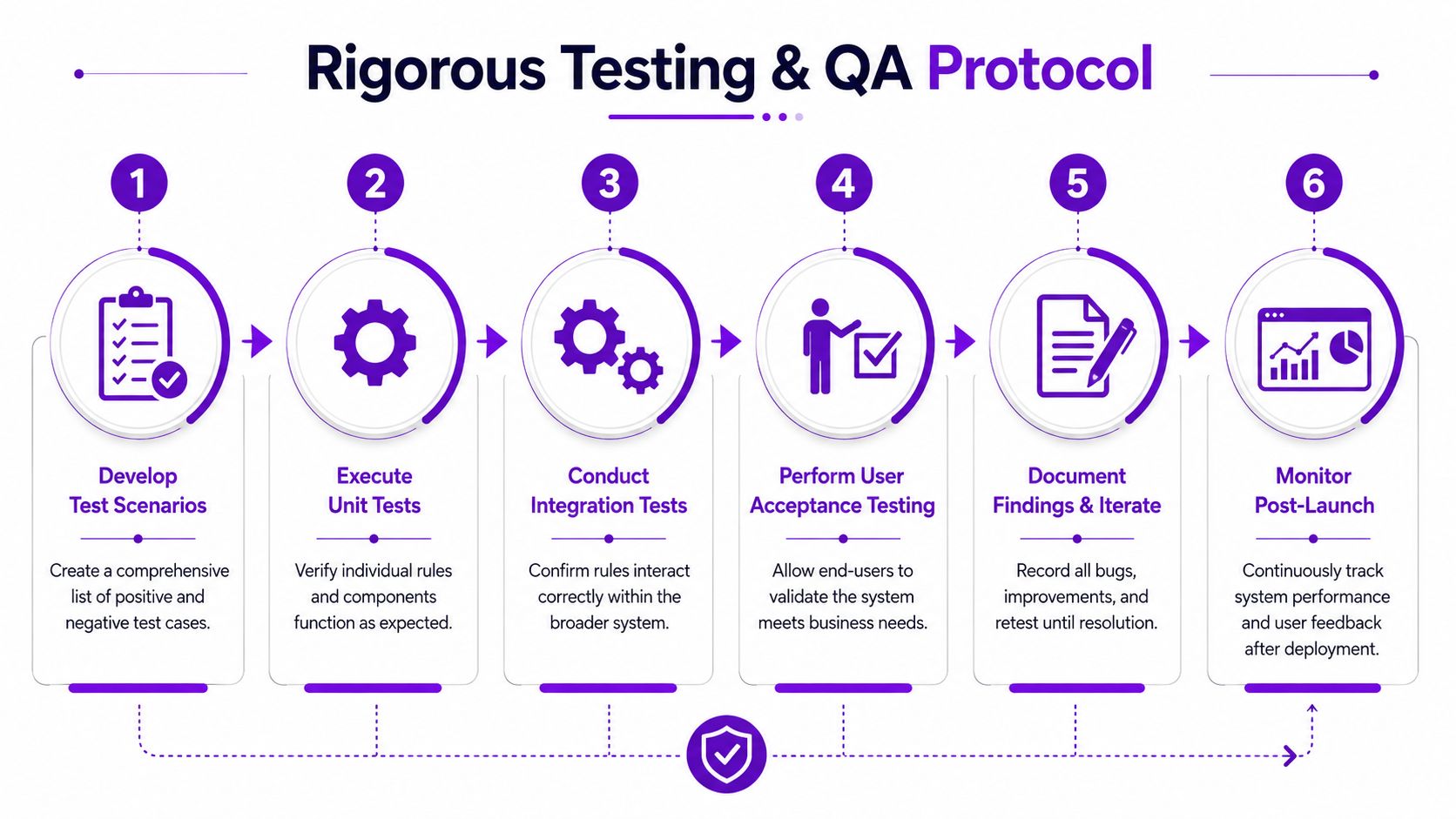
Start small. Confirm that each rule fires under the right conditions and stays off everywhere else. After that, test complete order paths that reflect how customers shop, how staff review orders, and how your platform hands data to downstream systems.
A practical sequence looks like this:
-
Rule checks
Verify individual conditions by SKU type, destination, customer type, and shipping option. -
Cart scenario checks
Test mixed carts, quantity changes, shipping method changes, coupon use, and guest checkout. -
Address edge-case checks
Run addresses near city, county, and ZIP boundaries if your logic depends on jurisdiction mapping. -
Message checks
Confirm the correct restriction message appears for the correct reason, in the correct place. -
Workflow checks
Confirm blocked orders do not pass into payment capture, pick tickets, carrier label creation, or FFL review queues as valid orders.
That last point gets missed often. A checkout block is only one control. If an order can still leak into fulfillment through an admin override, API sync, or manual invoice flow, the restriction system is incomplete.
Use production-like data
Generic test products and fake addresses create false confidence. They do not expose naming inconsistencies, category mistakes, inherited attributes, or old shipping classes that still exist in the catalog.
Use a staging environment with real SKU structures, realistic destination patterns, and the same carriers and service levels you use in production. If you are migrating product data or restriction logic, apply the same discipline used in migration QA. The digna data validation insights are useful here because they focus on catching field mismatches before they turn into live rule failures.
Test the data feeding the rules, not just the rules themselves.
Include support, warehouse, and compliance in UAT
Developers can confirm whether the code behaves as written. They usually cannot tell you whether the result will create avoidable tickets, confuse pick-pack staff, or push preventable exceptions onto the compliance team.
User acceptance testing should include the teams that deal with real orders:
- Support checks whether the restriction reason is clear enough to explain without escalating every order.
- Warehouse checks whether blocked orders disappear cleanly from operational workflows.
- Compliance or FFL staff checks whether the restriction outcome matches how the business interprets current law and carrier policy.
- Ecommerce owners check whether lawful orders still convert without unnecessary friction.
That mix matters because a legally correct rule can still be operationally expensive. I have seen stores block an entire cart because one item was restricted, even though the platform could have isolated the restricted SKU and let the rest of the order proceed. The rule was defensible. The customer experience was poor, support volume climbed, and staff started making manual exceptions outside the system.
Build test cases around failure patterns, not happy paths
Happy-path testing is easy. The expensive mistakes usually come from exceptions, inherited catalog errors, and edge-case geography.
A useful UAT checklist includes:
-
Allowed orders pass cleanly
Lawful shipments should not be blocked by overbroad category logic. -
Blocked orders stop early
Customers should not complete payment for a prohibited order and wait for cancellation. -
Mixed-cart behavior is consistent
The system should clearly determine whether one restricted item blocks the full cart or only that line item. -
Admin visibility is usable
Staff should be able to see which rule triggered, what data matched, and what action to take next. -
Retesting follows every rule change
One update to a state restriction or carrier exception can affect unrelated products if rule priority is poorly structured.
Document expected outcomes before testing starts. Otherwise, teams argue about what the system "should" do after a defect appears, which slows fixes and leads to ad hoc decisions.
A disciplined QA process takes more time before launch. It prevents cancelled orders, bad customer interactions, and the kind of compliance misses that are expensive to explain later.
Establishing Ongoing Maintenance and Monitoring
A shipping restriction system isn't finished when it goes live. It becomes a living compliance process, and that process needs ownership, review cadence, and feedback loops.
At this point, stores either become stable or slowly drift out of alignment. The rule engine that worked at launch can become unreliable if laws change, carrier policies move, product lines expand, or staff start making informal exceptions outside the system.
Treat the regulatory matrix like a living document
Static documentation fails in dynamic environments. According to GPX's shipping compliance guidance, best practices call for a formal review of shipping policies at least twice annually, and high-risk markets may require quarterly audits. The same source warns that relying on static documents can lead to a 25-30% error rate in geographic restriction enforcement when laws change between audits.
That number should get every firearms merchant's attention. Geographic restriction logic doesn't fail dramatically at first. It fails subtly. One stale county rule. One outdated ZIP block. One old exception nobody removed.
Build a maintenance rhythm your team can sustain
A workable maintenance framework usually includes three layers.
Legal and policy review
Someone has to confirm whether the current rule matrix still matches the latest legal reality and carrier requirements. That review should cover product classes, destination logic, exception handling, and message language.
Operational review
Look at what happened in the store. Which orders were blocked? Which ones required manual override? Which customer questions kept appearing? If support keeps seeing confusion around one rule, that's a maintenance issue, not just a support issue.
System review
Check whether scheduled changes fired correctly, whether bulk updates applied consistently, and whether new products were mapped into the right compliance classes.
A simple operating model looks like this:
| Review area | What to check |
|---|---|
| Rule accuracy | Jurisdiction restrictions, SKU mapping, expiration dates |
| Customer impact | Restriction-related tickets, checkout confusion, blocked cart patterns |
| Operations | Manual intervention volume, fulfillment exceptions, override requests |
| Administration | Bulk edit capability, scheduled update reliability, audit trail clarity |
Use KPIs that reflect real compliance work
Good KPIs are practical. They help the team see whether the system is reducing risk without damaging operations.
Useful examples include:
-
Blocked order patterns
Which product classes and destinations generate the most blocks? -
Restriction-related support volume
Are customers confused by the same messages repeatedly? -
Rule update frequency
How often is the matrix revised, and by whom? -
Manual review load
Are staff still checking orders the system should resolve automatically?
None of those metrics mean much in isolation. Together, they show whether the system is doing its job or merely shifting work around.
If your compliance system requires constant manual cleanup, it isn't automated. It's just hiding the labor in a different department.
Bulk rule management is not a luxury
When a legal change affects an entire state, county set, or product category, the team needs to update that logic in one controlled action. Platforms that support bulk rule management reduce inconsistency and make audits realistic. Scheduled updates matter for the same reason. If a rule change has an effective date, the system should apply it on that date without someone remembering to log in at the right moment.
That's the heart of a living compliance framework. Review the law. Watch operational signals. Update centrally. Confirm the change worked.
Advanced Strategies and Emergency Rollback Plans
Mature stores eventually run into scenarios that basic setup guides don't cover. A multi-store catalog may share products but not the same shipping policies. A 3PL may need compliance status passed downstream. A temporary restriction may have to coexist with a standing state rule. These are implementation problems, not just configuration details.
The biggest mistake at this stage is treating launch as the finish line. Implementation science work stresses the need for “audit and feedback” and “purposeful re-examination” in dynamic environments, as outlined by the Implementation Science at UW resource on implementation strategies. That applies directly to regulated shipping systems. The more dynamic the rule environment, the more you need flexibility built into the operating model.
Plan for complexity before it arrives
Advanced environments usually need clearer separation between policy, logic, and operations.
For example:
- A multi-store setup may require one shared rule base with store-specific overrides.
- A 3PL workflow may need a clear pass/fail compliance status attached to the order before the handoff.
- A conditional rule may depend on product type plus destination plus fulfillment method.
If those cases aren't documented, teams start improvising. Improvisation is how contradictory rules creep in.
Every professional rollout needs a rollback plan
Rollback planning sounds pessimistic until the first bad deployment. Then it sounds responsible.
A real rollback plan should answer:
-
What change triggered the issue
Was it a legal update, a bulk edit, a product classification change, or a software release? -
How fast can you disable the bad logic
Can you pause specific rules, revert to the last known-good configuration, or switch to a manual review mode? -
Who approves the rollback
Compliance, operations, and development need a clear decision path. -
How will staff handle in-flight orders
Orders sitting between checkout and fulfillment need a documented review process. -
How will you verify recovery
A rollback isn't complete until test orders confirm expected behavior.
The safest system isn't the one that never fails. It's the one your team can recover quickly without guessing.
Use feedback loops to harden the system
After every major rule update, gather evidence. Did support volume spike? Did lawful orders get blocked? Did edge-case destinations behave differently than expected? Feed that back into the next rule review.
That cycle is what separates a brittle restriction tool from a durable compliance operation. Implementation best practices in this space aren't about installing software cleanly once. They're about building a process that survives legal change, staffing change, product change, and the occasional bad release without losing control.
If you need a WooCommerce-first way to automate firearms shipping compliance without relying on manual ZIP checks and spreadsheet rules, Ship Restrict is built for that job. It gives regulated-goods merchants granular restriction controls by state, county, city, and ZIP code, plus bulk rule creation, scheduled updates, and customer-facing messaging that makes checkout clearer. For FFLs and agencies that need a system they can maintain, it's a practical path from reactive order review to controlled, auditable enforcement.
Automate Shipping Compliance
Stop worrying about restricted states. Ship Restrict handles it automatically.

Cody Yurk
Founder and Lead Developer of ShipRestrict, helping e-commerce businesses navigate complex shipping regulations for regulated products. Ecommerce store owner turned developer.
Automate Shipping Compliance
- Block restricted states
- No more cancellations
- Set and forget
3-day free trial · Card required