Automated Compliance Reporting for WooCommerce Stores
Set up automated compliance reporting for a regulated WooCommerce store: map order fields, schedule jobs, handle exceptions and test.

It's Tuesday morning, and someone on your team is working through the weekend's orders with a state restriction spreadsheet open in the next tab, cancelling the ones that shouldn't have gone out. A carrier wants documentation on a shipment that got flagged. A customer wants to know why their order came back as a refund instead of a parcel.
Six months from now, the question won't be how many orders you stopped. It will be which orders were restricted, under which version of which rule, and whether the block happened before the money moved. Automated compliance reporting is the record your checkout writes each time it makes that decision. Build it as evidence and it holds up. Build it as a formatted summary and you'll spend a week reconstructing a quarter by hand.
What Your Compliance Report Must Prove
The first question an auditor or state regulator asks isn't how many orders you blocked. It's which orders were restricted, under which rule, on what date, and why a shipment was stopped or allowed through. Answer that for every order in a quarter and you've got a control environment. Answer it for most of them and you've got a finding waiting to be written up.
Every regime that touches your catalog needs its own line in the report, and each covers a different product category:
Automate Shipping Compliance
Block orders to restricted states automatically. 3-day free trial.
Start Free Trial- State bans on airguns, knives and certain accessories: scoped to the product category, never to the whole store.
- CBD, hemp and vape restrictions: often split by potency, flavor or delivery method, and frequently by a carrier rule riding on top of state law.
- City and ZIP ordinances: they sit below the state rule and vanish from a report that only groups by state.
- Age-restricted products: they need the verification outcome printed next to the order, not stored in a separate system.
What the report has to support: an evidence log of every checkout decision, a monthly exception summary a manager can read in five minutes, and a re-runnable export an auditor can open without you in the room.
Set cadence per obligation rather than per store. High-risk states where the law moves get a weekly look; low-volume rules are fine monthly. Give each rule group one named owner, so a statute change lands on a person instead of a shared inbox.
The automation gap in this layer is measured. In a November 2024 survey of 50 licensed corporations, Hong Kong's Securities and Futures Commission found name screening automated at 92% of respondents, while management-information reporting, the process closest to assembling compliance data, sat at 43%. Detection gets automated first. The layer that consolidates evidence lags behind it.
The same pattern holds in capital markets. A 2026 survey of 300 compliance leaders found that more than 82% described their systems as fully integrated and automated, yet 79% acknowledged that between 10% and 25% of compliance and monitoring activity still depended on manual processes or spreadsheets, as the FIS Global State of Capital Markets Compliance Report sets out. Automated compliance reporting doesn't remove exception reviews, approvals or evidence capture. It makes them countable.
The one-page scope document
Write the scope down before you touch a setting. Jurisdictions covered, product scope, retention period, reviewer roles, and the outcome the report must prove, such as zero restricted shipments to blocked states across a quarter. Sign it off with the person who owns compliance risk. Matil's compliance reporting guide is a reasonable template for structuring that one-pager, and our notes on shipping restriction record keeping requirements cover what to retain and for how long.
Map WooCommerce Order Fields to Report Columns
A compliance report is a join, not a template. Every line comes from WooCommerce plus your decision log, and the columns you pick now are the columns an auditor reads later.
| Report field | WooCommerce source | Why it matters | Example value |
|---|---|---|---|
| Order ID and status | Order number and status in the orders table | Links every decision to one transaction | Order number from the admin order screen, status processing |
| Shipping state, city and ZIP | Order shipping address fields | Shows where the goods were going | IL, city and ZIP from the shipping address |
| Product SKU and variation ID | Product and variation records | Identifies the exact item that was restricted | AIR-22-01, variation 8842 |
| Category and tags | Product taxonomy | Matches rules scoped by category or tag | Air rifles, restricted-by-state |
| Checkout validation result | Ship Restrict decision log | Records whether the order was blocked or allowed | Blocked, before payment |
| Rule ID and version | Rule record with effective dates | Shows which version of the law applied | CITY-AIRGUN-01 v3 |
| Payment and fulfillment timestamps | Date paid and date shipped on the order | Proves the block happened before payment or dispatch | date_paid empty, date_shipped empty |
Where the mapping breaks
Billing address used as shipping address. Plenty of exports pull billing_state because it's one line of code. If a customer ships a knife to a state they don't live in, the report says the order went home with them. Map from the shipping fields and snapshot the evaluated location into order meta at checkout, so a later address edit can't rewrite history.
Guest orders with no saved shipping ZIP. A guest checkout abandoned before the shipping step can leave a record without a full address. Those lines export blank and look like a data problem you created. The decision log should carry the location the rule evaluated, captured at the moment of validation, not the location the order ended up with.
Variations that don't inherit parent tags. WooCommerce stores variations separately, so a rule scoped to the parent's tag won't always catch the variation a customer buys. That's a mapping failure before it's a rule failure, and it's the most common reason a restricted item gets through.
Free Shipping Compliance Audit
We'll review your WooCommerce store's shipping compliance for free.
Worked example: take an order for a 0.22 caliber air rifle variation going to a ZIP that your city-level rule marks restricted. The line reads SKU AIR-22-01, variation 8842, category air rifles, rule CITY-AIRGUN-01 v3, outcome blocked at 14:06, payment timestamp blank.
Reconcile before the first audit. Pull WooCommerce's own order totals by state for the period and compare them with your report's totals. Every variance is a missing decision, a wrong address field or an order created outside the checkout flow. Fix it while the difference is three orders, not three hundred.
Configure Rules and Validation Hooks at Checkout
A report can only prove what the checkout enforced, so rules come first. Enforcement intent is high across the market: in 2025, 82% of companies surveyed by PwC planned to invest more in at least one technology to automate and optimize compliance activities, according to the PwC Global Compliance Survey. Spend that on enforcement that writes a log, not on a dashboard that summarizes one.
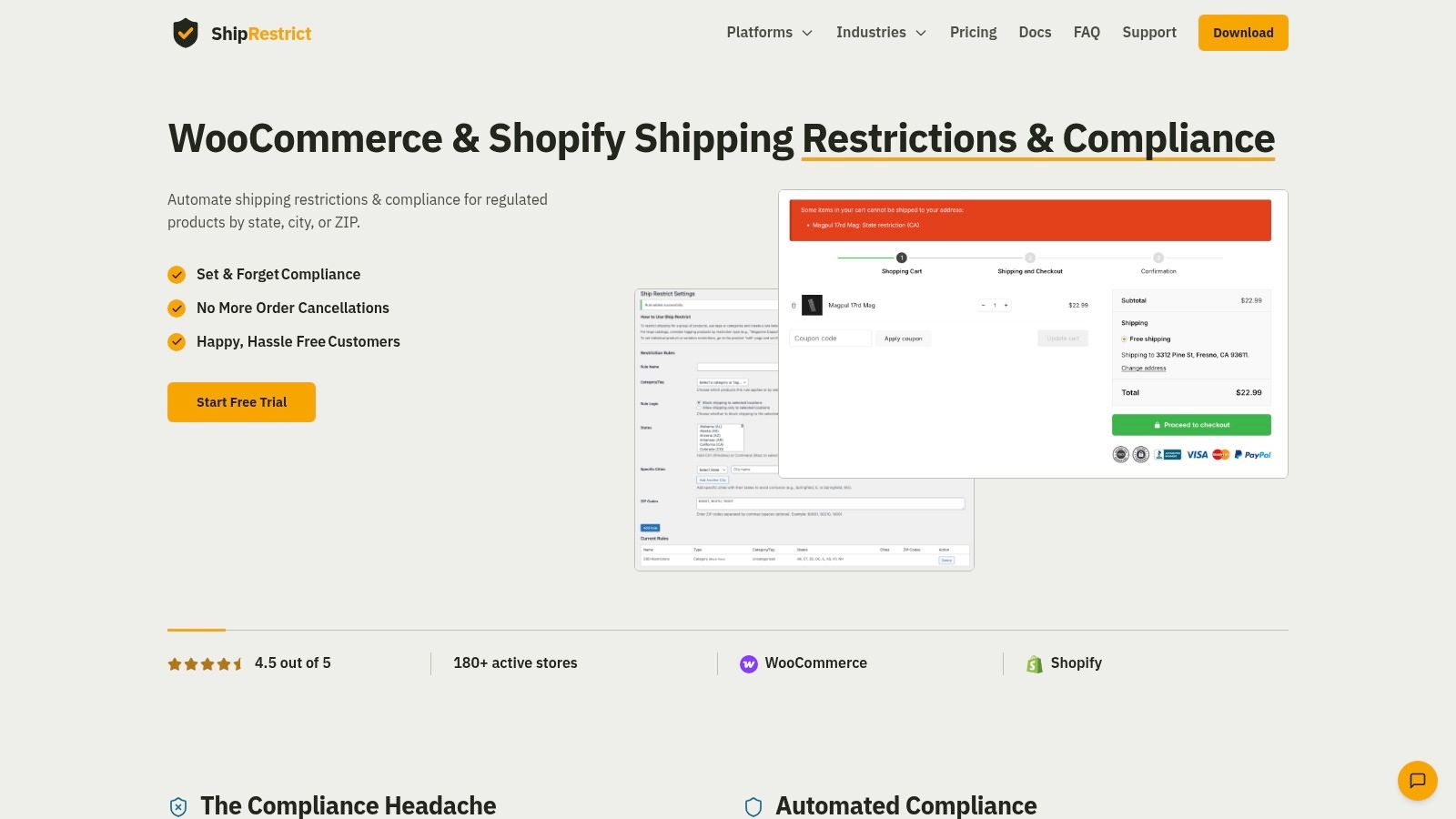
The admin screen below shows a rule set scoped by category and geography, which is the shape every report line will inherit.
Six steps per rule group
- Name the group after the regulation. "Illinois city airgun ordinance" beats "Rule Set A", because the name travels into the report and an auditor should recognize the law behind each entry.
- Scope products first, geography second. Tag the products, categories or variations the rule covers, then narrow to states, cities or ZIPs. Doing it in that order stops a geography edit from widening the product set.
- Set an effective window. A start date and an expiry date let a temporary ban switch itself on and off. A rule with no expiry is a rule nobody reviews.
- Write the customer-facing message. Explain the restriction on the product page and again at checkout, in plain language. A blocked order with no explanation turns into a support ticket, and often a chargeback.
- Test three addresses. One that should pass, one that should be blocked, and one on a city boundary where the logic is most likely to be wrong. Record which rule version you tested.
- Export the rule set as JSON and file it beside the report archive. Rules get edited and rules get deleted. The export is how you prove which version was live on the day of an order.
The variation trap
A parent product is tagged as restricted while one variation is legal, or the reverse. Both cases produce a report line that looks correct and isn't. Evaluate the rule against the variation record's own SKU, category and attributes, then fall back to the parent only when the variation carries nothing of its own. Test the variation a customer buys.
Validate the input, not just the outcome. The discipline accountants apply when avoiding input errors before VAT returns belongs here too: a ZIP that doesn't match its state, or a customer-typed city name, will fail a comparison and produce a false allow that never reaches the exception queue.
Where to attach the check
Hook the evaluation to woocommerce_after_checkout_validation so a restricted order fails before payment is taken, and write the rule ID, jurisdiction, matched product, timestamp and outcome into the decision log inside the same callback. A log write that runs as a separate request can time out and leave a blocked order with no evidence behind it. We enforce shipping restriction rules automatically at checkout, so nobody on the store team does an address lookup or opens a policy spreadsheet while an order waits.
A correctly configured log line for a blocked order is short and complete: rule ID, jurisdiction, product and variation, checkout timestamp, outcome, and an empty payment timestamp. That contrast between a populated checkout field and a missing payment one is the whole proof that the block happened first.
Schedule Report Jobs and Format Them for Auditors
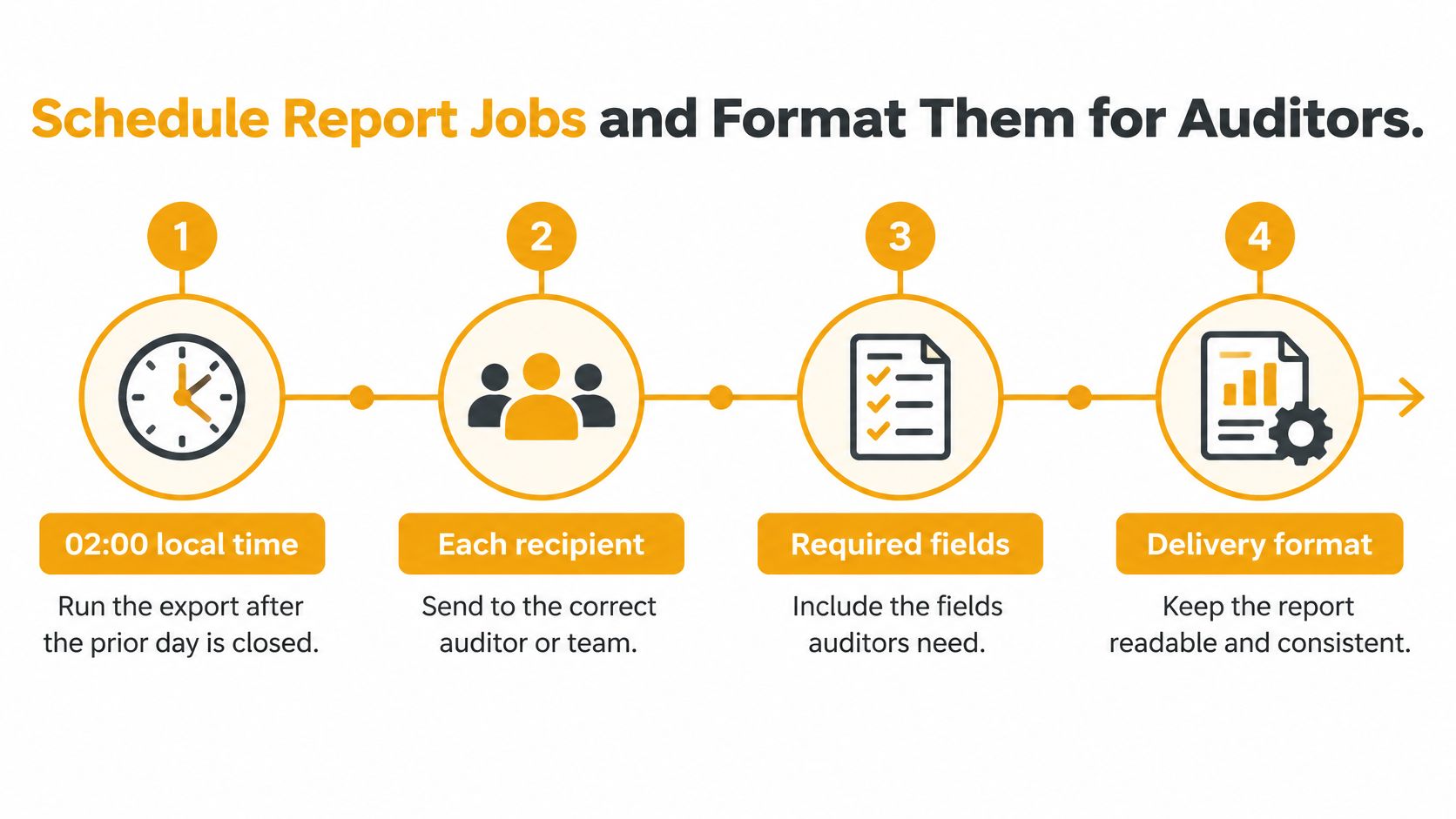
A report nobody receives is a report nobody uses. Four decisions shape the job: when it runs, who gets it, what it contains and how it's delivered.
| Audience | Cadence | Required content | Format |
|---|---|---|---|
| Compliance owner | Weekly | Blocked and overridden orders by state, rule version and reviewer | CSV plus summary PDF |
| Regulator or state audit | On request, plus quarterly | Full population, period, rules in force, exceptions with reviewer | Signed CSV and rule JSON export |
| Operations manager | Monthly | Blocked order count, false positives, support contacts | Dashboard or XLSX summary |
| Carrier or fulfillment partner | Per dispute | Order, destination, shipment status and rule decision | Single-order PDF |
The export job, step by step
- Run at 02:00 local time. The prior day is closed, refunds have settled, and the file won't capture an order that changes five minutes after export.
- Pull every order with a checkout decision, not just blocked ones. A report that shows only failures can't prove you allowed the right orders.
- Join each decision to its rule ID, version and jurisdiction from the rule register, so a line stays meaningful after the rule is edited or retired.
- Hash the file and write it to storage that won't overwrite it. A hash plus a generation timestamp is harder to argue with than a spreadsheet someone forwarded around.
- Send the summary to the compliance owner and archive the full export. Two artifacts, two audiences, one job.
Auditors open with four questions: the population covered, the period, the rules in force, and each exception with its reviewer. If you report on a sample, say so and describe the method. NIST's continuous monitoring guide warns that sampling becomes unreliable when the population is non-random or the sample too small, so a sampled report should carry its scope and confidence assumptions instead of presenting itself as complete coverage.
Name files so a stranger can retrieve one without asking: report_YYYYMMDD_state_rule.csv, with the period end in the name rather than the run time. Keep the rule JSON export in the same folder, and set retention by jurisdiction rather than by what your host happens to charge for. Our own compliance documentation notes cover the archive structure, and the logging underneath it matters because every action is recorded for audit purposes, which gives the export a source to pull from instead of a gap to explain.
Automated audits only work when the data feeding them is sound, the same argument behind Trackingplan's guidance to check cookie consent compliance automatically. A scheduled job that faithfully exports bad input just makes the bad input arrive on time.
Sample Audit Export Layout
Build to this layout and the first audit becomes a file transfer rather than a project. Auditors read exports in a predictable order, and matching it saves weeks of back-and-forth.
- Header block. Report name, legal entity, period start and end, generation timestamp, population count and the file hash. Put the count here so nobody has to derive it from the rows.
- Rule register. Rule ID, version, jurisdiction, product scope, effective start, expiry date and owner. Place it before the decision log, not in an appendix, because a reader looking at a decision line needs the register open in the same file to know what the rule ID means.
- Decision log. Columns in this order:
decision_id,order_id,checkout_timestamp,payment_timestamp,shipping_state,shipping_city,shipping_zip,sku,variation_id,category,rule_id,rule_version,outcome,override_reviewer,override_reason. Fixed order means a reviewer can diff two exports from different quarters without reading the header. - Exception summary. Counts of blocked attempts, overrides and ambiguous cases, with median resolution time per queue. One page, no narrative.
- Footer. The sampling statement, either full population or the method and sample size, plus the reviewer's sign-off date and name.
A single line tells an auditor most of what they need. Take a blocked 0.22 caliber air rifle variation going to a restricted ZIP: the row shows outcome blocked, a blank payment_timestamp, and the rule ID and version of the city airgun rule in force on the order date. A reader can see the timing, the geography, the item and the authority without opening another file.
Keep column names stable across releases. Renaming a field in month four breaks every comparison an auditor has already built, and a version note in the header block is cheaper than a reissued export.
Route Alerts and Handle Exceptions
Say a new CBD flavor variant arrives with a THC content that sits close to the threshold your rules use. No existing rule covers it, the legality varies by destination, and someone has to decide whether it can be listed at all. Automated compliance reporting says an order was allowed or blocked. It never says whether the rule behind that decision was right.
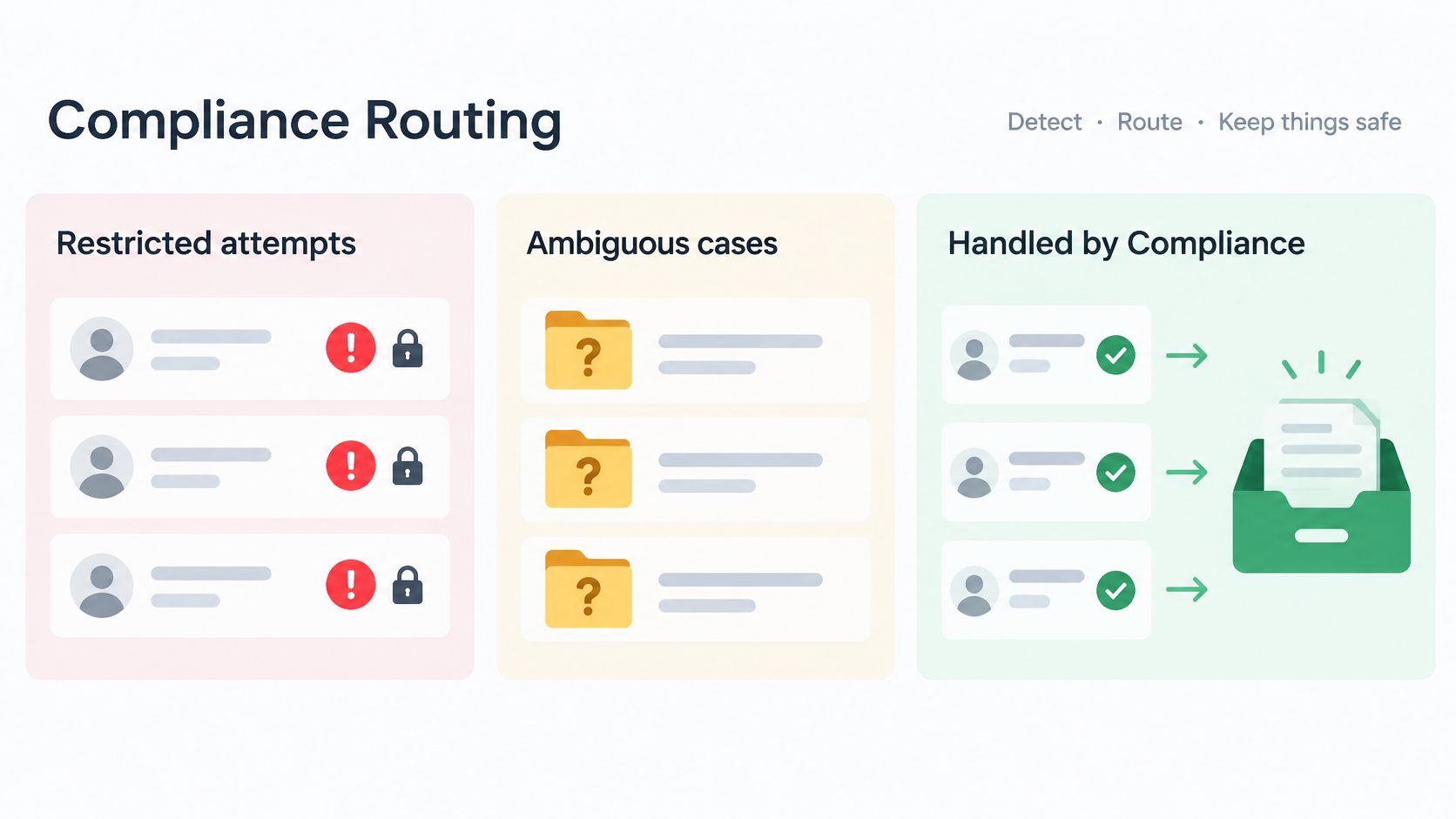
That's the boundary worth naming plainly: reporting is not interpretation. The queue structure below keeps the two from collapsing into one inbox.
Three queues, one owner each
- Restricted attempts. The order was blocked, logged and the customer was told why. Nobody chases it. Scan the volume weekly only to spot a rule firing far more often than it should, which usually means the geography is too wide.
- Ambiguous cases. A new variant, a rule that might apply, an address sitting on a city line. Same-day response from the rule owner, because the customer is waiting and the answer is either list it or don't.
- Stale evidence. A rule not reviewed since the statute changed, a sync that stopped, a payment timestamp that never populated. Forty-eight hours to fix or escalate, because stale evidence is what turns a clean quarter into a finding.
An override is a record, not a favor. The reviewer writes the reason, the rule ID, the evidence they consulted and the decision, and the override closes only when the order does. When the rule itself is unclear, MetricStream's analysis of compliance automation and regulatory change makes the point that change systems need applicability assessment and obligation mapping, not just alerts. An alert that says a law changed still leaves your team holding the hardest part of the work.
Blocking more is not better compliance. A rule that catches legal ZIPs costs sales, support time and goodwill, while a narrow rule leaves legal exposure. Review false positives monthly beside violations, and put both numbers in the exception summary, so nobody can widen a rule without the cost appearing on the same page.
Escalation to counsel needs a trigger, not a mood. Use a new product class, a potency or classification question, a rule that would block an entire state, or a conflict between state law and a carrier's own terms. Send the order, the destination, the rule and your proposed answer. Legal advice gets sharper when the question arrives specific.
Test, Monitor and Confirm the Report Before the Audit
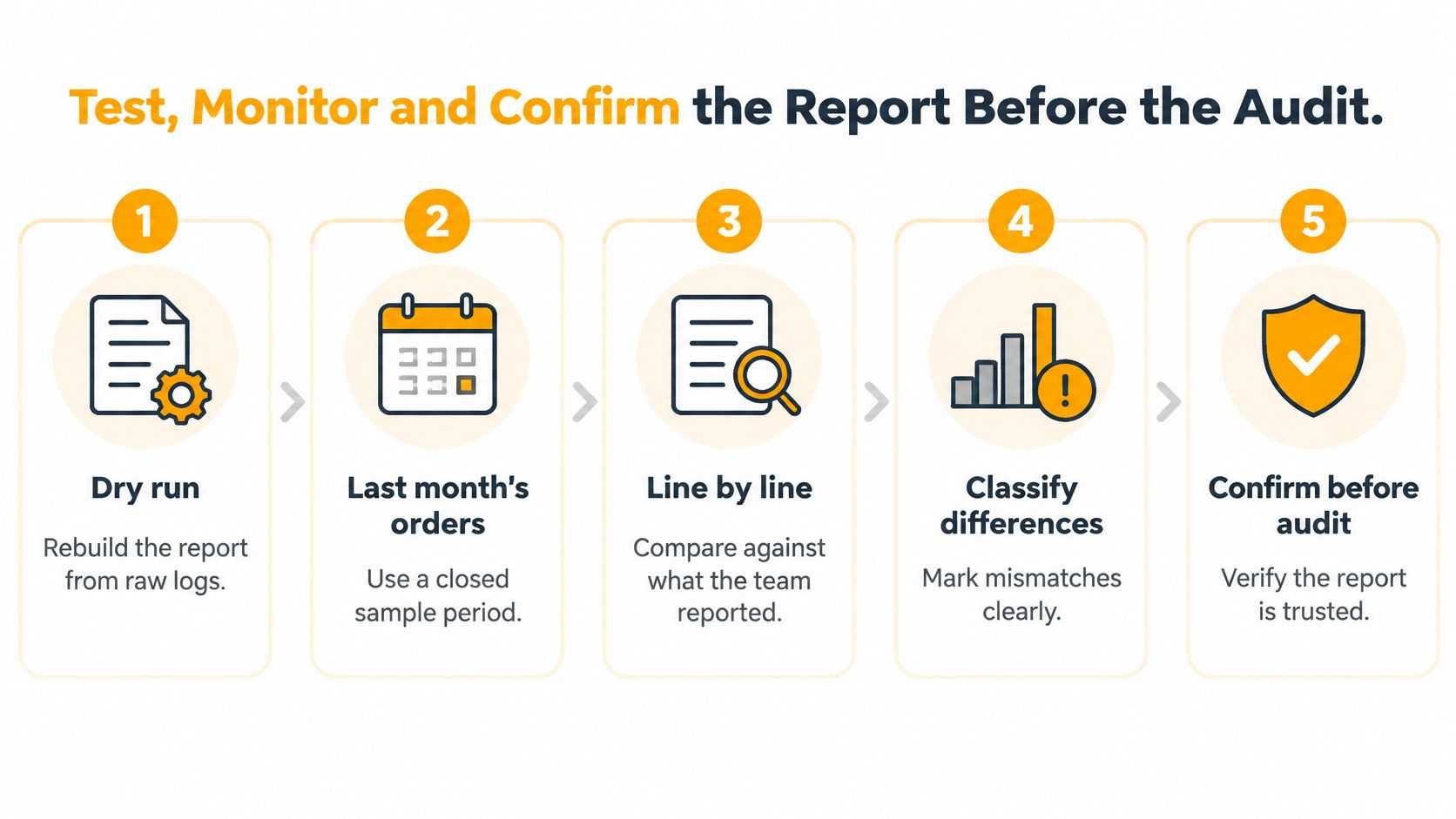
Take last month's orders and rebuild the export from the raw decision log. Compare it line by line with the report the team used at the time. Classify each mismatch as a rule gap, a data gap or a reporting gap, then trace it to the checkout decision. Matching totals alone can hide a missing order and a duplicate row.
In a 2026 survey of 860 U.S. IT, security and compliance professionals, 48% claimed continuous audit readiness while 67% still manually collected a meaningful share of compliance evidence, as reported by Security Boulevard. Manual collection leaves more evidence to reconcile before an audit. Automation still needs testing: a consistently generated report can consistently repeat the same mapping error.
The four-order test set
Push four orders through staging before trusting a rule change: one allowed, one restricted, one variation case where the parent is tagged but the variation isn't, and one inside a rule's activation window. Record the expected result before testing. Compare each outcome with its report line, including the destination, rule ID and decision time.
An allowed order matters as much as a block. If a legal destination fails, the test exposes a false positive rather than successful enforcement.
Monitor failed collection jobs, missing-data rates, the last successful run, differences between backed-up and live rules, and the share of decisions requiring human review. Keep false positives beside blocked attempts so a broader rule cannot look better just because it blocks more.
| Symptom | Likely cause | Fix |
|---|---|---|
| Restricted order got through | Rule targets the parent but misses the variation | Check variation targeting and retest |
| Report missing orders | Date filter uses creation time instead of decision time | Use the decision period consistently |
| Blocked attempt has no rule ID | Decision-to-rule mapping is missing | Repair the mapping and consult the JSON backup to identify the rule |
| Many false positives in one state | ZIP scope is too broad | Narrow the ZIP list and retest allowed destinations |
| Export differs from WooCommerce count | Shipping data is missing or rows are duplicated | Reconcile by order ID and inspect the shipping ZIP field |
| Rule not applied after a law change | Live rule or activation date was not updated | Review the requirement, correct the rule and retest its effective window |
What to confirm after every change
- Counts match: exported orders reconcile with WooCommerce for the same period; blocked checkout attempts are counted separately.
- Rule IDs present: every blocked decision maps to an identifiable rule, with no unexplained blanks.
- No zombie rules: expired rules have a recorded disposition, and scheduled activation and expiry behave as expected.
- Backup current: the JSON export matches the live rule set, not an earlier configuration.
A restricted order that reaches payment needs investigation before the ticket closes. Trace whether the rule was active, whether it targeted the variation and whether validation ran before payment. Preserve the decision evidence before changing the configuration; otherwise, the retest may pass while the original failure remains unexplained.
Export rules as a backup and review them when regulations change. Confirm current product requirements with legal counsel: the report demonstrates how configured rules behaved, while legal review establishes whether those rules reflect current requirements. Use the shipping audit checklist to check the rule inventory, ownership, reporting cadence, exception response time and last test date before external review.
Ship Restrict enforces configured shipping restrictions at checkout and logs actions for audit purposes. Test an allowed address, a restricted address and a boundary ZIP, then check whether the reporting layer preserves enough evidence to explain each result. Visit Ship Restrict to see how the WooCommerce plugin handles JSON import and export and audit logging alongside the rules you already maintain.
Automate Shipping Compliance
Stop worrying about restricted states. Ship Restrict handles it automatically.

Cody Yurk
Founder and Lead Developer of ShipRestrict, helping e-commerce businesses navigate complex shipping regulations for regulated products. Ecommerce store owner turned developer.
Automate Shipping Compliance
- Block restricted states
- No more cancellations
- Set and forget
3-day free trial · Card required