What Is Table Rate Shipping? Your 2026 Guide
Learn what is table rate shipping, how it works, and see calculation examples. Discover why it's critical for WooCommerce stores.
If you sell firearms or accessories online, you've probably already felt the problem. One shipment goes to a nearby customer and your flat shipping charge covers it comfortably. The next order includes heavier items, a longer zone, extra handling, and suddenly the same shipping charge cuts straight into margin. Worse, if you're dealing with regulated products, a shipping setup that's merely inaccurate can turn into a compliance headache fast.
That's where table rate shipping comes in. If you're asking what is table rate shipping, the simple answer is this: it's a rules-based way to calculate shipping charges based on the actual order scenario instead of using one blunt number for everything.
For firearms retailers, that matters for two reasons. First, shipping costs are rarely uniform. Second, cost logic and legal logic are not the same thing. A good table rate setup can improve pricing accuracy, reduce manual mistakes, and make checkout feel more reasonable to buyers. But it also has limits, especially when the shipment itself may be restricted by state, county, city, or ZIP-level rules.
Beyond Flat-Rate The Search for Accurate Shipping Costs
Most stores start with flat rate shipping because it's easy. You set one price, turn it on, and move on to more urgent work. That works for a while, especially if your catalog is small and your average order profile doesn't vary much.
Automate Shipping Compliance
Block orders to restricted states automatically. 3-day free trial.
Start Free TrialThen reality catches up.
A lightweight accessory going to a nearby address may be profitable under a flat rate. A heavier order going farther away may not be. If your store sells firearms, magazines, parts, safes, or mixed carts with very different shipping profiles, one flat fee starts creating two problems at once. You either overcharge simple orders or undercharge expensive ones.
Where flat rate starts to break
The issue isn't that flat rate is wrong in every store. The issue is that it assumes your fulfillment costs are stable. They usually aren't.
A few common examples:
- Mixed product weights: A small parts order and a heavier hard-goods order don't cost the same to ship.
- Zone differences: Nearby urban destinations and remote addresses don't create the same delivery cost.
- Order value strategy: You may want lower shipping on higher-value carts to protect conversion.
- Handling complexity: Some shipments take more labor even before the label is printed.
Flat rate works best when your products, package sizes, and delivery zones are all fairly predictable. Most firearms stores don't operate in that kind of environment.
This is the same broader pricing problem importers and operators face across logistics. If you want a useful parallel outside parcel shipping, this modern guide for freight forwarders shows how cost-plus thinking affects margin control when freight variables stack up.
Why merchants move to table rates
Table rate shipping treats shipping as part of your pricing system, not just an admin setting. Instead of charging everyone the same amount, you define rules for specific situations. That gives you a way to charge more fairly and protect gross margin without defaulting to live carrier rates for every order.
For merchants that need more precision, that shift matters. Historical Adobe Commerce documentation shows merchants using table rate shipping can reduce shipping errors by up to 35% compared to manual estimations, especially when rate tables are kept accurate through ongoing maintenance.
How Table Rate Shipping Works A Rule-Based Approach
Table rate shipping is a decision grid. You build a table of rules, and the store checks the order against those rules until it finds the one that matches.
Free Shipping Compliance Audit
We'll review your WooCommerce store's shipping compliance for free.
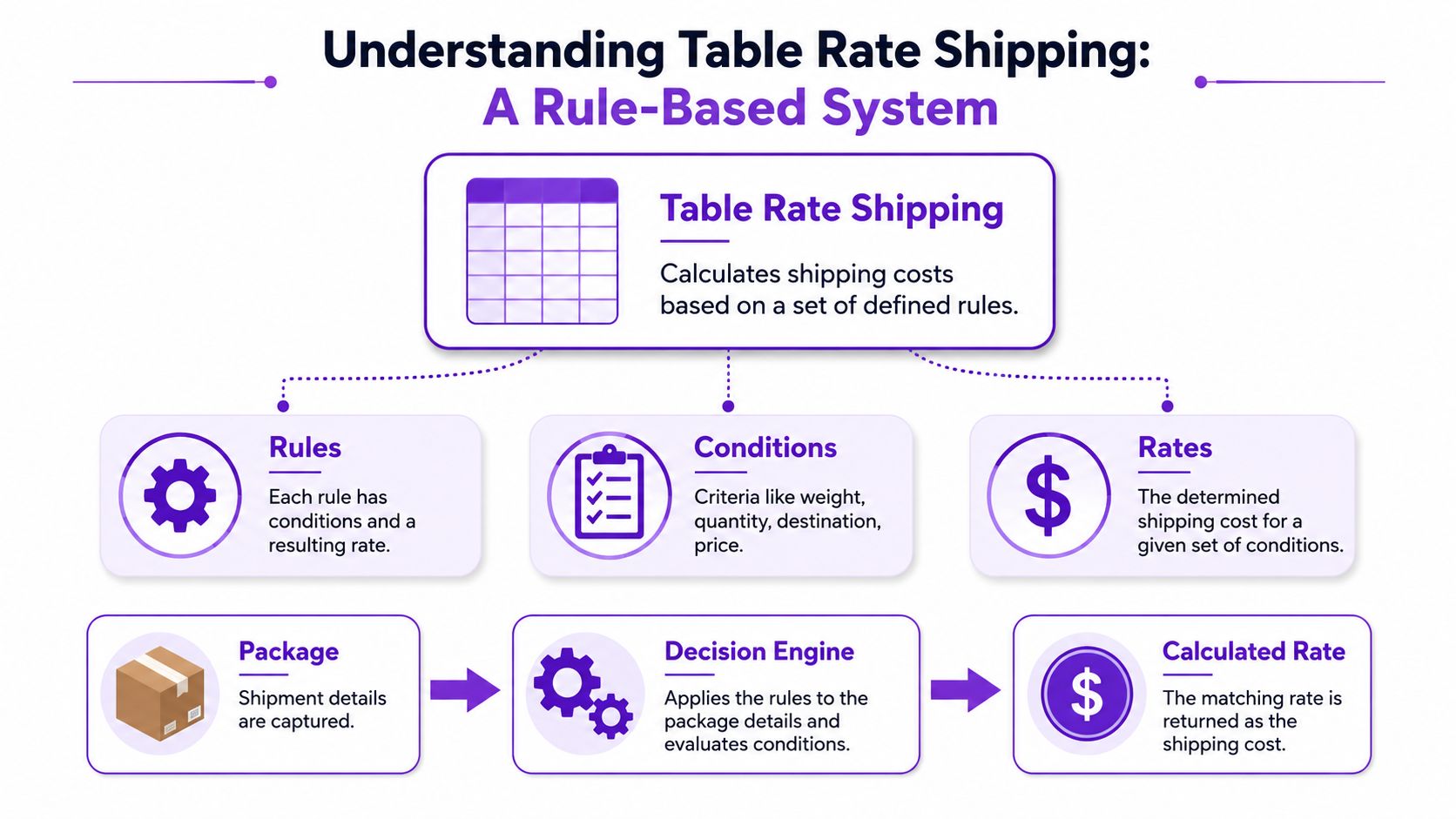
The mechanics are straightforward. Table rate shipping operates as a grid-based decision engine that evaluates cart contents against a structured dataset of rules. It iterates through the rule table until it identifies the first row where all condition columns match the cart data and the destination matches the customer's address. The data is often prepared in a CSV spreadsheet using asterisks (*) as wildcards for “all values,” as described in Zoey's table rate shipping documentation.
The two parts of every rule
Every table rate rule has two basic ingredients:
- Condition
- Destination
The condition is the trigger. That might be:
- cart weight
- order subtotal
- item count
- a combination of those factors
The destination is where the rule applies:
- country
- state or region
- ZIP code or ZIP range
Put those together and you get logic like this:
- If the order weighs up to a certain amount and ships to a specific state, charge one rate.
- If the order subtotal crosses a threshold and ships to another zone, charge a different rate.
- If no specific rule applies, fall back to a wildcard entry.
Think of it like a delivery menu
A simple way to think about table rates is a restaurant delivery menu with tiers. Delivery pricing might change based on where the customer lives and how large the order is. The restaurant isn't guessing. It's checking the order against a predefined grid.
That's what your store is doing at checkout.
Practical rule: Table rates aren't “smart” in the human sense. They only do exactly what your rule table tells them to do.
That point matters. Store owners sometimes expect table rate shipping to understand exceptions automatically. It won't. It matches inputs against rows.
Why this gives you more control
This structure is what makes table rates useful for stores with uneven fulfillment costs. You can build pricing around the variables that affect shipping burden instead of averaging everything into one number.
Typical rule models include:
| Rule model | What it uses | Best fit |
|---|---|---|
| Weight vs destination | Package weight and delivery zone | Stores with meaningful carrier cost differences by weight |
| Price vs destination | Cart subtotal and zone | Stores using shipping as a conversion lever |
| Item count vs destination | Number of units and zone | Stores where packing labor rises with cart volume |
A well-built table can get very granular. The verified data notes that table rate shipping can process over 10,000 unique shipping rules within a single rate table, which is why merchants use it for detailed ZIP, weight range, and order total logic.
Table Rate Shipping Calculation Examples
The fastest way to understand what table rate shipping is is to watch the rule match happen.
Example one using weight and destination
Say your store uses a Weight vs Destination table for accessories and compliant non-restricted items.
| State | Weight (Up to) | Shipping Cost |
|---|---|---|
| Texas | 1 lb | Standard rate |
| Texas | 5 lb | Higher standard rate |
| California | 1 lb | Standard rate |
| California | 5 lb | Higher standard rate |
| * | * | Fallback rate |
A customer places an order going to California. The packed shipment weight is 3 lb.
The system reads the table from top to bottom. It checks:
- Is the destination Texas? No.
- Is the destination Texas for the next weight tier? No.
- Is the destination California and weight up to 1 lb? No.
- Is the destination California and weight up to 5 lb? Yes.
That row becomes the shipping charge shown at checkout.
This is why your product weights matter so much. If the stored weight is wrong, the rule match can still be technically correct while the price is operationally wrong. If your catalog includes bulky products, review how to calculate dimensional weight before you build weight-based tables. Actual scale weight and billable shipping weight are not always the same thing.
Example two using price and destination
Now consider a Price vs Destination setup. This is common when you want shipping to support conversion.
A simple version might look like this:
| State | Order Total | Shipping Result |
|---|---|---|
| Arizona | Under threshold | Paid shipping |
| Arizona | Above threshold | Reduced or free shipping |
| Nevada | Under threshold | Paid shipping |
| Nevada | Above threshold | Reduced or free shipping |
| * | * | Default shipping |
A customer from Arizona places a larger order that crosses your free-shipping threshold. The engine checks destination first, then order total range, and applies the matching row.
This kind of table is useful when your margin structure lets you absorb shipping on better carts, but it also creates a discipline issue. If your product costs, packaging assumptions, or carrier pricing change, your threshold may stop making sense. The table still works. The economics don't.
A good table rate setup is only as reliable as the catalog data and shipping assumptions behind it.
That's why experienced merchants treat shipping tables as live operational assets, not one-time setup work.
Table Rate vs Flat Rate vs Carrier Calculated Shipping
These three methods solve different problems. None is universally best. The right choice depends on how much control you need, how stable your fulfillment costs are, and how much operational complexity your team can manage.
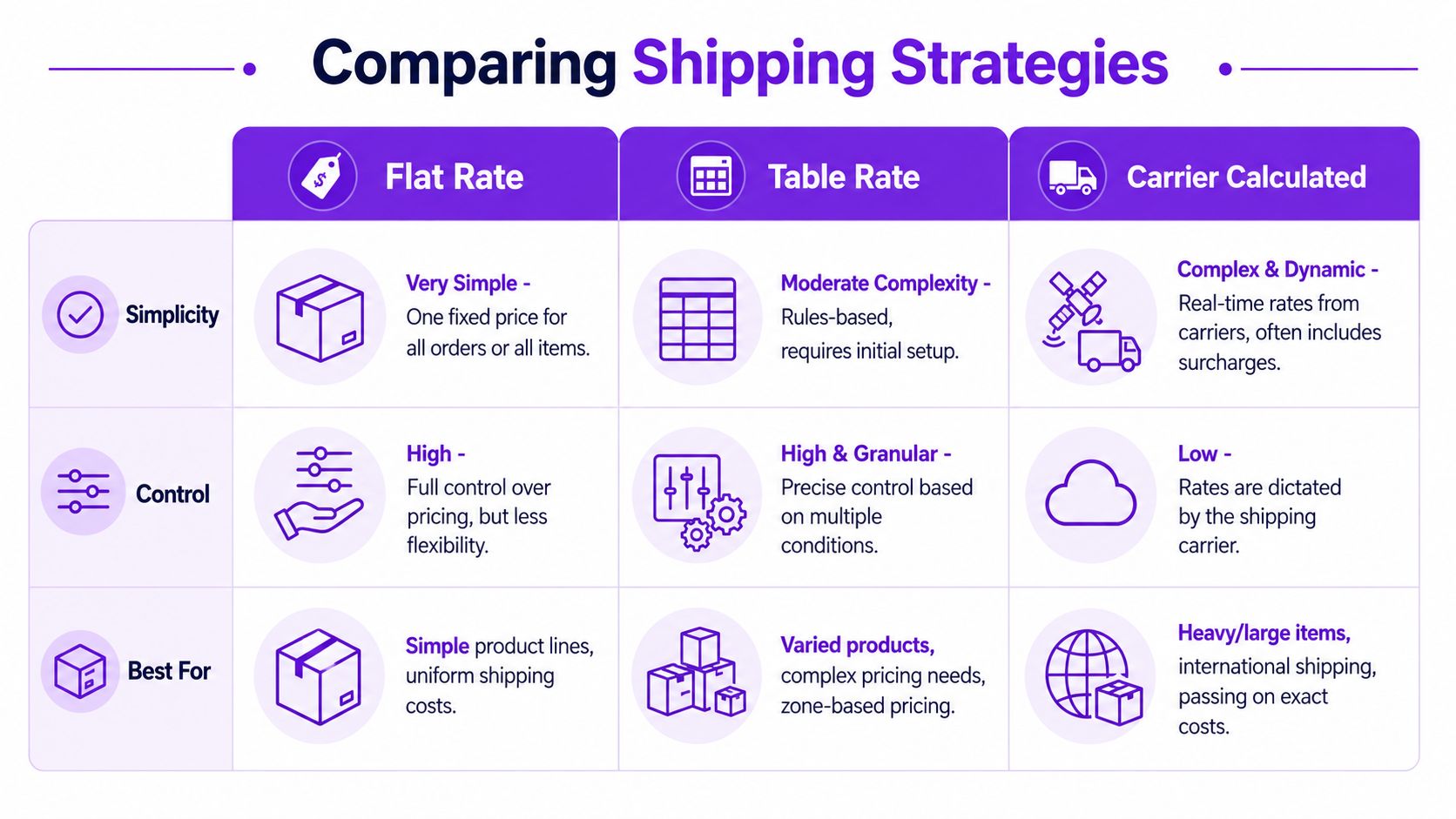
Flat rate shipping
Flat rate is the easiest to administer. You define one shipping charge for a method or zone and move on.
That simplicity is the advantage. It's also the weakness.
Flat rate works best when you have:
- consistent package sizes
- limited zone variation
- a narrow product mix
- enough margin to absorb occasional mismatch
For firearms retailers, that's often too crude. A store shipping optics, accessories, compliance-sensitive items, and heavier products usually needs more precision than one fixed fee can deliver.
If you want a deeper look at where flat rate fits, this guide to a flat rate shipping box is a useful practical reference.
Table rate shipping
Table rates sit in the middle. You get control without handing every pricing decision to the carrier.
That middle ground is why many merchants adopt it. According to industry data cited in ShipperHQ's guide to table rate shipping, table rate shipping can reduce checkout abandonment by approximately 22% compared to flat-rate systems because customers see more accurate shipping estimates based on their actual order details.
It also gives you room to shape customer behavior. You can use zone-based pricing, subtotal thresholds, or item-count logic without relying on volatile real-time carrier quotes.
Carrier-calculated shipping
Carrier-calculated shipping gives you the most direct pass-through of current shipping charges. That can be useful for heavy items, large boxes, or international orders where costs move sharply by service level and destination.
The trade-off is control.
You may run into:
- rate volatility at checkout
- surcharge surprise for customers
- less flexibility in shaping margin
- dependence on clean package data for every SKU
For many stores, especially those with mixed products, carrier-calculated rates can feel too exposed. Customers see the carrier's reality. You lose some ability to smooth the buying experience.
Which one usually makes sense
Here's the practical version:
| Method | Best trait | Main weakness | Good fit |
|---|---|---|---|
| Flat rate | Easy to manage | Often inaccurate | Small catalogs with stable shipping profiles |
| Table rate | Strong balance of control and accuracy | Needs maintenance | Stores with varied products and zones |
| Carrier calculated | Closest to real-time cost | Less pricing control | Heavy, oversized, or highly variable shipments |
For a firearms retailer, table rates often make sense as the pricing method because they let you model cost more realistically than flat rate, without exposing every customer to raw carrier pricing.
Implementing Table Rates in WooCommerce
WooCommerce can support complex shipping setups, but true table rate shipping usually requires a dedicated plugin or extension. The built-in options are fine for simple methods. They're rarely enough for stores that need layered shipping rules across zones, weight bands, and order thresholds.
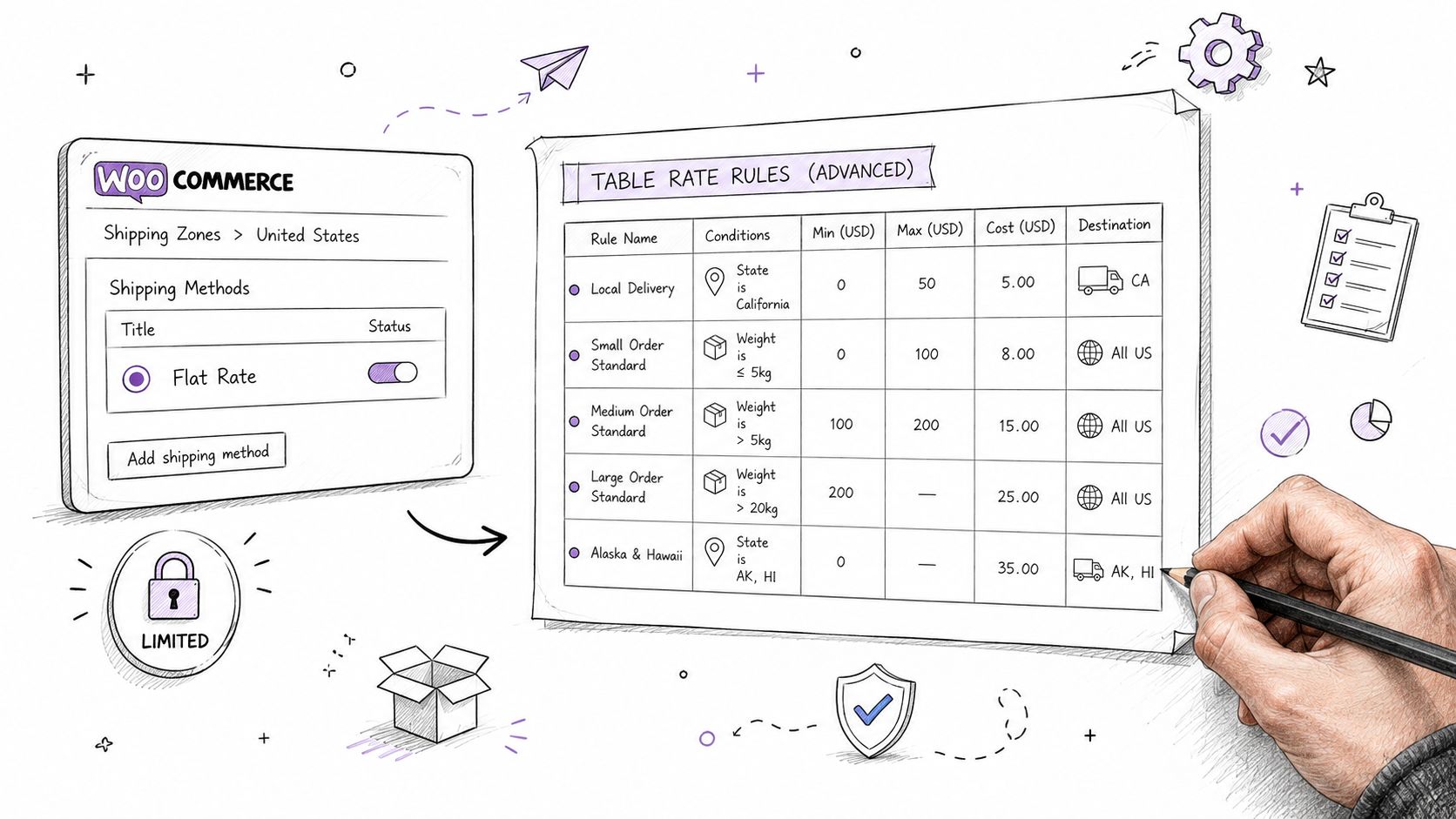
If you're still deciding whether WooCommerce is the right foundation for your stack, this breakdown on how to choose the best eCommerce platform is worth reading before you commit deeper to custom shipping logic.
The real workflow in WooCommerce
In practice, implementation usually looks like this:
-
Define the pricing logic Decide what should drive shipping. Weight, order total, item count, destination, or a combination.
-
Build the rule sheet Most merchants do this in a spreadsheet first. That gives you a cleaner place to review conditions, ranges, and fallback logic before import.
-
Import the CSV Many tools use CSV-based imports so you can manage larger rule sets more efficiently.
-
Test with real carts Don't stop at one test order. Check edge cases, mixed carts, nearby zones, distant zones, and fallback behavior.
Rule order matters more than people expect
A lot of table rate mistakes in WooCommerce aren't caused by bad math. They're caused by bad rule hierarchy.
Specific geographic locations must appear before wildcard entries. If a wildcard rule appears first, the system can match the generic rule too early and assign the wrong charge. Another operational constraint is that only one set of table rate data can be active at a time, so your CSV has to function as a single complete rule set rather than several independent mini-tables.
That sounds technical, but the business consequence is simple. One badly ordered row can make your checkout charge the wrong shipping amount for an entire region.
If your rates look “mostly right” but some customers still get strange shipping charges, check rule order before you check anything else.
What to verify before launch
Before you push table rates live, verify these items:
- Product data is clean: Weights, classes, and shipping-relevant attributes must be current.
- Fallback logic exists: A wildcard rule should catch scenarios that don't match specific rows.
- Zone definitions are tight: State and ZIP coverage should reflect your actual shipping policy.
- Ownership is clear: One person should be accountable for updates and audits.
A short walkthrough can help teams see how these pieces fit together in a live WooCommerce environment:
<iframe width="100%" style="aspect-ratio: 16 / 9;" src="https://www.youtube.com/embed/6quj0FLM9TA" frameborder="0" allow="autoplay; encrypted-media" allowfullscreen></iframe>The stores that handle table rates well usually don't treat them as a plugin setting. They treat them as part of operations.
The Compliance Gap When Table Rates Are Not Enough
Table rate shipping answers one question well: how much should this shipment cost?
For regulated products, that's not the first question that matters.
The first question is: can this item legally ship to this address at all?

Cost logic is not compliance logic
This is the blind spot in a lot of generic content about table rate shipping. The model assumes shipping decisions are based on economics such as weight, price, and distance. For regulated goods, many shipping decisions are based on legal restrictions instead. An item may not be shippable to a destination regardless of what the shipping table says.
That distinction matters a lot in firearms eCommerce.
A rate table can calculate a shipping charge for:
- a magazine going to a restricted state
- an item with local jurisdiction limits
- a product category that requires different destination controls
- an order containing a legally problematic cart combination
The table may be functioning exactly as configured. It's still solving the wrong problem.
What this looks like in a firearms store
Take a common scenario. A customer adds a restricted accessory to cart, enters an address in a location with specific legal limits, and the shipping engine returns a price because the order fits the weight and zone rules.
From a pricing perspective, the result is correct.
From a compliance perspective, the result can be dangerous.
That's why firearms retailers need to separate two layers of logic:
| Layer | Core question | Tool type |
|---|---|---|
| Compliance layer | Can this order ship there? | Restriction engine |
| Pricing layer | What should shipping cost? | Table rate or carrier method |
The safest operational model is to block non-compliant shipments before the store ever calculates a shipping price.
If you want a closer look at that distinction, this article on Ship Restrict vs. table rate shipping for regulated products lays out the separation between pricing logic and restriction logic in more detail.
When table rates become strategically weak
Table rates are strongest when your rules are based on predictable fulfillment economics. They become weaker when shipments involve exceptions, legal overlays, or destination-specific prohibitions that don't map cleanly to price and weight.
That doesn't make table rates bad. It means they need boundaries.
For a firearms retailer, table rate shipping can still be the right way to price eligible shipments. It just shouldn't be the system you trust to decide whether the shipment is allowed in the first place.
Common Pitfalls and Maintenance Best Practices
Most table rate failures don't happen during setup. They happen months later, after catalog changes, carrier changes, and rule-sheet drift.
Historical Adobe Commerce documentation shows merchants using table rate shipping can reduce shipping errors by up to 35% compared to manual estimations, but that benefit depends on maintaining the tables. The same documentation notes that CSV import and export features were expanded to support large rule sets because merchants were already managing thousands of entries and struggling to keep them accurate over time.
Where stores usually get into trouble
A few patterns show up repeatedly:
- Outdated rate sheets: Carrier costs change, but the CSV stays untouched.
- Rule conflicts: A broad rule catches orders that a more specific rule was supposed to handle.
- Catalog drift: Product weights, packaging, or dimensions change without a matching shipping update.
- No clear owner: Everyone assumes someone else is maintaining the table.
A maintenance standard that actually works
The stores that avoid chronic shipping issues usually follow a simple governance routine:
- Assign one owner: One person should approve edits and maintain the active CSV.
- Review on a schedule: Recheck tables after carrier updates, product launches, and packaging changes.
- Test edge cases: Audit ZIP-level, fallback, and mixed-cart scenarios instead of only testing common orders.
- Keep compliance separate: Don't force pricing tables to carry legal restriction logic they were never built to manage.
Good table rate shipping is not set-and-forget. It's controlled, reviewed, and tested like any other operational system.
If you sell regulated products on WooCommerce, separating shipping price logic from shipping restriction logic is the cleanest way to reduce errors without making checkout unmanageable.
If your store sells firearms or other regulated products, Ship Restrict adds the compliance layer table rate shipping doesn't provide on its own. It helps WooCommerce merchants block restricted orders by state, county, city, or ZIP before checkout, so your shipping rules can focus on pricing while restriction rules handle legality.
Automate Shipping Compliance
Stop worrying about restricted states. Ship Restrict handles it automatically.

Cody Yurk
Founder and Lead Developer of ShipRestrict, helping e-commerce businesses navigate complex shipping regulations for regulated products. Ecommerce store owner turned developer.
Automate Shipping Compliance
- Block restricted states
- No more cancellations
- Set and forget
3-day free trial · Card required