What Is a Business Day for UPS: Get Accurate Estimates
Understand what is a business day for UPS in 2026. This guide covers M-F rules, holidays, & cutoff times for precise delivery estimates.
A UPS business day is Monday through Friday, excluding UPS holidays. That simple rule drives delivery estimates, pickup timing, and compliance decisions, which is why a small misunderstanding can turn a routine shipment into a late delivery or a regulated-goods problem.
If you run a firearms store, this usually becomes real on a Friday afternoon. A customer places an order, your team prints the label, and everyone assumes the box is “in transit” over the weekend. Then Monday arrives, the customer is frustrated, and your staff is sorting through whether the package entered the UPS network before cutoff, whether the receiving FFL is open when it lands, and whether the delivery promise shown at checkout was ever realistic.
For ordinary retail, that's a service issue. For firearms retail, it can become a compliance issue fast. Timing affects handoff planning, adult-signature expectations, customer communication, and whether your store is making promises based on calendar days instead of the business-day logic UPS uses.
The High Stakes of a Simple Shipping Question
A Friday order can look finished on your screen and still be one business day away from starting in the UPS system. For a firearms retailer, that gap is where late deliveries, missed dealer expectations, and preventable compliance trouble begin.
Automate Shipping Compliance
Block orders to restricted states automatically. 3-day free trial.
Start Free TrialHere is the situation. Your team packs a handgun order at 4:45 p.m. on Friday, prints the label, and sends the tracking number to the customer. The buyer assumes the package is on its way. Your staff sees the order as shipped. The receiving FFL may be planning around an arrival window that was never possible. If UPS does not accept the package before cutoff, the shipment clock usually starts on Monday, not Friday.
That distinction sounds small. In regulated commerce, it changes everything.
A business day works like a slot on a scheduling board. If the shipment misses Friday's slot, it does not slide into Saturday by default. It waits for the next slot UPS counts. If your store treats calendar days as shipping days, your promised delivery date drifts away from the carrier's actual timetable.
For firearms orders, the cost is higher than a routine customer service complaint. You may end up with support tickets from buyers who expected weekend movement, receiving dealers caught off guard by delivery timing, and packages arriving when the destination is closed, short-staffed, or unable to complete a controlled transfer. That puts pressure on handoff planning, adult signature coordination, and the accuracy of the delivery dates shown at checkout.
Why retailers get this wrong
These mistakes usually come from four habits:
- Calendar counting: Staff count Saturday and Sunday because the order was packed or the label exists, even though UPS usually does not count those days in standard domestic transit.
- Label-first thinking: A printed label feels like progress, but transit time usually depends on when UPS receives the package.
- Service-name confusion: "2nd Day" sounds like two days on the calendar, which leads customers and staff to expect faster delivery than the service provides.
- Checkout estimates that ignore operations: Delivery messaging often skips cutoff times, holidays, and whether the receiving FFL will be open when the package arrives.
What the answer means in practice
Use one rule across your team. A UPS business day is generally a weekday that UPS counts for transit and delivery promises. What matters operationally is not when your store creates the label, but when the package enters the carrier's workflow in time to count for that day.
That is the part firearms retailers have to train on. A package can be packed, manifested, and marked complete in WooCommerce while the actual delivery commitment still depends on cutoff time, service level, holiday timing, and the receiving dealer's availability. If your staff misses that distinction, the error does not stay on a spreadsheet. It reaches the customer, the FFL, and your compliance process.
The Official UPS Business Day Definition
A firearms order ships on Friday afternoon. The customer hears "Second Day Air" and expects a Sunday or Monday outcome. Your staff hears "two days" and counts the weekend. UPS usually does not. That gap is where bad promises start.
Free Shipping Compliance Audit
We'll review your WooCommerce store's shipping compliance for free.
For UPS domestic shipping, a business day generally means Monday through Friday. Saturday, Sunday, and UPS-observed holidays are outside the standard transit count unless the shipment has a specific Saturday service option attached. Use that sentence in your SOPs, your customer service scripts, and your checkout logic.
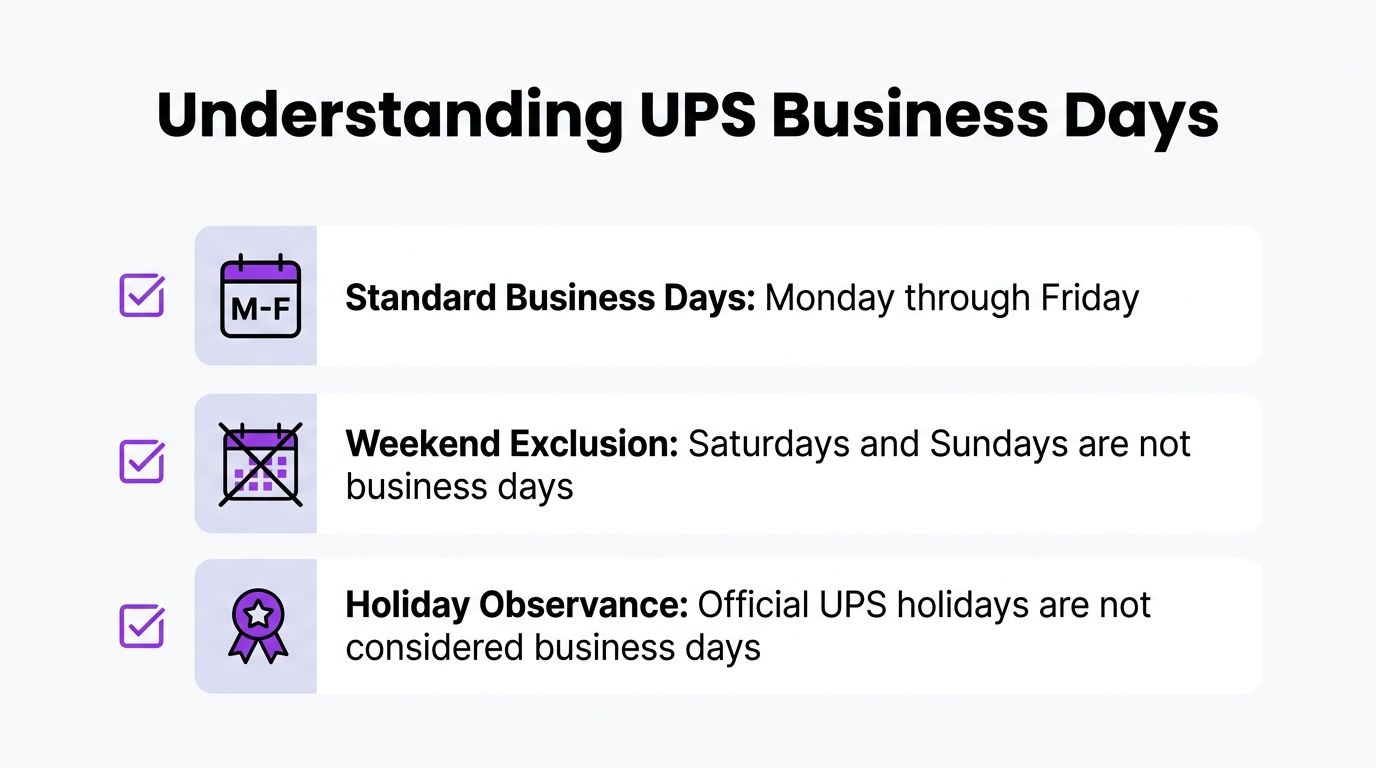
The easiest way to apply the rule is to treat the UPS transit calendar like a warehouse with the lights off on weekends and holidays. The package may exist. The label may be printed. Your WooCommerce order may show fulfilled. But the standard business-day clock is not counting those closed periods for normal domestic service commitments.
What UPS usually excludes from the count
For standard domestic UPS transit calculations, do not count:
- Saturday: Excluded unless the shipment includes a Saturday delivery option.
- Sunday: Excluded.
- UPS-observed holidays: Excluded from the transit count.
That sounds simple, but it causes expensive errors in firearms retail. If your team tells a buyer, "It shipped Friday, so two business days means Sunday," you have created a delivery promise UPS never made. If the item is headed to an FFL, that wrong promise also creates friction with transfer scheduling, adult-signature expectations, and customer pickup timing.
Holidays pause the clock
A holiday works like a paused timer. The service level stays the same, but the count skips that day.
Keep the guidance practical. Do not publish your own fixed holiday chart unless someone on your team is responsible for updating it every year inside your shipping rules. Check the current UPS holiday schedule in your carrier tools before you promise a date, especially during year-end volume spikes or around federal holidays that affect receiving FFL hours.
The Saturday exception
Saturday service changes the delivery result for that shipment. It does not change the default definition of a UPS business day.
That distinction matters for regulated goods. A Saturday-capable service only helps if the destination is set up to receive it, the receiving FFL is open, and your workflow accounts for the extra cost and handling rules. If your staff needs a closer look at weekend timing, use this guide on whether UPS Second Day Air delivers on Saturday.
Retailers in any high-expectation shipping environment run into the same problem. The issue is not only speed. It is promise accuracy. This short piece on avoiding next day delivery pitfalls makes that point from another angle.
For a firearms retailer, the rule to train on is straightforward. Count weekdays. Exclude UPS holidays. Add Saturday only when the shipment, the destination, and the compliance workflow all support it.
How Cutoff Times and Service Types Affect Delivery
A customer places an order for a compliant firearm on Friday at 5:12 PM. Your team buys a two-day service, prints the label, and assumes delivery will land Tuesday. If UPS accepts that package after the day's cutoff, the transit clock may not start until the next business day. In a firearms business, that is not a small timing error. It can create a missed customer promise, a wasted support cycle, or a transfer delay that puts pressure on your receiving FFL process.

The key question is simple. When did UPS take possession of the shipment for transit?
Cutoff time works like an airport gate closing time. A package accepted before the carrier's daily handoff window can move under that day's schedule. A package accepted after the window usually waits for the next business day to begin its trip. The label date does not control this. The acceptance moment does.
That distinction matters more for regulated goods than for ordinary retail. Firearms dealers often coordinate customer expectations, adult-signature workflows, receiving FFL availability, and internal compliance records around the expected arrival date. A one-day mistake can ripple through each step.
Cutoff time sets the transit start
Store teams often focus first on speed. Start with acceptance instead.
Ask these questions in order:
- Did UPS receive the package before the daily cutoff?
- What service level did you purchase?
- Is the destination able to receive the package on the projected delivery day?
That order keeps your staff from promising a date based on the checkout calendar instead of the carrier's operating clock. The same operational gap shows up in other ecommerce categories, which is why broad guidance on avoiding next day delivery pitfalls is useful here too.
For day-to-day operations, this affects more than the shipping desk:
- Late packed orders can miss the same-day handoff. If the box is ready after the carrier window closes, the business-day count usually starts later.
- Pickup schedules shape your promise accuracy. A 3 PM driver scan and a 6 PM warehouse close are two different clocks.
- Checkout messaging needs cutoff logic. Without it, your site can promise delivery dates your carrier never had a fair chance to meet.
- FFL coordination depends on realistic arrival estimates. If a receiving dealer is closed on the expected day, the shipment can sit longer than the customer expects.
Service type sets the delivery target
Once UPS accepts the package, the service level determines how many business days you count. The easiest way to train staff is to separate the process into two parts. Cutoff time starts the clock. Service type determines how long the clock runs.
Here is the practical pattern:
| UPS service | How to read the promise |
|---|---|
| UPS Ground | Delivery timing is based on a business-day transit window that varies by origin and destination. |
| UPS 3 Day Select | Count forward to the third business day after accepted transit begins. |
| UPS 2nd Day Air | Count forward to the second business day after accepted transit begins. |
| UPS 2nd Day Air A.M. | Use the same second-business-day count, with morning delivery in qualifying areas. |
A common misunderstanding for firearms retailers often arises. Staff may see "2nd Day Air" and treat it like "arrives in two calendar days." That shortcut causes trouble. Carrier service names are countdown rules tied to business days and acceptance timing. They are not blanket calendar promises.
Saturday adds another layer. Some shipments can arrive on Saturday, but only when the service, destination, and receiving workflow support it. If your team gets frequent weekend-delivery questions, review this focused guide on whether UPS 2nd Day Air delivers on Saturday. It helps staff explain why a premium air label does not always produce a weekend handoff.
A short visual explanation can help teams align on this before they start promising dates to customers.
<iframe width="100%" style="aspect-ratio: 16 / 9;" src="https://www.youtube.com/embed/Lv0KslenJws" frameborder="0" allow="autoplay; encrypted-media" allowfullscreen></iframe>Calculating Real-World UPS Delivery Dates
A firearms order comes in on Tuesday. Your team prints the label, the customer sees a tracking number, and everyone assumes the clock is running. But in UPS terms, the date that matters is the date the package is accepted into transit under the service rules. For regulated shipments, that difference can decide whether your promised handoff date is accurate or whether your staff just created a support problem.
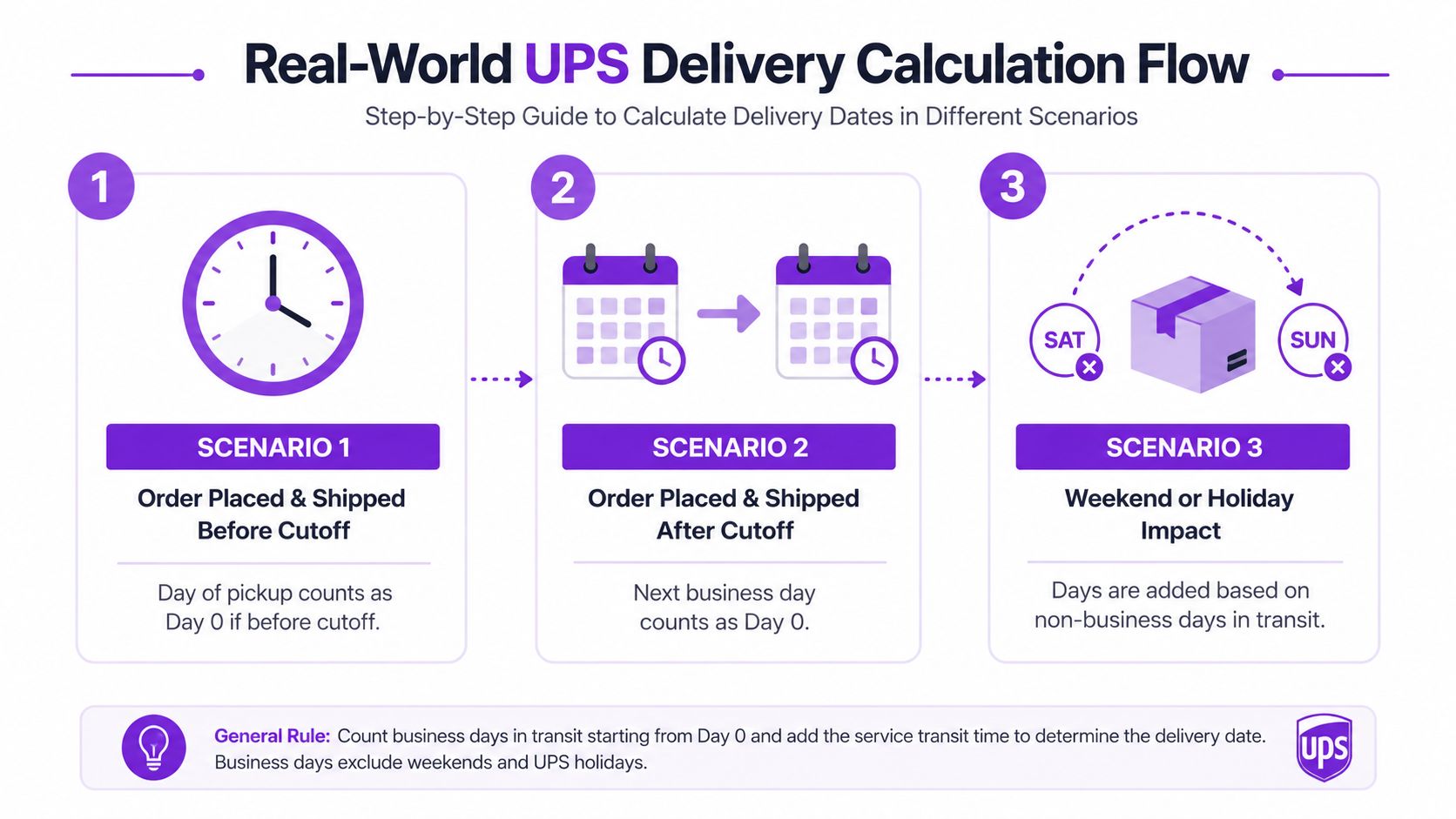
Example one with a midweek UPS 2nd Day Air shipment
A customer places an order on Tuesday morning. Your staff packs it, and UPS accepts it before the day's cutoff. You selected UPS 2nd Day Air.
Count it like this:
| Day | Count |
|---|---|
| Tuesday | Acceptance day |
| Wednesday | First business day after acceptance |
| Thursday | Second business day after acceptance |
Result: the shipment is due by the end of Thursday.
This is the easy training example because the calendar is clean. No weekend interruption. No holiday pause. No cutoff dispute. For store staff, it helps to treat acceptance day like the day a chess clock is started. The piece is on the board before that, but the timed play has not begun until the clock is running.
Example two with a late Friday UPS Ground shipment
Now use the version that causes more customer complaints. Your warehouse finishes packing on Friday, but UPS receives the package after the daily cutoff. In practice, that usually pushes the shipment's transit start to the next business day.
The count looks like this:
| Day | Count |
|---|---|
| Friday after cutoff | Too late to start that business day |
| Saturday | Not counted |
| Sunday | Not counted |
| Monday | Transit begins as the next business day |
That is why a customer can receive a tracking number on Friday and still see little or no meaningful movement until Monday. The label exists. The package may even be staged in your shipping area. The service clock still has not started the way the customer assumes it has.
For firearms retailers, that gap matters more than it does for a store selling T-shirts. A bad date estimate can push a transfer pickup into a day when the receiving FFL has limited hours, or trigger complaints that your team “shipped late” when the underlying issue was cutoff timing. If your SOPs blur label creation, shipment date, and delivery promise, keep a plain-language reference on what shipping date means. It helps staff explain the difference without sounding evasive.
The same calendar discipline shows up in freight operations too. Resources like Container Haulage from Felixstowe reflect the same operating reality. A planned date only matters if it matches the carrier's actual movement window.
Example three with a holiday week
Holiday weeks create the mistakes that cost the most because the calendar looks straightforward until you apply carrier rules. If UPS observes a holiday inside the transit window, that date is skipped just like a Sunday.
Use this method every time:
- Start with carrier acceptance, not the order date
- Confirm whether the package made the daily cutoff
- Count only valid business days for the service
- Skip weekends unless the service and destination support weekend movement
- Skip UPS-observed holidays
- Check the result against the receiving FFL's actual hours
That last step matters for compliance. A lawful shipment can still turn into an expensive operational mess if your store promises delivery on a day the receiving dealer cannot process it cleanly. Real-world date calculation is not just customer service math. For firearms retailers, it is part of running a defensible shipping process.
Why This Matters for WooCommerce Firearms Retailers
A customer places an order on Friday afternoon for a firearm that must ship to a receiving FFL. Your checkout shows a delivery estimate that seems reasonable. By Monday, support is answering angry emails because the customer counted Saturday and Sunday, the receiving dealer has limited hours, and your store promised a timeline UPS was never set up to meet.
For a WooCommerce firearms retailer, a business day is part of your compliance process. It shapes the date shown at checkout, the handoff plan for the package, the customer message after purchase, and the record you can point to if a buyer disputes the timeline. In regulated retail, a date estimate is more than a convenience feature. It is part of how you show that your operation follows carrier rules and handles transfers responsibly.
Where stores usually create risk
The first problem starts in the language customers see. If your storefront says “arrives in two days,” many buyers will count every square on the calendar. UPS does not. That gap creates preventable friction.
The second problem sits on the receiving end. Firearms shipments do not end with a porch drop-off. They move into a dealer workflow, with business hours, staffing, and transfer procedures. A package can be in the local area and still miss a clean handoff window if your estimate ignored the actual carrier schedule.
A simple way to view it is this: business-day logic works like the clock on your bound book process. If one step starts on the wrong date, every step after it shifts too.
Why the timing logic affects compliance and operations
For regulated goods, bad date math creates more than disappointed customers. It can lead staff to print labels too early, promise the wrong delivery window, choose the wrong service level, or schedule outbound work around an arrival date the receiving FFL cannot support. Each of those mistakes leaves a paper trail.
That matters if a customer challenges the shipment timeline or if your team needs to explain why a transfer did not happen when expected. Clear, repeatable business-day rules give your store a defensible process. Loose calendar assumptions do the opposite.
This is also why your shipping settings in WooCommerce need to mirror carrier reality. A checkout estimate should reflect UPS operating rules before the customer pays, with cutoff times, holidays, and service type built into the logic.
Practical controls for store owners
Use controls that reduce guesswork:
- Show checkout estimates in business days. Make the wording match how UPS counts transit.
- Separate order date from carrier acceptance date. A late Friday order and a Friday-accepted package are different events.
- Train staff on daily cutoff times. The package only starts moving on schedule if it enters the UPS system in time.
- Review the receiving FFL's hours before promising urgency. Delivery timing only works if the dealer can receive and process the package.
- Use service names carefully in customer messaging. Faster services still follow acceptance and business-day rules.
- Write down one standard calculation method. Customer support, fulfillment, and compliance staff should all use the same rule set.
Store owners who want a carrier-policy reference for staff should keep this guide on shipping firearms with UPS in their internal documentation. It helps the team align label creation, pickup planning, and customer communication with the rules that apply to regulated shipments.
Common Questions About UPS Business Days
A simple phrase like "business day" causes expensive mistakes because customers hear "two days" and picture calendar dates, while UPS counts operating days under specific rules. For a firearms retailer, that gap can create more than a support headache. It can produce a missed transfer appointment, a package arriving after the receiving FFL closes, or a delivery promise your team should never have made.
Does UPS Saturday delivery count as a business day
Standard UPS domestic transit counting treats business days as Monday through Friday, excluding UPS-recognized holidays. Saturday only enters the picture when the shipment uses a service or option that includes Saturday handling or delivery.
For store operations, treat Saturday like an optional lane, not part of the default road. If your checkout or customer service script assumes Saturday counts automatically, your estimate can drift by a full day.
Does a Friday shipment count as day one
Friday counts only if UPS accepts the package early enough to enter that day's network. A label printed on Friday is not the same as a package accepted on Friday.
That distinction matters for regulated orders. If your staff closes packing late, misses the carrier cutoff, and still tells the buyer the parcel "shipped Friday," the clock may not start until Monday. Around a holiday weekend, that mistake gets bigger fast.
Is UPS Ground based on business days or calendar days
UPS Ground is generally quoted in business days. Customers often read "1 to 5 days" as calendar time, but your store should present that estimate as business-day transit so the promise matches carrier practice.
A good rule for firearms sellers is to translate carrier language before the customer sees it. If the carrier speaks in business days, your checkout should too.
What about UPS 2nd Day Air A.M.
UPS 2nd Day Air A.M. still follows business-day counting. The difference is the delivery target within the day, not a switch to calendar-day math.
It works like an earlier appointment on the same timetable. You are buying a morning delivery window on the second business day for eligible locations, not skipping weekends, holidays, or late tender rules.
Are international UPS business days always the same
No. International service can follow different operating patterns depending on destination-country practices, customs processing, and local carrier schedules. In some markets, Saturday may be part of the practical delivery week. In others, customs delays matter more than the nominal transit schedule.
For U.S. firearms retailers, the safer approach is simple. Do not assume domestic counting rules carry over to every international lane. Confirm the service standard before you promise a date.
Why does this confuse customers so often
Customers buy on calendar dates. Carriers move on operating schedules. Receiving FFLs also have their own hours, intake routines, and closure days.
So a buyer may place an order on Thursday night and expect arrival "by Saturday" because the service name sounds fast. Your team knows the package may not be accepted until Friday, may move on business-day timing, and may still need to arrive when the destination dealer is open to receive it. That is why this question keeps surfacing, and why a loose answer can create compliance and service problems at the same time.
If your WooCommerce store sells regulated products, you need delivery logic that reflects real carrier rules before the order is completed, not after support tickets start piling up. Ship Restrict helps firearms retailers control shipping eligibility, reduce checkout mistakes, and enforce smarter shipping rules for regulated orders.
Automate Shipping Compliance
Stop worrying about restricted states. Ship Restrict handles it automatically.

Cody Yurk
Founder and Lead Developer of ShipRestrict, helping e-commerce businesses navigate complex shipping regulations for regulated products. Ecommerce store owner turned developer.
Automate Shipping Compliance
- Block restricted states
- No more cancellations
- Set and forget
3-day free trial · Card required