How to Set Up UPS Account for FFL Firearms in 2026
Learn how to set up UPS account for shipping firearms. Our 2026 guide helps FFL dealers with compliance, documentation, and more.
You're probably here because you tried to set up a UPS account the same way any normal ecommerce store would. You created a UPS.com login, added your business details, and assumed you were close to printing labels.
That assumption causes a lot of trouble for FFLs.
For firearms, a standard UPS business account isn't the finish line. It's barely the front door. UPS routes firearm shippers through a separate regulated goods approval process that requires license review, category selection, and a signed agreement. If you sell through WooCommerce, there's another layer to manage: making sure your store doesn't accept orders that shouldn't ship in the first place.
The hard part isn't clicking Sign Up. The hard part is structuring the account correctly, knowing when one account won't cover all firearm categories, and understanding what you're agreeing to when UPS asks for audit access and records. That's where most generic “set up UPS account” tutorials fall apart.
Automate Shipping Compliance
Block orders to restricted states automatically. 3-day free trial.
Start Free TrialWhy Your Standard Business Account Is Not Enough
A lot of new dealers treat UPS setup like a normal carrier onboarding task. They open a business login and expect to add firearms later. That's not how UPS handles this category.
To ship firearms through UPS, merchants must first create a UPS.com profile and then go through the regulated goods setup flow at UPS regulated goods onboarding. That process includes uploading valid licenses such as an FFL, choosing the regulated goods type, answering business-type questions, and signing a UPS agreement through DocuSign before approval.
What trips people up
The mistake usually starts with a false assumption: “I already have a UPS account, so I'm covered.”
You're not covered until UPS has approved your business for the specific regulated category you intend to ship. A general account can exist without the permissions needed for firearms shipments. That gap shows up when labels fail, applications get kicked back, or internal UPS review flags the account.
A standard business account gets you access to UPS. It doesn't automatically get you authorization to ship firearms.
What's actually at risk
This isn't just administrative friction. A bad setup creates operational and compliance exposure:
- Returned or blocked shipments: The account may not be approved for the product category you're trying to send.
- Account termination risk: If UPS sees activity outside the approved structure, the relationship can end quickly.
- Workflow confusion inside your team: Customer service, warehouse staff, and compliance staff start making assumptions from incomplete account notes.
- Legal exposure from bad fulfillment decisions: Carrier acceptance is not the same thing as lawful shipment.
The right mental model
Think of the standard UPS signup as identity creation. The firearm-shipping piece is a second gate with separate review criteria.
If you're trying to set up a UPS account for an FFL operation, start with the premise that carrier approval is category-specific and document-driven. That mindset prevents the two most common failures: using the wrong account type and sending regulated items before the account structure is fully approved.
Choosing the Right UPS Account Structure for Firearms
The least discussed part of this process is often the one that causes the most rework. Many FFLs assume they need one UPS account for the business and that's it.
Free Shipping Compliance Audit
We'll review your WooCommerce store's shipping compliance for free.
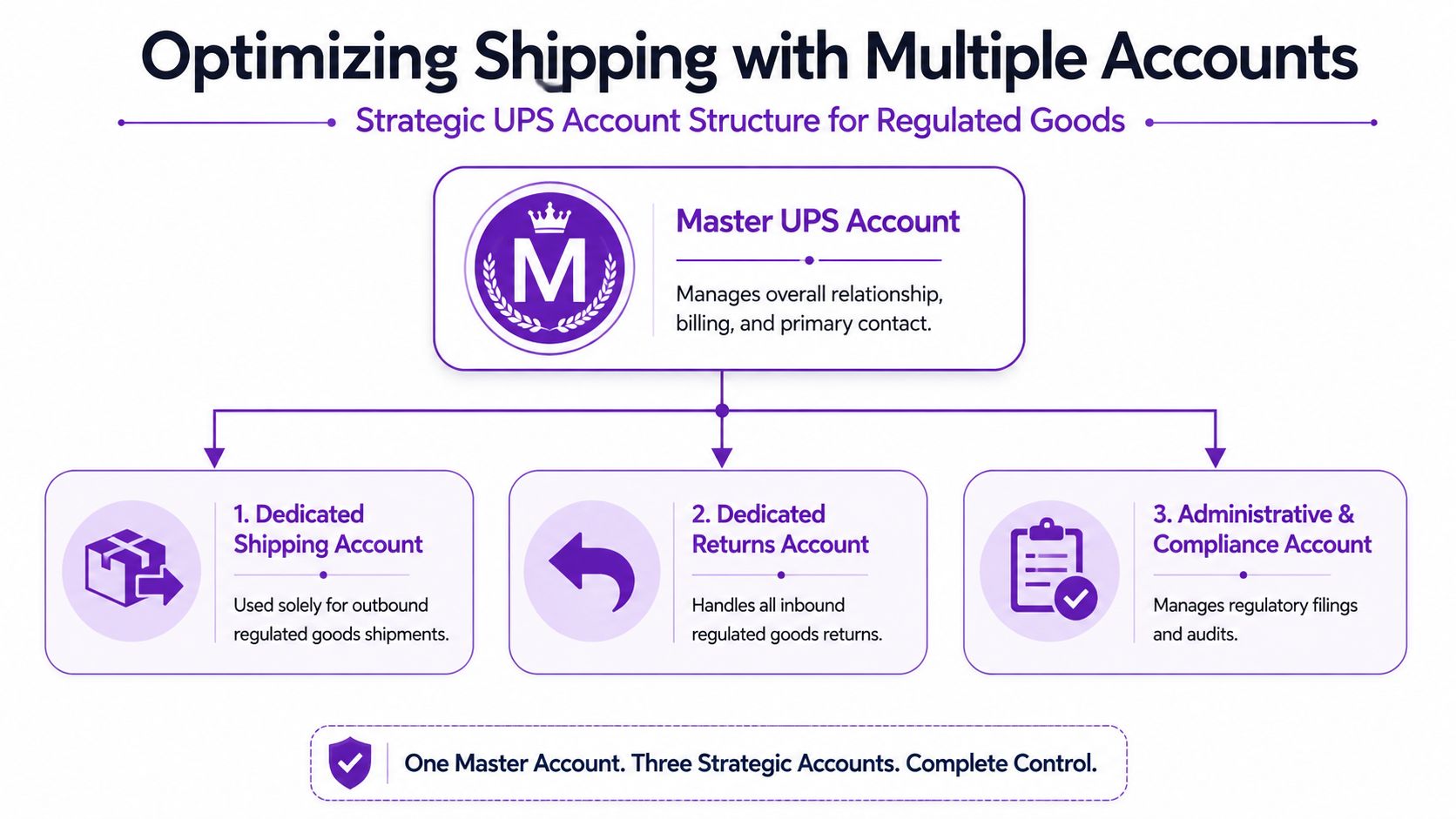
In practice, that single-account approach often breaks down. Community discussions among FFL holders repeatedly point to the need for multiple distinct UPS accounts for different firearm categories, such as one for receivers, another for parts, and a separate one for handguns, because trying to ship everything under one generic account can lead to confusion and rejected applications, as noted in this FFL discussion on UPS account setup.
Why one account often fails
UPS evaluates regulated shipments through a risk and classification lens. That means your business may be acceptable, but the product category still matters.
Serialized items, handgun shipments, and firearm parts don't always get treated the same way operationally. If your application language is vague, or if your shipping activity doesn't match the category tied to the account, UPS may treat that mismatch as a setup problem or a compliance problem.
Here's the practical issue: your catalog may look unified inside WooCommerce, but the carrier doesn't necessarily see it that way.
A structure that reduces friction
A cleaner structure usually separates activity by function and by regulated category. For many dealers, that means thinking in layers:
| Account layer | What it handles | Why it helps |
|---|---|---|
| Master business relationship | Main contact, billing oversight, account ownership | Keeps administration centralized |
| Dedicated shipping account | Specific outbound regulated category | Reduces category mismatch |
| Dedicated returns account | Return flows and inbound exceptions | Prevents return handling from contaminating outbound workflows |
| Compliance and admin access | Document management and agreement review | Limits who can change shipping settings |
That doesn't mean every dealer needs the exact same architecture. It means you should avoid the lazy default of one generic account for everything.
How to decide your account split
Use your product mix, not your legal entity name, as the starting point.
- Serialized firearm activity: If you ship controlled serialized items, keep that flow clearly separated.
- Handgun shipping: Treat this as its own decision path. Don't assume it belongs under the same approval as parts or long-gun related items.
- Parts and components: If UPS asks you to distinguish parts, do it precisely. Don't bury parts inside broad firearm language.
- Returns and exchanges: Returns create their own paper trail and staff behavior. Separate oversight helps.
A lot of account problems start because merchants try to simplify for themselves instead of simplifying for the carrier reviewer.
What works better than “one login, one account”
The better approach is to map your catalog to account purpose before you ever submit the onboarding form. If you need a planning reference for that internal split, this guide on dedicated account management for regulated shipping operations is a useful model for documenting ownership and separation.
Practical rule: If a product category would require a different explanation to a UPS reviewer, it probably deserves separate handling in your account structure.
The Regulated Goods Application and Verification Process
A lot of dealers get in trouble here because the UPS form looks like routine carrier onboarding. It is not. This is the point where UPS decides what your account is allowed to do, what records you may have to produce later, and whether your internal account split matches your shipping activity.
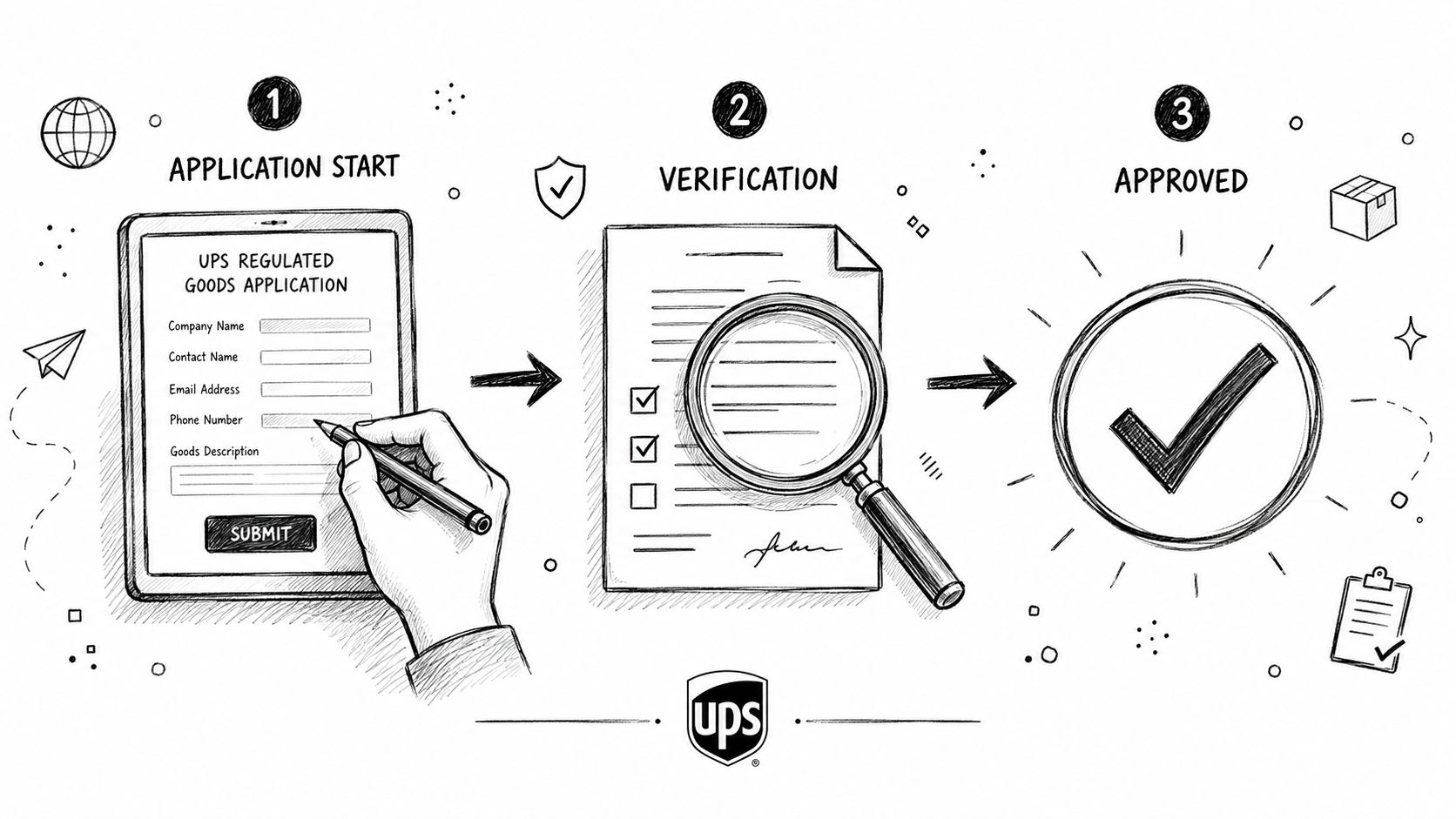
The regulated goods application requires merchants to go to UPS regulated goods application requirements, upload current licenses such as an FFL, answer category-specific business questions, and sign a UPS agreement through DocuSign before approval. For firearm shippers, the agreement terms matter as much as the application itself. Recent UPS firearm program terms include audit and records-access language that can force an FFL to produce transaction support quickly, including invoices and related records, if UPS asks.
Use the regulated goods workflow, not just the public business signup
The standard UPS business account flow does not finish firearm approval by itself. You still need the regulated goods review tied to the specific shipment category you want approved.
The sequence usually looks like this:
- Create or confirm the UPS.com user profile tied to the correct business entity.
- Enter the regulated goods workflow at ups.com/regulated-goods.
- Submit the application for the specific regulated category.
- Provide license and business verification documents.
- Review and sign the UPS agreement through DocuSign.
- Wait for final confirmation before releasing live shipments.
I tell teams to build their packet before anyone starts clicking through forms. A documented carrier setup packet for regulated shipping teams keeps licenses, ownership details, account purpose, and signer authority in one place. That cuts down on avoidable back-and-forth with UPS.
Prepare documents with the reviewer in mind
Reviewers are looking for consistency. If your FFL shows one name, your UPS profile shows another, and your shipping location appears under a third variation, you have created work for the person deciding whether to approve you.
Have these items cleaned up first:
- Current licensing files: Use clear, current copies of your FFL and any supporting business documentation UPS requests.
- Exact business identity: Match the legal entity, DBA, phone, email, and ship-from addresses to your internal records.
- Defined account purpose: State whether the application is for handguns, other firearms, parts, or another regulated category. Do not blur them together.
- Named operational contact: Use a real owner of the process, not a generic inbox nobody checks.
This is also where the multiple-account strategy becomes real. If you decided earlier that handguns and parts should not sit under the same account, your paperwork and application answers need to reflect that separation cleanly.
Answer narrowly enough to avoid the wrong approval
UPS reviewers do not benefit from a broad description of your entire catalog. They need a precise explanation of what that specific account will ship.
If the account is for parts, describe parts. If the account is for a firearm category with tighter controls, describe that category without dragging accessories, returns, and unrelated store inventory into the same answer. Broad language can produce an approval that is too vague to rely on, or a review cycle that gets kicked back for clarification.
A simple test helps. If a UPS reviewer would need a different explanation for handguns than for parts, those should not be mashed together in one application response.
Read the DocuSign agreement like an operations document
The signature step is where many FFLs stop paying attention. That is a mistake.
The 2024 to 2026 UPS firearm compliance terms raise real privacy and audit issues for dealers. If UPS reserves the right to inspect books, records, invoices, or customer transaction support on short notice, your internal promises about confidentiality, retention, and data access need to match what you just agreed to. Legal should review it. Operations should review it too, because operations is the team that will have to respond.
The hard part is not signing. The hard part is producing clean records inside the response window if UPS audits the account.
Build an audit-response process before you need one
I have seen small FFLs lose time here because the signer, the warehouse lead, and the bookkeeper all assume somebody else owns the response.
Set these controls before the account goes live:
| Question | Why it matters |
|---|---|
| Who responds to a UPS records request? | One owner prevents missed deadlines and conflicting replies |
| Where are invoices and order records stored? | A scattered record trail slows retrieval and increases risk |
| Can your team separate customer, order, and shipment data quickly? | Fast exports matter if UPS asks for support tied to specific shipments |
| Do order notes follow a standard format? | Inconsistent notes make reviews harder and create avoidable exposure |
The newer privacy terms hit hardest in this scenario. A dealer can have a valid FFL, a working UPS account, and still be operationally unprepared for the audit rights built into the agreement.
Wait for confirmed approval details before shipping
Do not assume submission equals activation. UPS may review the application, request clarification, issue the agreement, and then confirm what categories the account is approved to ship.
Read that confirmation carefully. Make sure the approved activity matches the account purpose you intended. If you expected handgun approval and the email only supports a narrower category, stop and resolve it before the warehouse prints labels. That is a much cheaper conversation before the first package moves than after UPS questions the account.
Configuring Billing and Securing Negotiated Rates
Approval is only half the job. After you set up a UPS account for firearm shipping, the next failure point is billing configuration.
A lot of merchants assume invoices will sort themselves out if the account is live. That's a mistake. Billing errors are one of the fastest ways to create internal chaos because they affect fulfillment, accounting, and customer service at the same time.
Set billing controls before the first live shipment
Treat billing setup as part of compliance operations, not just finance admin.
At minimum, your team should lock down:
- Primary payment method: Make sure the account has a valid payment source tied to the correct business entity.
- Backup payment method: If the primary method fails, you don't want shipments held up while someone hunts for a card.
- Invoice routing: Send invoices to accounting and one operational owner who can spot unusual charges.
- Reference discipline: Use consistent internal references so invoices can be matched to order activity.
If you separate shipping accounts by category, make sure your billing review reflects that split. Otherwise, you'll lose the clarity you just created.
Read early invoices closely
Your first invoices are diagnostic tools. They tell you whether the account is being used the way you intended.
Look for mismatches between shipment type, internal department expectations, and invoice routing. If one category is appearing on the wrong account, that usually points to a training issue, a WooCommerce mapping problem, or loose warehouse habits.
The first billing cycle tells you whether your account structure is operational or just theoretical.
Negotiated rates matter, even for smaller dealers
Many smaller FFL retailers assume negotiated rates are only for large-volume shippers. That assumption leaves money on the table.
UPS reps usually respond better when the request is organized. Don't start the conversation with “Can you discount us?” Start with a clear operating profile.
Bring practical information such as:
- Common shipment profile: Typical package weights, dimensions, and service levels.
- Destination pattern: Where most orders go and which shipments create the most cost pressure.
- Category explanation: Explain that the business handles regulated goods and requires stable, predictable account handling.
- Growth plan: Share what you expect to ship, but keep it realistic.
What gets better results
A rate conversation tends to go better when you frame it around consistency and fit.
You're not just asking for lower pricing. You're asking UPS to support a controlled, compliant shipping operation with clearly defined account use. That makes the conversation more credible than a generic discount request.
Also, assign one person to manage the carrier relationship. When pricing, billing, and compliance questions all go through different staff members, the account gets harder to manage and harder to advocate for.
Integrating UPS with Your WooCommerce Store
Once UPS approval and billing are in place, the next challenge is connecting the carrier to WooCommerce without creating a compliance blind spot.
A basic UPS integration plugin and a firearms compliance workflow do two different jobs. The carrier plugin handles shipping functions. Your store still needs a way to stop unlawful or prohibited orders before they become labels.
What a normal UPS plugin does well
A standard UPS plugin for WooCommerce usually helps with:
| Function | What it solves | What it does not solve |
|---|---|---|
| Rate lookup | Shows shipping options and pricing | Doesn't decide whether the item may ship legally |
| Label generation | Produces shipment labels | Doesn't validate regulated destination rules |
| Tracking sync | Pushes tracking updates into the order flow | Doesn't stop restricted checkouts |
| Service selection | Lets you choose supported UPS services | Doesn't enforce category-specific compliance policy |
That distinction matters. If you only install the carrier plugin, you've connected your store to UPS, but you haven't protected the checkout against bad destination acceptance.
What manual WooCommerce restrictions look like
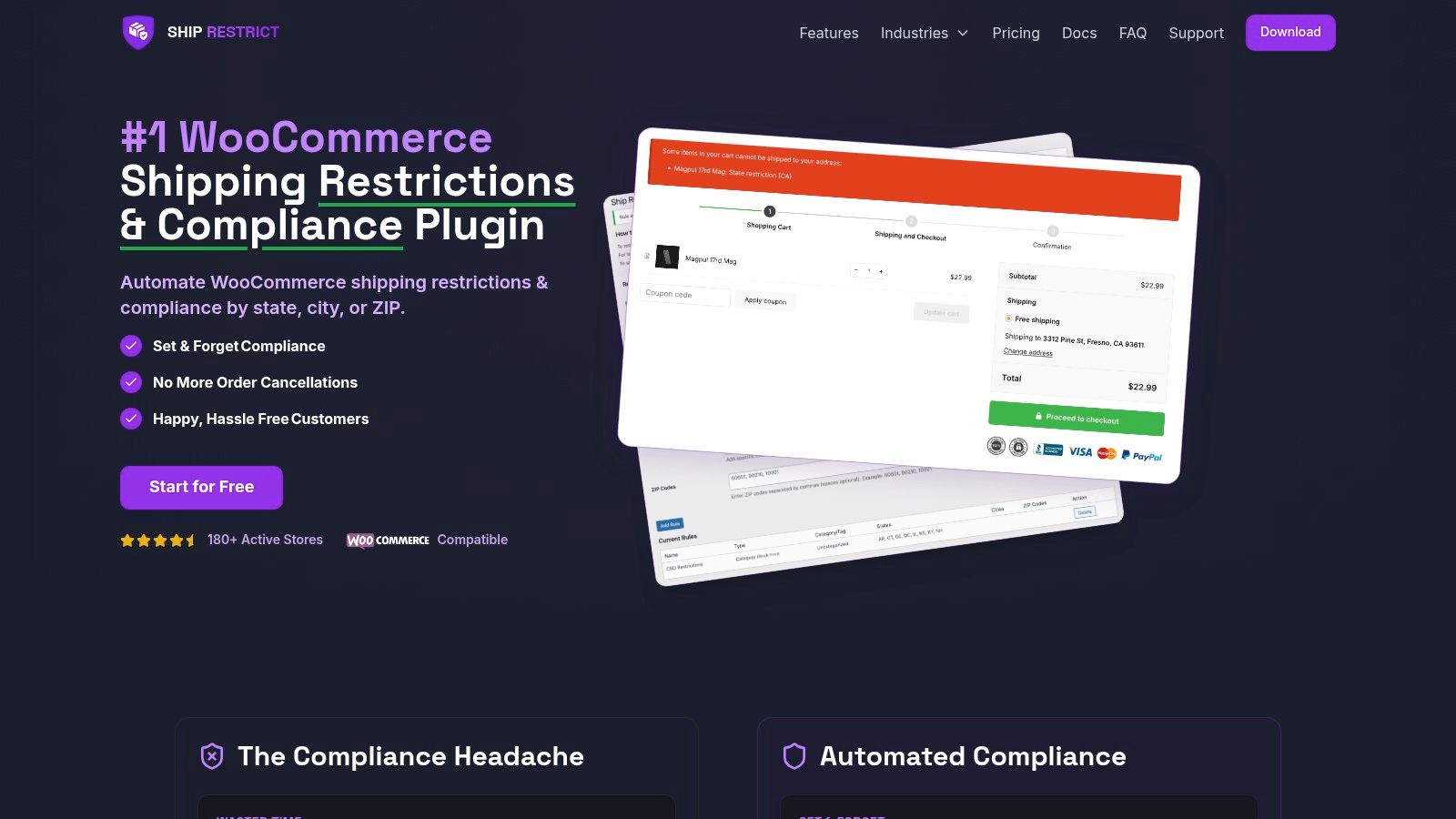
Without a specialized compliance tool, WooCommerce merchants must manually create shipping zones for restricted states, such as a zone named “Restricted” with prohibited states added to block products like ammunition, according to this Ship Restrict profile and WooCommerce restriction overview.
That method works only in the narrow sense that it exists. It doesn't work well operationally.
Manual shipping zones become fragile when:
- Restrictions vary below the state level: County, city, and ZIP-based rules are harder to manage manually.
- Your catalog changes often: Staff forget which products need which zone logic.
- Rules evolve: Someone has to remember to update WooCommerce settings before the next bad order arrives.
- More than one person edits shipping settings: Small mistakes create exposure fast.
The better way to think about the stack
Your UPS plugin is the carrier connection. Your restriction logic is the compliance gate. Don't confuse the two.
This is also where many store builds go wrong. Developers install the shipping plugin, test a label, and call the project done. From a firearms compliance standpoint, it isn't done unless checkout blocks restricted orders before payment and fulfillment.
For merchants mapping the carrier side of that workflow, this reference on UPS hazmat certification and WooCommerce integration planning is useful because it forces the team to separate carrier capability from store rule enforcement.
Where automation changes the risk profile
When the store checks address restrictions automatically before checkout completion, staff stop relying on memory and exception handling. That's a significant operational improvement.
Here's a walkthrough worth watching if your team needs to see what that looks like in practice:
<iframe width="100%" style="aspect-ratio: 16 / 9;" src="https://www.youtube.com/embed/EnbEjHGw96s" frameborder="0" allow="autoplay; encrypted-media" allowfullscreen></iframe>The key point is simple. Printing a valid UPS label doesn't prove the order should have been accepted in the first place. Your WooCommerce setup has to answer that question earlier in the process.
Best Practices to Avoid Costly Shipping Compliance Errors
A bad shipment day usually starts with something small. A warehouse employee prints a handgun label on the parts account. A return gets processed through the wrong workflow. UPS asks for supporting records, and the team discovers billing, order notes, and license documents are scattered across three systems.
For firearm shippers, expensive mistakes usually come from account design and record discipline. That matters even more now because UPS approval, data handling, and audit expectations from 2024 through 2026 put more weight on what your team can document after the label is printed.
Daily practices that prevent bigger problems
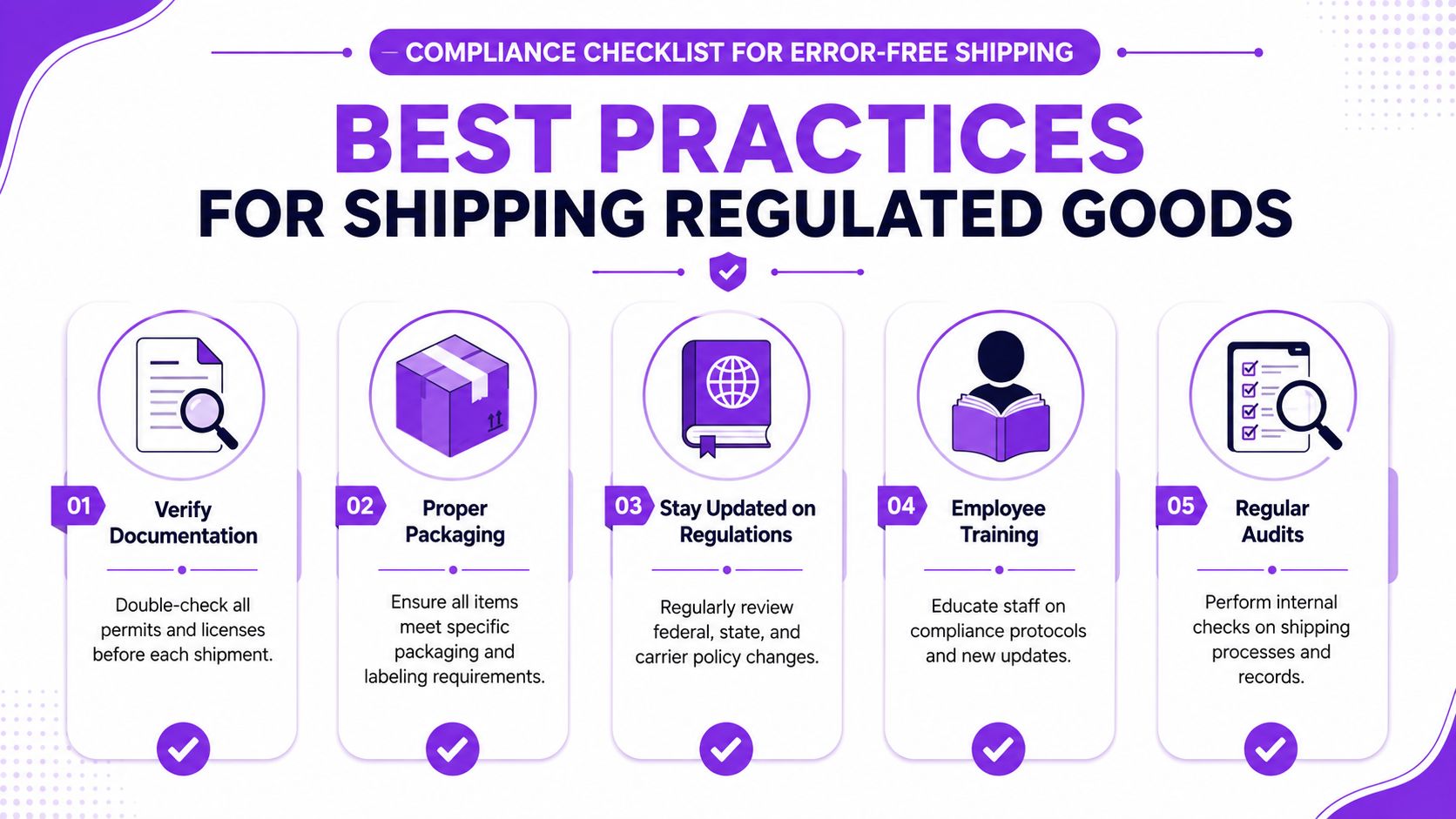
- Separate accounts by firearm category: Handguns, firearm parts, and other regulated product classes should not share one catch-all UPS account. If UPS approved a specific account for a specific category, keep usage inside that approval.
- Check category before label creation: Train staff to confirm the item class first, then select the shipping account. Reversing that order is how misclassified shipments happen.
- Review supporting records before pickup: The FFL copy, order file, recipient details, and shipment record should agree before the package leaves your facility.
- Standardize packaging and label placement: Written SOPs reduce avoidable variation. They also make retraining much easier when turnover hits the shipping bench.
- Reconcile shipments every day: End-of-day review catches voided labels, duplicate labels, and account misuse while the trail is still easy to follow.
- Prepare for a records request before one arrives: Keep invoices, approvals, exceptions, and shipment notes in one retrieval process, not in personal inboxes or chat threads.
Make record retrieval boring
Recordkeeping should feel routine. If your team has to hunt for who approved an account, why a package went out under a certain billing number, or which employee cleared an exception, the process is already weak.
UPS audits are much easier to manage when each shipment record tells a complete story. That includes the right account, the right product category, the right billing setup, and notes that another employee can understand without asking for background. Teams that study Arch's transportation logistics insights usually reach the same conclusion. Shipping performance comes from process control, not carrier access alone.
Good compliance programs remove guesswork from ordinary tasks.
Train for exceptions, not just normal orders
Routine orders rarely expose the weak spots. Returns, mixed carts, replacement shipments, and restricted destinations do.
| Risk area | Better habit |
|---|---|
| Category confusion | Match the product type to the approved UPS account before label creation |
| Mixed product orders | Split fulfillment when needed so one shipment does not force the wrong account choice |
| Return handling | Route returns through a documented review path, not ad hoc email threads |
| Restricted destinations | Use automation so store staff are not making legal judgment calls during checkout or fulfillment |
| Audit response | Assign one records owner and one backup before UPS requests anything |
The safety net is layered
Manual review still matters. Someone on your team needs to understand the UPS agreement, the approved account structure, and the privacy and audit terms your business accepted. But manual review by itself breaks down during staffing changes, heavy order volume, and rush fulfillment.
The safer setup combines three controls. Separate UPS accounts for separate regulated categories. Clean, retrievable records tied to each shipment. Automated destination and product-rule enforcement inside WooCommerce. That combination reduces the common failures that create the biggest compliance problems.
If your WooCommerce store sells firearms or other regulated products, Ship Restrict helps prevent restricted orders before checkout by automating shipping rules at the state, county, city, and ZIP level. It's a practical way to reduce manual address checks, tighten compliance, and give your team a safer fulfillment workflow.
Automate Shipping Compliance
Stop worrying about restricted states. Ship Restrict handles it automatically.

Cody Yurk
Founder and Lead Developer of ShipRestrict, helping e-commerce businesses navigate complex shipping regulations for regulated products. Ecommerce store owner turned developer.
Automate Shipping Compliance
- Block restricted states
- No more cancellations
- Set and forget
3-day free trial · Card required