Carrier Setup Packet: A Guide for Firearms Retailers
Master your carrier setup packet for firearms shipping. This guide covers required documents for UPS/FedEx, compliance steps, and how to avoid costly errors.
You've got the FFL. The store is live or close to it. Orders are starting to look real. Then shipping becomes the bottleneck.
Most new firearms dealers assume carrier setup works like any other parcel account. You open a business account, print labels, and move on. That assumption causes delays fast. Firearms shipping sits in a different lane. Carriers want more documentation, more review, and clearer operating controls than a standard eCommerce merchant expects.
That's where the carrier setup packet idea becomes useful. Even if UPS or FedEx doesn't call it that in the parcel world, you still need a complete, organized file that proves who you are, what you're licensed to do, and how your business will handle regulated shipments. If you treat setup like a casual signup form, you'll lose time. If you treat it like a compliance file, you'll move much more cleanly.
What Is a Carrier Setup Packet for eCommerce
In freight, a carrier setup packet isn't one simple form. It's a bundled onboarding file. A standard packet typically includes a broker-carrier agreement, W-9, liability insurance, operating authority, safety-rating documentation, and carrier profile details, with some packets also including licensing, invoicing procedures, and quick-pay terms, as outlined in Truckstop's broker-carrier packet guide.
Automate Shipping Compliance
Block orders to restricted states automatically. 3-day free trial.
Start Free TrialFor a firearms retailer, the parcel version works the same way in practice. You're building a single source of truth for carrier approval. It's the set of documents, contact details, policy acknowledgments, and internal controls that support account approval and keep the account defensible if a carrier reviews it later.
What the packet really means for an FFL
For eCommerce, the term matters less than the function. Your carrier setup packet is the file you can hand to legal, compliance, operations, or a carrier rep without scrambling through inboxes and shared drives.
That file should answer a carrier's basic questions:
-
Who are you legally
Your business identity, tax records, licenses, and responsible contacts need to line up. -
Are you authorized to ship what you sell
For firearms and related regulated items, the carrier wants evidence that your business is properly licensed and operating within policy. -
Can your team ship correctly every time
Carriers care about mislabels, unauthorized contents, bad handoffs, and avoidable claims.
Practical rule: If your documents are scattered across email threads, you don't have a carrier setup packet yet. You have a future delay.
Why this matters before your first label
New dealers usually focus on rates first. Compliance comes first. A clean setup file reduces the back-and-forth that slows approval and exposes weak spots in your shipping process.
It also forces you to standardize how your team handles regulated fulfillment. That's the same discipline behind any strong shipping operation. If you want a broader operational perspective beyond firearms-specific issues, this guide to ecommerce shipping efficiency is worth reviewing alongside your compliance prep.
Free Shipping Compliance Audit
We'll review your WooCommerce store's shipping compliance for free.
For firearms retailers, the best packet isn't the thickest one. It's the one that is complete, current, internally consistent, and ready to support a carrier review without last-minute fixes.
Your Essential Firearms Shipper Document Checklist
Most setup problems come from one issue. The dealer sends some documents, but not the right set in the right form.
In freight, onboarding packets can run 10 to 20 pages and often collect detailed operational information before approval, as shown in this carrier setup walkthrough on YouTube. Parcel firearms accounts aren't identical, but the lesson carries over. Carriers don't just want proof that your business exists. They want enough information to verify that your shipping operation is real, reachable, and controllable.
Keep one approval-ready file
Build a dedicated folder for carrier onboarding and keep a current PDF set ready to send. Don't make the rep ask for each item one by one.
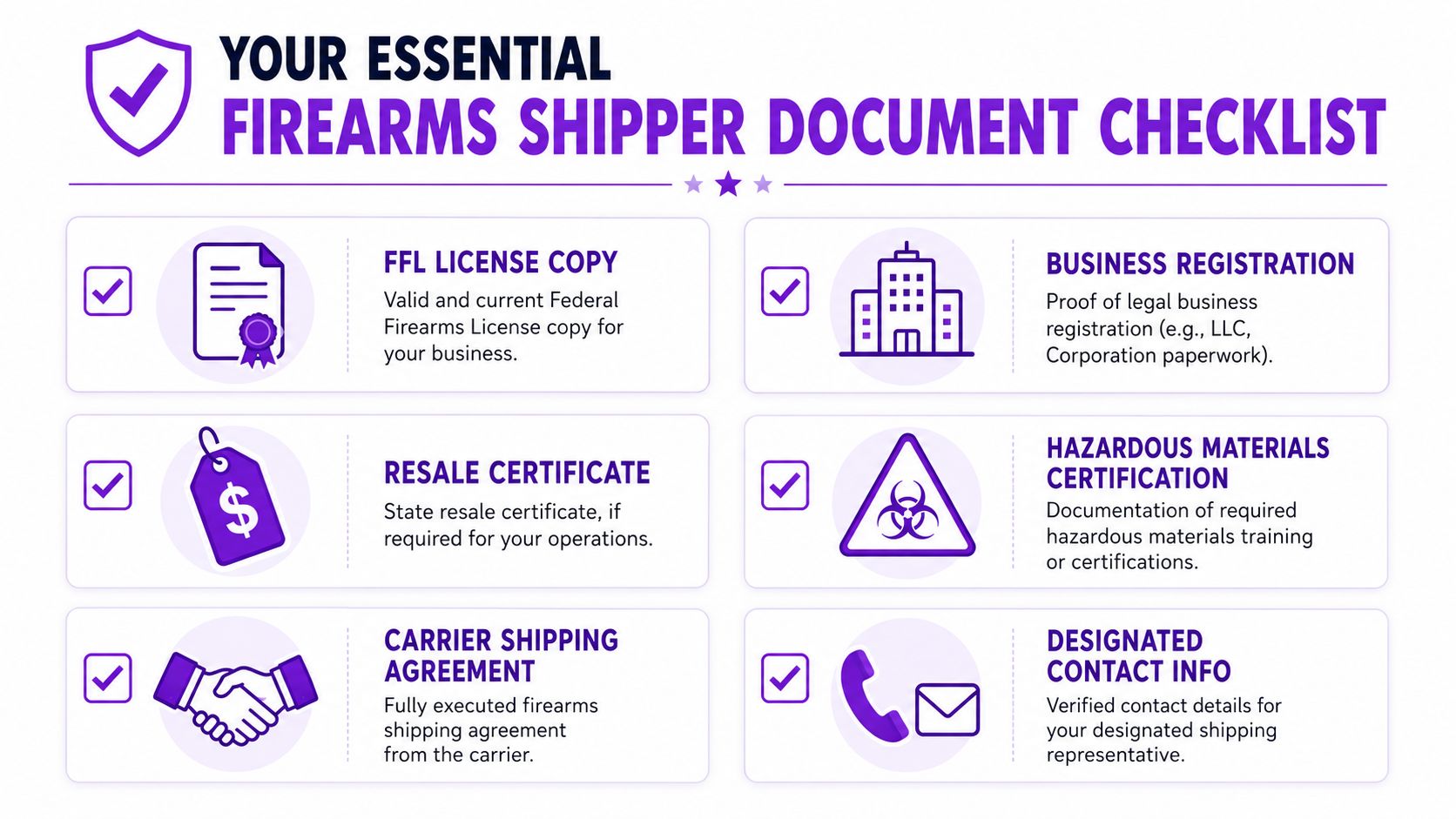
| Document | Purpose |
|---|---|
| FFL license copy | Confirms your federal authority to conduct licensed firearms business |
| Business registration documents | Shows the legal entity matches the name applying for the account |
| W-9 | Gives the carrier your tax reporting information |
| Government-issued photo ID for responsible person | Helps verify the identity of the person tied to the business and account |
| State or local business licenses | Supports local operating legitimacy where required |
| Resale certificate, if applicable | Helps document tax treatment for relevant transactions |
| Carrier shipping agreement | Establishes the service terms and firearms-specific account rules |
| Designated shipping contact information | Gives the carrier a clear person for compliance, operations, and billing questions |
| Hazardous materials training or certification records, if applicable | Supports shipping processes where regulated materials or related training obligations apply |
| Insurance documentation | Helps demonstrate business readiness and risk handling |
| Payment and remittance details | Lets the carrier set up billing correctly and reduces avoidable account holds |
What carriers usually look at closely
Some documents get reviewed more carefully than others.
-
FFL consistency
The business name and address on your FFL should match the account application where possible. If they don't, be ready to explain why. -
Tax identity
Your W-9 should align with the legal entity entering the agreement. Small mismatches here create outsized delays. -
Operational contact details
Carriers want to know who handles shipping questions, billing, and escalations. Generic inboxes alone usually aren't enough. -
Supporting business records
If your operating name differs from your legal entity, include the paperwork that connects them.
A missing document slows the process. A conflicting document can stop it.
What works and what doesn't
What works is boring. One current PDF packet, clearly named files, one primary contact, one backup contact, and a short internal note explaining any non-obvious detail such as a DBA, warehouse address, or ownership change.
What doesn't work is sending a partial file and hoping the rep will tell you what's missing. That turns your approval into a drip campaign of corrections.
Before you send anything, check three things manually:
- Names match
- Addresses match
- Dates are current
That simple review catches a surprising number of preventable problems.
Navigating UPS and FedEx Firearms Shipping Programs
Many dealers lose weeks assuming a normal business parcel account is enough for firearms shipments. It usually isn't. Firearms shipping requires carrier-specific approval and agreement terms that go beyond routine account setup.

UPS approval is not just account creation
With UPS, the common mistake is opening a standard shipper account and assuming that's enough authority for regulated shipments. It isn't safe to treat it that way. Firearms dealers need to work through the carrier's approval process and get the right agreement in place before tendering eligible shipments.
If you want a carrier-specific overview of the policy side, review this UPS firearms shipping guide before you send your first package.
What usually works with UPS is direct, documented communication:
-
Ask for the correct program path
Don't rely on a general signup workflow if your business ships regulated products. -
Request written confirmation of requirements
Phone calls are useful, but approval standards belong in email or the agreement itself. -
Review tendering and drop-off rules carefully
Some dealers focus only on label creation and miss handoff requirements.
FedEx also uses a separate approval mindset
FedEx presents a similar issue from a different angle. Dealers often think in terms of service level and rates first. FedEx will care first about whether your business fits its program requirements and whether the account is set up for the shipment types you intend to tender.
Look for clarity on these points before shipping:
- Which legal entity is the contracting shipper
- Whether the account is approved for firearms-related shipments
- Which locations or pickup methods are acceptable
- What notice, labeling, or adult-signature requirements apply
- How claims, refusals, and exception handling are managed
If a rep gives verbal guidance that conflicts with written policy, pause the process and get the answer in writing.
Questions to ask before signing
Don't skim the service agreement. For a firearms retailer, the risky terms are usually buried in operational language, not flashy pricing language.
Ask about:
-
Approved shipment categories
Make sure the agreement covers what your business will ship. -
Pickup and acceptance rules
Approval can fail in practice if your local handoff process doesn't match the account permissions. -
Account termination triggers
You need to know what kinds of violations can suspend the account. -
Claims and indemnification language
Terms around restricted shipments deserve careful review.
A useful explainer on the broader account-approval context sits below.
<iframe width="100%" style="aspect-ratio: 16 / 9;" src="https://www.youtube.com/embed/q_1SFqhOMXE" frameborder="0" allow="autoplay; encrypted-media" allowfullscreen></iframe>What experienced dealers do differently
They don't ask, “Can I create labels?” They ask, “Has the carrier approved my business, my shipment type, and my handoff method in writing?”
That framing changes everything. It keeps your account setup grounded in compliance instead of assumptions.
How to Protect Your FFL from Carrier Packet Fraud
The dangerous part of a carrier setup packet isn't just delay. It's exposure.
In onboarding, businesses often share tax IDs, license details, insurance records, contact names, and sometimes banking information. In freight, newer guidance warns carriers to verify the broker through FMCSA before sending sensitive packet information because onboarding files can expose tax IDs, DOT numbers, and banking details that bad actors can misuse, as discussed in TruckSmarter's carrier packet fraud warning. Firearms dealers face the same pattern even though the carrier context is different.
Why speed creates risk
Scammers know setup is stressful. A new dealer wants approval fast, so an email that looks like a carrier follow-up can get an immediate response. That's exactly when bad decisions happen.
The highest-risk moments are usually:
-
Unsolicited document requests
Especially when the sender asks for your full packet again. -
Payment detail changes
Any request to update banking or remittance instructions needs independent verification. -
Spoofed onboarding links
If the portal link came from an unexpected email, don't trust it on first glance.
The verification routine worth using every time
Use a hard rule. Never send a full packet because of an inbound email alone. Verify the request through an official carrier channel you found independently.
A practical internal process looks like this:
-
Stop and compare
Check whether the request matches an existing open application or rep you already know. -
Call back through official contact paths
Don't use the phone number in the suspicious email unless you've already confirmed it elsewhere. -
Send only what is necessary
If the carrier only needs one missing record, don't resend the full file. -
Redact where possible
Share the minimum information required for the stage of review.
Security beats speed. A delayed approval is recoverable. A compromised license file is harder to unwind.
Contract review matters here too
Fraud risk isn't limited to fake onboarding. It also shows up in sloppy contract review. If your team signs first and reads later, you can accept obligations that create problems when shipments go wrong. This is one reason to review indemnification clauses in carrier agreements carefully before the account goes live.
Treat your packet like controlled business information. Store it securely, limit who can send it, and keep a record of when each document was shared and with whom. Dealers who do that tend to catch suspicious requests earlier.
Troubleshooting Common Carrier Account Setup Issues
Even a clean file can stall inside a large carrier organization. The trick is knowing whether you have a documentation problem, a policy problem, or a communication problem.
When the application is delayed
Long silence usually means the file is sitting in review, missing an internal handoff, or waiting on a clarification nobody asked for clearly. Start by replying to the last documented contact with a short checklist of what you submitted and the date sent.
Then ask narrow questions, not open-ended ones:
- Has the application been assigned for review
- Is any document missing or unreadable
- Is there a policy issue preventing approval
- What team owns the next step
That approach gets better answers than “just checking in.”
When the account is denied
A denial doesn't always mean you're ineligible. Sometimes it means the file was incomplete, the wrong entity applied, or the requested shipping activity wasn't described clearly enough.
Use a written appeal or reconsideration note that includes:
- A concise explanation of what was misunderstood
- Corrected documents if any item was outdated or mismatched
- A plain summary of your licensed business model and intended shipment types
Short, precise responses move faster than defensive ones.
When reps give conflicting instructions
This happens often. One rep talks sales. Another talks operations. A third mentions compliance. If the answers don't match, stop chasing verbal advice and ask for the governing written requirement.
Keep your own internal record of:
- Who said what
- On what date
- In which channel
- What document or policy they referenced
If your team needs a practical process for sorting out shipping problems after setup, keep this shipping troubleshooting documentation bookmarked. It's easier to handle carrier friction when your internal escalation path is already defined.
The dealers who solve setup issues fastest usually do one thing better than everyone else. They document every step instead of trying to remember it later.
Integrating Your New Carrier Account with WooCommerce
Approval is only half the job. The next problem is preventing your own store from creating shipments that violate the account you just worked to secure.
That's where many firearms retailers get exposed. The carrier account is compliant on paper, but the WooCommerce checkout still allows orders that should be blocked, rerouted, or manually reviewed. A good setup process should lock in operating rules before the first transaction. In freight onboarding, effective setup is treated as a control document that verifies authority, collects insurance and tax records, and fixes operational rules before business starts, with software enforcing those rules at scale, as described in this onboarding control workflow on YouTube.
Turn account rules into checkout rules
Your store should reflect the same logic your carrier approval depends on.
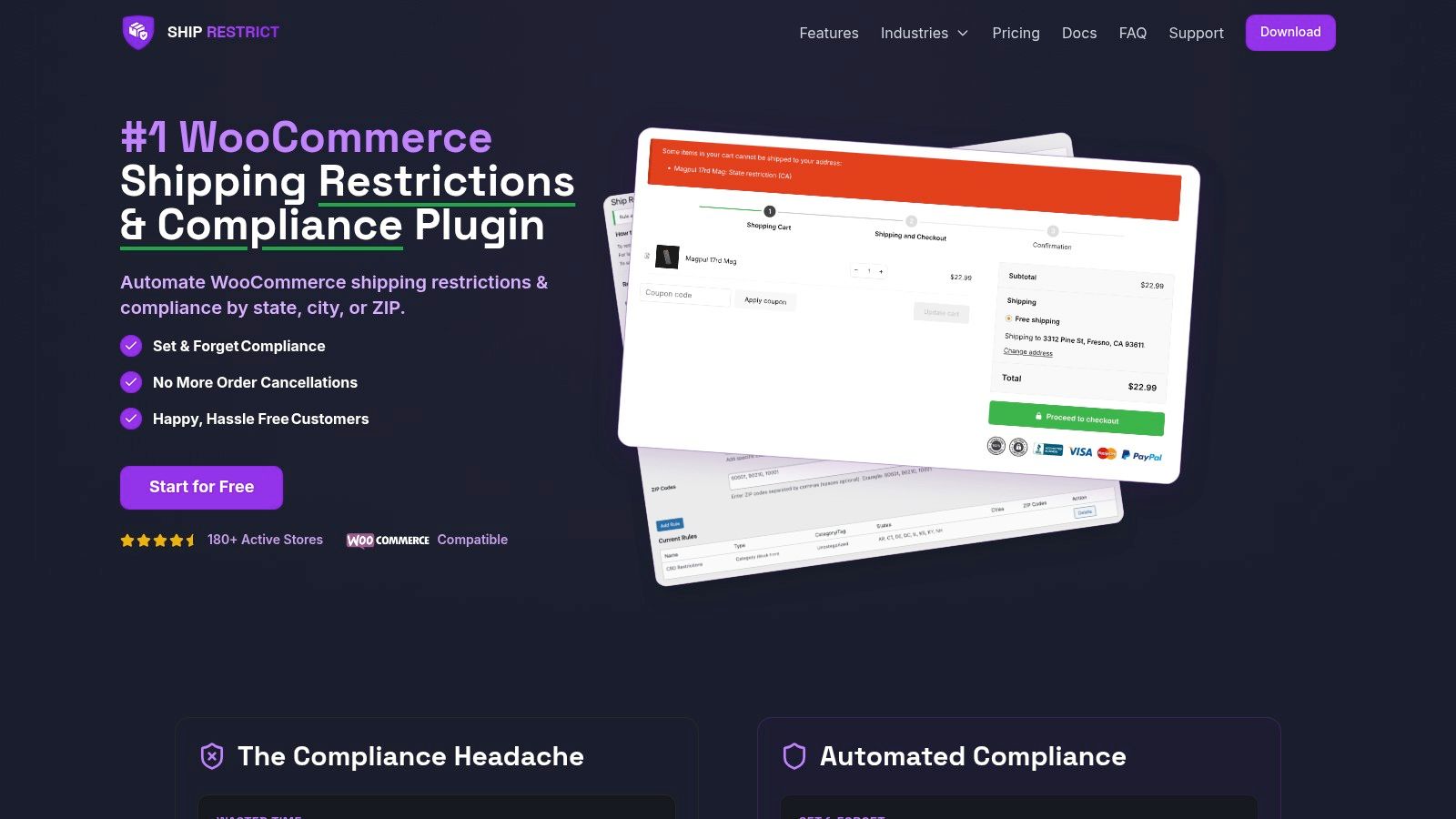
That usually means mapping restrictions by destination and product type, then deciding what happens at checkout. Some orders should be blocked outright. Others should display a message, require an alternate shipping method, or route to manual review.
Why manual review eventually breaks down
At low volume, a staff member can inspect addresses and product combinations manually. That works until it doesn't. Team members get busy, rules change, and edge cases slip through.
For WooCommerce stores, it helps to think in terms of system design. This broader look at eCommerce integration for shipping platforms is useful if you're evaluating how shipping logic should connect with your storefront, order flow, and carrier tools.
The practical standard is simple:
- Storefront rules should match carrier permissions
- Restricted destinations should be screened before payment
- Customer messaging should explain the restriction clearly
- Admins should be able to update rules without rebuilding checkout
What a compliant workflow looks like
A disciplined workflow starts before label creation. The store validates the order. The order management process confirms any exceptions. Only then should the shipment move into carrier systems.
That's the operational difference between “having a carrier account” and “using a carrier account safely.” The first gets you approved. The second keeps you approved.
If you're running WooCommerce and need a practical way to enforce firearms shipping rules before checkout, Ship Restrict helps block restricted orders by state, county, city, or ZIP code so your new carrier account doesn't get undermined by preventable mistakes in the cart.
Automate Shipping Compliance
Stop worrying about restricted states. Ship Restrict handles it automatically.

Cody Yurk
Founder and Lead Developer of ShipRestrict, helping e-commerce businesses navigate complex shipping regulations for regulated products. Ecommerce store owner turned developer.
Automate Shipping Compliance
- Block restricted states
- No more cancellations
- Set and forget
3-day free trial · Card required