How to Automate Compliance: Firearms Retail Guide 2026
Prevent shipping errors. Our 2026 guide on how to automate compliance helps firearms retailers use WooCommerce to block restricted orders by state, county, &
If you sell firearms or related products online, you already know the routine. An order comes in, someone on your team checks the shipping address, opens a spreadsheet, compares state rules, then tries to remember whether that city has its own restriction layered on top. The work is slow, repetitive, and dangerous in the worst way. One missed county rule can turn a normal order into a cancelled shipment, a support problem, or a legal problem.
That's why learning how to automate compliance matters so much for firearms retail. General ecommerce advice treats compliance like one policy file and one set of universal rules. Firearms don't work that way. Your risk sits in the details. State, county, city, and sometimes ZIP-specific restrictions all matter, and they need to be enforced before payment and fulfillment move forward.
The Daily Grind of Manual Shipping Compliance
A typical firearms dealer doesn't lose sleep over packing boxes. They lose sleep over the order that almost slipped through.
The pattern is familiar. A customer places an order late in the day. The shipping clerk checks the product, checks the destination state, then checks local rules because the state rule alone doesn't answer the question. Another order comes in from a nearby ZIP code with different restrictions. A marketplace order uses a slightly different address format, so the match isn't obvious. Someone puts the order on hold “just to be safe,” and now the customer wants an answer.
Automate Shipping Compliance
Block orders to restricted states automatically. 3-day free trial.
Start Free TrialManual screening breaks down because the work depends on memory, consistency, and constant updates. None of those hold up under volume. Teams get tired. Spreadsheets get outdated. Different staff members interpret the same rule differently. That creates the exact kind of operational risk regulated stores can't afford.
The true cost of manual order screening vs automated restrictions is usually bigger than merchants expect. The visible cost is labor. The actual cost is blocked growth, delayed shipments, preventable cancellations, and a store owner who doesn't trust the process enough to scale.
Practical rule: If your compliance process depends on one employee “knowing the rules,” you don't have a system. You have a bottleneck.
For firearms retailers, automation isn't about convenience. It's about moving the compliance decision to checkout, where the system can evaluate the product, destination, and rule set instantly. That shift changes everything. Orders that should be blocked never enter the fulfillment queue. Orders that are allowed move faster. Support gets a clear reason when something is restricted.
The result is less guesswork and more control. That's what a workable WooCommerce setup should give you.
Planning Your Compliance Automation Strategy
Most stores fail before they ever touch the plugin settings. They fail in planning.
The biggest mistake is assuming firearms compliance can be automated with a short list of state bans. It can't. Most automation content assumes centralized, uniform compliance rules across all channels, but fails to address the need for granular, real-time, multi-channel geographic rule feeds that adapt to evolving local regulations such as ZIP-code-specific firearm restrictions. This gap leaves SMBs vulnerable to costly shipping mistakes and legal exposure (Usercentrics).
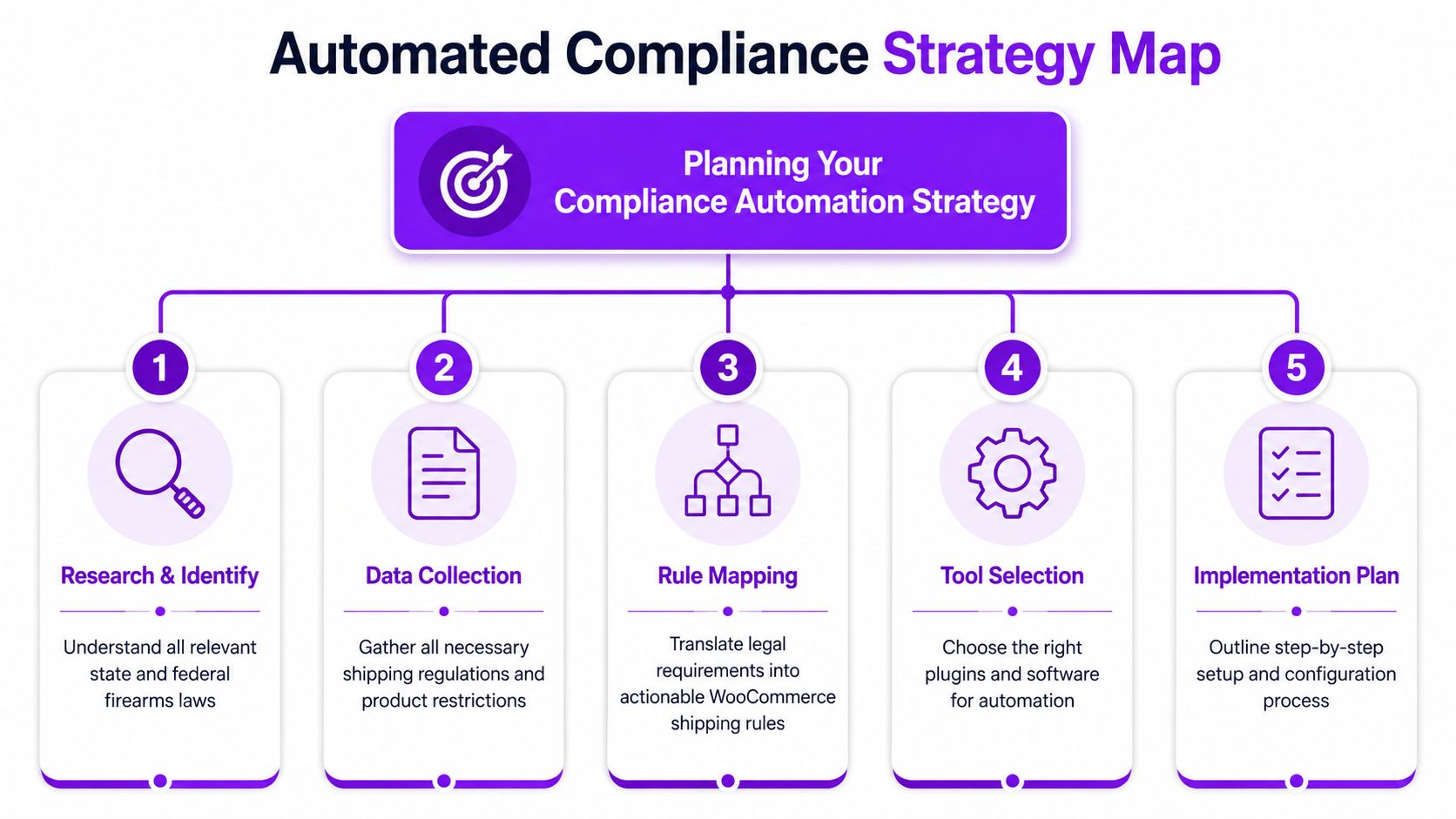
Build a master restriction list
Start with one working document. Not five spreadsheets. Not a mix of notes in email and Slack. One master restriction list that your store rules will follow.
That list should separate rules by these layers:
Free Shipping Compliance Audit
We'll review your WooCommerce store's shipping compliance for free.
- Federal constraints: Product categories and shipping conditions that apply nationally.
- State restrictions: Broad rules that block a product type across the entire state.
- County and city overlays: Local rules that narrow or expand what's allowed.
- ZIP-specific exceptions: The awkward edge cases that break simple state logic.
- Channel-specific handling: Cases where your website, phone orders, and marketplace listings need different enforcement steps.
The point is to create a hierarchy. When a rule conflict appears, your team needs to know which rule controls the decision.
Classify by product and action
Don't just collect laws. Translate them into store actions.
A useful restriction list usually includes categories such as:
| Rule category | What the system needs to do |
|---|---|
| Handgun restriction | Block checkout or block that SKU class to matched locations |
| Magazine capacity limit | Restrict only affected products, not the whole cart if avoidable |
| Ammunition restriction | Prevent shipping to affected areas and show a clear message |
| Accessory restriction | Apply category-level logic to reduce one-off rule clutter |
| Temporary legal hold | Apply start and end dates so the rule doesn't live forever |
That conversion work is what makes automation defensible. A legal rule in plain language doesn't help at checkout until you define the exact trigger and the exact response.
Don't automate vague interpretations. Automate clear operational decisions tied to products, locations, and outcomes.
Separate must-haves from nice-to-haves
This matters more than most merchants realize. When teams buy or configure compliance tools without deciding what's mandatory, they end up with a system that looks complete but can't survive an audit or a policy dispute.
A sound buyer checklist should include:
- Explainable rule logic: You need to see why the system blocked an order.
- Searchable audit logs: A blocked transaction should be traceable later.
- Workflow context: Logs should connect to the actual rule and order event.
- Scalability: The rule structure has to handle growth in products and destinations.
- Security and access controls: Only the right staff should edit restriction logic.
That approach lines up with practical compliance buying guidance from Regly, which stresses defining must-haves early, validating explainability, and avoiding black-box logic. The same source notes that AI-powered compliance automation can reduce manual work by up to 80% while enabling continuous monitoring across frameworks.
If you also ship internationally, or expect to, you should map customs data requirements at the planning stage instead of bolting them on later. For stores moving into cross-border operations, an EORI number application is one of those administrative steps that needs to be sorted before shipping workflows get more complex.
Use planning to prevent bad automation
Bad automation is worse than slow automation. It gives false confidence.
If your source data is incomplete, your rules will be incomplete. If your rule names are messy, your staff won't know what fired. If your categories are inconsistent, one product gets blocked while a near-identical one slips through.
Planning is where you stop that from happening.
Configuring Shipping Rules in WooCommerce
Once the rule map is clean, configuration gets simpler. Not easy, but predictable.
The practical setup inside WooCommerce should mirror the actual restrictions your team already documented. That means location logic first, product logic second, and customer messaging third. If you reverse that order, you'll create a store full of exceptions.
Start with one state-level rule
Begin with the simplest useful case. Pick one product category and one restricted state. For example, block a category of regulated items from shipping to that state.
The reason to start small is operational clarity. You need to verify four things before expanding:
- The rule triggers correctly
- The correct products are affected
- The customer sees a clear restriction message
- Staff can identify the rule in admin later
That first rule becomes your baseline template for naming, grouping, and testing.
A practical naming structure works like this:
- Location first: State, county, city, or ZIP
- Product scope second: Firearm, magazine, ammo, accessory
- Action third: Block, hold, or review
- Optional status marker: Temporary or permanent
That naming discipline matters when your rule count grows from a handful to hundreds.
Add local rules where state logic fails
Firearms compliance gets difficult where broad geography stops being accurate. A state may allow a category generally while one city or county creates tighter rules.
That's where location-based enforcement in WooCommerce has to be granular. A store should be able to block by state, then narrow further by city or ZIP when local rules require it. If you're mapping these scenarios in detail, this walkthrough on WooCommerce location-based shipping restrictions is useful because it reflects how stores structure rule conditions around destination data.
Field note: State-only logic is where most “working” compliance setups quietly fail.
A common example is a rule like Block Cook County, IL for a defined product group. That should not require staff to remember the county manually after checkout. The store should evaluate the destination before the order proceeds.
Use bulk import for scale
No serious firearms retailer should hand-build every restriction one by one if the system supports import. That's how errors creep in.
Bulk creation from CSV is the difference between a hobby setup and an operational system. It lets you prepare rules in a controlled sheet, review them with whoever owns compliance, then import them in batches. That's especially useful when you're dealing with long lists of cities, ZIP codes, or temporary updates tied to legal changes.
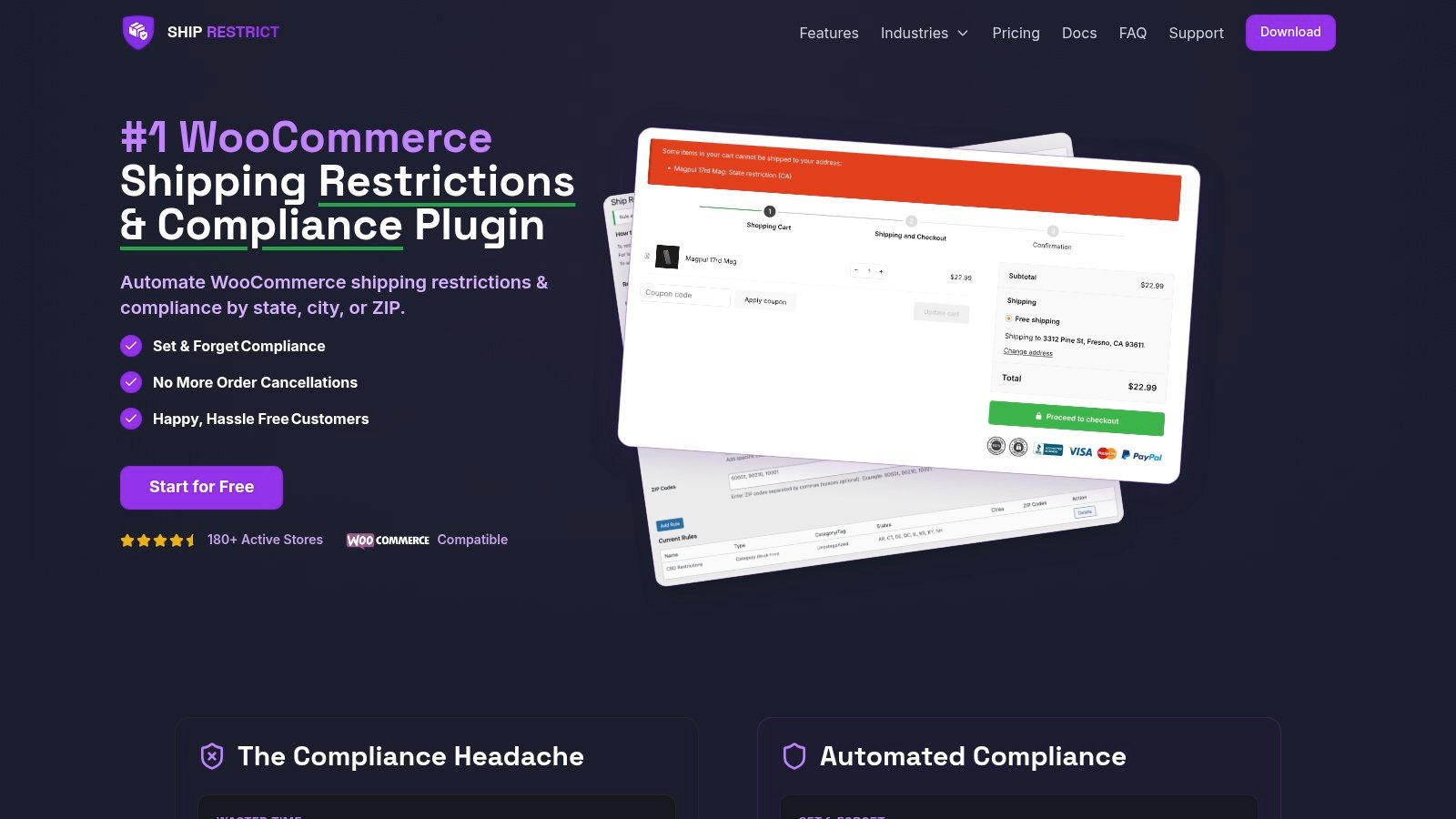
One option in this category is Ship Restrict, a WooCommerce plugin that lets merchants create shipping restriction rules by state, county, city, or ZIP code, including bulk rule creation and custom customer messages. For firearms dealers, that structure fits the problem better than generic shipping plugins that only think in zones.
If your broader WooCommerce build is still evolving, especially for merchants with UK operations or related storefront work, this guide for UK businesses on WordPress eCommerce is a useful reference for how store architecture choices affect operations later.
Configure the message customers see
A blocked order without an explanation creates support tickets. A blocked order with the wrong explanation creates angry support tickets.
Use direct language. Don't over-explain the law. Don't invite argument. Just explain the restriction and the next step if there is one.
Good message patterns include:
- Product restriction notice: This item can't be shipped to your delivery location due to local restrictions.
- Category restriction notice: One or more items in your cart can't be shipped to the selected address.
- Action prompt: Remove the restricted item or use an eligible shipping destination if permitted by law.
- Review notice: Your order requires manual review before shipment.
What works is clarity. What doesn't work is vague text like “shipping unavailable” that gives the customer no idea whether the issue is inventory, carrier service, or compliance.
Keep the admin side explainable
The technical setup should never become a black box. Pathlock's compliance guidance emphasizes explainability, mapped controls, continuous evidence collection, and dashboard visibility. It also notes that systems with continuous reporting into dashboards can reduce manual effort by an average of 65% while maintaining continuous policy adherence (Pathlock).
That same principle applies inside WooCommerce. If a rule blocks an order, your team should be able to answer:
- Which rule fired?
- Which location field matched?
- Which product or category triggered the restriction?
- What message did the customer see?
- Can the event be reviewed later?
Here's a short demo format that helps teams visualize the setup flow before they roll it into production.
<iframe width="100%" style="aspect-ratio: 16 / 9;" src="https://www.youtube.com/embed/jE8xuhBXmdY" frameborder="0" allow="autoplay; encrypted-media" allowfullscreen></iframe>When those answers are visible, you're not just blocking shipments. You're building a compliance process people can operate under pressure.
Testing Your Automated Restriction Flows
A rule that looks correct in admin can still fail at checkout. Testing is where you find out whether your automation is protecting the business or just making everyone feel better.
The fastest way to test is to build a small set of real scenarios and run them exactly as a customer would. Don't test with idealized addresses only. Test the messy reality too.
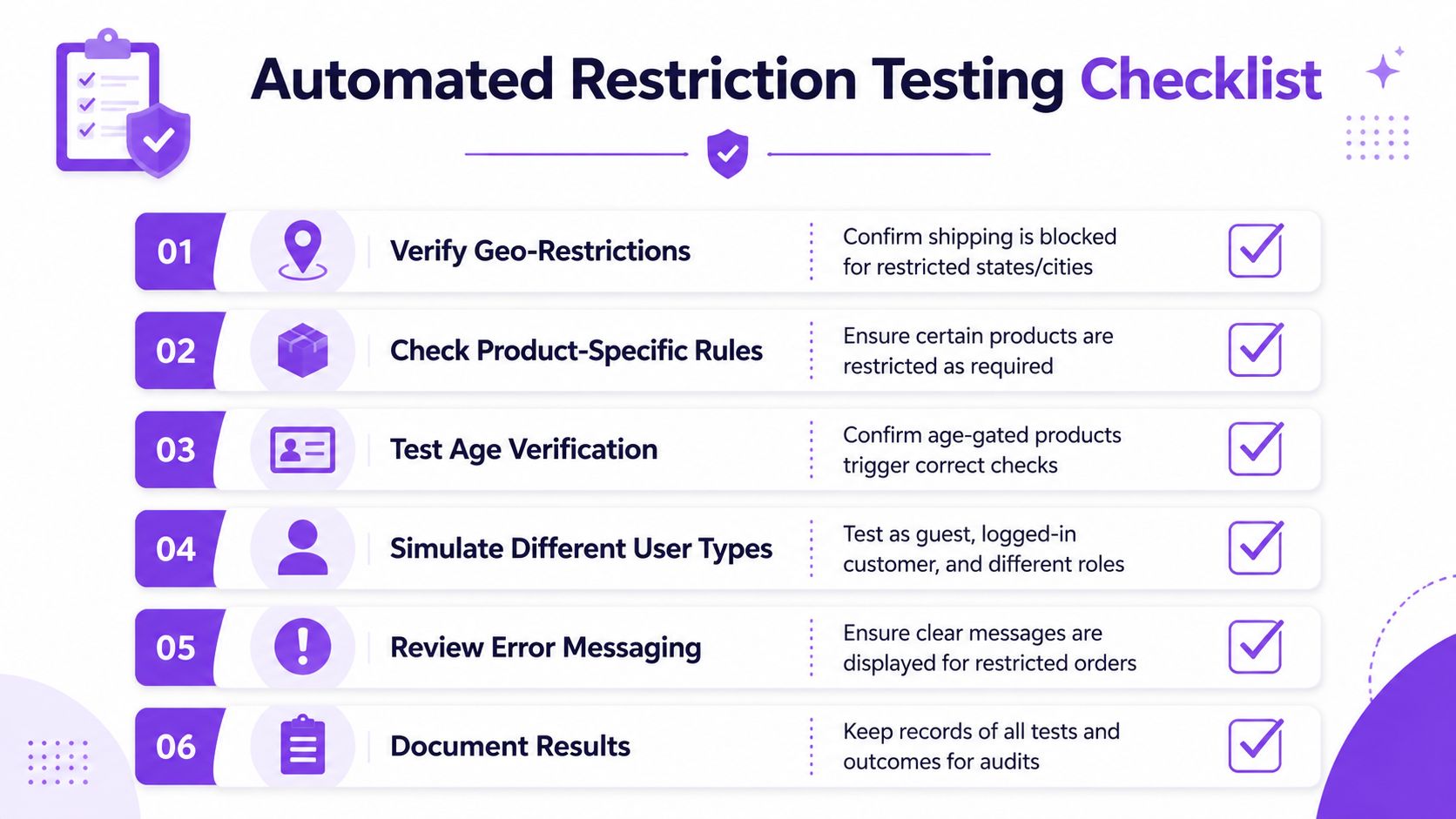
Run scenario-based checks
Your first test group should cover three buckets. Fully blocked locations, partially restricted locations, and clearly allowed locations.
Use a checklist like this:
- Restricted state order: Add a product that should be blocked and use an address in a fully restricted state. Confirm checkout stops at the right point.
- Restricted city or county order: Use a destination like a city-level or county-level restricted area inside a state that is otherwise partially allowed. Confirm the local rule overrides broader permission.
- Allowed location order: Use an address that should pass. Confirm the order completes without a false block.
- Typo or mismatch case: Use a valid area with a malformed city or postal entry. Check whether the system fails safely and whether staff can review the result.
- Mixed cart test: Add one restricted product and one unrestricted product. Confirm the store handles the restricted item properly instead of permitting the cart to proceed without flagging.
A staging copy of the site is the right place to do this. If you need a practical workflow for that environment, use a proper WooCommerce testing environment rather than experimenting on the live store.
Verify the outcome, not just the block
Too many teams stop at “the order was blocked.” That's incomplete.
Check these items for every scenario:
| Test point | What to verify |
|---|---|
| Trigger accuracy | The intended rule fired, not a different one |
| Customer message | The reason shown is clear and matches the restriction |
| Checkout behavior | The order cannot proceed when it shouldn't |
| Admin visibility | Staff can identify the event in the backend |
| Repeatability | The same test gives the same result on repeat runs |
A compliance test passes only when the store blocks the right order, for the right reason, with a record your team can review later.
Add ongoing monitoring
Testing isn't a one-time launch task. Address data changes, product catalogs change, and location rules change.
Pathlock notes that a key success factor in compliance automation is continuous reporting into dashboards, which supports proactive risk management and can reduce manual effort by an average of 65% while maintaining policy adherence. In plain store operations, that means you want regular visibility into blocked orders, edge cases, and unusual checkout behavior, not just a plugin that performs its task without continuous reporting.
That monitoring loop catches drift before customers do.
Maintaining Compliance and Handling Updates
The store you configure today won't stay compliant on its own. Firearms regulation is too fragmented, too local, and too changeable for that.
The biggest operational mistake I see is treating compliance automation like a site redesign. Teams put in the effort once, declare it done, and move on. Then a rule changes, a city gets missed, or a temporary restriction stays active long after it should have been removed. The software isn't the problem in those cases. The maintenance process is.
Assign ownership for rule changes
Every compliance system needs an owner. Not a committee. Not “the warehouse team.” One accountable person or role.
That owner should control a simple update cycle:
- Review legal and carrier changes
- Decide whether the change affects products, destinations, or both
- Update the rule set
- Retest affected flows
- Document what changed and when
Without that chain, rules drift. Someone hears about a change, someone else edits a spreadsheet, and nobody updates checkout logic.
Use temporary rules when the law is temporary
Some restrictions aren't permanent. They may be tied to a grace period, enforcement pause, litigation, or internal hold while counsel reviews language.
That's where scheduled start and expiry dates become operationally useful. Instead of relying on a calendar reminder and human memory, set the rule timing when you create it. This avoids two common failures. A temporary restriction that never turns on, and a temporary restriction that never turns off.
Watch for shipping and customs knock-on effects
Even if most of your concern is domestic firearms compliance, your broader shipping operation still needs formal rule tracking. Bean Ninjas notes that ignoring or failing to comply with shipping regulations can lead to immediate customs issues, fines, and delays, and that regulatory compliance tools help prevent human error and keep up with changing requirements.
That matters because firearms retailers rarely operate in one isolated compliance lane. Product restrictions, carrier rules, prohibited items, documentation expectations, and customer data obligations all touch the same checkout and fulfillment workflow.
The store doesn't care whether a bad shipment happened because of a firearms rule, a carrier rule, or a customs rule. The business still pays for the mistake.
Build a recurring maintenance rhythm
A practical rhythm is more valuable than an ambitious one nobody follows.
Use a cadence like this:
- Weekly: Review blocked orders and odd checkout failures.
- Monthly: Audit key rules, especially local restrictions and product mappings.
- Before catalog changes: Check whether new SKUs fit existing categories or need new logic.
- After legal updates: Patch only the affected rules, then run focused retesting.
- Before peak sales periods: Recheck the rules most likely to fire under high order volume.
Plan for more dynamic rule inputs
Most firearms stores still manage location restrictions manually, even when checkout enforcement is automated. That works up to a point. It stops working well when rule changes become more frequent and more local.
The long-term answer is a more dynamic rule pipeline. That could mean structured imports, scheduled syncs, and eventually real-time rule feeds tied to geographic restrictions. The reason is simple. Hyper-local compliance can't depend forever on staff manually editing the same set of records across channels.
Stores that prepare for that model now will handle growth better later.
Operational Best Practices to Reduce Legal Risk
Software blocks orders. Process protects the business.
A firearms dealer should back up checkout automation with a few essential operating habits. First, publish clear restriction language on product pages, shipping policy pages, and checkout notices. Customers don't need a legal memo, but they do need notice that eligibility depends on destination and applicable law.
Second, train support staff on restricted-order handling. They should know how to explain a block, when to escalate, and when not to improvise. A bad support response can create as much risk as a bad shipment decision.
Third, keep audit logs of blocked transactions and rule edits. If your team changes a location rule, you should be able to show who changed it, why, and what orders it affected. That discipline matters because modern trade compliance systems increasingly rely on automation that validates shipment information and detects risks early, helping businesses adhere to changing rules without manual rework (Customs City).
A broader lesson applies here too. Regulated businesses are getting pulled into more formal reporting and governance expectations well beyond shipping. If your leadership team is building a stronger compliance culture across the company, looking at adjacent frameworks like Evolving ESG standards for Israel can be useful because it shows how regulatory maturity tends to spread from one function into the whole operation.
Finally, keep legal counsel in the loop. Automation should enforce your policy. Counsel should help confirm that the policy is sound.
If you're ready to stop relying on spreadsheets and manual address checks, Ship Restrict gives WooCommerce merchants a way to enforce location-based shipping restrictions before restricted orders reach fulfillment. For firearms retailers, that means a cleaner checkout process, fewer preventable mistakes, and a compliance workflow your team can run day to day.
Automate Shipping Compliance
Stop worrying about restricted states. Ship Restrict handles it automatically.

Cody Yurk
Founder and Lead Developer of ShipRestrict, helping e-commerce businesses navigate complex shipping regulations for regulated products. Ecommerce store owner turned developer.
Automate Shipping Compliance
- Block restricted states
- No more cancellations
- Set and forget
3-day free trial · Card required