Shopify Restricted Products: Rules and Checkout Fixes
Learn how Shopify restricted products rules work, where state laws apply, and how to block non-compliant orders at checkout before payment.
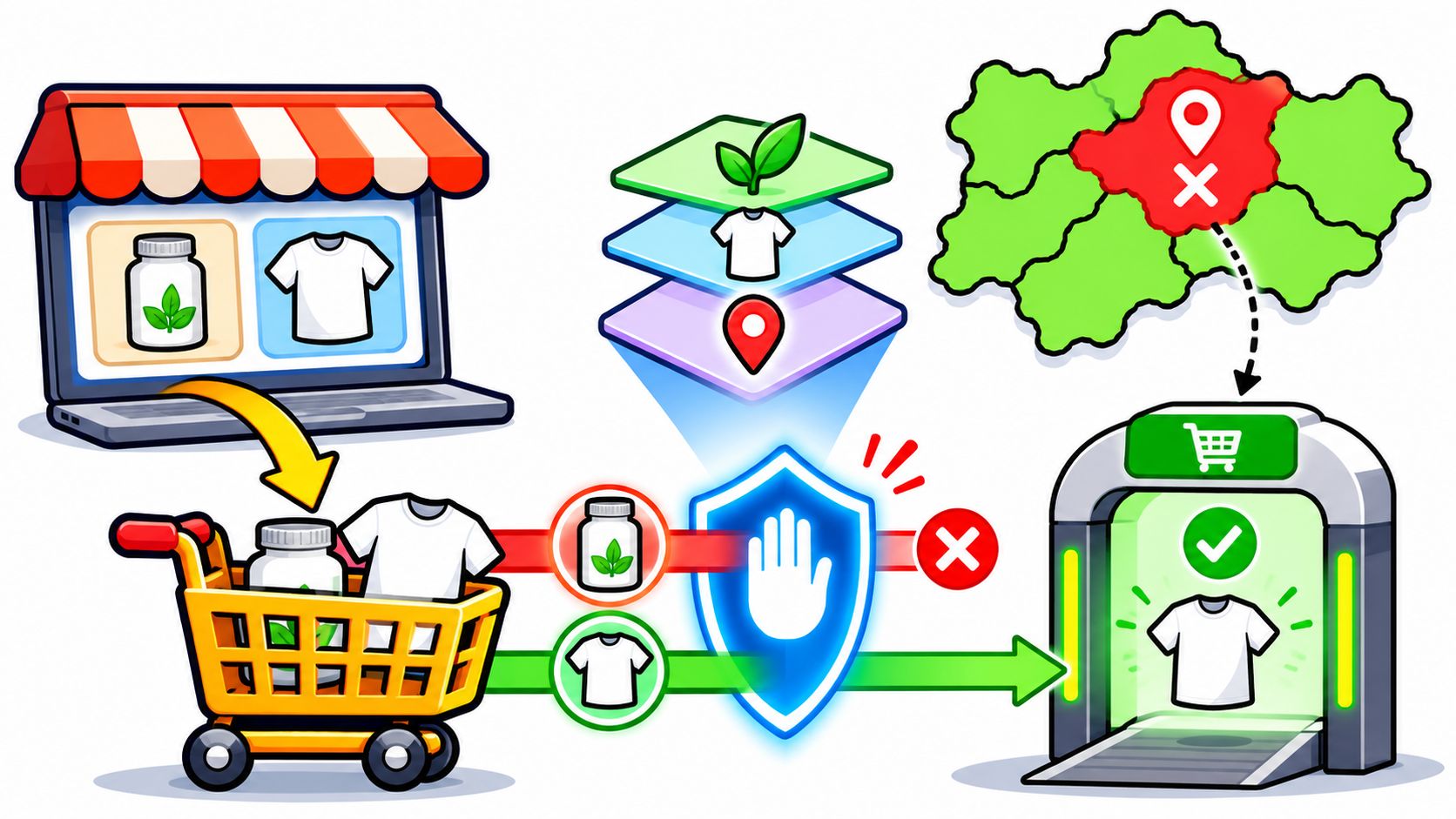
A shopper in a state you can't ship to adds a hemp tincture to the cart, pays with Apple Pay, and gets an order confirmation. Nothing in the flow stopped them. Your fulfilment lead catches it an hour later, refunds the payment, sends an apology, and adds another line to the list of orders that should never have existed.
That order wasn't bad luck. It happened because "can I sell this" is really six separate questions, each written by a different party, and passing one tells you nothing about the rest. A store can be perfectly compliant on five of them and still take money for an order it cannot legally deliver.
Here's how the layers stack, and where the gap opens.
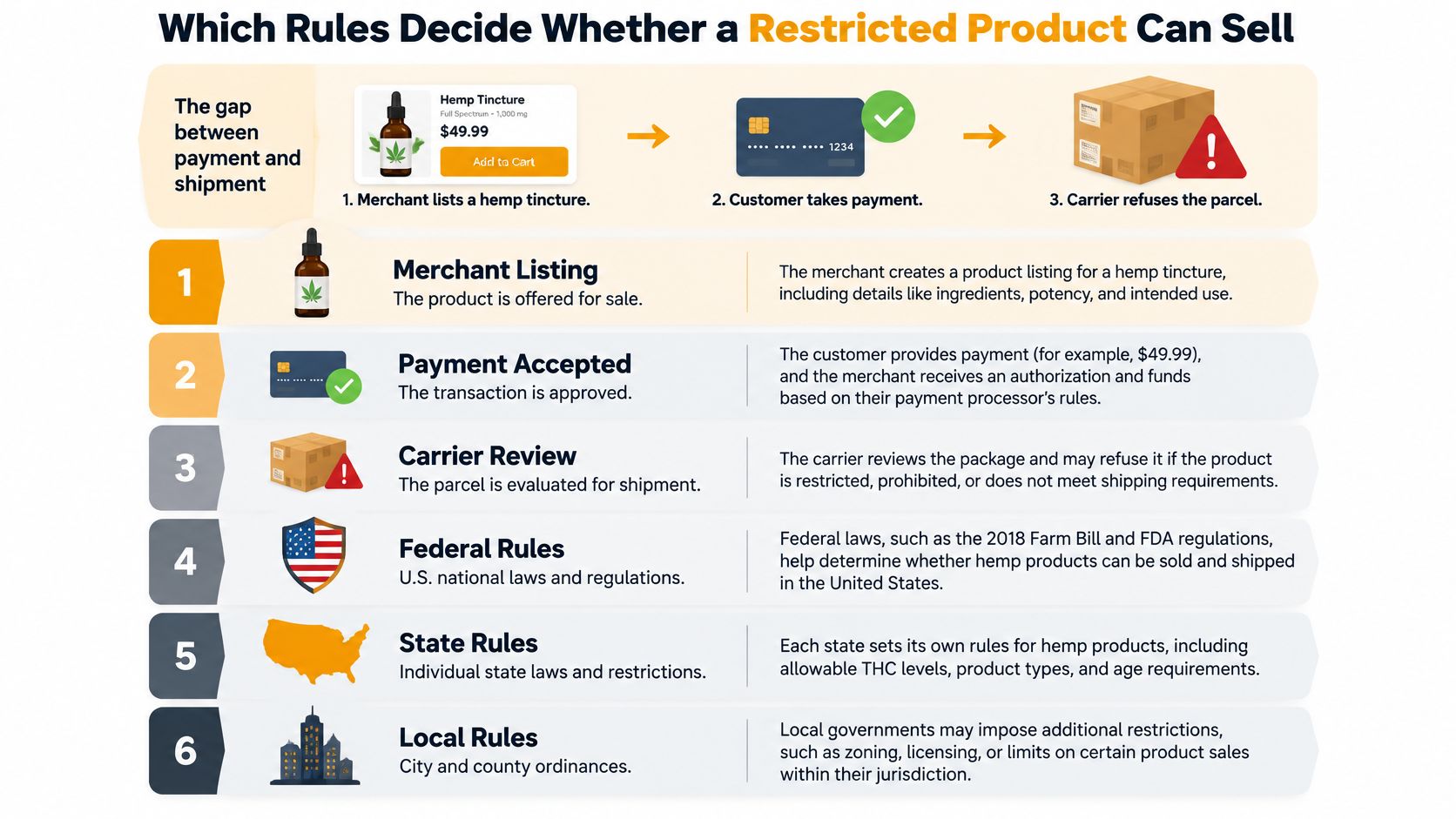
Which Rules Decide Whether a Restricted Product Can Sell
A shopper sees a product page, taps buy, and reaches checkout. That path can look approved while the order still fails three tests. Selling a restricted product means clearing several gates, each owned by a different party.
Automate Shipping Compliance
Block orders to restricted states automatically. 3-day free trial.
Start Free TrialUse a building analogy. The storefront is the door. Payment is the lock. The sales channel is the hallway. The carrier is the road. Destination law is the address at the end of the road. A product can pass the door and stop at the lock. It can pass payment and still have no legal road to that address.
Start With the Platform Gate
Shopify's Terms of Service and Acceptable Use Policy prohibit merchants and partners from using the platform for illegal or otherwise prohibited activities. The same filing says Shopify may terminate a shop or partner account when it becomes aware of such use.
That is the widest gate. It asks whether the store may run the activity at all. It does not approve one SKU, one payment method, or one delivery address. Treat it as the operating license for the storefront, not as a product pass.
Then Check Payment Eligibility
Payment eligibility is narrower. The Shopify Payments eligibility guidance lists regulated or illegal products and services as a prohibited category. It names cannabis and related products, prescription drugs, tobacco products, firearms, ammunition, weapons, and other regulated categories among prohibited or restricted business types. The guidance also says the list varies by region and is not exhaustive.
This document answers one question: can the product be paid for through Shopify Payments? A separate payment provider may answer that question differently. That choice still leaves shipping law untouched.
Six Layers, Six Questions
| Layer | Question it answers | Who sets it | Example |
|---|---|---|---|
| Shopify Acceptable Use Policy | Can this store operate for this activity at all? | Shopify | Illegal or prohibited use can lead to shop termination |
| Shopify Payments eligibility | Can this product be paid for through Shopify Payments? | Shopify | Firearms, ammunition and prescription drugs are listed as prohibited or restricted |
| Sales channel policy | Can this product be sold through this channel? | The policy of each sales channel | A channel can refuse a category the storefront still publishes |
| Carrier acceptance | Will the carrier move it, and to which destinations? | The carrier | The same item can travel by ground and be refused by air |
| State and local law | Can it legally reach this exact address? | Each state, county and city | One city can restrict a product the neighbouring town allows |
| Federal law | What applies nationwide? | Congress and federal agencies | The national baseline applies in every state before any local rule is added |
Six rows, six owners. A product can pass the first row and fail the fourth. Passing payment does not predict carrier acceptance. Passing carrier acceptance does not answer city or state law.
That is why a single "restricted" flag causes trouble. It blends different failures into one label. A payment failure needs one response. A shipping failure needs another.
Three Questions Store Teams Often Collapse
Can the product appear on the storefront? This is the platform-terms question. If the activity itself is prohibited, the downstream checks cannot rescue the sale.
Free Shipping Compliance Audit
We'll review your WooCommerce store's shipping compliance for free.
Can payment be accepted? This answer comes from payment eligibility. It belongs to the merchant and category level. A shipping rule can stop a bad order, but it cannot create payment approval.
Can the order lawfully ship? This answer depends on the exact product, the variant, the carrier, and the destination address. It changes with the other end of the order.
The distinction that prevents most incidents: checkout allowed is not the same as payment compliant, and payment compliant is not the same as shippable. Track all three as separate columns for every regulated SKU.
A shipping-restriction engine closes the destination gap. It applies the rules a merchant gives it and does not decide which places restrict a product. On Shopify, restrictions are rules inside the Ship Restrict app in the Shopify admin. Shopify Functions evaluate those rules inside Shopify's own infrastructure. Ship Restrict stores the rules, never customers' addresses or personal data.
The granularity matters. Restrictions can target a product, a variation, or specific destinations by state, city, and ZIP code. One variant can be blocked while its sibling variants ship normally. The Shopify restriction rule types show how a rule can narrow from broad coverage to one product variant.
Four Ways to Handle a Product Your Processor Won't Take
Say a storefront publishes something Shopify Payments treats as restricted. There are four moves, and each solves a different problem.
- Change processor: route that category through a provider that accepts it and leave the rest of the catalog on Shopify Payments. This fixes payment eligibility only; destination rules are untouched.
- Disable the channel: pull the product from the channel that refuses it. Clean when one channel is the whole problem.
- Use a compliant fulfilment model: change how the order is fulfilled rather than whether it can be placed.
- Block the affected destinations: keep the product live where it is legal and stop checkout where it is not.
The last two often run together. One line item can carry two independent risks at once: a payment risk set by its category and a shipping risk set by the address. Store those as separate metadata on the product or variant, never as one "restricted" flag. Then the team can see which gate the product failed.
Before launch, put every restricted product through all six rows. Give each row its own answer. One result has no bearing on the next.
How State and Local Laws Change Shipping Eligibility
Two shoppers, same hemp tincture, same card, same week. One order ships and arrives. The other can't legally be delivered, and nothing in your checkout knew the difference until someone read the address by hand.
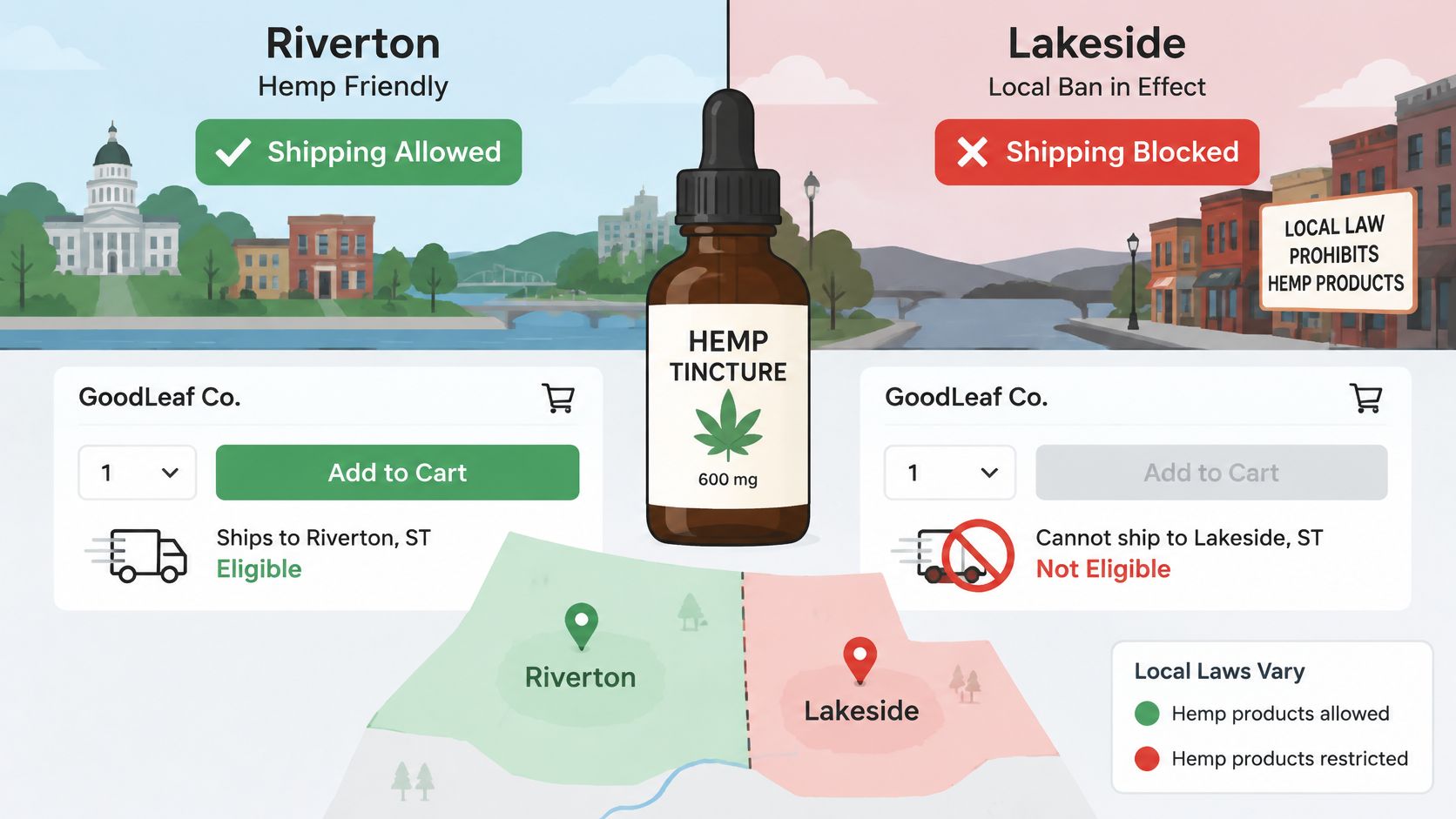
Federal Law Sets the Floor, Not the Answer
Federal rules apply nationally, and state regulations can add limits on top of them. That layering is where most shipping mistakes live, because a product that's fine under national rules can still be undeliverable at the destination.
The spread is wide even inside one country. Industry guidance on regulated ecommerce contrasts California, which may permit DTC alcohol shipping with relatively few limitations, with Utah, which doesn't allow DTC alcohol shipping at all, and notes that in the UK strict age verification has been a legal requirement since July 2025 for stores selling vapes, alcohol, adult products and other age-restricted goods.
Hemp works the same way. Federal law sorts cannabis by THC content, and a product above the federal line is regulated as marijuana rather than hemp, which changes what can move and where. State rules sit on top of that classification, and some states treat the whole category more strictly than the national baseline does.
What a State List Won't Catch
A list of blocked states looks like a compliance system until a real cart arrives. Four things break it.
- City and county rules: an ordinance can cover one municipality and stop at the town line, so a state-level block either misses it or over-blocks.
- ZIP boundaries: delivery zones don't respect state borders or city limits, and a rule tied to a ZIP can split a city in half.
- Mixed carts: a legal t-shirt and an illegal tincture arrive in the same basket, and the block has to land on exactly one of them.
- Scheduled rules: a temporary prohibition, a court stay, or a statute with a start date won't fit a static list at all.
A warning banner is not enforcement. "We may not be able to ship this to you" leaves the order in your queue, paid for, waiting for someone to cancel it.
The Order to Apply Rules In
Precedence matters, because a rule evaluated in the wrong order produces the wrong message and sometimes the wrong result.
- Product or variant first. Is this exact item restricted, and is it restricted as a product or only as one variant?
- Destination second. State, then city, then ZIP, checked in that sequence.
- Carrier and payment constraints third. Will the carrier move it, and is the payment method eligible?
- Message and record last. Name the item in the customer message and write an audit entry.
Our guide to Shopify location restrictions shows how those state, city and ZIP rules are structured inside the app. The reason to apply them in this sequence is simple: the customer needs one clear sentence about the item that failed, not a generic refusal.
How to Block Restricted Orders at Checkout
A warning banner is not a block. The check has to run where the order is created, not where the page is drawn. In Shopify, that means checkout validation inside Shopify's own infrastructure. Ship Restrict uses a Shopify Function there, so the rule is enforced before payment and without scripts or theme changes.
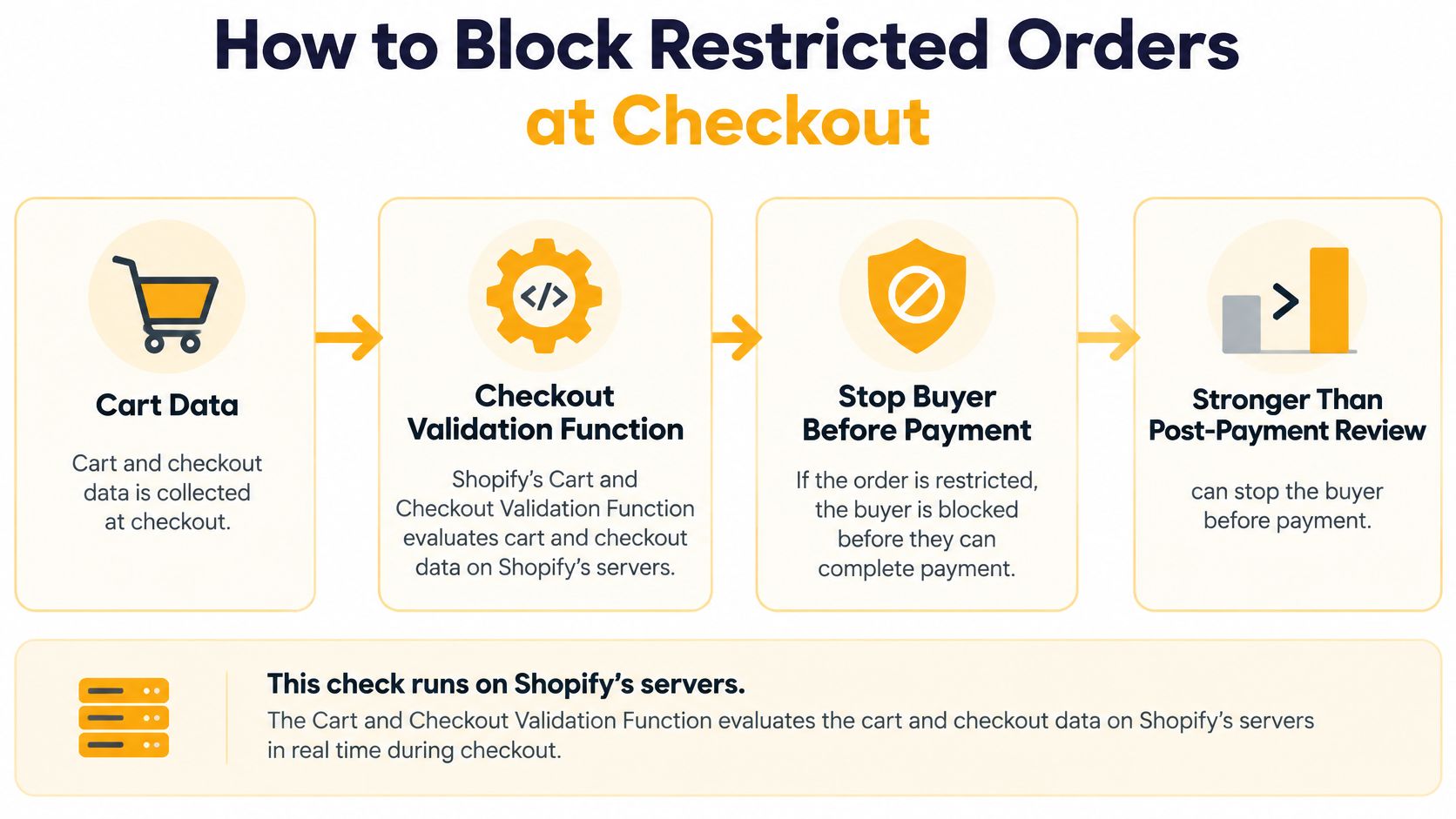
Think of the checkout like a door with a lock built into the frame. The storefront can display a product, the cart can hold it, and a payment method can be available. None of those facts answer the shipping question. The lock is the rule that checks the exact item against the address before the order completes.
Ship Restrict uses that model on Shopify. Each restriction is a rule set in the Ship Restrict app inside your Shopify admin. The rule can target a product or a variant, and it can use state, city, and ZIP conditions. That matters because one variant may be restricted while its sibling variants ship normally.
Eight Steps to a Working Block
-
Define the restricted item first. Start with the exact product or variant. A broad catalog label can block legal products by mistake. A variant-level rule gives you tighter control when only one size, strength, or formulation is restricted.
-
Separate storefront, payment, sales-channel, carrier, and destination eligibility. Storefront visibility says the item can appear online. Payment eligibility says a provider may process the sale. A sales channel has its own product rules. A carrier has its own shipping limits. Destination law decides where the product may go. Keep those as separate questions so one prohibited-products list does not stand in for five different decisions.
-
Build destination rules in order: state, then city, then ZIP. Start coarse, then add precision where the law is precise. A state rule catches the broad cases. City rules handle local limits. ZIP rules deal with narrower delivery areas. Ship Restrict checks item variation restrictions first, then product restrictions, with each pass moving through states, then specific cities, then ZIP codes.
-
Use the right structure in the right platform. In the Shopify edition, restrictions are set in the Ship Restrict app in your Shopify admin, where every restriction is a rule. In the WooCommerce edition, restrictions are set under WooCommerce → Ship Restrict, plus fields on each product and variation.
-
Match the message to the item that failed. A custom error message can use
{product}to show the restricted product's name. The message appears under the standard heading, so the shopper sees the reason next to the normal checkout warning. -
Check mixed carts deliberately. When a cart has one restricted product and one unrestricted product and the address is restricted, Ship Restrict shows one error line naming only the restricted product. The order cannot be placed. The unrestricted product stays out of the message because it is not the problem.
-
Test the paths shoppers use. Use a restricted address and confirm the block at Shopify checkout before payment. Repeat with an unrestricted address to confirm the order can continue. Check admins too. Ship Restrict checks every shopper the same way, including admins.
-
Keep your rule set clear and current. The app stores only your rules, never your customers' addresses or personal data. Ship Restrict enforces the rules you give it and does not decide which places restrict your products. Your team still owns the legal and policy judgement behind each rule.
If you are auditing the surfaces a shopper passes through on the way to payment, the PlatformDTC checkout feature maps what each step of the flow controls.
The result to test for is simple: a restricted order cannot reach payment, and the shopper sees which product caused the block. On Shopify, Ship Restrict blocks restricted orders before payment using Shopify's native checkout validation. The rule runs inside Shopify's infrastructure, so the checkout itself stops the order instead of leaving your team to catch it after payment.
A Mixed Cart Walked Through Step by Step
Picture a store selling hemp products and branded apparel. A shopper adds a 30 ml tincture and a plain t-shirt. The tincture is restricted in the shopper's state; the t-shirt ships anywhere. She enters a city address in that state and hits checkout.
The runs are listed in order.
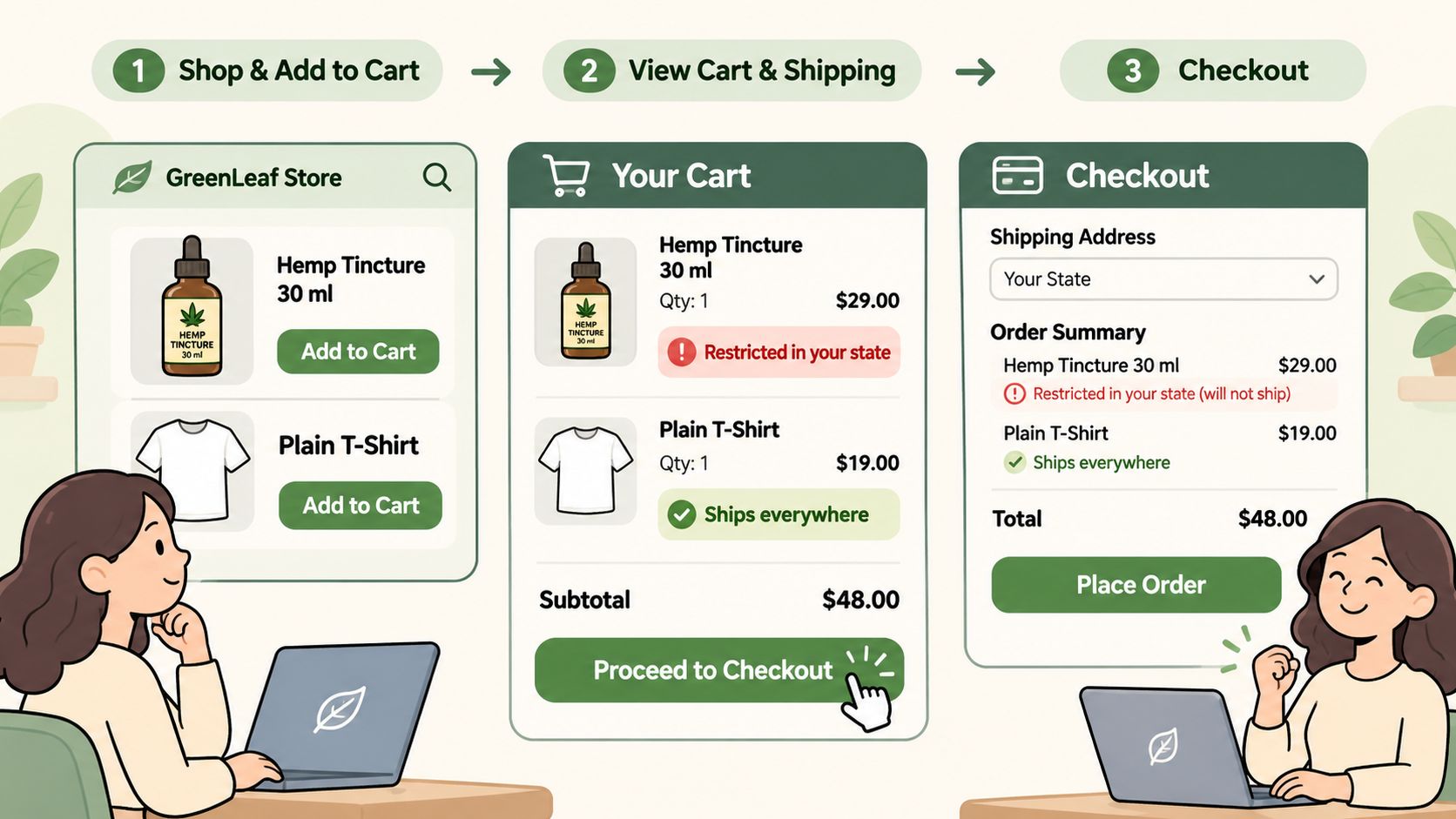
The Checks, in Sequence
The system checks variation restrictions first, then product restrictions, and within each pass it checks states, then specific cities, then ZIP codes. The tincture's 30 ml variant matches at the state level, so the evaluation stops there for that item. The t-shirt matches nothing and is left alone.
The shopper sees one line of copy: "Some items in your cart cannot be shipped to your address:" followed by the message for the tincture. The t-shirt isn't named, because the t-shirt isn't the problem. The order can't be placed until she removes the tincture or changes the address.
Every shopper gets the same treatment, admins included, and the error appears on the cart and checkout pages as soon as a restricted item and a restricted US address are both present. There's no override to remember and no manual step to forget.
Why Variant-Level Rules Change the Outcome
Now rerun the same cart with one change: the store restricted the whole product instead of the 30 ml variant. The shopper's order is identical, but a second shopper buying the 60 ml variant to the same address is now blocked too, even though that variant may be fine there.
That's the difference between a rule that fits the business and one that fits the catalog structure. Restrictions can target a single variant, so one size can be blocked while its siblings ship normally.
<iframe width="100%" style="aspect-ratio: 16 / 9;" src="https://www.youtube.com/embed/vnenuM-LazA" frameborder="0" allow="autoplay; encrypted-media" allowfullscreen></iframe>Both editions block at checkout with your own message naming the restricted product, so the customer learns which item failed rather than guessing at the whole cart. The message is the difference between a shopper who removes one item and a shopper who leaves.
Before you go live, run the test that catches all of this at once: check every variant against every restricted destination on your list. Not the product, the variant. A catalog with three sizes and four restriction zones has twelve cases, and the one you didn't test is the one that ships.
Symptoms That Mean Restricted Orders Are Getting Through
A restricted order that reaches payment creates clean-up work. The customer may already be charged, the processing fee may be spent, and someone has to unwind the order by hand.
The reason is usually a stack of eligibility decisions being treated as one decision. Platform eligibility, payment-processing eligibility, sales-channel eligibility, and destination-law compliance all answer different questions. If one answer is no, the checkout rule has to catch the order before payment.
Shopify's Shopify Payments eligibility guidance identifies categories such as cannabis, prescription drugs, medical devices, tobacco, firearms, ammunition and weapons as potentially prohibited, with restrictions varying by region. That guidance belongs to Shopify Payments eligibility. It does not replace your own review of destination law, sales channels, or product-level shipping rules.
A useful analogy is a set of doors. The storefront door asks whether the product can be displayed. The payment door asks whether it can be paid for. The sales-channel door asks whether that channel allows it. The destination door asks whether the product can legally ship there. A restricted order gets through when one door says no, but no rule closes it at checkout.
The Lookup Table
| Symptom | Likely cause | Fix |
|---|---|---|
| Restricted order reaches payment | Rule set at state level only, city or ZIP missed | Add city and ZIP rules and check them against the destination list |
| Restricted item passes through Apple Pay or Shop Pay | Express checkout paths never tested | Test every express path with a restricted address |
| Restricted item ships in a mixed cart | Rule attached at product level when only one variant is restricted | Attach the rule to the specific variant |
| Payment declined for a product on the storefront | Checkout allowed treated as payable | Check Shopify Payments eligibility and set an alternative processor where needed |
| Blank or unclear address passes validation | Incomplete address not covered by the rule set | Fail closed and ask the shopper for a complete address |
| Old rule still blocks, or new rule never applies | No activation or expiry dates set | Schedule activation and expiry and review rules when laws change |
| Customers cancel or write in confused | Generic error message | Name the restricted product in the validation message |
Read the middle column carefully. Most symptoms point to a rule that is too broad, too narrow, or aimed at the wrong layer. A state rule may miss a city. A product rule may block a sibling variant that should still ship. A payment problem may be showing up as a storefront problem.
Some fixes are quick. Adding a missing city or ZIP rule, attaching a rule to a variant, and naming the product in the message can change the next test order. Ship Restrict can target states, cities and ZIP codes, and those rules can apply to specific product variations. On Shopify, block rules can include cities for local restrictions.
Other fixes need a review cycle. A law change, a processor switch, or a temporary rule that has passed its end date may need a fresh decision before the rule set changes again.
Set an end date on every temporary rule. A rule added for a short-term prohibition can keep blocking legal orders after that restriction ends. Put the review on the calendar before the rule goes live.
Watch the message too. On Shopify, when a restricted address is entered at checkout, the cart shows “Some items in your cart cannot be shipped to your address:” followed by the restriction message for the product. If shoppers cannot tell which item failed, they may abandon the cart or contact support. A custom error message can use {product} to show the restricted product's name under that standard heading.
The practical routine is simple. Treat each layer as a separate door, write the checkout rule to match the product, variant and destination, then test the paths that let an order through. Rules do not drift on their own. They drift when the law, the catalog, or the payment setup changes and no one updates the rule.
Confirm Your Restricted-Product Rules Before Launch
Launch day is the wrong time to discover which layer fails. Confirm the rules for each restricted product first, in this order.
- Check payment eligibility per product, per country. Shopify Payments eligibility is a merchant-and-category decision, so verify each regulated product where you sell it and stand up an alternative processor where the answer is no.
- Map products, variants and destinations with legal review. Your map has to cover states, cities and ZIPs, because the law at each destination is the thing you're encoding.
- Enter the rules where they live. In the Shopify edition, that's the Ship Restrict app in your Shopify admin, where every restriction is a rule; in the WooCommerce edition, it's under WooCommerce → Ship Restrict plus fields on each product and variation.
- Test with both a restricted and an unrestricted variant, and include the express paths rather than only standard checkout.
- Schedule activation and expiry dates on anything temporary, so a rule retires itself when the restriction does.
One boundary is worth stating plainly. We enforce the rules you give us before payment, and we don't decide which places restrict your products. Legal review stays with you, and the app is the mechanism that turns a legal map into a checkout block.
Our Shopify testing guide walks through the test orders that prove a rule fires. If a restricted order still gets through after launch, the symptom table above will usually name the cause in one line.
Ship Restrict blocks restricted orders in Shopify checkout before payment and enforces the same rules in WooCommerce, at state, city and ZIP level, down to a single variant, with your own message naming the item that failed. It runs on one paid plan with no rule limits, so a large regulated catalog doesn't cost more to protect than a small one. Visit Ship Restrict to map your restricted products to destinations and put the rule in place before your next order arrives.
Automate Shipping Compliance
Stop worrying about restricted states. Ship Restrict handles it automatically.

Cody Yurk
Founder and Lead Developer of ShipRestrict, helping e-commerce businesses navigate complex shipping regulations for regulated products. Ecommerce store owner turned developer.
Automate Shipping Compliance
- Block restricted states
- No more cancellations
- Set and forget
3-day free trial · Card required