Order Management System Guide for WooCommerce Merchants
Learn how an order management system streamlines WooCommerce fulfillment. Covers core features, compliance, ROI, and how to pick the right OMS in 2026.
You can usually tell when a WooCommerce store has outgrown its setup. Orders still come in, but somebody is manually checking ZIP codes in a spreadsheet, someone else is comparing inventory in two tabs, and the shipping label gets printed before the compliance question is answered. That works until the wrong order leaves the building, then the customer email lands, the cancellation gets logged, and everyone starts asking why a restricted shipment made it this far.
The problem is not that the team is careless. The problem is that the workflow is built around reacting after the order exists instead of stopping invalid orders before they become a cost. That is where an order management system earns its keep, because the right OMS does more than track an order. It acts as the control layer that decides whether an order should be accepted, where it should go, and what status it should hold next.
The Tuesday Morning an Order Should Never Have Shipped
The box was already on the packing table when somebody noticed the destination ZIP was in a restricted county. That's the kind of mistake that happens when the team is juggling phone calls, checkout alerts, inventory notes, and address checks by hand. One person looked at the order screen, another checked the shipping map, and nobody caught the issue in time.
The customer was already expecting tracking. Support then had to explain why the order got canceled after payment, why the refund would take time, and why the store had accepted an order it should never have touched. That's not just an awkward conversation. It's labor, lost margin, and avoidable exposure rolled into one cleanup job.
Automate Shipping Compliance
Block orders to restricted states automatically. 3-day free trial.
Start Free TrialWhy the failure happens
Manual screening always looks manageable right up until the store gets busy. A single miss is easy to dismiss, but the process breaks when the rule lives in someone's head instead of the system.
Practical rule: if a restriction matters, it has to be enforced before fulfillment starts, not after someone notices the label is already printed.
An order management system is the workflow layer that would have caught that order earlier. Instead of letting checkout proceed and hoping the back office catches the problem, it can validate the destination and block the order before payment or fulfillment continues. For regulated sellers, that shift matters more than any dashboard widget.
That is why so many generic OMS pitches miss the point. They talk about speed, visibility, and routing, which are useful, but the core pain is preventing a bad order from entering the pipeline at all. If you have ever had to explain to a customer why a canceled order was your mistake, you already know the difference between reporting a problem and stopping it.
What an Order Management System Actually Does
Think of an OMS as the control tower between your storefront, inventory, payments, and shipping. WooCommerce takes the order. The OMS decides what should happen next. Without that middle layer, the order screen is just a record of what happened. With it, the system becomes an active decision point.
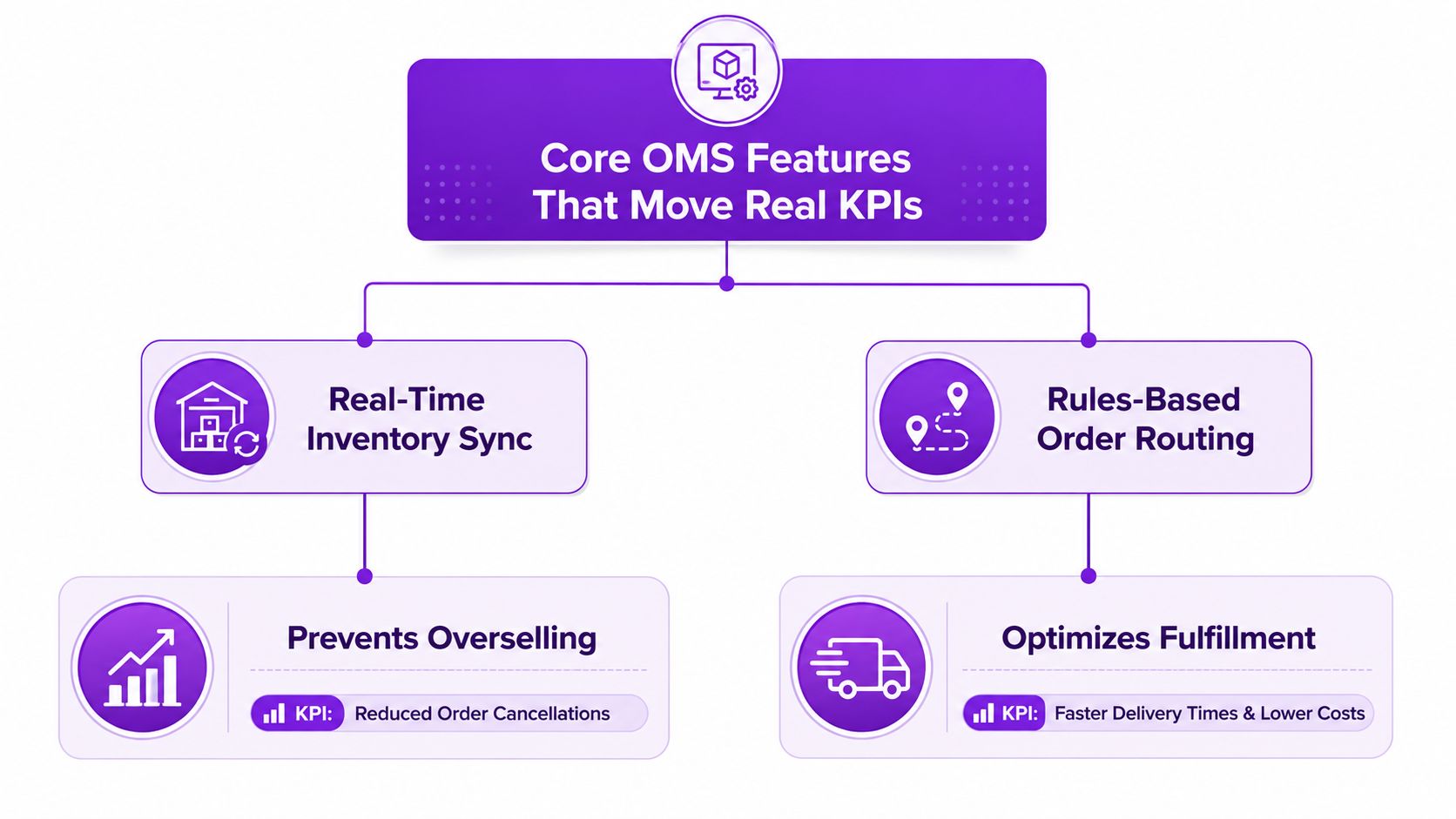
The simplest way to understand it is to break the job into four parts.
The four jobs that matter
- Capture the order. The OMS receives the order details from WooCommerce and stores them in one working queue instead of leaving them spread across tabs and inboxes.
- Validate the order. It checks the order against business rules before it moves forward. That can mean payment status, inventory availability, or location restrictions.
- Route the order. It assigns the order to the best warehouse, store, or vendor based on shipping cost, inventory, and delivery speed.
- Track the status. It follows the order through each state until delivery, which gives the team a single version of truth.
That is the difference between software that records and software that controls. WooCommerce's native orders view is useful, but it mostly shows what already happened. A real OMS sits in the path of the order and makes decisions that reduce manual cleanup.
The state model matters too. Enterprise OMS setups rely on structured transitions such as Pending, Confirmed, Shipped, and Delivered, because those stages make exceptions easier to handle and audit. That matters in a busy operation where support, fulfillment, and finance all need the same order history without reconciling three different spreadsheets. A requirements document for an OMS also calls for handling up to 1,000 simultaneous users without performance degradation, which shows how seriously this category has to treat concurrency in larger operations. OutSystems OMS requirements specification
For merchants who also think about logistics infrastructure, the logic is similar to a transportation control layer. A useful companion read is Peak Transport's guide on TMS for logistics managers, because it explains how routing and coordination logic changes when operations stop being purely manual.
Free Shipping Compliance Audit
We'll review your WooCommerce store's shipping compliance for free.
A mature OMS should answer one question cleanly, then answer the next one just as cleanly. Can this order be accepted. If yes, where should it go. If no, why not. That sequence is the point.
Core OMS Features That Move Real KPIs
A long feature list is useless if it doesn't move a metric your team already watches. For OMS buying decisions, I'd treat order accuracy rate, on-time delivery rate, order cycle time, and fulfillment cost per order as the scoreboard. Industry guidance defines order accuracy as accurate orders / total orders × 100, and on-time delivery as on-time deliveries / total deliveries × 100. High-performing U.S. operations often target order accuracy above 99.8% and average fulfillment time below 12 hours from payment to shipment, which gives you a concrete bar instead of vague vendor promises. Zuora order management metrics
Features that earn their keep
Real-time inventory sync prevents overselling. The OMS reserves inventory when the order is validated and keeps stock synchronized across channels, so the last unit sold in one place disappears everywhere else. That cuts cancellations and the awkward “sorry, we were out of stock” message that usually follows a bad sync.
Rules-based routing sends each order to the best node. If one warehouse can ship faster or cheaper, the OMS should know that before a human starts guessing. That's how you reduce split shipments, late deliveries, and the wasted labor that comes from picking the wrong fulfillment point in the first place. SKUNexus guide to order management
Automated state transitions keep everyone aligned. When an order moves from Pending to Confirmed to Shipped without manual nudges, support doesn't waste time asking operations where things stand. That kind of visibility matters when a customer wants an answer now, not after a Slack thread finishes.
Returns and exception handling protect the downstream process. The OMS should make it obvious when an order needs a hold, a reroute, or a reversal. That's especially useful in regulated commerce, where the wrong exception handling path can create a compliance problem as well as a service issue.
If you want to see how those mechanics get framed in a broader automation context, the order fulfillment automation guide is a good reference point. The key takeaway is simple. Features are only worth paying for if they reduce a metric you can verify in your own store.
How to Choose an OMS for WooCommerce
WooCommerce merchants need to be blunt about fit. A lot of tools can record orders. Far fewer can enforce the rules that keep a regulated store out of trouble. Start with the integration question. If the platform can't speak cleanly to WooCommerce REST endpoints and webhooks, you're buying extra work for your developer, not operational relief.
The next filter is rule depth. Can the system layer restrictions by product class, jurisdiction, and customer type. If it can only block by a simple shipping zone, it's too shallow for regulated goods. You need rules that reflect real-world legal boundaries, not just storefront convenience.
The shortlist that actually matters
Use this as your buying order: first check compliance depth, then check integration fit, then check how much manual maintenance the system creates.
| Approach | Best For | Compliance Depth | WooCommerce Fit | Cost Model |
|---|---|---|---|---|
| Native WooCommerce order tools | Very small stores with simple workflows | Low | Very high | Usually low upfront, high manual labor |
| General SaaS OMS suites | Multi-channel operators with complex routing | Medium | Medium to high, depending on connector quality | Subscription plus implementation |
| Compliance-first plugins | Regulated sellers who need pre-checkout blocking | High | Very high | Plugin pricing plus setup |
That table is the part most demos skip. Native WooCommerce tools are fine until you need to stop an order before it becomes a mistake. Broad SaaS suites can be powerful, but they often assume you have a bigger ops team than you really do. Compliance-first plugins are narrow by design, which is exactly why they can work well for regulated merchants.
For a look at how WooCommerce reporting is commonly presented to operators, the WooCommerce reporting data overview is useful context. It's a reminder that reporting alone doesn't solve the workflow problem. Reporting tells you what happened. An OMS should prevent the wrong thing from happening in the first place.
Support also matters more than most merchants admit. If the vendor needs a custom implementation every time your catalog changes, the tool will age badly. Pick the option that keeps rule maintenance simple enough for your actual team to own.
Why Regulated Sellers Need Compliance Built Into the OMS
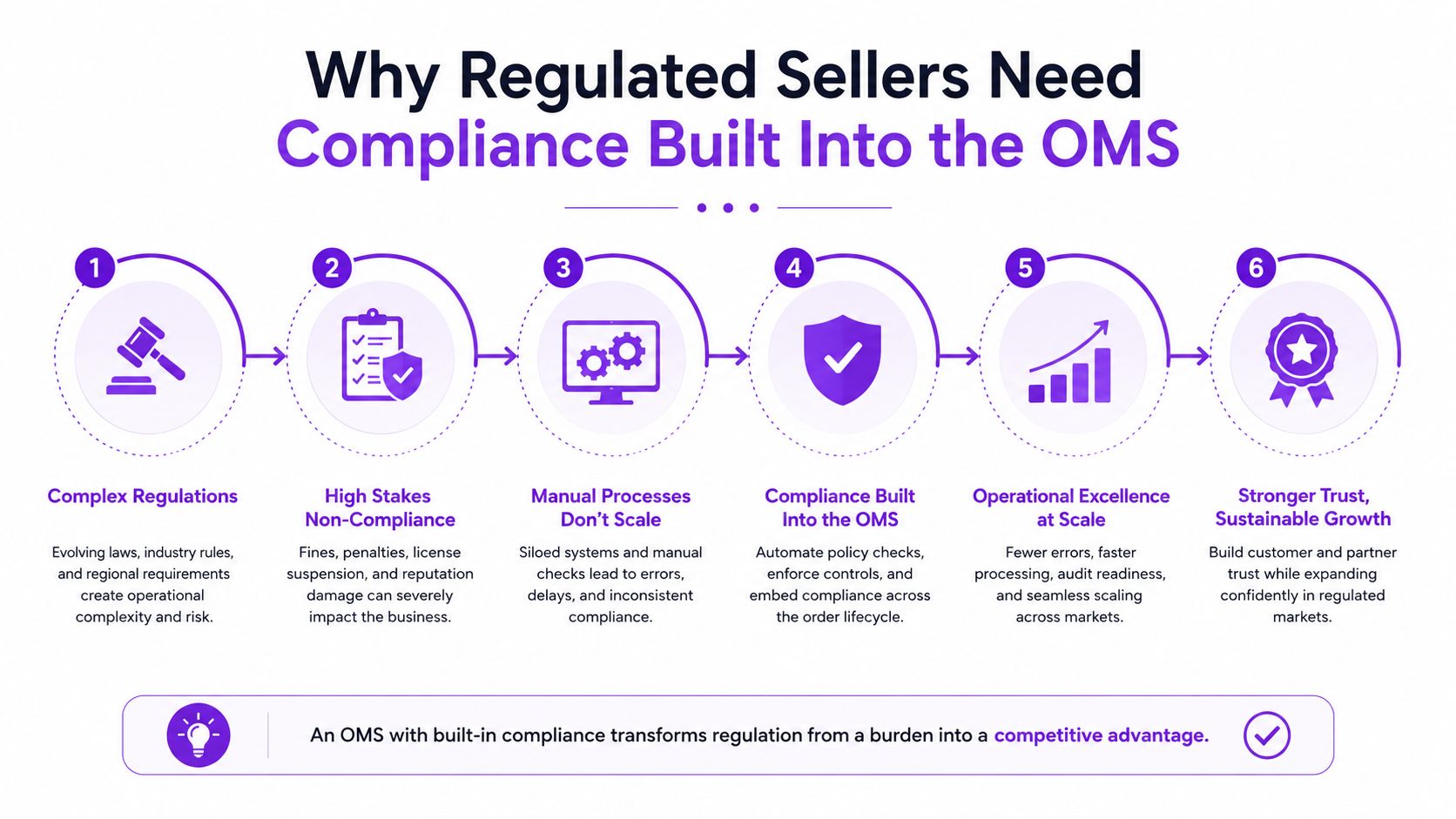
A regulated order should fail before checkout finishes, not after the warehouse has already touched it. That is the part generic OMS workflows miss. They can confirm payment, address, and inventory, yet still let an illegal or restricted order move too far down the pipe. For firearms, tobacco, and other location-specific products, that creates avoidable cancellations, refunds, and support work that should never have been created.
Compliance has to sit inside order validation. If a state blocks a product category, or a ZIP code requires age verification at delivery, that rule must run before the customer clicks through. Once the order is accepted, the business has already taken on the cleanup. That means the OMS is doing half the job too late.
Where standard validation stops
Payment checks tell you the card worked. They do not tell you the order is legally shippable.
Address checks confirm a destination, but they often stop at the street level. They do not reliably catch county, city, or ZIP-specific restrictions, and they do nothing about product rules tied to the destination itself. Inventory checks only confirm stock on hand, so they can still green-light a sale that should have been blocked before the customer reached the payment page.
Post-order review catches some mistakes, but it catches them late. The team has already spent time on an order that should have been rejected at the door. If you need a clearer view of how regulated checkout rules should work in WooCommerce, the automated shipping compliance guide for WooCommerce stores is a useful reference.
That changes the economics fast. Blocking invalid orders early reduces chargebacks, avoids preventable cancellations, and keeps staff from babysitting orders that never should have existed. The benefit is operational, not theoretical.
For regulated sellers, the OMS has to understand legal eligibility before fulfillment begins. If it only reacts after the box is packed, it is helping the wrong side of the workflow.
Integrating and Rolling Out Your New OMS
Start the rollout like an operations project, because that is what it is. Build a staging environment that mirrors the live store closely enough to expose bad mappings before customers ever see them. Skip sandbox testing and you are not moving faster. You are pushing the mistake into production.
Wire the OMS to WooCommerce statuses before anyone touches live orders. Pending, Confirmed, Shipped, and Delivered need a clear relationship to the workflow your team already uses, or the first week turns into a guessing game about which screen is telling the truth. Test payment hooks and shipping carrier connections in the same environment, because failures usually show up in the handoff between systems, not inside one system alone.
A clean launch depends on a boring amount of setup work.
Run the rules in staging with real examples from your store, including restricted destinations and orders that should be blocked before checkout completes. Connect payment and shipping hooks, then confirm the OMS receives status changes and passes carrier updates without delay. Import the restrictions and routing logic your team already uses so the live launch does not start from zero. Train fulfillment staff on which statuses need action and which ones mean wait. Then run a parallel week, with the old workflow and the new one side by side, until mismatches are found and fixed.
Don't let the dev agency own the rollout alone. Operations has to own the order logic, or the setup will look correct and behave wrong.
The failure mode I see most often is split ownership. The agency says the integration is done, and the warehouse says the process does not match reality. Fix that by assigning one owner for order states, one owner for compliance rules, and one owner for the go-live checklist. The system only works if someone owns the full path from checkout to shipment, including the pre-checkout block on invalid orders. For a practical look at why that control saves real labor, see the true cost of manual order screening versus automated restrictions.
Calculating the ROI of an OMS for a Small Store
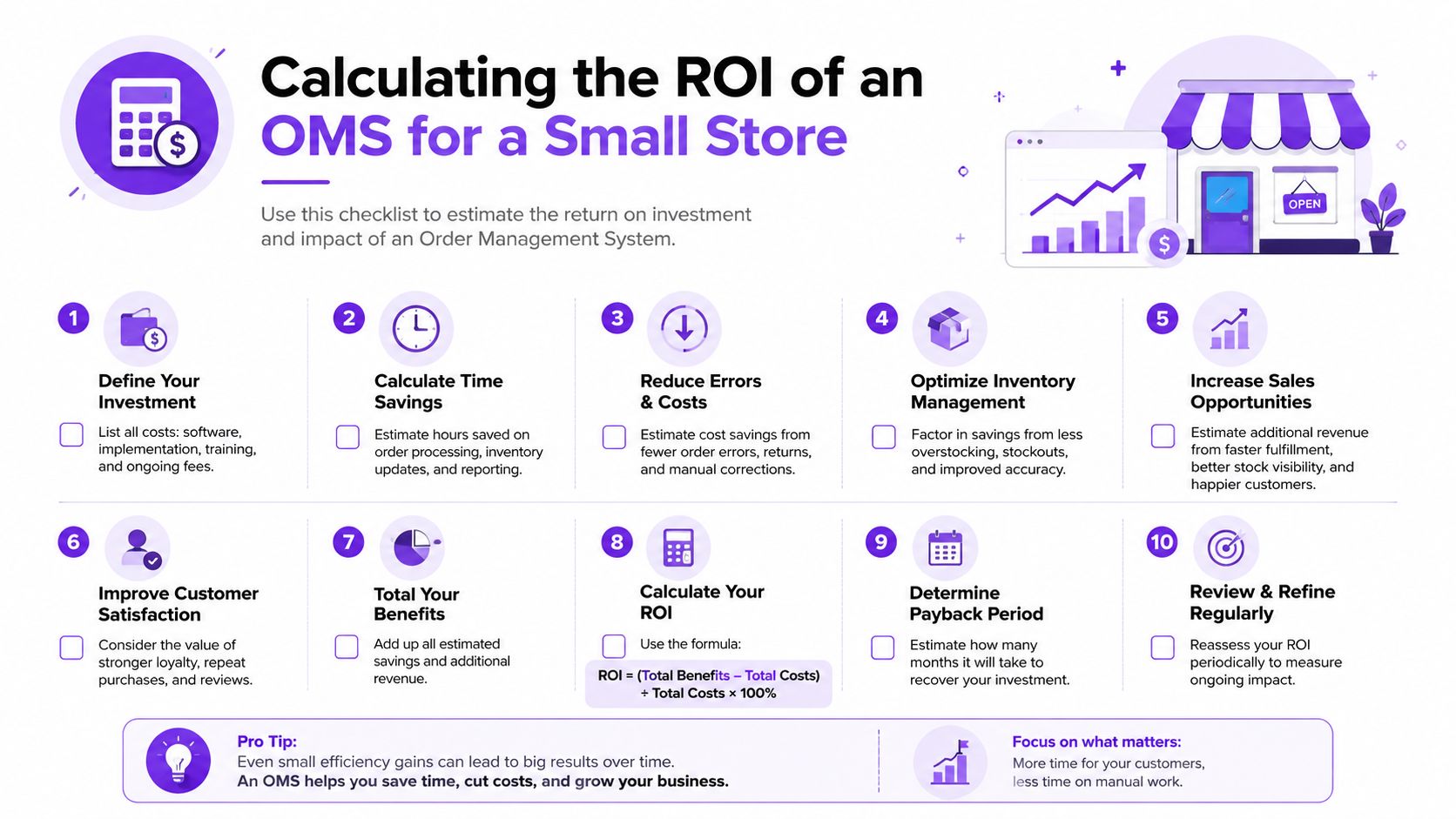
A small store does not need a finance team to prove an OMS is paying for itself. It needs a clear before-and-after view of the work your team is already doing. Start with order accuracy rate, calculated as accurate orders / total orders × 100, and on-time delivery rate, calculated as on-time deliveries / total deliveries × 100. Those two numbers show whether the OMS is cutting mistakes or just moving them into a different queue.
The cleaner gain is labor that disappears from the daily grind. If a staff member no longer has to manually review every restricted destination, that time goes back into shipping, support, or purchasing. The larger savings usually come from cleanup you no longer have to do. One blocked invalid order is cheaper than a refund, a support ticket, and the processing time that follows it.
Build the case around what the OMS removes
A simple ROI view works better than a bloated spreadsheet.
- Labor avoided: manual address reviews, repeated inventory checks, and the time spent reconciling order status.
- Error cost avoided: chargebacks, cancellations, and reshipments that happen when a bad order slips through.
- Process gain: fewer handoffs and less time waiting for someone to confirm whether an order is allowed.
Small WooCommerce stores do not need a giant financial model. They need a ledger that compares what manual screening costs now against what the OMS removes. If your current process depends on one person catching every restricted order, the control is brittle. If the OMS blocks those orders at checkout, the gain shows up in fewer mistakes and less back-office cleanup.
For a direct comparison between manual screening and automated restriction workflows, the true cost of manual order screening vs automated restrictions breaks down why the manual approach burns labor fast. Keep your ROI review tied to your own order mix, not vendor estimates. Even a small store can see the software pay back if compliance errors are chewing up time, refunds, and attention.
Your 30 Day Plan to Put an OMS to Work
The first week should be an audit, not a purchase. List every manual check your team performs before fulfillment, then separate the checks that are operational from the checks that are compliance work. If a person is regularly deciding whether an order is eligible to ship, that belongs in the system, not in someone's memory.
The second step is to shortlist only the tools that can absorb those rules. If you are comparing options, include a full OMS, a lighter WooCommerce-native approach, and a compliance-focused plugin so the trade-offs are visible instead of assumed. Demo only the products that can block invalid orders before checkout and can explain how their rules are maintained over time.
A 30 day rollout map
- Days 1 to 7: document restricted zones, product classes, and the manual review steps that slow checkout and fulfillment.
- Days 8 to 14: test two or three OMS approaches in a staging environment and verify how each one handles rule logic.
- Days 15 to 21: define which order statuses map to WooCommerce, who owns them, and what the team sees when an order is blocked.
- Days 22 to 30: go live, then track the first metric that matters most to your store, usually order accuracy or the number of blocked invalid orders.
The practical advantage of a compliance-first tool is in the control it gives you. Bulk rule creation keeps large catalogs manageable. Scheduled start and expiry dates help you handle temporary restrictions without manual cleanup. Customizable checkout messaging reduces confusion when an order gets blocked, which means fewer support tickets and fewer angry customers asking why the site accepted something it later rejected.
If you need a starting point, Ship Restrict is built for exactly this job, blocking restricted WooCommerce orders before checkout instead of after the damage is done. It handles the kind of granular compliance logic regulated sellers need, and it gives you a cleaner way to protect the checkout flow without turning your staff into full-time rule watchers. Visit Ship Restrict if you want to see how pre-checkout restriction enforcement can fit into your own OMS rollout.
Automate Shipping Compliance
Stop worrying about restricted states. Ship Restrict handles it automatically.

Cody Yurk
Founder and Lead Developer of ShipRestrict, helping e-commerce businesses navigate complex shipping regulations for regulated products. Ecommerce store owner turned developer.
Automate Shipping Compliance
- Block restricted states
- No more cancellations
- Set and forget
3-day free trial · Card required