Firearms Order Fulfillment Automation: Your 2026 Guide
Order fulfillment automation - Boost firearms eCommerce with order fulfillment automation. Integrate WooCommerce & Ship Restrict for compliance, reduced
You're probably dealing with some version of the same bottleneck I see in regulated eCommerce stores all the time. Orders come in fast, but fulfillment still depends on people checking addresses, reviewing product restrictions, confirming transfer details, printing labels, and catching mistakes before a package leaves the building. When volume rises, the process gets slower right when you need it to get tighter.
For a firearms retailer, that tension is worse than it is for a general online store. A shirt order sent to the wrong state is a customer service problem. A restricted item shipped where it shouldn't go can turn into chargebacks, return headaches, carrier issues, and compliance exposure. That's why order fulfillment automation matters here. It's not just about speed. It's about building a process that stays controlled when your staff is busy, tired, or training someone new.
Understanding Order Fulfillment Automation
A good way to think about order fulfillment automation is the difference between one skilled gunsmith building every part by hand and a disciplined production line where each step happens in the right order, with the right checks, every time. The gunsmith still matters. The expertise still matters. But the system removes avoidable variability.
In eCommerce, automation works the same way. It doesn't mean replacing your team with robots. It means your software stack handles repetitive tasks that humans are bad at doing consistently under pressure. That includes syncing inventory, routing orders, generating pick documents, validating shipping options, and stopping orders that fail your rules before they become warehouse work.
Automate Shipping Compliance
Block orders to restricted states automatically. 3-day free trial.
Start Free Trial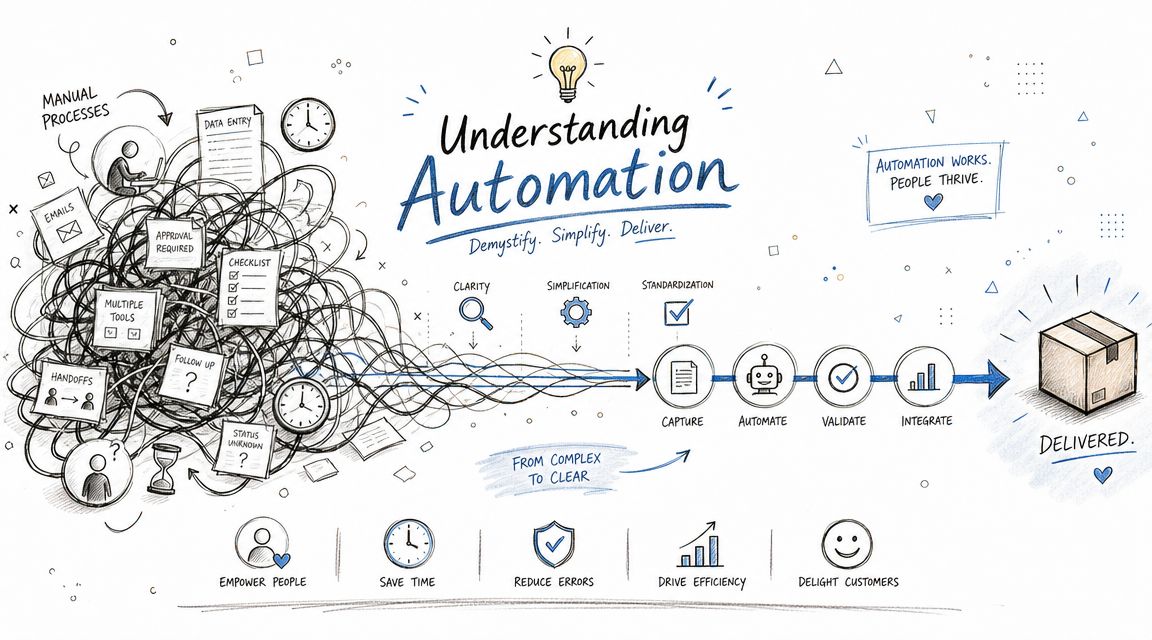
What automation is and what it isn't
Most store owners first think of automation as label printing or carrier rate shopping. That's part of it, but that isn't the whole system.
Real automation connects the platforms you already use so order data moves without re-entry. A customer places an order in WooCommerce. Inventory adjusts automatically. The order gets flagged or cleared according to your rules. Warehouse staff receive the right instructions. Tracking goes back to the customer without someone copying and pasting details between screens.
Bad automation is just manual work disguised by software. If your staff still has to open multiple tabs, compare a shipping address against a spreadsheet, remember state restrictions from memory, and manually hold questionable orders, you haven't automated the risky part. You've just digitized it.
Practical rule: If a step depends on one employee “knowing what to look for,” that step is a weak point.
What changes inside the business
When a firearms retailer automates fulfillment well, the biggest shift is operational discipline. Staff stop spending energy on routine checks and spend it where judgment matters. That includes transfer coordination, customer communication, exception handling, and reviewing edge cases.
That's also why teams that want to boost operational efficiency often start by mapping where data gets touched more than once. Duplicate entry, manual reviews, and informal workarounds usually hide the underlying cost.
A practical example is manual order screening. If someone on your team has to inspect each order for shipping restrictions before release, you've created a queue that gets longer with every sale. That bottleneck gets expensive fast, especially in regulated retail. A closer look at the true cost of manual order screening versus automated restrictions shows why.
The payoff of a cohesive workflow
The stores that get the most from order fulfillment automation don't chase flashy warehouse tech first. They fix the flow of information first. They build one workflow where inventory, checkout, order review, and shipping all speak the same language.
That's what makes automation useful in firearms eCommerce. The point isn't novelty. The point is consistency under regulatory pressure.
Free Shipping Compliance Audit
We'll review your WooCommerce store's shipping compliance for free.
Key Components of an Automated Fulfillment Workflow
Most automated fulfillment systems break down into four connected parts. If even one of them is weak, the whole workflow starts leaking time and creating exceptions.
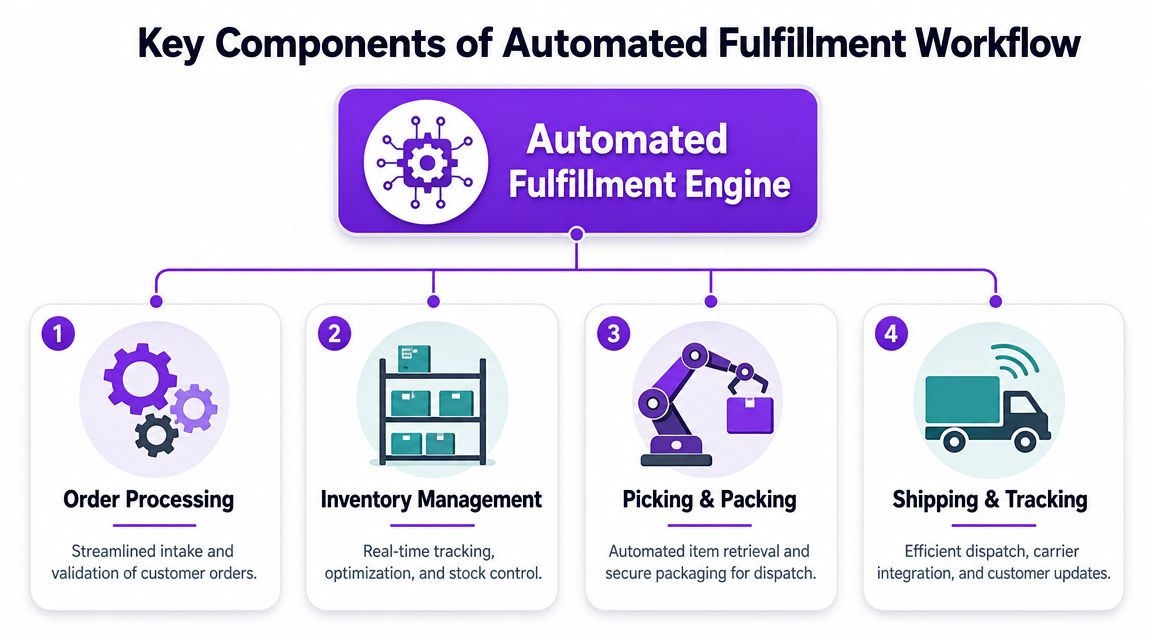
Centralized inventory management
If your store, warehouse, and website don't agree on what's in stock, no amount of downstream automation will save you. Centralized inventory is the control layer that keeps product availability accurate across channels.
For firearms retailers, this matters beyond ordinary oversell issues. A mismatched inventory record can trigger avoidable customer calls, transfer confusion, and rushed fulfillment decisions. The fix is straightforward in principle. One source of inventory truth, updated automatically, with clear product data and no side spreadsheets.
A solid inventory layer should support:
- Channel syncing: Keep your online storefront and in-store availability aligned.
- Product-specific handling: Separate accessories, serialized items, and restricted products in a way your workflow can act on.
- Reservation logic: Prevent staff from accidentally allocating the same unit twice when orders and in-store sales overlap.
Intelligent order processing
The system decides what happens next. An order comes in, and the software applies rules before a person gets involved.
Some orders can move directly to picking. Others should be held for review. Others shouldn't be accepted at all because the destination, product type, or fulfillment method conflicts with your rules.
This is the layer many WooCommerce stores ignore until they start scaling. They treat every order as if it belongs in the same queue. That works for simple retail. It doesn't work well when some items can ship broadly, others require transfer handling, and some combinations should never proceed.
Retailers exploring WooCommerce third-party fulfillment with shipping restrictions usually discover the same thing. Fulfillment only stays manageable when routing rules are defined before orders hit the warehouse.
The best workflows don't ask staff to remember exceptions. They encode the exceptions into the process.
Guided picking and packing
Picking and packing gets messy when warehouse staff rely on order emails, handwritten notes, or tribal knowledge. Automation cleans that up by generating the documents and prompts needed to complete the job consistently.
That can include pick lists, packing slips, bin locations, shipping methods, and handling notes. For a firearms business, this step also needs enough structure to keep restricted and non-restricted products from getting mixed into the wrong dispatch pattern.
A useful workflow here doesn't need to be fancy. It needs to be legible. Staff should know what to pull, where it goes, and whether the order is cleared for shipment without asking a manager.
Automated shipping and compliance
Shipping is where many stores think automation starts. In reality, it's where weak upstream decisions become expensive.
A proper shipping layer selects the right carrier options, creates labels, records tracking, and pushes customer notifications automatically. For regulated products, it also needs compliance logic attached to the destination and item type. If that logic sits outside the workflow, your automation remains incomplete.
Here's the simple test. If your shipping station is the first place someone notices a restriction problem, your process is too late.
Weighing the Benefits and Risks for FFL Retailers
Monday morning gets expensive fast when three held orders, one restricted destination, and a mislabeled package all hit the counter at once. In an FFL operation, automation should reduce that kind of cleanup. If it speeds up the wrong orders or hides missing compliance checks, it creates a bigger problem than the manual process it replaced.
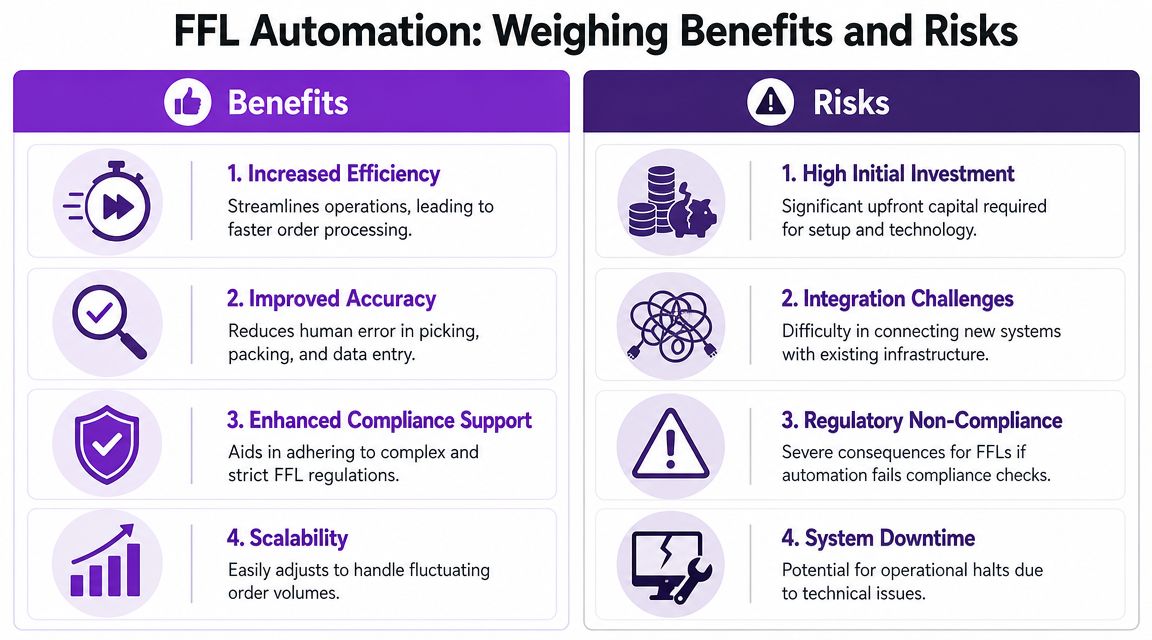
Where automation helps
The clearest benefit is repeatability. Staff do not need to re-decide the same routine steps on every order, and managers spend less time answering preventable questions at the packing bench.
That matters in firearms retail because your team is already balancing product restrictions, destination rules, carrier requirements, and customer expectations. Good automation removes low-value manual checks from that stack. It also reduces fatigue and frees experienced staff for exception handling, which is a practical way to improve operational efficiency.
The gains usually show up in a few places first:
- Cleaner queues: Orders that fail basic rules stop earlier, before staff spend time touching them.
- Better labor use: Counter staff and warehouse staff spend less time chasing approvals, reprinting labels, or correcting preventable entry mistakes.
- Faster status updates: Tracking and order notifications go out on time without relying on someone to remember them.
- More stable peak-season output: Holiday volume and promotion spikes put less pressure on memory and ad hoc decision-making.
The main operational win is simple. Automation makes routine work boring, and boring is good when the cost of a shipping mistake includes returns, customer disputes, wasted labor, and possible compliance exposure.
Where automation creates risk
The risk comes from bad design, not from software alone.
I see the same pattern repeatedly. A store automates checkout, order routing, and label creation, but the rules for restricted items or destination-specific requirements live in a manager's head or in a spreadsheet nobody updates consistently. The system looks efficient until it processes a prohibited order as if it were normal.
That is how stores end up scaling errors. Staff trust the queue because software placed the order there. By the time someone notices the problem, labor has already been spent and the customer may already have shipping notifications.
A slow manual review process is frustrating. A fast process that clears the wrong orders is worse.
Common failure points usually fall into four categories:
| Risk area | What it looks like in practice | What it causes |
|---|---|---|
| Rule gaps | Product, state, or local restrictions are missing from system logic | Orders enter fulfillment that should have been blocked or held |
| Weak integrations | WooCommerce, inventory, and shipping tools do not pass clean item, address, or fulfillment data | Staff build workarounds and start checking orders outside the system |
| Over-automation | Every order follows the same path, including transfers, FFL shipments, and edge cases | High-risk orders move too far before anyone reviews them |
| Poor fallback procedures | Staff do not know how to hold, escalate, or document exceptions when systems fail | Orders stall, get manually pushed through, or lose audit clarity |
The right position for an FFL
FFL retailers get the best results when automation is treated as a control system first and a labor saver second. Routine actions should be automated. Judgment calls, exception handling, and legal edge cases should stay visible and intentional.
That trade-off matters. A general eCommerce store can tolerate a certain amount of workflow sloppiness. A firearms retailer operates under tighter scrutiny, higher consequence, and narrower room for error. Automation has real value here, but only when the workflow reflects firearms-specific shipping compliance from the start.
Integrating Compliance into Your Automated Workflow
Generic fulfillment automation breaks down in regulated retail at one specific point. It assumes every paid order is a valid order to process. In firearms eCommerce, that assumption is dangerous.
The compliance decision has to happen before the order enters your fulfillment queue. If your system waits until packing or label creation to check whether a product can go to a destination, you've already spent labor on an order that may need to be canceled, edited, or escalated. Worse, your team may treat that order as operationally normal because the platform presented it that way.
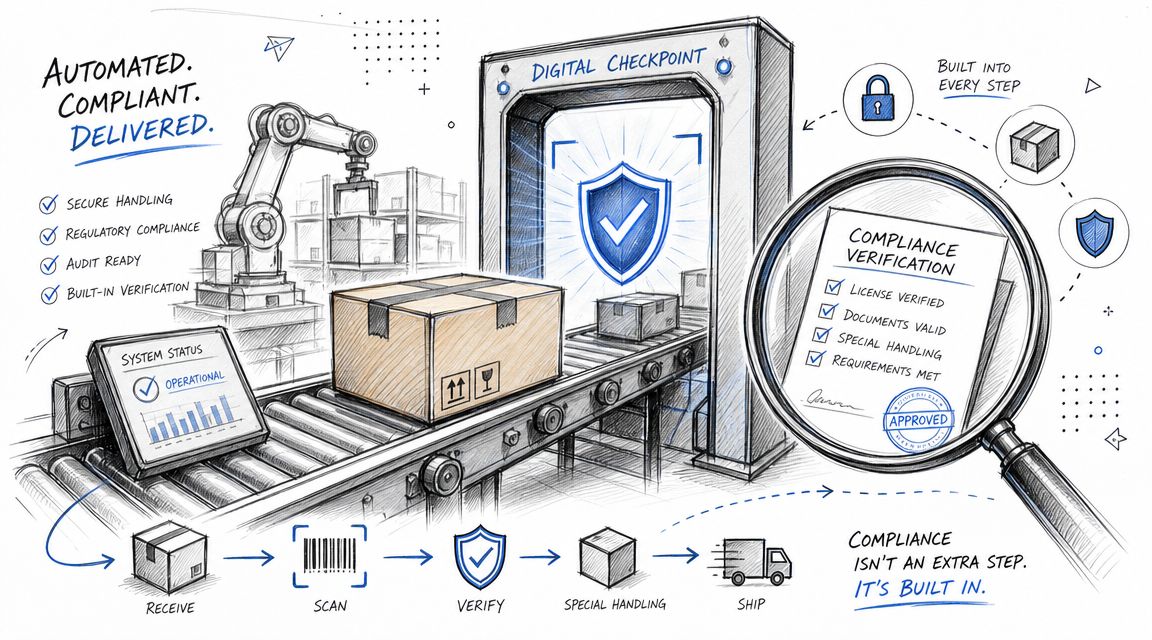
Why checkout is the real control point
For WooCommerce stores, the strongest place to enforce compliance is at or before checkout. That's where the store already knows the customer's address, cart contents, and shipping intent. If your rules engine can evaluate those inputs immediately, the order never becomes warehouse work unless it qualifies.
That matters because most fulfillment teams follow the path the software gives them. If the order lands in the normal queue, staff assume the upstream checks already happened. Good compliance design respects that reality. It doesn't rely on someone at the shipping station to act as the final legal filter every time.
A better workflow looks like this:
- The customer builds the cart with firearms, parts, magazines, or accessories.
- WooCommerce evaluates the destination against your business rules.
- Restricted combinations get blocked or rerouted before payment completes or before the order moves further.
- Only valid orders enter fulfillment, where ordinary automation can do its job.
What a compliance-aware workflow needs
A firearms retailer usually needs more than broad state-level logic. Restrictions can hinge on state, county, city, or ZIP code. They can also depend on the product category, not just the destination. That means your automated workflow needs rule handling that's both granular and maintainable.
The practical requirements are usually these:
- Location-based restrictions: Rules that account for more than just the state field.
- Product-aware logic: A magazine, ammunition item, or accessory may need different handling than another product in the same cart.
- Clear customer messaging: If the store blocks an order, the buyer should see why, in plain language.
- Admin simplicity: Your team must be able to update rules without rebuilding the store.
That last point matters more than most owners expect. Compliance workflows fail when the underlying rules are so awkward to maintain that staff postpone updates or keep relying on memory.
Software should remove judgment from repeatable decisions, not hide the rules from the people responsible for them.
Where WooCommerce usually needs help
WooCommerce is flexible, but flexibility isn't the same thing as compliance readiness. Out of the box, it can support order flow, product management, and carrier integrations. What it doesn't do by itself is enforce firearms-specific shipping restrictions in a way that's operationally reliable for an FFL.
That's why many stores end up with manual review habits layered on top of a modern storefront. The site takes the order. The staff then acts as the compliance plugin. That arrangement may work at low volume, but it doesn't hold up when order counts rise or when different employees interpret the rules differently.
Here's a useful walkthrough that shows what a fulfillment-focused setup can look like in practice:
<iframe width="100%" style="aspect-ratio: 16 / 9;" src="https://www.youtube.com/embed/wujEIvy0Z64" frameborder="0" allow="autoplay; encrypted-media" allowfullscreen></iframe>The operational result
When compliance is built into checkout instead of bolted onto shipping, the whole fulfillment chain gets cleaner. Customer service handles fewer avoidable cancellations. Warehouse staff touch fewer dead-end orders. Managers spend less time reviewing obvious mismatches. Your automation becomes trustworthy because it reflects your legal reality, not just your shipping workflow.
That's the standard firearms retailers should aim for. Not just a faster process. A process that knows when an order should never proceed.
Your Step-by-Step Implementation Roadmap
Most firearms retailers shouldn't automate everything at once. That creates confusion, weak testing, and rushed rule decisions. The better approach is staged implementation, with each phase solving one operational problem cleanly before the next starts.
Phase one audit your current process
Start by documenting what happens from checkout to shipment. Don't map what you think happens. Map what your team does.
Follow one order from start to finish and write down every handoff, every manual check, and every place someone leaves the main system to look something up. Those detours are usually where risk and delay are hiding.
Audit questions worth asking:
- Where does staff re-enter data: If the same information gets typed twice, automation can probably remove that step.
- Which orders require manual review: Separate genuine edge cases from routine checks that should be rule-based.
- When do errors get caught: If problems surface at the label stage, your controls are too late.
- Who owns exceptions: Someone must decide what happens when the system blocks or flags an order.
Phase two select your tech stack
For most small to mid-sized FFL retailers, the practical stack starts with WooCommerce because it's flexible and widely supported. Then you add the systems that govern inventory, shipping, and compliance behavior.
Many businesses make a mistake. They choose tools based on feature lists, not workflow fit. A polished shipping app won't solve a compliance gap. A warehouse tool won't fix checkout logic. Pick tools according to where they sit in the actual order path.
A simple selection standard works well:
| System area | What to look for |
|---|---|
| Store platform | Stable WooCommerce setup with reliable product data |
| Inventory layer | Accurate stock syncing and clean SKU structure |
| Shipping layer | Label creation, tracking flow, and carrier support |
| Compliance layer | Rule-based restriction handling tied to destination and product |
Phase three configure your business rules
This phase determines whether your automation protects the business or just speeds it up.
Your rules need to reflect how you sell and ship. That includes destination-based restrictions, product category restrictions, FFL transfer handling, and any internal review triggers you use for higher-risk orders. Keep the rule set organized by product type and geography so staff can update it without guessing what depends on what.
Examples of useful rule categories include:
- Serialized firearms: Route to transfer workflows instead of standard shipment paths.
- Restricted magazines or accessories: Block checkout or display destination-specific limitations.
- Non-restricted merchandise: Allow standard automated fulfillment with minimal intervention.
- Manual review flags: Hold unusual orders for confirmation rather than forcing them through the normal queue.
Implementation note: If a rule can't be explained clearly in one sentence, simplify it before you automate it.
Phase four test end-to-end scenarios
Don't stop at plugin activation and a quick sample order. Test the entire journey.
Run scenarios that mirror real-world buying behavior. Mixed carts. Borderline addresses. Different shipping destinations. Valid orders. Invalid orders. Orders that should proceed, orders that should be blocked, and orders that should be held. Include your warehouse team and customer service team in this process because they'll spot friction that admins often miss.
Good testing answers practical questions:
- Does the right order get blocked at the right point
- Does the customer see a useful explanation
- Does the warehouse only receive eligible orders
- Can staff resolve exceptions without improvising
Phase five go live and monitor performance
Launch with a narrower scope than you think you need. It's better to automate one clean workflow well than to push every order type through a half-finished system.
Once live, watch for operational signals instead of chasing vanity metrics. Are staff touching fewer orders manually? Are blocked orders being explained clearly to customers? Are exceptions going to the right person quickly? Those answers tell you whether the system is improving daily work.
Use a simple checklist to keep implementation disciplined:
| Phase | Task | Status |
|---|---|---|
| Audit | Document current order flow from checkout to shipment | ☐ |
| Audit | Identify every manual compliance check | ☐ |
| Audit | List recurring fulfillment errors and exception types | ☐ |
| Tech stack | Confirm WooCommerce product and shipping data is clean | ☐ |
| Tech stack | Select inventory, shipping, and compliance tools | ☐ |
| Rules | Define destination-based restrictions by product type | ☐ |
| Rules | Write customer-facing restriction messages | ☐ |
| Rules | Set internal hold and review conditions | ☐ |
| Testing | Run valid order scenarios | ☐ |
| Testing | Run blocked order scenarios | ☐ |
| Testing | Run mixed-cart and edge-case scenarios | ☐ |
| Go live | Train fulfillment and support staff on exception handling | ☐ |
| Go live | Monitor blocked, held, and shipped orders daily | ☐ |
| Go live | Update rules when product mix or restrictions change | ☐ |
Measuring return without fooling yourself
You don't need a complicated dashboard to tell whether order fulfillment automation is working. Start with two simple measurements.
Fulfillment cost per order
Use this basic formula:
| Measure | Simple formula |
|---|---|
| Fulfillment cost per order | Total fulfillment labor and shipping admin cost / Total orders fulfilled |
Track it before and after implementation using the same method each time.
Error rate reduction
Use this formula:
| Measure | Simple formula |
|---|---|
| Error rate | Number of fulfillment or compliance errors / Total orders processed |
If your process was heavily manual, compare your current results against the benchmark in the earlier compliance report and your own internal baseline. The point isn't to impress anyone with spreadsheets. The point is to prove whether the workflow is removing avoidable work and preventing mistakes.
The stores that succeed here don't treat automation like a one-time install. They treat it like a controlled operating system for the business.
Common Questions About Fulfillment Automation
Can I automate compliance first and leave the rest for later
Yes. In many firearms stores, that's the smartest place to start.
Compliance checks usually create the most risk when they stay manual. If you automate restriction enforcement at checkout first, you remove bad-fit orders before they consume warehouse time. Then you can improve inventory syncing, picking flow, and customer notifications in later phases without exposing the business during the transition.
How should an automated system handle FFL to FFL transfers
Treat transfer orders as a separate workflow, not a variation of normal retail shipping.
That means the order should be identified early, routed differently, and kept visible to the team member responsible for transfer coordination. Don't bury transfer logic inside generic fulfillment notes. If the system can't distinguish transfer-dependent orders from ordinary orders, staff will eventually process one with the wrong assumptions.
What's the best way to manage returns
Keep returns structured and narrow. Automated returns work best when the system clearly distinguishes between items that can re-enter ordinary inventory and items that need a manual compliance review or separate intake procedure.
In practice, the return request should capture enough information for your team to route it correctly before anyone authorizes the next step. For firearms retailers, returns often fail when staff tries to use the same procedure for every product category.
Train staff on the exception path first. Routine orders are easy. It's the unusual returns and blocked orders that test the system.
What kind of staff training matters most
Focus on decision handling, not button clicking.
Most employees can learn a new WooCommerce or shipping interface quickly. The bigger issue is whether they understand what to do when the system blocks an order, flags a destination, or sends an order into review. Staff should know which issues they can resolve, which ones need escalation, and how to document the action consistently.
A short training plan should cover:
- Normal flow: What a cleared order looks like and how it moves.
- Exception flow: What happens when an order is blocked, held, or rerouted.
- Customer communication: How to explain restrictions without guessing.
- Rule ownership: Who updates restriction logic and who approves changes.
Will automation remove the need for human review entirely
No, and it shouldn't.
The goal is to remove repetitive review from straightforward orders so your experienced people can focus on exceptions. A healthy system reduces routine checking. It doesn't eliminate judgment where judgment still matters.
If your WooCommerce store sells regulated products, Ship Restrict helps you enforce shipping restrictions before bad orders reach fulfillment. It's built for merchants who need location-based rules, cleaner compliance workflows, and fewer manual checks at checkout.
Automate Shipping Compliance
Stop worrying about restricted states. Ship Restrict handles it automatically.

Cody Yurk
Founder and Lead Developer of ShipRestrict, helping e-commerce businesses navigate complex shipping regulations for regulated products. Ecommerce store owner turned developer.
Automate Shipping Compliance
- Block restricted states
- No more cancellations
- Set and forget
3-day free trial · Card required