Hazmat Shipping Regulations: Your 2026 Compliance Guide
Master US DOT, IATA, IMDG hazmat shipping regulations. Learn to classify, package, & document for 2026 e-commerce compliance & avoid fines.
You might already be selling a regulated product without realizing it.
A cordless accessory with a battery pack. A cleaning chemical. A fragrance item. A canister, aerosol, or refill. On a WooCommerce store, those products can look ordinary. In transit, they can fall under hazmat shipping regulations.
That disconnect is where small e-commerce teams get into trouble. Most owners think compliance starts in the warehouse, when someone prints a label or tapes a box. In practice, risk often starts much earlier, at the moment your store accepts an order it shouldn't have accepted.
For online sellers, especially merchants handling regulated goods, hazmat compliance isn't just a packaging issue. It's a classification issue, a workflow issue, and increasingly a checkout rules issue. If your system lets a restricted order through and your staff catches it later, you still created avoidable exposure.
Automate Shipping Compliance
Block orders to restricted states automatically. 3-day free trial.
Start Free TrialThe Hidden Dangers in Your Inventory
A small seller adds a new SKU to a WooCommerce catalog. It's a practical item, not industrial freight. Maybe it contains a battery, maybe it's an aerosol product, maybe it's a chemical blend sourced from another manufacturer. The listing goes live fast because the product team is focused on conversion, not transport classification.
Then fulfillment hits a wall. The carrier rejects the shipment, or a staff member spots unusual transport language on the paperwork from the supplier. That's often the first time the merchant realizes the item may be regulated for transport.
Hazmat is broader than most stores assume
A lot of e-commerce owners still picture hazmat as drums, acids, or obvious industrial chemicals. That's outdated. The category now reaches into everyday online retail inventory. According to Pitney Bowes on shipping hazardous materials, hazmat can include batteries, compressed gases, certain wastes, marine pollutants, and high-temperature materials, not just classic flammables and corrosives.
That matters because many online catalogs are mixed. You might stock products that are easy to ship beside products whose status depends on chemistry, packaging, or other product-specific details. One version of a SKU may move normally, while another requires a completely different handling process.
Practical rule: If a product has a Safety Data Sheet, don't assume the shipping team can “figure it out later.” Check it before the item becomes a normal part of your order flow.
The risk usually hides in familiar products
The hard part isn't spotting the obviously dangerous item. It's spotting the item that looks routine to merchandising and customer service.
Common examples include:
- Battery-powered products: Tool accessories, electronics, and backup power items can trigger hazmat handling rules.
- Pressurized goods: Compressed-gas products and similar items often need extra review before shipment.
- Chemical-based consumer products: Some cleaners, coatings, or treatment products can be regulated even when they're sold in ordinary retail packaging.
The practical takeaway is simple. Don't classify by product category name alone. Classify by actual transport information.
Why this catches WooCommerce stores off guard
Most small stores move fast. Products are imported, variants are duplicated, and shipping settings are applied in bulk. That works for standard merchandise. It breaks down when a regulated item slips into the catalog and nobody ties product data to shipping restrictions.
Free Shipping Compliance Audit
We'll review your WooCommerce store's shipping compliance for free.
Hazmat compliance has become more data-dependent. If the formulation changes, the battery chemistry changes, or the packaging changes, the shipping status can change too. That's why a merchant who says, “We've always shipped this item,” can still be wrong today.
Decoding the Language of Hazmat Shipping
Hazmat shipping regulations use a shared vocabulary. Once you understand the vocabulary, the rules stop looking random.
At the U.S. level, the framework sits under Title 49 of the Code of Federal Regulations, and the system divides hazardous materials into nine standardized classes. The shipper is legally responsible for proper classification, description, packaging, and labeling, usually starting with the product's Safety Data Sheet, as explained by Hazmat University's overview of 49 CFR and SDS use.
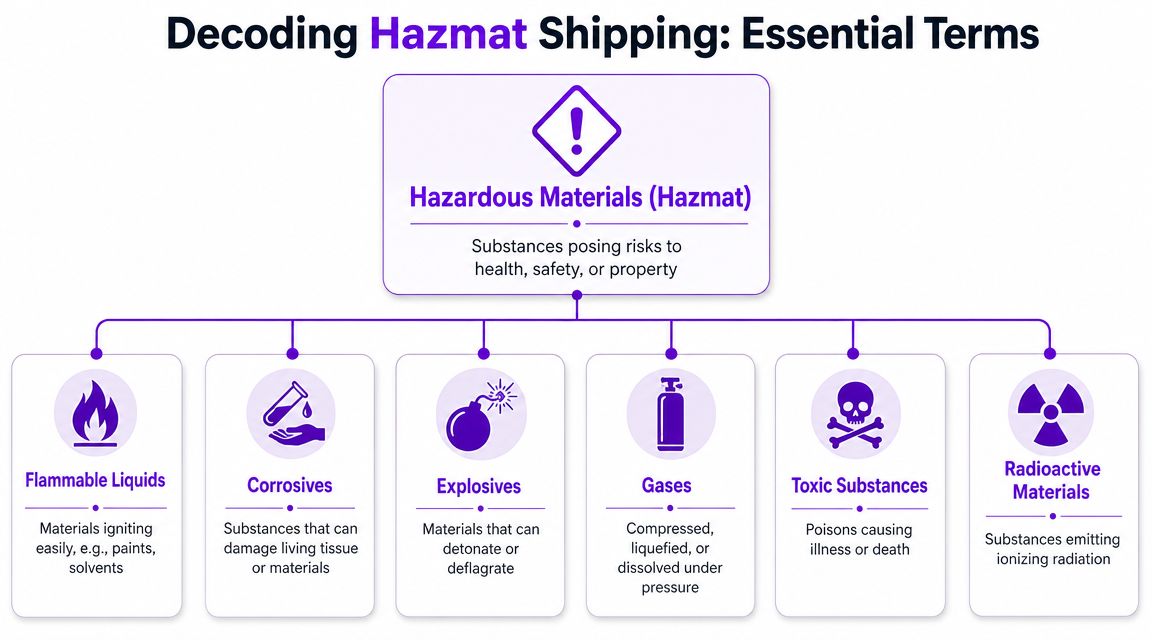
Start with the three identifiers that matter
Think of hazmat classification as a transport identity card. Three pieces usually do the heavy lifting.
- Hazard class: This tells carriers and regulators what type of danger the material presents within the nine-class system.
- UN identification number: This is the standardized transport identifier tied to a specific hazardous material entry.
- Packing group: This indicates relative level of danger for materials where packing groups apply, and it affects packaging choice.
If any one of those is wrong, the rest of the shipment setup tends to drift off course.
The nine classes are the foundation
You don't need to memorize every sub-rule to get the logic. You do need to know that the system is structured. A material isn't “sort of hazmat.” It's identified within a formal classification framework.
Here's the practical way to read that:
| Core term | What it tells you | Why a store owner should care |
|---|---|---|
| Hazard class | The type of transport hazard | Drives labels, handling, and mode restrictions |
| UN number | The specific regulated material entry | Prevents vague or incorrect descriptions |
| Packing group | Relative severity where applicable | Affects approved packaging choices |
Read the SDS like an operations document
Many small businesses treat the SDS as paperwork for the warehouse shelf. That's a mistake. For shipping, the SDS is often the document that tells you whether the product needs hazmat treatment at all.
Look for the transportation section. That's where the product's shipping identity usually starts to come into focus. From there, the job is to match the product to the applicable regulatory table and packaging requirements.
If your team is still deciding hazmat status from the marketing title of a product, you don't have a compliance process. You have a guessing process.
Why this language matters beyond the warehouse
The language of hazmat doesn't stay in a binder. It affects what packaging you buy, which carriers can handle the shipment, which service levels are available, and whether the order should have been accepted in the first place.
For a WooCommerce merchant, that means product data and checkout logic need to speak the same language as shipping compliance. If they don't, your store can keep selling items that operations later has to stop.
The Rule Makers DOT IATA and IMDG
A customer orders nail polish remover at 4:45 p.m. Your store shows next-day air, the order clears, and the warehouse prints the label. An hour later, someone realizes the product can move by ground but not under the air service the customer bought. That is the last-mile compliance gap. Federal hazmat rules exist upstream, but the failure often happens at checkout.
The biggest mistake small e-commerce shippers make is treating hazmat as one rule set. The rule set changes with the mode of transport, and your store logic needs to reflect that.
For U.S. ground transport, the main framework is DOT under 49 CFR. For air shipments, airlines use IATA's Dangerous Goods Regulations. For vessel movements, the governing framework is the IMDG Code. If you need a plain-language primer before digging into the regulations, this guide to understanding hazmat requirements is a useful starting point.
Hazmat regulatory bodies at a glance
| Regulatory Body | Governing Document | Primary Transport Mode | Geographic Scope |
|---|---|---|---|
| DOT | 49 CFR | Ground and U.S. transport oversight | United States |
| IATA | Dangerous Goods Regulations | Air | Global airline practice |
| IMDG | IMDG Code | Sea | International vessel transport |
What changes by mode
Mode changes the compliance job. A package prepared for domestic ground service may need different packaging, marks, documentation, quantity limits, or may be barred entirely once it moves by air or ocean.
Air is where online stores get exposed fastest. A merchant enables expedited shipping across the catalog, assuming the carrier will sort out any exceptions. The carrier will not fix a bad offer made at checkout. If the product is restricted for air, the cleanest control is to stop the customer from choosing that service in the first place.
That is why IATA matters even for a business that mostly ships within the U.S. The question is not just, "Can I ship this product?" The operational question is, "Can I ship this product by this service level, to this destination, in this packaging, through this carrier network?"
Where merchants usually get tripped up
The failure points are usually operational, not theoretical:
- Service-level mismatch: Ground-eligible items still display air options at checkout.
- Carrier-specific acceptance rules: One carrier may accept a shipment under conditions another carrier rejects.
- International oversimplification: A team copies domestic rules into cross-border workflows and misses ocean or airline-specific constraints.
- Manual exception handling: Customer service or warehouse staff are expected to catch restricted orders after payment.
For merchants running WooCommerce, the practical question is not who writes the rulebook. The practical question is how those rulebooks control what the customer can buy. If your product data does not drive shipping-method restrictions, your compliance process starts too late.
A good example is dangerous goods declaration automation for DHL workflows. The larger lesson applies beyond DHL. Once regulated products are in your catalog, document prep, carrier selection, and checkout restrictions need to work together or your team ends up fixing preventable errors one order at a time.
Your Step-by-Step Hazmat Compliance Workflow
A customer orders nail polish remover at 4:50 p.m., pays for next-day air, and your warehouse prints the label before anyone checks whether that service is even allowed. That is the last-mile compliance gap in e-commerce. The federal rules may be correct on paper, but if your WooCommerce checkout lets a non-compliant combination through, the failure has already happened.
Hazmat compliance follows a strict sequence. Get the first call wrong and every later step, from packaging to paperwork to carrier selection, can still be wrong.
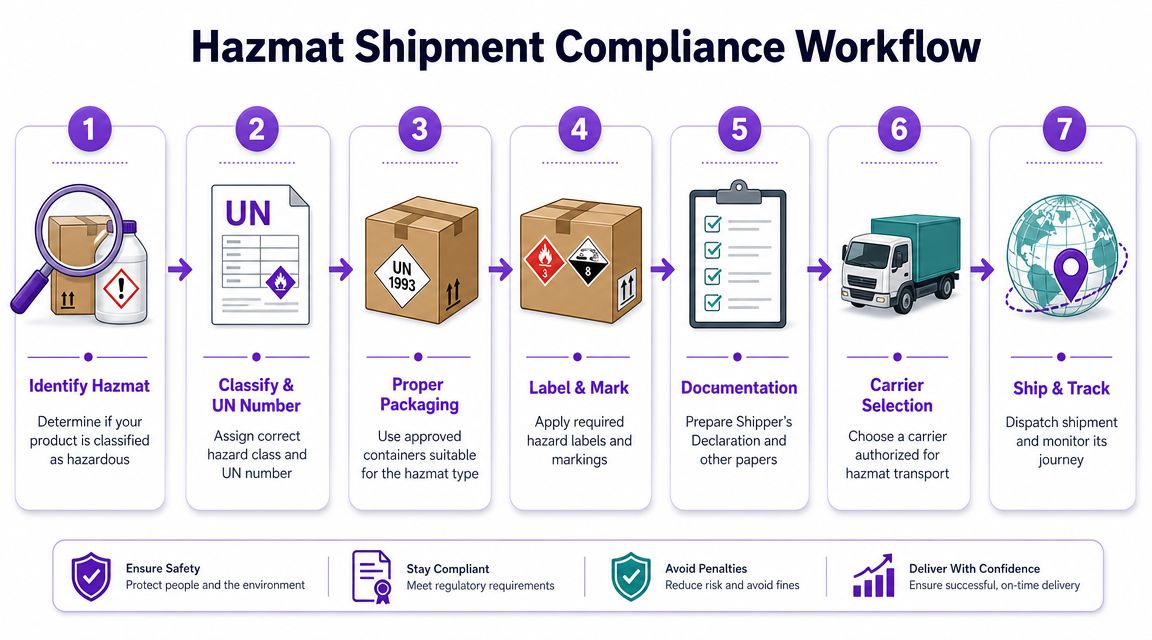
Step 1 through step 2
Start with classification. Pull the SDS and confirm whether the product is regulated for transport. Then identify the shipping description that will control the rest of the job, including the UN number, hazard class, and any packing group if one applies. No one should guess this from a product title, a supplier nickname, or an old warehouse note.
Next comes packaging. The package must be authorized for the material, the quantity, and the mode of transport. A box that feels sturdy is not the same as compliant packaging, and that distinction matters once a carrier audits the shipment or a damaged parcel triggers questions.
Classification also needs to reach your storefront. If a SKU is limited to ground service, your checkout should suppress air options before payment, not after the order drops into the queue. Stores working through UPS hazmat certification and WooCommerce integration guidance usually find the same thing. Carrier approval, package rules, and checkout logic have to match or staff end up cleaning up avoidable exceptions by hand.
To see the sequence visually, this walkthrough is useful:
<iframe width="100%" style="aspect-ratio: 16 / 9;" src="https://www.youtube.com/embed/HkJPx0CmVl8" frameborder="0" allow="autoplay; encrypted-media" allowfullscreen></iframe>Step 3 through step 4
Once classification and packaging are set, handle marking and labeling. The outside of the package has to communicate the material and handling requirements clearly enough for carrier staff and inspectors to act on it. If the label set does not match the actual shipment configuration, the package can be rejected even when the product itself was classified correctly.
Then complete documentation. Shipping papers need the regulated description to match the package and the service being used. In practice, that means checking the identification number, proper shipping name, hazard class, packing group where required, quantity, package count, emergency contact details, and shipper certification before tender.
A warehouse checklist should be short enough to use under pressure:
- Pull the SDS first. Do not start from catalog copy or supplier shorthand.
- Confirm the transport classification. Lock the shipment identity before choosing a box.
- Match the package to the material and mode. Ground and air do not always allow the same setup.
- Apply the correct marks and labels. The package exterior has to match the shipment record.
- Review shipping papers before handoff. Small description errors can stop the load.
Training still matters even when software helps
Software can block bad combinations at checkout, flag restricted destinations, and prompt staff for missing fields. It cannot train judgment. Someone on your team still needs to understand why one SKU can move by ground domestically but cannot go by air or into an international lane under the same settings.
For teams that need broader dangerous goods context, HGV hazardous goods training is a useful reference for how formal transport training is structured.
The practical goal is simple. Classify the item correctly, tie that classification to the order rules in WooCommerce, and stop non-compliant shipments before the customer ever sees a shipping option you cannot legally use.
Common Hazmat Shipping Pitfalls for E-Commerce
A customer orders a cleaning product at 10:42 p.m. The checkout accepts an air service to Alaska, the warehouse picks it the next morning, and only at label creation does someone realize the package cannot move under the service selected. That is how hazmat problems show up in e-commerce. The failure starts at the order screen, then rolls through fulfillment as if the order were valid.
Retail workflows create this gap all the time. Product data gets imported from suppliers with weak descriptions. A shipping manager remembers an old exception and applies it to a current order. Small parcels look harmless on their own, then become a different compliance problem once they are loaded together on one vehicle.
Mistakes that keep repeating online
Undeclared hazmat is still the biggest one. A SKU enters the catalog as a normal consumer product because nobody reviewed the SDS or confirmed the transport classification. The site sells it under standard shipping rules, which means the bad decision is baked into checkout before the warehouse ever touches the box.
Outdated exceptions are another common failure. ORM-D is a good example. That marking has been phased out for years, but some e-commerce teams still treat it like a live shortcut for consumer shipments. It is not. If your store rules, packaging instructions, or staff training still refer to ORM-D, those controls need to be updated.
Aggregation errors also catch smaller merchants by surprise. For highway transport, placarding exceptions for certain Table 2 materials can change once the aggregate gross weight on a single vehicle crosses the threshold described in FMCSA's hazmat placarding guidance. The individual order may look routine. The outbound trailer may not.
Penalties are only part of the cost
Civil penalties under the federal hazmat rules are high enough to hurt a small business, and PHMSA adjusts those penalty amounts over time. The fine is rarely the only damage. Carriers can suspend service. Orders get delayed or canceled. Staff time gets pulled into rework, customer support, and document cleanup.
I have seen small stores focus on the package and miss the order logic that created the bad shipment in the first place. That is the last-mile compliance gap. Broad federal rules from DOT or IATA do not protect you by themselves if your WooCommerce checkout still lets a customer buy a restricted item for the wrong destination or service.
A practical fix is to connect product classification to storefront controls early. Hazmat shipping restrictions in WooCommerce should be treated as a compliance control, not just a cart customization.
What fails in practice
These approaches break down fast:
- Memory-based compliance: one employee knows which SKUs are regulated, but that knowledge is not built into the store.
- Catalog-only warnings: the product page says "ground only," but checkout still offers air services.
- Post-pick review: staff accept and pick the order before anyone checks destination, mode, or quantity limits.
- Carrier catch-all assumptions: the merchant expects UPS, FedEx, or another carrier to stop every non-compliant shipment before tender.
The trade-off is straightforward. Manual controls look cheaper at first. In e-commerce, they usually fail at the exact point where hazmat compliance should be strongest, before the customer completes the order.
Automating Restrictions in WooCommerce
A customer in Alaska adds a lithium battery product to the cart, picks an air service, pays, and gets an order confirmation. Your warehouse catches the problem later. By then, you have already accepted an order you cannot ship as selected.
That is the last-mile compliance gap for e-commerce. DOT and carrier rules matter, but an online store still needs a checkout control that stops a non-compliant order before it becomes a fulfillment problem.
According to DOT's getting started hazmat guidance, hazmat compliance starts with identifying regulated materials and handling them correctly throughout the shipping process. For a WooCommerce store, that means product restrictions cannot live only in a warehouse SOP or a spreadsheet. They need to affect what the customer is allowed to buy, where it can ship, and which methods can appear at checkout.
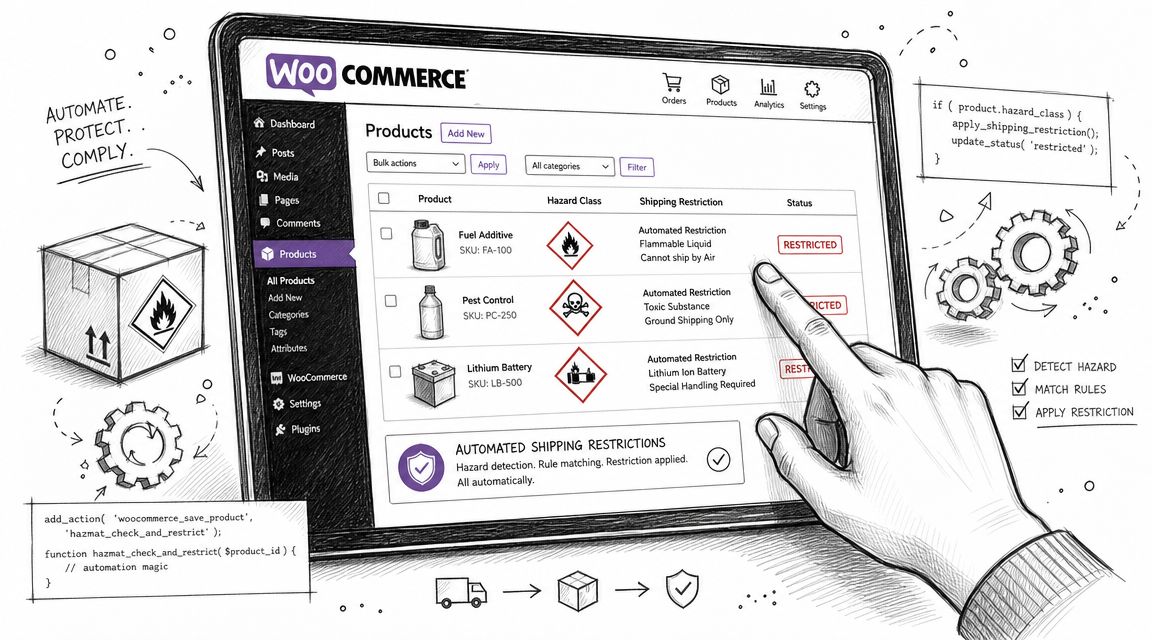
Why manual checks fail at checkout
Small merchants often try to manage hazmat restrictions after the order is placed. Staff review the address, compare the SKU against an internal list, then call the customer if something is wrong.
That process creates delay, refund work, and inconsistency. It also puts the compliance decision in the hands of whoever happens to review the order that day.
The failure points are predictable:
- Destination rules can be narrow: Some restrictions depend on more than country or state. ZIP code, territory status, and service level can matter.
- Checkout happens before human review: The customer sees approval from your store the moment payment goes through.
- Product catalogs shift fast: New variations, bundles, and imported listings can bypass tribal knowledge.
- Warehouse catches issues too late: By pick and pack, the transaction already exists and customer service is now part of the cleanup.
What automation should handle
In WooCommerce, the goal is simple. If an item cannot ship to that destination by that method, the store should stop the order before payment.
A useful control does four jobs well:
- Tie each restricted SKU to shipping rules: Ground only, excluded states, excluded territories, or other conditions tied to that product.
- Check the destination during cart and checkout: Do not wait for a manual review queue.
- Suppress non-compliant methods: If air is not allowed, the customer should never see air as an option.
- Give a clear reason to the shopper: “This item cannot ship to your address” is better than letting the order through and canceling it later.
For a platform-specific example, this guide on managing hazmat shipping restrictions in WooCommerce shows how storefront rules can act as a compliance control, not just a UX feature.
The trade-off for small merchants
Owners usually hesitate for a fair reason. Rules take setup time, and bad rules can block legitimate sales. I advise clients to treat that as a configuration problem, not a reason to keep compliance manual.
The trade-off is upfront rule maintenance versus repeated exception handling. If you sell regulated products across multiple states or service zones, manual review costs more than it looks. Staff time gets pulled into order holds, customer emails, refunds, and internal second-guessing. You still carry the risk that one order slips through.
Training matters here too, especially when the person updating products is not the person shipping them. Teams that learn well from scenarios can use resources built around compliance training use cases to make checkout restrictions, product setup, and fulfillment decisions line up.
A warehouse checklist helps after the order exists. WooCommerce restriction logic helps decide whether the order should exist at all.
Building a Culture of Shipping Compliance
Strong hazmat compliance doesn't come from one smart employee or one good warehouse checklist. It comes from a system people can follow consistently.
That system has a few clear parts. Staff need to understand the language of hazardous materials. Operations needs a repeatable shipment workflow. The business needs to know which rulebook applies to which mode. And online stores need controls at checkout, not just at packout.
What a durable program looks like
The businesses that handle this well usually share the same habits:
- They treat SDS review as operational data: Not as paperwork to file and forget.
- They separate product setup from fulfillment urgency: New SKUs don't go live until shipping status is clear.
- They document decisions: If a product is classified a certain way, the team can show why.
- They train beyond the warehouse: Merchandising, customer service, and developers all affect compliance outcomes.
Training format matters too. If your team learns better from real scenarios than dense manuals, resources built around compliance training use cases can help managers turn abstract rules into repeatable decision-making.
Compliance is a growth function too
Small merchants often treat hazmat shipping regulations as a drag on sales. The better way to view them is as part of operational maturity. A store that knows what it can sell, where it can ship, and how orders should be screened is easier to scale than a store that improvises every exception.
That's especially true in WooCommerce environments, where custom workflows and plugins can either reinforce compliance or undermine it. The practical goal isn't perfection. It's building a store where the product catalog, checkout logic, fulfillment process, and staff training all point in the same direction.
When that happens, compliance stops being a daily scramble. It becomes a managed business function.
If your WooCommerce store sells regulated products, Ship Restrict helps you enforce shipping rules before checkout by blocking restricted orders based on state, county, city, or ZIP-level restrictions. Instead of relying on manual address checks after the sale, you can turn location-based compliance into an automated part of your storefront.
Automate Shipping Compliance
Stop worrying about restricted states. Ship Restrict handles it automatically.

Cody Yurk
Founder and Lead Developer of ShipRestrict, helping e-commerce businesses navigate complex shipping regulations for regulated products. Ecommerce store owner turned developer.
Automate Shipping Compliance
- Block restricted states
- No more cancellations
- Set and forget
3-day free trial · Card required