WooCommerce Conditional Shipping Plugin: A Complete Guide
Learn how a WooCommerce conditional shipping plugin can enforce rules for regulated goods, ensuring compliance and cost control.
A WooCommerce Conditional Shipping plugin is a rule-based tool that blocks shipping methods, payment gateways, or destinations before checkout based on granular criteria. For regulated-product merchants, that isn't optional, it's a compliance necessity.
If you've ever had to stop a sale because a shipment was headed to the wrong jurisdiction, you already know the problem. Manual spreadsheet checks work until they don't, and when they fail, the cost lands on the business, not the plugin.
Many WooCommerce tutorials treat conditional shipping as a simple checkout adjustment. That framing is too soft for firearms, alcohol, CBD, hazmat, and other regulated goods. The primary job is to keep restricted orders from progressing far enough to create a compliance headache, a cancellation, or a customer argument you didn't need.
There's a useful parallel in regulated logistics outside ecommerce. A practical guide on handling evidence bags for UK police shows how process discipline matters when the chain of custody has to be exact, not approximate, and that same mindset belongs in shipping controls too, because the wrong handoff creates problems fast. A good reference point is the UK police evidence bag guide.
Automate Shipping Compliance
Block orders to restricted states automatically. 3-day free trial.
Start Free TrialIf your current setup relies on a couple of shipping zones and some hopeful manual review, it's probably already too loose. The standard alternative is the why generic shipping plugins fail regulated industries argument, and it's not wrong. Generic tools are built to move boxes, not to prevent legal-risk orders from ever reaching payment.
Why Regulated-Product Retailers Need Conditional Shipping Plugins
A firearms retailer can do everything right on sourcing, age checks, and store policy, then lose control at checkout. An order comes through, the address looks normal at first glance, and someone catches too late that the destination violates a jurisdiction rule or a product-specific restriction. The sale gets canceled, support has to explain why, and the customer is stuck dealing with a checkout flow that never should have allowed the order to proceed.
That is where a WooCommerce conditional shipping plugin earns its place. WooCommerce's Conditional Shipping and Payments extension is built to restrict shipping methods, payment gateways, and shipping destinations with rule-based controls, and it separates global restrictions from product-level restrictions (WooCommerce product documentation). Those rules are enforced before checkout finishes, which is the point that matters when the goal is preventing a bad order from ever becoming a manual cleanup job (WooCommerce documentation).
Compliance work starts before payment clears
A lot of WooCommerce guides introduce conditional shipping as a checkout convenience feature. Hide a method, swap a gateway, or steer a buyer toward a different delivery option. That may be enough for ordinary merchandise, but regulated goods need controls that hold up under review.
Practical rule: if the restriction is not checked before payment is completed, it is not doing compliance work yet.
That is why merchants who sell regulated products automate hard. The plugin has to make the decision early, consistently, and without relying on a staff member to catch a bad address after the fact. If your process still depends on a spreadsheet review after the customer has clicked through checkout, the workflow is backwards, and the business carries the risk.
The official WooCommerce docs also show restrictions organized around Payment Gateways, Shipping Methods, and Shipping Destinations (WooCommerce product documentation). That structure matters because conditional shipping has matured into an operations tool that enforces store policy. For stores dealing with regulated inventory, the old generic approach is the problem, which is why the case against broad shipping plugins is laid out clearly in why generic shipping plugins fail regulated industries.
Understanding How Conditional Shipping Rule Engines Work
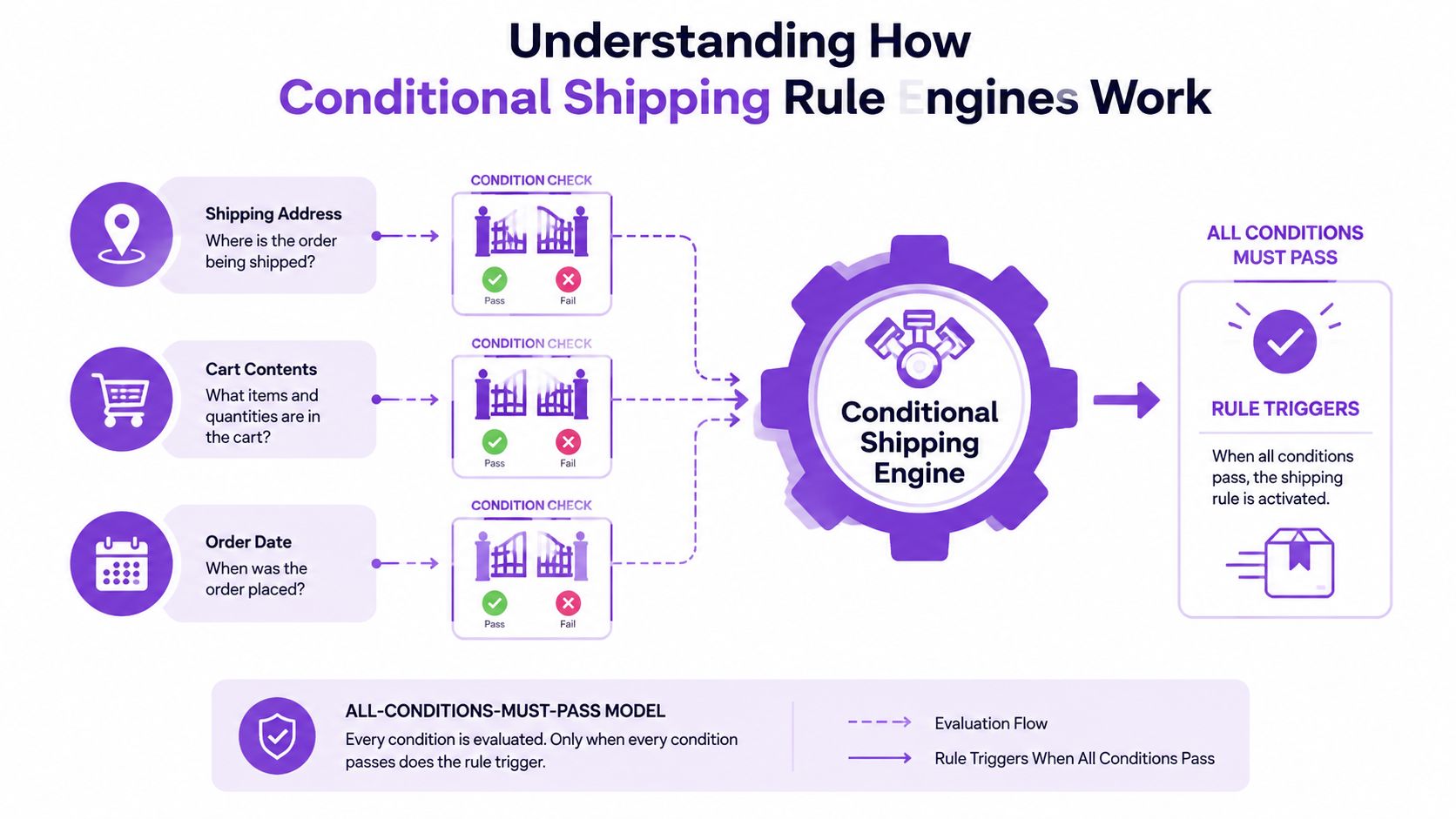
A conditional shipping engine works like a checkpoint with layered gates. The customer reaches checkout, the engine evaluates the defined conditions, and the restriction only activates when every condition passes. WooCommerce's framework uses an all-conditions-must-pass model, which matters because it keeps the logic deterministic instead of fuzzy (WooCommerce documentation).
Global rules and product-level rules are not the same thing
The difference between global and product-level restrictions is where a lot of bad implementations go off the rails. Global restrictions are always evaluated during checkout, while product-level restrictions are only evaluated when the cart contains the restricted products (WooCommerce documentation). That separation matters for regulated goods because not every item in the catalog carries the same legal burden.
Free Shipping Compliance Audit
We'll review your WooCommerce store's shipping compliance for free.
A store that sells both restricted and unrestricted inventory needs that distinction. Apply one blunt rule across the whole catalog and you'll either block too much or let too much through. Neither outcome works when compliance is the reason for the plugin.
Where the rules live in WooCommerce
The configuration is split into dedicated admin sections for Payment Gateways, Shipping Methods, and Shipping Destinations (WooCommerce product documentation). That structure shows how the platform treats the problem. Checkout paths have to be controlled directly, before a restricted order can move forward.
Rule engines also have to handle the kind of address checks that staff used to do by hand. In practice, that means matching terms like PO Box variants, apartment formats, or other flagged address patterns without building a separate rule for every spelling. If the search logic is too loose, bad orders slip through. If it is too strict, legitimate buyers get blocked. That trade-off is why merchants need clear rule governance, not a pile of ad hoc exceptions.
Bulk rule administration helps keep that governance from turning into a mess. A store that manages many restricted products needs a repeatable way to review, update, and retire rules without editing each one from scratch, which is why a documented bulk management workflow is worth having in place.
The goal is to make bad orders impossible to finish.
Granular Rules, Bulk Management, and Performance Considerations
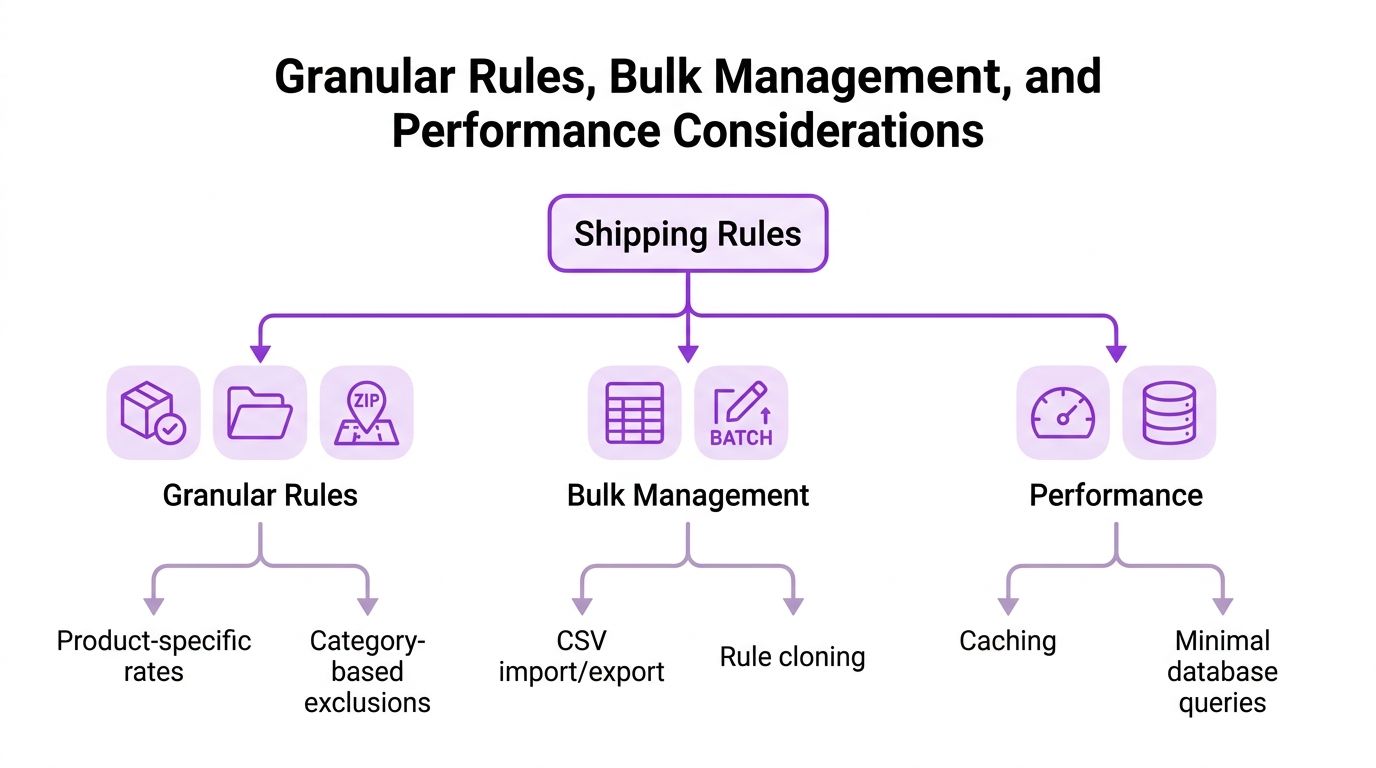
For regulated shipping, a plugin has to handle detail without slowing checkout to a crawl. One third-party plugin listing in the WooCommerce ecosystem shows the category is still active, with 100 active installs, 2,965 total downloads, an added on 2025-05-12 date, and a last updated on 2026-07-08 timeline, which tells you the market is still being maintained rather than frozen (plugin listing). The exact numbers are not the point. The point is that conditional shipping is a maintained category, not a one-off hack.
<iframe width="100%" style="aspect-ratio: 16 / 9;" src="https://www.youtube.com/embed/HM8sSz9xsbg" frameborder="0" allow="autoplay; encrypted-media" allowfullscreen></iframe>What granular rule control should cover
A regulated store does not just need state filters. It needs rules that work at a finer level when the law or carrier policy demands it. The broader WordPress ecosystem shows rule controls for products, total weight, total length, total height, total width, total volume, and order subtotal in a separate WooCommerce conditional shipping plugin listing, which shows the category has moved beyond simple zone blocking.
That level of control only helps if the interface stays manageable. A good setup separates product-specific exclusions from broader shipping rules, so one SKU restriction does not accidentally suppress an entire cart. It also needs room for customer-facing notices, because a clear explanation cuts down on the support tickets that start with “why was my order blocked?”
Bulk management and performance matter just as much
The hard part is not writing one rule. It is managing a lot of them without making a mess. The bulk management guidance matters because compliance work rarely stays small once you start covering multiple jurisdictions or product groups.
For teams that need a more structured pattern, the operational checklist should look like this:
- Granular rules first: Use specific conditions for the exact products or destinations that are restricted, instead of blocking broad regions by default.
- Bulk editing next: Keep imports, exports, or cloning available so rule changes do not turn into a one-by-one clerical job.
- Performance last: Test whether the rules evaluate quickly enough that checkout still feels normal.
A plugin can be technically correct and still be a bad fit if it slows the funnel. Conditional shipping should validate rules quickly, use as few queries as practical, and avoid forcing support to explain laggy checkout behavior to irritated customers.
Implementation Strategies for Firearms Retailers
Moving from spreadsheet checks to automated enforcement is an operations job first. The plugin matters, but the work is turning scattered manual decisions into one rule set that your team can maintain without guesswork. If your approval logic still lives in email threads and side conversations, pull those exceptions into the rules before you trust the system.
Start with the highest-risk restrictions and build outward. Test everything in a controlled environment before it touches live checkout, because a false block and a missed block both create work, and regulated-goods stores do not get to treat either one as a minor inconvenience. A practical compliance reference for that setup is the firearms and ammunition shipping compliance guide for WooCommerce stores.
Keep the rules auditable
Rule governance keeps automation from turning into a black box. Every restriction should have an owner, a reason it exists, and a clear change record. When a customer says an order was blocked for no good reason, you need to identify the rule fast, not dig through old settings and hope the answer is buried somewhere obvious.
That matters even more once the checkout logic starts covering separate product lines, carriers, and destination rules. In a regulated store, you are not just trying to hide one shipping method. You are trying to prove why a rule exists and why it still belongs in the system. That is the difference between a setup that supports compliance work and one that creates more manual review.
Use address logic that stays predictable
Address handling should be strict enough to catch real restrictions, but not so loose that it starts blocking ordinary orders. Exact matches, clear field rules, and consistent formatting are safer than clever workarounds that nobody can explain later.
For example, if you need to exclude a specific address pattern, keep the rule readable and tied to the field you trust. The point is not to write fancy logic. The point is to make sure the same input always produces the same result, which is what keeps support calls and compliance reviews from turning into arguments.
Build the workflow around review, not guesswork
Rules work better when the team knows how they are approved, changed, and checked. A good workflow assigns who can edit restrictions, who reviews them, and how exceptions get logged when they happen. That is where conditional shipping stops being a checkout convenience and becomes part of the compliance process.
If a rule affects a legally sensitive product, treat it like a controlled change, not a casual setting tweak. Keep notes on why the rule exists, what it is supposed to block, and what happens if it fires on the wrong order. That makes future maintenance faster and reduces the risk of repeating the same mistake every time a similar case comes up.
The Hidden Pitfall Rule Sprawl and Over-Blocking
More rules do not automatically mean better compliance. They can also mean more ways to block the wrong customer. As shipping logic gets more granular, the risk shifts from letting a bad order through to over-blocking legitimate orders, and that creates conversion loss, support churn, and a lot of unnecessary anger at checkout.
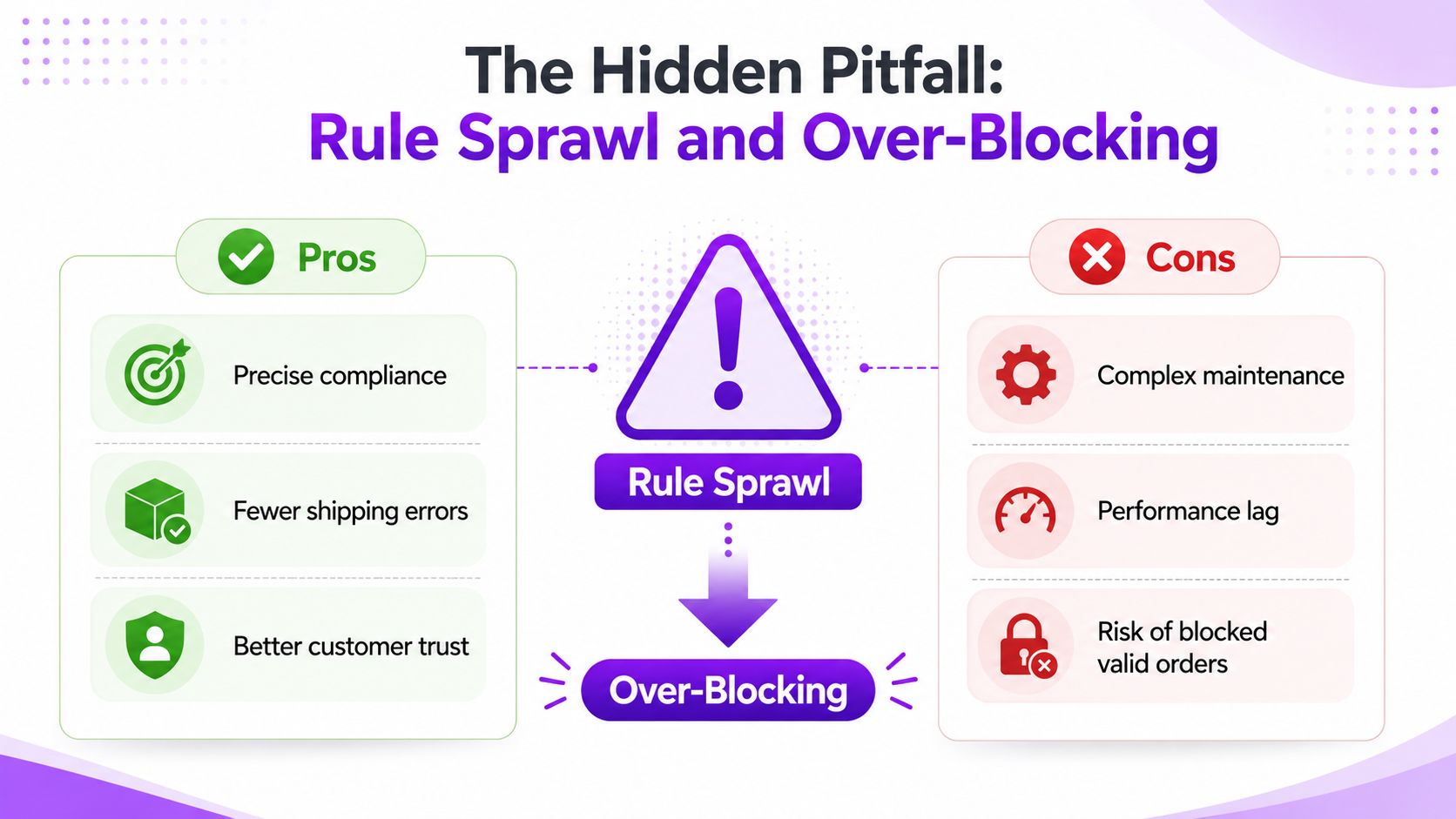
A lot of WooCommerce content still treats conditional shipping like a simple hide-or-show feature. The official plugin material focuses on countries, states, and zip codes, which leaves a real gap for regulated merchants who need tighter jurisdictional control. The gap is both technical and operational, because the docs rarely show how to keep rules current, how to avoid false positives, or how to stop one bad rule from contaminating the whole checkout.
Rule sprawl usually starts innocently
One retailer adds a rule for one product. Another rule gets added for one carrier exception. Then a region needs a special block, and soon the checkout logic turns into a stack of overlapping conditions no one wants to touch.
Staged rollouts help here. Test the rule set somewhere safe, compare the blocked and allowed paths against a real order profile, and keep a change log that names the restriction, the reason, and the date it was updated. Without that, troubleshooting turns into guesswork.
Over-blocking is worse than it looks
A blocked legitimate customer is not just a lost sale. It is also a support conversation, a possible re-order, and a trust problem that did not need to happen. Once the store starts blocking too much, teams often respond by loosening the rules, which creates the opposite risk and puts compliance back in danger.
The discipline here is to audit existing rules regularly and remove duplicates, overlaps, and outdated jurisdiction logic. That matters because the mainstream WooCommerce discussion still frames conditional shipping as checkout convenience, not legal-risk prevention. In regulated ecommerce, that difference is everything.
Compliance Workflows and Ongoing Rule Maintenance
A shipping compliance setup only works if someone owns the process end to end. One person watches for legal or policy changes, another updates the rules, another tests them, and someone else signs off before they go live. That structure matters because shipping restrictions for a regulated store should be handled as operational controls rather than casual admin settings.
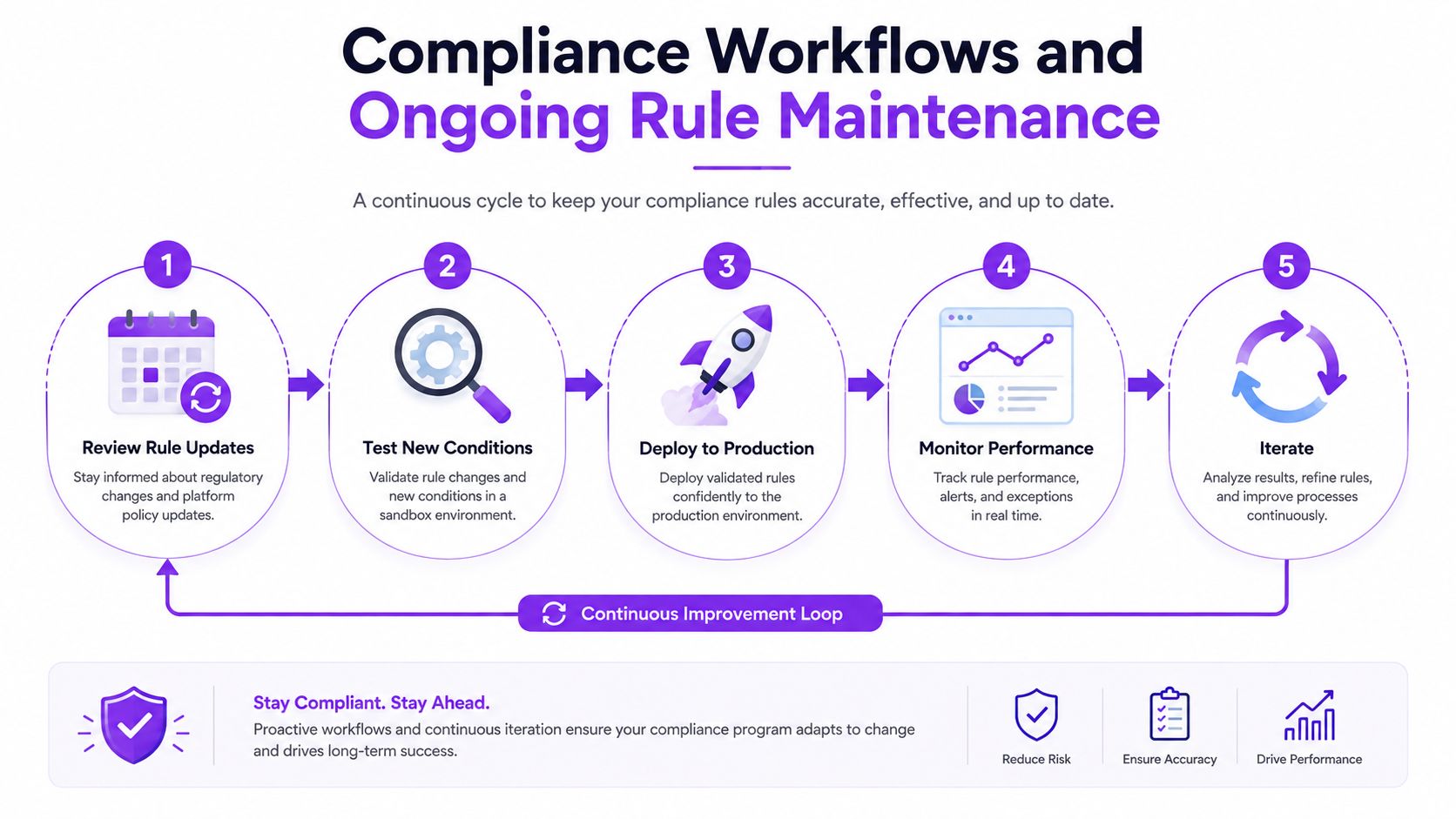
The best workflow is plain and repeatable. Review rule updates, test the new conditions, deploy them to production, watch for false positives, then adjust what needs fixing. That keeps surprises out of live checkout and gives the team a clear way to respond when local restrictions change.
Bulk changes should still be controlled changes
Bulk rule creation saves labor, but speed only helps when the process stays visible. If a mass update goes out without review, one bad entry can block an entire jurisdiction by mistake. For that reason, bulk work has to be treated as governed change, not improvised setup, which is why UFO Performance Marketing's plugin guide is a useful reminder that plugin quality has to be judged by control, not surface-level convenience.
Customer messaging has to match the rule set
When a rule blocks a shipping method, the customer-facing message has to explain the restriction clearly. Otherwise the buyer runs into a dead end and support gets the ticket. Clear messaging cuts confusion, and it also tells the customer the site understands its own rules.
A maintenance process that holds up looks like this:
- Review changes: Check whether any jurisdiction or product restrictions have changed.
- Stage and test: Validate new rules before they touch live checkout.
- Deploy carefully: Roll out the update and watch for unexpected blocks.
- Log the change: Keep a record of what changed and why.
- Adjust quickly: Remove false positives before they pile up.
That is what automation should do. It should reduce manual review, not create a new kind of manual chaos.
Next Steps and Choosing the Right Solution
The right plugin for regulated shipping has to do more than hide a method at checkout. It needs to support granular restrictions, keep rules auditable, and give you a way to manage change without breaking live orders. If a tool only solves convenience, it's not enough for a store that has to think about legal exposure as part of daily operations.
For a broader look at how plugin quality varies across WordPress, the UFO Performance Marketing plugin guide is a decent reminder that not every plugin category carries the same business risk. Conditional shipping for regulated goods is one of those areas where the wrong fit creates a real operational burden, so the decision should be made on control, not marketing copy.
Ship Restrict is one option built for this exact problem set, and it focuses on automating shipping compliance for regulated products through granular restriction rules by state, county, city, or ZIP code. It also aligns with the practical needs covered here, bulk rule creation, performance-optimized validation, scheduled updates, and customer messaging that explains what's going on instead of confusing the buyer.
If your current setup can't confidently handle county- and city-level restrictions, if bulk rule management is still a manual chore, or if you're relying on generic conditional shipping logic to cover legal-risk workflows, it's time to tighten the system. Go evaluate your current rules, compare them against your real compliance requirements, and visit Ship Restrict to see whether your store is set up to stop bad orders before checkout.
Automate Shipping Compliance
Stop worrying about restricted states. Ship Restrict handles it automatically.

Cody Yurk
Founder and Lead Developer of ShipRestrict, helping e-commerce businesses navigate complex shipping regulations for regulated products. Ecommerce store owner turned developer.
Automate Shipping Compliance
- Block restricted states
- No more cancellations
- Set and forget
3-day free trial · Card required