Mastering WooCommerce Shipping by Product Variation
A practical guide to WooCommerce shipping by product variation. Learn to configure complex rules for regulated items and streamline your fulfillment process.
For any online store selling regulated products, managing WooCommerce shipping by product variation isn't just a logistical headache—it's a critical compliance issue. When something as simple as a product's barrel length or magazine capacity determines its legality in a particular state, a one-size-fits-all shipping rule is a massive liability. Getting granular with your shipping rules is the only way to automate compliance and avoid potentially business-ending mistakes.
Why Granular Shipping Rules Are Not Optional
Shipping a standard t-shirt is easy. Shipping regulated goods? That's a completely different ballgame, where the stakes are exponentially higher. A single rifle model might have ten different variations, and a simple attribute like magazine capacity can make it illegal to ship to California or New York.
Trying to catch these nuances with manual checks during fulfillment is a recipe for disaster. It's slow, incredibly prone to human error, and becomes completely unmanageable as your store grows.
This isn't just a hypothetical problem. One wrong shipment can lead to returned packages, frustrated customers, and lost sales. Far more seriously, it can trigger investigations from carriers or even put your business license in jeopardy. The hidden costs of non-compliance pile up fast, turning what looked like a profitable sale into a huge financial and legal mess.
Automate Shipping Compliance
Block orders to restricted states automatically. 3-day free trial.
Start Free TrialThe Overwhelming Complexity of Manual Checks
Let’s put this in perspective. Imagine an online store selling just 30 core products, each with an average of six variations. That creates 180 distinct restriction profiles to manage, each potentially having its own unique legal or carrier rule.
For a firearms retailer, that means manually checking every single order against an ever-changing list of state, county, city, and ZIP code laws. This is where a tool like Ship Restrict becomes essential. It automates those hundreds of variation-specific policies, replacing hours of weekly manual address checks and drastically reducing the risk of costly mis-shipments that attract unwanted scrutiny.
This diagram shows exactly why automation is so critical. Different product variations trigger a complex web of overlapping restrictions across the country.
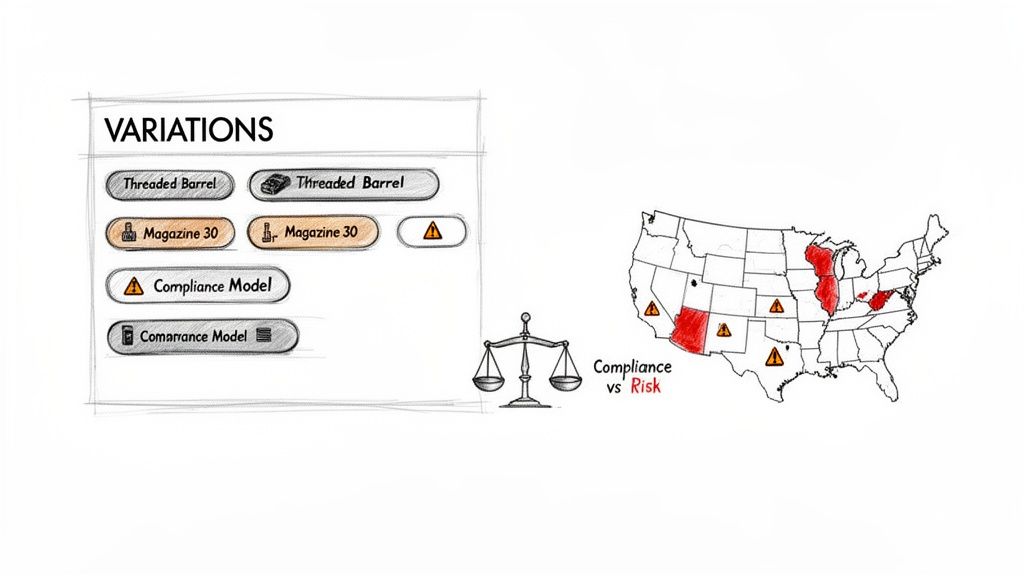
Without an automated system, you're essentially rolling the dice with every single order that contains a variable product.
The table below breaks down the real-world difference between relying on manual checks and implementing an automated solution.
Shipping Challenges for Regulated Product Variations
| Challenge Area | Manual Process Risks | Automated Solution Benefits |
|---|---|---|
| Order Processing Speed | Extremely slow; each order requires cross-referencing spreadsheets or legal databases, creating fulfillment bottlenecks. | Instant validation at checkout; orders are either blocked or approved without any manual intervention. |
| Accuracy & Human Error | High risk of mistakes due to fatigue, outdated information, or misinterpretation of complex, overlapping laws. | 100% consistent rule enforcement; eliminates guesswork and ensures every order is compliant with pre-set rules. |
| Scalability | Not scalable. More orders and more product variations lead to an exponential increase in manual work and risk. | Infinitely scalable; handles thousands of orders and variations without any decline in performance or accuracy. |
| Legal & Financial Risk | Significant exposure to fines, license revocation, and carrier penalties from shipping non-compliant products. | Dramatically reduces legal exposure by preventing illegal sales at the point of purchase, not after the fact. |
| Customer Experience | Poor experience; customers may place orders only to have them canceled later, leading to frustration and lost trust. | Clear, upfront messaging at checkout informs customers why an item can't ship, preventing confusion and cart abandonment. |
As you can see, the manual approach is simply unsustainable for any serious business in a regulated industry.
Shifting from Reactive to Proactive Compliance
Automating WooCommerce shipping by product variation fundamentally changes your business posture from reactive to proactive. Instead of catching mistakes after they've already happened and dealing with the fallout, you build a system that enforces compliance from the very beginning—right at checkout.
By implementing variation-specific shipping rules, you transform compliance from a manual burden into a scalable, automated asset. It’s the foundational step toward building a resilient and legally sound eCommerce operation in a high-stakes industry.
This approach does more than just prevent illegal sales. It vastly improves the customer experience. Shoppers are told immediately if a specific product configuration isn't available for their location, which prevents confusion, abandoned carts, and angry follow-up emails. It's about building a trustworthy, scalable business that operates safely within the law.
Free Shipping Compliance Audit
We'll review your WooCommerce store's shipping compliance for free.
Structuring Your Products for Smart Shipping
Effective shipping restrictions don't start with the rules engine. They start with a rock-solid product structure. Before you can dream of applying a single restriction, your variable products have to be set up with compliance in mind.
Think of it as building a strong foundation before putting up the walls. If your product data is a mess, the whole system becomes unstable, no matter how powerful your tools are. The goal here is to create a clean, organized catalog where you can easily target specific variations for restriction. This means creating attributes that map directly to your compliance needs, not just generic options like "color" or "size."
Creating Compliance-Focused Attributes
First things first: you need to define the product attributes that actually trigger your shipping restrictions. These are the specific characteristics that make an item legal in one state but illegal in another.
Here are a few real-world examples I see all the time:
- Magazine Capacity: Options like "10-Round," "15-Round," and "30-Round" are essential for anyone selling firearm accessories.
- Barrel Features: Attributes such as "Threaded Barrel" vs. "Non-Threaded Barrel" are common restriction points.
- Compliance Model: A simple "State Compliant" vs. "Standard Model" attribute can make it incredibly easy to manage rules for entire product lines.
Once you’ve created these attributes in WooCommerce, you apply them to your variable products and generate all the possible combinations. This step is critical because it ensures every unique configuration of your product exists as a distinct variation that your shipping rules can latch onto.
The most common mistake store owners make is trying to build complex rules on top of a disorganized product catalog. By creating clean, compliance-focused attributes from the start, you make your rule-building process exponentially simpler and more reliable.
The Non-Negotiable Role of Unique SKUs
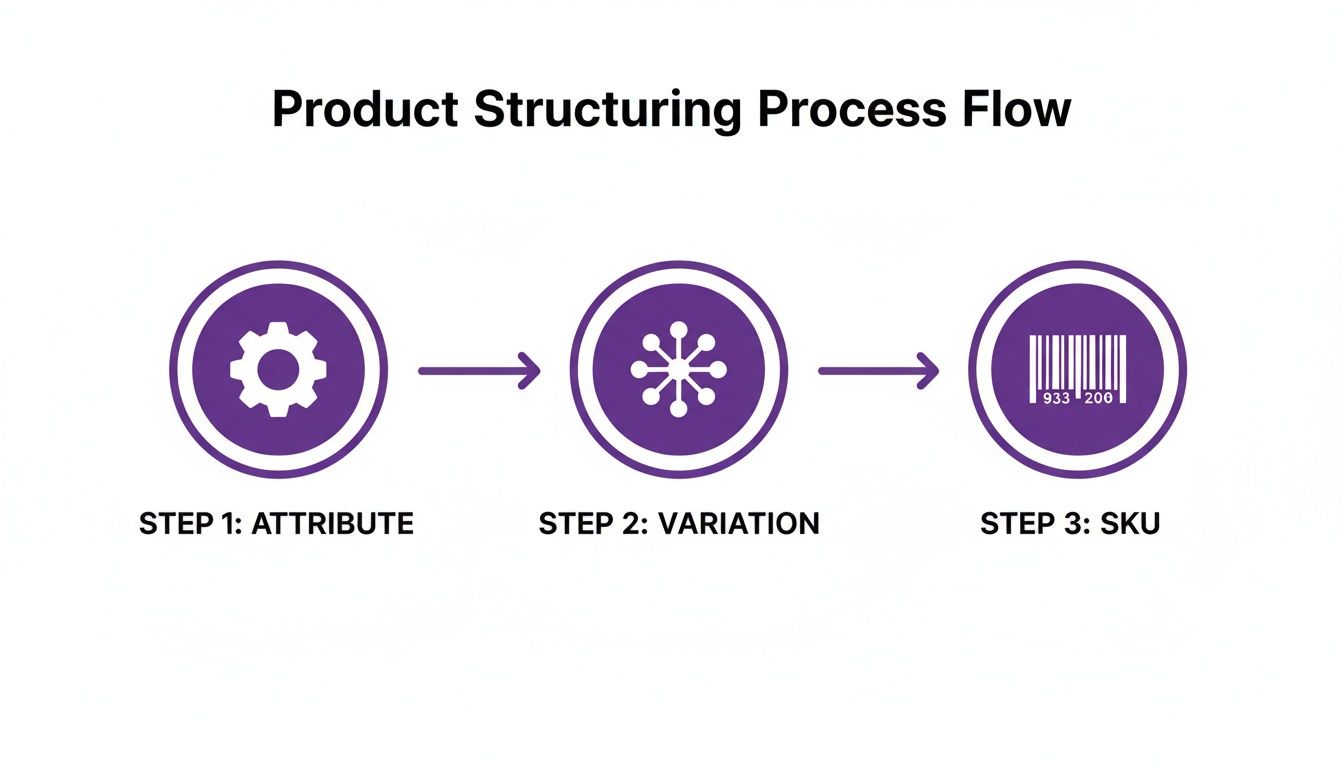
This part is not optional. Assigning a unique SKU (Stock Keeping Unit) to every single product variation is absolutely essential for precise rule targeting. The SKU acts as a unique identifier, an anchor that your shipping plugin uses to pinpoint exactly which item in the cart needs a restriction check.
A clear SKU naming convention also makes your life easier when managing inventory. For instance, a rifle SKU might be RIFLE-X-TB-30R, which could tell you at a glance it's a specific model with a threaded barrel and a 30-round magazine. This organized approach is a core principle of optimizing your product assortment with SKU rationalization, a practice that helps manage complex inventories without losing your mind.
This screenshot shows exactly where you'll manage these attributes and variations within the WooCommerce product data settings.
Notice how each variation can have its own SKU, price, and stock status. This granular control is exactly what you need to manage every configuration you sell.
Using Categories and Tags for Bulk Management
Look, creating a rule for every single non-compliant variation would be an absolute nightmare. That's where categories and tags become your best friends for working efficiently.
By applying a specific tag—like high-capacity—to all variations with magazines over 10 rounds, you can create a single rule that restricts this entire group of products. Done.
This strategy is far more scalable than trying to manage rules product by product. For a deeper dive on this, understanding the difference between standard https://shiprestrict.com/blog/shipping-restrictions/woo-commerce-shipping-classes-vs-restriction-plugins-when-you-need-more can give you more context for building a truly robust system. Ultimately, this approach lets you manage hundreds of variations with just a handful of well-structured rules, saving you countless hours of tedious configuration.
Building and Implementing Your Restriction Rules
Once your product catalog is dialed in, it's time to turn all that careful structuring into automated, real-world shipping rules. This is where the rubber meets the road—connecting your product variations to the specific geographic areas where they can and can't go.
The whole game is about creating conditions that tell WooCommerce when to show or hide shipping options at checkout. A solid tool like Ship Restrict lets you layer these conditions, combining product data with customer location to make an instant, compliant decision. Let's walk through a couple of common, practical examples.
Creating a State-Level Variation Rule
Let's start with a classic scenario. Imagine you sell a rifle with two variations: one with a standard barrel and another with a "Threaded Barrel". That threaded barrel model is illegal to ship to California.
To automate this, you'll build a rule with some simple, powerful logic:
- The "What": The rule applies if the cart contains a specific Product Variation.
- The "Which One": You'll target the exact SKU you assigned earlier, like
RIFLE-X-TB-30R. - The "Where": The rule only kicks in if the customer's shipping address is in the State of California.
When a shopper with a California address tries to check out with that specific variation, all three conditions are met. The rule activates, hides all shipping methods, and effectively blocks the non-compliant sale before it can even be placed. It’s that straightforward.
This is why getting your product structure right from the beginning is so critical. The SKUs you create become the direct targets for your rules.
Tackling Complex ZIP Code Restrictions
Now for a more granular challenge. Some cities have local ordinances that are even stricter than state law. Maybe you sell magazines, and your "Standard Capacity Magazine" variations are only restricted in a handful of ZIP codes within a single city, not the entire state.
Instead of a broad state-level rule, you can get surgical by targeting specific postal codes.
- Condition 1: Cart contains product variations with the tag
high-capacity. - Condition 2: The shipping ZIP Code is one of the following:
90210,90211, or90212.
This example also highlights the power of using tags for managing rules at scale. Rather than listing out dozens of individual magazine SKUs, you just apply the rule to the high-capacity tag. Now, every single product variation you've labeled that way is automatically covered.
Pro-Tip: For blocking entire regions without mind-numbing data entry, use wildcard ZIP codes. If you need to restrict a whole area starting with
902, just enter902**as your condition. This one simple entry can cover hundreds of individual ZIP codes, saving you an incredible amount of time.
The key takeaway is how you can stack multiple conditions—product, variation, category, location—to create incredibly precise and powerful restrictions that run on autopilot.
Automating these rules prevents logistical headaches before they happen. Even WooCommerce’s own guidance notes that incorrect declarations or prohibited items can make a shipment “unacceptable” by carriers like DHL. By linking your variation attributes directly to your restriction logic, you can head off a huge number of carrier refusals, failed labels, and costly returns.
A robust tool lets you go far beyond just products and locations. You can explore many other powerful conditions by checking out the different restriction types available for your rules.
Testing Your Rules and Guiding Your Customers
Look, creating a rule in the backend is the easy part. The real test is making sure it actually works in the wild, under real-world conditions. Before you let a single customer interact with your new setup, you have to rigorously test every single condition. You need to be confident that your WooCommerce shipping rules work flawlessly.
But it's not just about functionality. How you communicate these restrictions to your shoppers is just as critical.
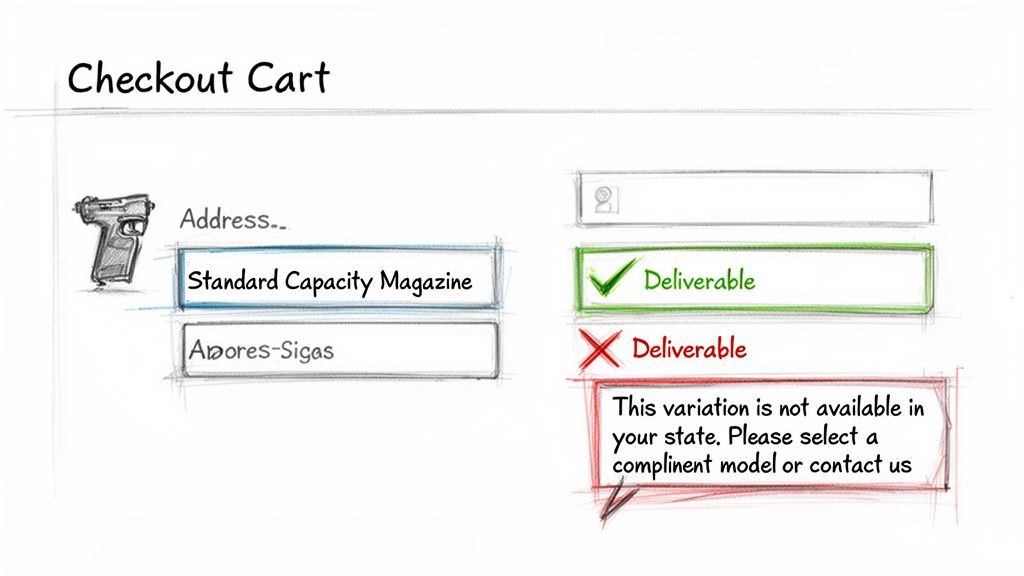
A clunky or confusing checkout is a guaranteed way to lose a sale. If a customer just sees a vague error like, "No shipping options were found for your address," they're not going to debug it for you. They’re just going to leave and probably never come back. Your goal is to turn a potential point of frustration into a moment of clarity.
A Practical Testing Checklist
Don't just click "save" and assume your rules are working. You need to put on your customer hat and walk through the entire checkout process from different perspectives. This is the only way to catch any snags.
Here’s a quick rundown of the scenarios you absolutely must test:
- Restricted Variation: Add a non-compliant variation to the cart (e.g., a "Threaded Barrel" model) and try to ship it to a restricted state like California. Your expected result? All shipping methods should vanish, and your custom message should pop up.
- Compliant Variation: Now try adding a compliant variation (like a "Standard Barrel" model) to the cart using that same California address. The expected result here is that shipping methods should appear as normal.
- Mixed Cart: What happens when a customer has both a restricted and a compliant item in their cart? Test it. Add both to the cart and use a restricted address. The rule should still trigger, blocking the shipment because of that one non-compliant item.
- Valid Location: Finally, test a restricted item with a valid, non-restricted shipping address. Everything should proceed without a hitch.
Running through these tests ensures your rules aren't too broad and you're not accidentally blocking legitimate sales.
Crafting Clear Customer Messages
The default error messages in WooCommerce just weren't built for these kinds of compliance scenarios. They're generic, unhelpful, and frankly, a little cold. This is where a plugin like Ship Restrict really shines—it lets you replace those generic notices with custom messages that actually guide the customer.
The difference between a lost sale and a happy customer often comes down to communication. A clear, helpful message explains the "why" behind a restriction, preserves trust, and can even guide the shopper toward a compliant alternative.
Instead of hitting them with a dead end, craft messages that offer a path forward.
Poor Message:
- "This item cannot be shipped to your location."
Effective Message:
- "The 'Threaded Barrel' rifle variation cannot be shipped to California. Please select the 'Standard Barrel' model or contact us for state-compliant options."
See the difference? This simple change completely transforms the experience. You've explained the problem, offered an immediate solution, and even invited them to contact your support team. This level of transparency is essential for building long-term customer loyalty, especially in regulated industries where shoppers often understand the need for compliance checks.
Advanced Strategies for Complex Scenarios
<iframe width="100%" style="aspect-ratio: 16 / 9;" src="https://www.youtube.com/embed/9grxkwNm-zQ" frameborder="0" allow="autoplay; encrypted-media" allowfullscreen></iframe>Once you get your foundational rules dialed in, you can start layering in more sophisticated logic. Basic restrictions are great for staying compliant, but advanced strategies are what truly create an intelligent checkout that anticipates both your needs and your customer’s.
One of the most powerful techniques is combining your restriction rules with standard WooCommerce shipping classes. This is the key to managing not just if a variation can ship, but how much it costs to ship. It’s the perfect solution for products with oversized or heavy variations that carriers hit you with extra fees for.
Think of it this way: you sell a rifle that has a variation including a large, heavy scope. That specific combo pushes the package into a higher shipping cost bracket. All you have to do is assign that single variation to a "Bulky Item" shipping class. Then, you can configure your shipping methods to tack on a surcharge only when that specific variation is in the cart.
This keeps your shipping rates dead-on accurate and protects your margins without overcharging customers who just want the standard, lighter versions.
Using Code for a Better User Experience
For anyone comfortable with a bit of code, you can take control of the entire shopping journey. Why wait until checkout to block a purchase? A much slicker move is to prevent a customer from even adding a restricted variation to their cart in the first place.
This is non-negotiable for firearms sellers, where variations might require special handling, adult signatures, or fall under state-specific bans. Here, granular rules aren't just about pricing; they're about tying your product data directly to your compliance outcomes by restricting sales by ZIP code, state, or country. Top stores are already managing this level of complexity to stay ahead, a trend you can see reflected in the broader WooCommerce market data.
Picture a customer from a restricted state landing on your product page. With a simple PHP snippet, you can programmatically hide or disable the specific non-compliant variations right in the dropdown selector.
This is how you create a frictionless front-end experience. The customer never sees an option they can't legally buy, which kills confusion and prevents the frustration of a blocked checkout.
Here’s a conceptual example of what that logic looks like.
// Note: This is a conceptual snippet and requires a developer to implement. add_filter( 'woocommerce_variation_is_purchasable', 'hide_variation_based_on_location', 10, 2 );
function hide_variation_based_on_location( $is_purchasable, $variation ) { // Get the customer's location from their session. $customer_state = WC()->customer->get_shipping_state();
// Check if the variation SKU is restricted for that state.
if ( 'CA' === $customer_state && 'RIFLE-X-TB-30R' === $variation->get_sku() ) {
    return false; // This hides the 'Add to Cart' button for this variation.
}

return $is_purchasable;
}
By putting custom logic like this to work, you tailor the shopping experience to each user’s location, making sure they only ever see products they can legally and successfully purchase.
Common Questions Answered
When you're dealing with something as precise as shipping rules for product variations, a few tricky questions always come up. Here are the answers to some of the most common ones we hear from store owners.
Can I Restrict a Whole Category of Variations at Once?
Yes, and you absolutely should if you want to stay sane. Instead of building individual rules for every single SKU that can't ship to California, for instance, a much smarter approach is to use tags.
Apply a specific product tag (like high-capacity or ca-restricted) to all the variations that fall under that restriction. Then, you can build a single, powerful rule that targets any item with that tag. This lets you manage shipping compliance across dozens or even hundreds of products all at once. It's a lifesaver for larger catalogs.
What Happens if a Customer Has Mixed Items in Their Cart?
A properly configured rule will block the entire order from completing checkout. The system doesn't just look at one item; it evaluates the entire cart against your rules.
If it finds a single non-compliant variation destined for a restricted ZIP code or state, it will prevent the checkout from proceeding. The customer will typically see a message explaining the issue and will need to remove that specific item before they can complete their purchase of the other goods.
The whole point of these rules is to ensure 100% compliance. It’s always better to block a mixed cart and have the customer remove the one problem item than it is to risk letting a non-compliant product slip through the cracks.
Can Rules Apply to More Than Just Location?
Definitely. While shipping location is the most common reason for these kinds of rules, it's far from the only one. A powerful plugin gives you the flexibility to build rules based on all sorts of other factors.
You could, for instance, restrict certain variations based on:
- The customer’s user role (e.g., wholesale vs. retail)
- The total weight of the cart
- The quantity of a specific item being ordered
This kind of flexibility allows you to solve complex logistical challenges that go way beyond simple geographic restrictions, making your WooCommerce shipping by product variation setup truly robust.
Ready to automate your compliance and eliminate shipping errors for good? Ship Restrict provides the powerful, variation-aware tools you need to build a scalable and legally sound eCommerce operation. Get Ship Restrict and start building smarter shipping rules today!
Automate Shipping Compliance
Stop worrying about restricted states. Ship Restrict handles it automatically.

Cody Yurk
Founder and Lead Developer of ShipRestrict, helping e-commerce businesses navigate complex shipping regulations for regulated products. Ecommerce store owner turned developer.
Automate Shipping Compliance
- Block restricted states
- No more cancellations
- Set and forget
3-day free trial · Card required