Shopify Shipping Restrictions: A Complete Guide 2026
Master Shopify shipping restrictions for regulated products. Learn native limitations and how to block non-compliant orders before payment.
You've got a checkout that looks fine in admin, then a restricted order slips through, payment clears, and now someone on ops has to decide whether to cancel, refund, or escalate a case that should never have existed. That's the cost behind Shopify shipping restrictions. The platform can help you shape where products go, but the timing of enforcement matters just as much as the rule itself.
For regulated catalogs, the problem usually isn't whether a restriction exists. It's whether the restriction stops the order before payment or only after a human spots it. That gap is where chargebacks, customer confusion, and compliance cleanup start piling up.
The Hidden Cost of Late Enforcement
A common failure looks harmless at first. A shopper places an order for a restricted SKU, checkout completes, and the order lands in the queue. Only then does someone notice the destination, the product mix, or the local rule that should have blocked the sale.
That's the point where the workflow turns expensive. The team has to reverse payment, explain the cancellation, document the issue, and often answer the same question from the customer more than once. If the category is regulated, the problem isn't just wasted labor. It's that the order was accepted at a stage where the business had already signaled approval.
Automate Shipping Compliance
Block orders to restricted states automatically. 3-day free trial.
Start Free TrialWhy the timing gap hurts more than the rule gap
Shopify's own community guidance points merchants toward shipping profiles and zones, which are useful, but they're still configuration tools, not a universal compliance gate. For regulated goods, that difference matters because the business needs the restriction to fire while the customer is still shopping, not after the order hits the back office. Shopify's help docs also show that international shipping can require destination-specific identifiers such as Spain's NIF/DNI and Taiwan's National ID Number, which reinforces the broader point that shipping logic often depends on destination-sensitive rules rather than a single global policy (Shopify international shipping considerations).
Practical rule: if a restriction only shows up after payment, it's not a compliance control, it's a cleanup task.
That difference is easy to miss until a team is dealing with repeated cancellations. A merchant can technically “restrict shipping” and still be too late in the order flow to avoid support work and customer frustration. In regulated categories, late enforcement also creates a messy paper trail because the business has to prove it acted after the fact instead of preventing the sale up front.
The operational lesson is simple. A restriction that works in theory but activates after payment doesn't remove risk, it moves risk downstream. For state, ZIP, or product-specific rules, the best implementation is the one that prevents non-compliant orders from ever becoming completed orders.
Understanding Shopify's Native Shipping Architecture
Shopify's shipping model is built around shipping profiles, zones, and rates. Merchants assign products to a profile, define where that profile can ship, and then set the rates customers see for those destinations. That structure works well when the rule is broad, such as “this product ships to these regions and not others.”
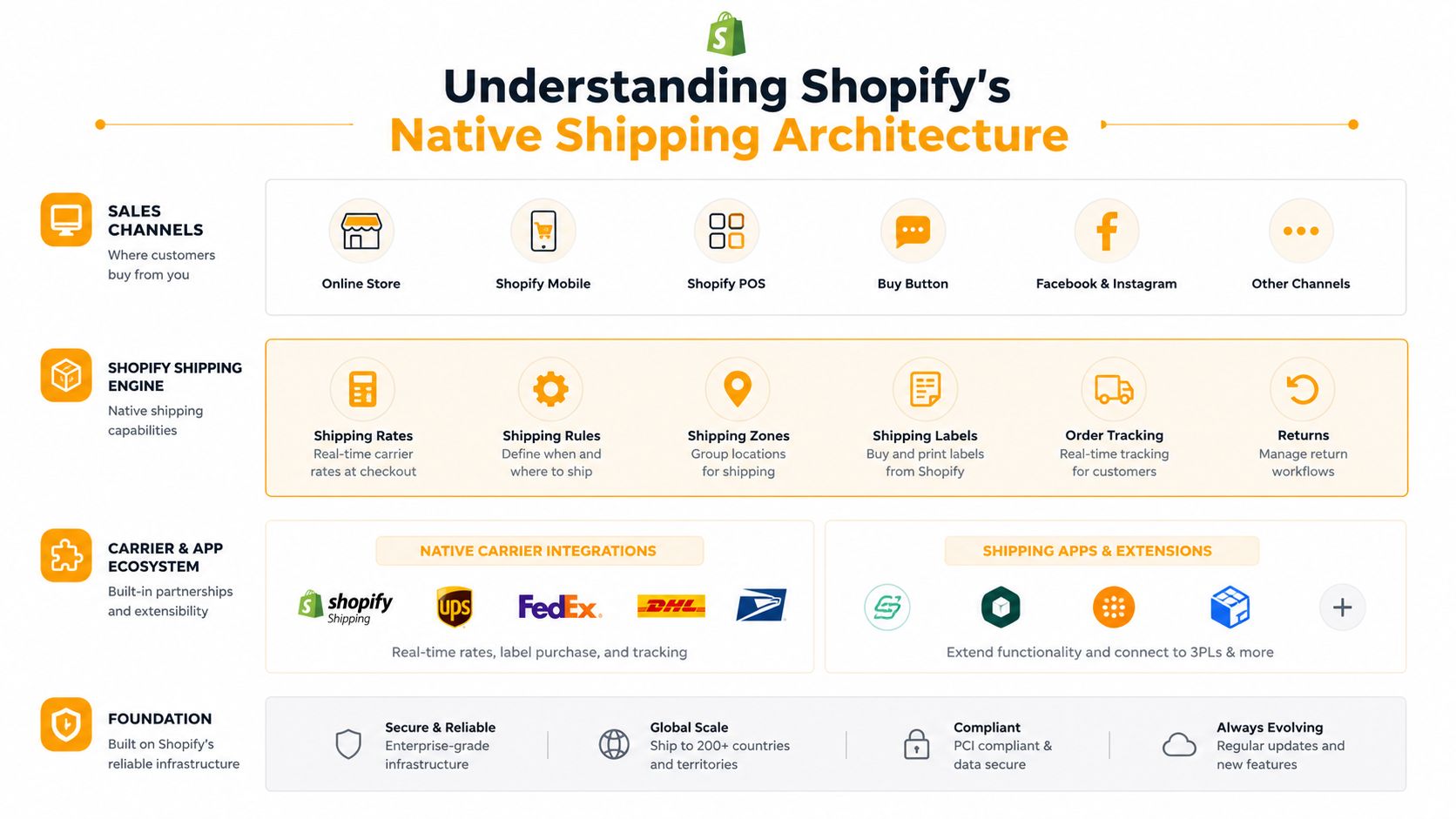
The limitation is that Shopify's native setup enforces restriction logic through fulfillment configuration, not through a true checkout-time compliance engine. The community guidance is clear on the mechanics, assign products to a profile, then define zones and rates per zone. That's effective for geography-based exclusion, but it doesn't behave like a fine-grained order validator for every product, variant, or destination edge case (Shopify community guidance on restricting shipping by product and collection).
Where native controls work and where they fray
Native local-delivery controls can be useful for delivery-radius restrictions under 160 kilometers or 100 miles, and postal-code lists are capped at 3,000 characters, which makes granular geo-fencing possible but also introduces scaling friction for very large rule sets (local delivery restriction details). That's enough for a focused local operation, but the shape of the limitation matters. It's easier to manage a compact rule set than a sprawling list of prohibited ZIPs across multiple states and cities.
Shopify shipping controls are strongest when the rule is broad and the catalog is simple.
For regulated sellers, the gap shows up when the business needs variant-level blocking. A product may be legal in one form but restricted in another, and Shopify's native shipping architecture doesn't magically turn that into a universal checkout compliance layer. It can be configured to exclude geography, but it's not designed to evaluate every combination of product, destination, and customer context in real time.
For merchants who need to automate catalog ingestion or keep product data moving across systems, a workflow tool like Scrape supplier website to Shopify can help with product setup, but it doesn't solve the compliance decision itself. That's still a shipping-rule problem, not a catalog-import problem.
Free Shipping Compliance Audit
We'll review your WooCommerce store's shipping compliance for free.
The cleanest way to think about native Shopify shipping restrictions is this. They're solid for straightforward location control, but the closer you get to regulated goods, the more the business needs restrictions that behave like a gate, not just a rate filter. If you need deeper Shopify-specific restriction behavior, the platform-level discussion at Ship Restrict for Shopify is worth reading alongside Shopify's own docs.
Three Implementation Paths Compared
Most merchants end up choosing between three paths. The first is native shipping profiles and zones. The second is carrier-calculated shipping with custom rules. The third is a dedicated compliance app built to block or allow orders more precisely.
A lot depends on where the restriction has to happen. If the business only needs to hide a shipping option for a destination, the native route may be enough. If the business needs a restriction to fire before payment with product-level nuance, the choice gets narrower fast.
How the options differ in practice
| Implementation Approach | Best For | Checkout Timing | Setup Complexity | Maintenance |
|---|---|---|---|---|
| Native shipping profiles and zones | Simple geography-based exclusion | Usually before a rate is shown, but not always a hard compliance gate | Low to moderate | Moderate, especially as catalogs grow |
| Carrier-calculated shipping with custom rules | Stores that need more flexible rate logic | Can be early in checkout if configured well | Moderate to high | High, because rule logic can become brittle |
| Dedicated compliance app | Regulated products, product-, variant-, and location-specific blocking | Before payment in the checkout flow | Moderate | Lower day-to-day burden once rules are stable |
The second path often gets overestimated. Carrier-calculated shipping sounds powerful, and it is, but it still depends on upstream configuration being clean. If zones, product data, or packaging assumptions are off, the rate engine can present confusing options instead of preventing a problem. That's why tool choice has to follow the operational job, not the feature list.
What usually works for regulated catalogs
Native controls are acceptable when the rule is broad and the catalog is small. A dedicated compliance app makes more sense when the store needs product-, variant-, city-, or ZIP-level blocking that should happen before payment. Shopify's own community discussions keep steering merchants toward shipping profiles and third-party apps when native controls can't model the restriction precisely enough (Shopify community discussion on specific product restrictions).
If you're also comparing broader shipping tooling, a practical roundup like optimize logistics with CartBoss can help you separate checkout logic from labels, tracking, and post-purchase workflows. That distinction matters because not every shipping app is solving the same problem.
For a regulated brand, the decision usually comes down to one question. Do you need to shape rates, or do you need to stop orders? If the answer is stop orders, the implementation has to be evaluated on checkout timing first and everything else second.
Configuration Patterns for Regulated Products
The cleanest setups start with category logic, then narrow by destination. A firearm seller might need a different rule structure than a CBD brand, even if both are managing state-level exclusions. The operational pattern is the same, though. Define the product group, apply the narrowest valid shipping profile, and make sure the checkout rule blocks the order before it reaches review.
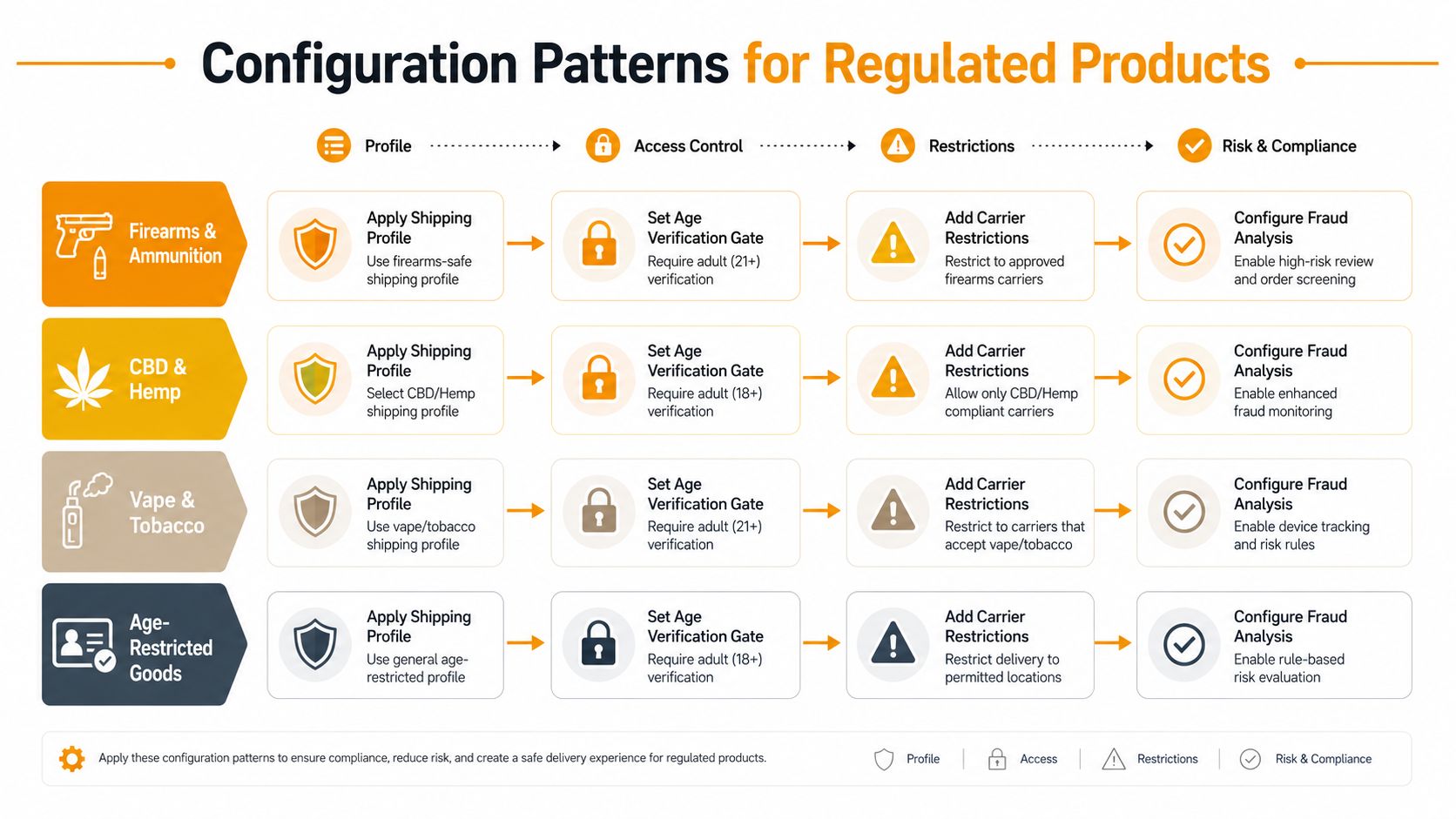
Firearms and ammunition
These catalogs usually need the tightest destination controls. Keep the restricted items in a separate shipping profile, then tie that profile to only the allowable states or ZIPs. If a variant has a different legal status, don't bury it in a shared product setup. Split the variant into its own rule set so the checkout logic can evaluate it cleanly.
The main mistake here is trying to manage everything with one broad shipping rule. That creates false positives, legitimate orders get blocked, and staff start bypassing the rules manually. Once that happens, the compliance model starts depending on memory instead of configuration.
CBD and hemp
CBD and hemp stores often deal with patchwork destination rules, so the rule structure needs to be tighter than the merchandising logic. Group products by product type or tag, then apply shipping restrictions by state and city where necessary. If one product is allowed in more places than another, separate the profiles instead of trying to share a single rule.
Vape and tobacco
Age-restricted goods need both destination logic and customer communication. The shipping rule should not rely on a vague “contact us” note. It should clearly block destinations that can't be served, and the product page should make that visible before checkout. That reduces the odds that a shopper spends time building a cart that can never ship.
Age-restricted items
Not every age-restricted item is geographically banned, but many require an extra gate in the ordering flow. If the product can ship only under certain conditions, build that condition into the restriction rule instead of handling it in the fulfillment queue. That keeps the burden out of manual review.
Batch setup matters when the catalog is large. Use researched presets where possible, then layer local exceptions on top instead of building every rule from scratch.
For merchants with several hundred products, the practical advantage is not just speed, it's consistency. Ship Restrict's Shopify app is one option that supports product-, variant-, and collection-level rules by state, city, and ZIP, which is exactly the kind of structure regulated sellers usually need. The right setup pattern is the one that prevents a broken rule from hiding in a long catalog.
Customer Messaging That Reduces Support Burden
A blocked order doesn't have to become a bad customer experience. The message matters because shoppers tend to interpret a hard restriction as a site error unless you tell them otherwise. Clear, plain-language messaging keeps support from having to explain the same rule ten different ways.
The strongest message does three things. It says the product can't ship to the destination, it avoids sounding accusatory, and it offers a next step if one exists. A vague “invalid address” notice creates more friction than a direct explanation that the item isn't available in that location.
Make the restriction feel intentional
Use the product page to set expectations early, then repeat the rule at checkout only if the shopper gets that far. That keeps the customer from discovering the restriction after they've already invested time in the cart. It also reduces the feeling that the store is hiding policy behind a generic error.
For wording and tone, a practical reference like customer service scripts for explaining shipping restrictions helps teams stay consistent across support, checkout, and email. The key is consistency, not creativity.
When the restriction blocks a sale, customer service still needs visibility into what happened. If your team uses chat heavily, the framework in live chat KPIs to track is useful because it reminds managers to measure whether shipping questions are being resolved quickly instead of just assumed away. A repeated restriction question is often a messaging problem, not just a policy problem.
Clear restriction copy is a compliance tool. It reduces cancellations because shoppers understand the rule before they push a cart through checkout.
The best messages stay specific without sounding defensive. “This item can't ship to your location” is better than “We're sorry for the inconvenience,” because the first sentence tells the shopper what happened. If an alternative exists, say so plainly. If not, don't invent one.
Good customer messaging doesn't just protect the support queue. It also lowers the odds that a blocked shopper comes back through a chargeback or complaint because the restriction felt arbitrary. The rule may be fixed, but the explanation shouldn't be.
Testing and Monitoring Your Restrictions
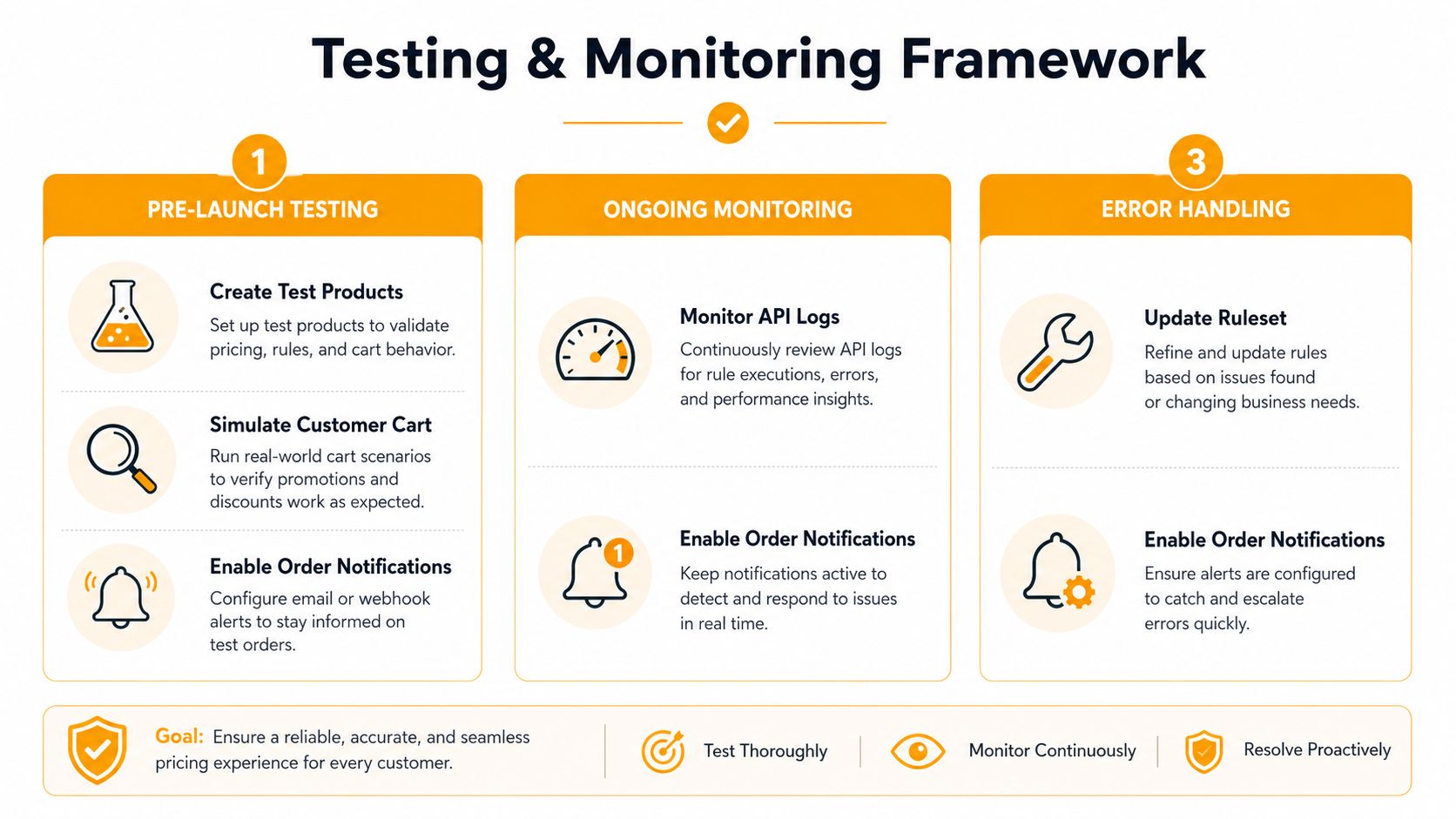
A restriction that looks correct in admin can still fail at checkout. That timing gap is where merchants get burned, because a rule that is visible in settings is not the same thing as a rule that blocks payment before the order goes through. Testing has to cover both allowed and blocked destinations, not just one clean path. If a product has multiple variants, each one needs its own test, because variant-level rules are where quiet mistakes hide.
Start by placing test orders to one allowed destination and one restricted destination. Then repeat the test for any product that shares a collection, tag, or shipping profile with other items, because mixed catalogs are where rule overlap causes the most confusion. If international destinations are involved, make sure destination-specific identification requirements do not break the flow, especially where Shopify's own docs call out country-sensitive data such as Spain's NIF/DNI or Taiwan's National ID Number.
What to monitor after launch
The point of monitoring is to catch rule drift before the business absorbs it. Regulations change, product catalogs expand, and a rule that worked last quarter can become incomplete without anyone noticing. Review attempted violations, failed blocks, and customer messages on a schedule that matches product turnover, not just the release calendar.
Use the internal testing guide at Ship Restrict testing guide if you are building or auditing a larger rule set. The goal is to keep restrictions deterministic, especially when a small rule change could open the door to a non-compliant shipment.
A good routine is simple:
- Pre-launch checks: test blocked and allowed destinations for every restricted product group.
- Ongoing review: compare attempted violations against the active ruleset.
- Error handling: fix broken rules before new products or destinations go live.
The work is not glamorous, but it prevents the most annoying kind of shipping failure, the one that only shows up after customers start paying. Restrictions are not a set-and-forget feature. They are a live control surface.
Common Mistakes and How to Fix Them
The biggest mistake is assuming more rules automatically mean better compliance. In practice, overly broad rules can block legitimate orders, while sloppy rule stacks can let restricted orders through. Both problems are expensive, and neither one gets solved by piling on more configuration.
Another common issue is false confidence from test results. A rule can work in a clean sandbox and fail in production because the live catalog has different variants, overlapping profiles, or destination exceptions. That's why merchants need to test the exact product and destination combinations customers use.
Troubleshooting the rule stack
If restrictions seem to fail only in production, inspect the order path, not just the shipping setting. A conflict between shipping profiles, a mismatch between product tags and variant assignments, or a stale rule can make the logic behave differently than expected. The problem is usually not that Shopify “ignored” the rule. It's that the rule wasn't the final decision point.
When a merchant can't explain why a rule failed, the setup is usually too complex for the team to maintain safely.
Performance is the other trap. Large catalogs with lots of exceptions can become hard to manage even when the logic is technically correct. That's where a focused compliance app earns its place. If the store needs rule depth, the system has to stay readable enough for someone to audit it later.
A few fixes usually help:
- Narrow the scope: split unrelated products into separate profiles instead of forcing one rule to cover everything.
- Remove overlaps: avoid stacking multiple rules that answer the same question in different ways.
- Retest edge cases: city, ZIP, and variant combinations should all be validated before the rule goes live.
The right setup is rarely the most aggressive one. It's the one the ops team can maintain without guessing. For regulated ecommerce, that's the difference between a functioning shipping restriction and a recurring compliance headache.
If you're trying to stop restricted orders before payment, Ship Restrict gives Shopify merchants a practical way to block by state, city, ZIP, product, variant, or collection without rebuilding the checkout around fragile workarounds. Visit Ship Restrict to see how the rule engine fits regulated catalogs and whether it's a better match than late-stage manual review.
Automate Shipping Compliance
Stop worrying about restricted states. Ship Restrict handles it automatically.

Cody Yurk
Founder and Lead Developer of ShipRestrict, helping e-commerce businesses navigate complex shipping regulations for regulated products. Ecommerce store owner turned developer.
Automate Shipping Compliance
- Block restricted states
- No more cancellations
- Set and forget
3-day free trial · Card required