Best Shipping Solution for Small Business: Your 2026 Guide
Discover the ideal shipping solution for small business success. Our 2026 guide covers FFL eCommerce compliance, automation, and WooCommerce Ship Restrict.
You're probably dealing with this right now. An order comes in. The cart looks fine at first glance. Then someone on your team opens a spreadsheet, checks the destination against state rules, tries to remember whether that county has an extra restriction, and wonders whether the selected carrier can legally handle that shipment at all.
That isn't a shipping process. It's a liability with a checkout attached.
Most advice about a shipping solution for small business talks about postage discounts, box sizes, and carrier comparisons. That matters. But for firearms and other regulated goods, the first problem to solve isn't postage. It's stopping invalid orders before payment, fulfillment, and customer service all get dragged into a preventable mess.
Your Shipping Solution for Small Business Starts with Compliance
If you sell regulated products online, the shipping problem starts before the label is printed. It starts when a customer enters an address.
Automate Shipping Compliance
Block orders to restricted states automatically. 3-day free trial.
Start Free TrialMost small-business shipping content misses that point. It focuses on cutting shipping costs after the order exists, even though firearm shipments face serious legal limits and handgun shipment rules are especially restrictive in the USPS system. That's why pre-checkout compliance matters. You need to prevent invalid orders before the transaction is completed, not clean them up afterward, as noted in USPS small business shipping guidance.
A firearms store running WooCommerce can't treat shipping like a generic apparel shop. The workflow has to answer a harder question first: Can this order ship to this destination at all?
That changes what “best shipping solution for small business” means.
What the usual advice gets wrong
Generic shipping advice usually assumes every valid order should move to rate shopping. For regulated goods, that assumption is dangerous. If the address is restricted, rate shopping is irrelevant. If the product can't go through a specific carrier or service, the cheapest option isn't a valid option.
Practical rule: Validate legality first. Compare carriers second.
The fix is to move compliance checks forward in the process. Destination rules should run before payment capture, before warehouse work, and before anyone on staff has to manually review the cart. If you're working through this in WooCommerce, this guide on automated shipping compliance for WooCommerce stores shows the operational logic clearly.
What good looks like
A workable setup does three things well:
- Stops restricted carts early: Customers shouldn't complete checkout if the order can't legally ship.
- Applies location rules precisely: State-only logic isn't enough when restrictions can vary by county, city, or ZIP.
- Removes manual review from daily operations: Staff should handle exceptions, not perform routine address policing all day.
That's the difference between a shipping tool and a shipping system.
The True Cost of Manual Shipping Compliance
A customer places an order for a restricted item at 9:12 p.m. The cart accepts payment, the order hits the queue, and nobody catches the destination problem until the next morning. By then, support has a ticket, fulfillment has touched the order, accounting has a refund to process, and the customer is angry. This is the true cost of manual compliance.
Free Shipping Compliance Audit
We'll review your WooCommerce store's shipping compliance for free.

Manual compliance looks inexpensive on a software budget. It gets expensive in labor, reversals, customer support, and preventable risk. In firearms and other regulated categories, the bigger problem is timing. Manual review happens after the bad order already exists.
That is backwards.
Labor cost is the first leak
Every manual check consumes trained time on work that should happen automatically. Staff have to review the cart, inspect the destination, compare product types against location rules, and decide whether the order can proceed. That is not high-value work. It is repetitive screening.
As noted earlier, standard shipping operations across small businesses are already heavily automated. The weak point for regulated sellers is compliance gating, especially before checkout. Many stores still handle that part with spreadsheets, tribal knowledge, and inbox approvals. That setup usually holds until volume rises, someone covers for a coworker, or a rule changes and the old note stays in circulation.
I have seen this failure pattern repeatedly. The team is competent. The process is not.
Failed orders cost money even when no package leaves the building
Once an invalid order clears checkout, every downstream step costs more. Support has to explain the problem. Finance has to reverse payment. Operations has to pull the order out of the queue. If picking or packing started, the store pays for that wasted motion too.
The operational damage usually shows up in a few places:
- Refund handling: Payment reversals take time and create reconciliation work.
- Support load: Staff end up explaining a restriction the cart should have enforced.
- Fulfillment disruption: Pick, pack, and hold steps get interrupted by preventable exceptions.
- Compliance exposure: A restricted order has already entered your workflow, which is a bad place to discover a legal problem.
This is why order fulfillment automation for restricted products has to start before the order is accepted, not after the warehouse receives it.
Manual review pushes the compliance decision to the most expensive point in the order lifecycle.
Human consistency fails under normal business conditions
Manual systems do not break only when people are careless. They break under ordinary conditions. A new hire handles a shift. A county rule changes. One employee updates a spreadsheet and another keeps using a saved copy. A product catalog expands faster than the process document.
In regulated shipping, consistency matters more than good intentions. A process that depends on memory will eventually miss a rule. A process that enforces rules automatically will miss far less often and leave a record of what happened.
That audit trail matters when you need to explain why an order was blocked, approved, or routed for review.
The customer experience suffers too
Customers judge the store by what the checkout allows. If the site accepts an order and cancels it later, the store looks disorganized, even if the staff handled the correction politely. For regulated goods, that kind of failure also invites chargebacks, complaints, and repeat support contacts.
A better system tells the customer the truth before payment. If the item cannot ship to that address, the cart should stop it immediately. If the order qualifies only under specific rules, those rules should be enforced before the sale is captured.
That reduces labor. It reduces noise in fulfillment. It reduces the chance that a compliance mistake turns into an operational one.
What a Real Firearms Shipping Solution Must Do
A real shipping solution for small business in the firearms space isn't just a rate shopper. It's a validation engine. If a tool can print labels and compare USPS, UPS, FedEx, or DHL rates but can't stop a restricted order before checkout, it doesn't solve the core problem.
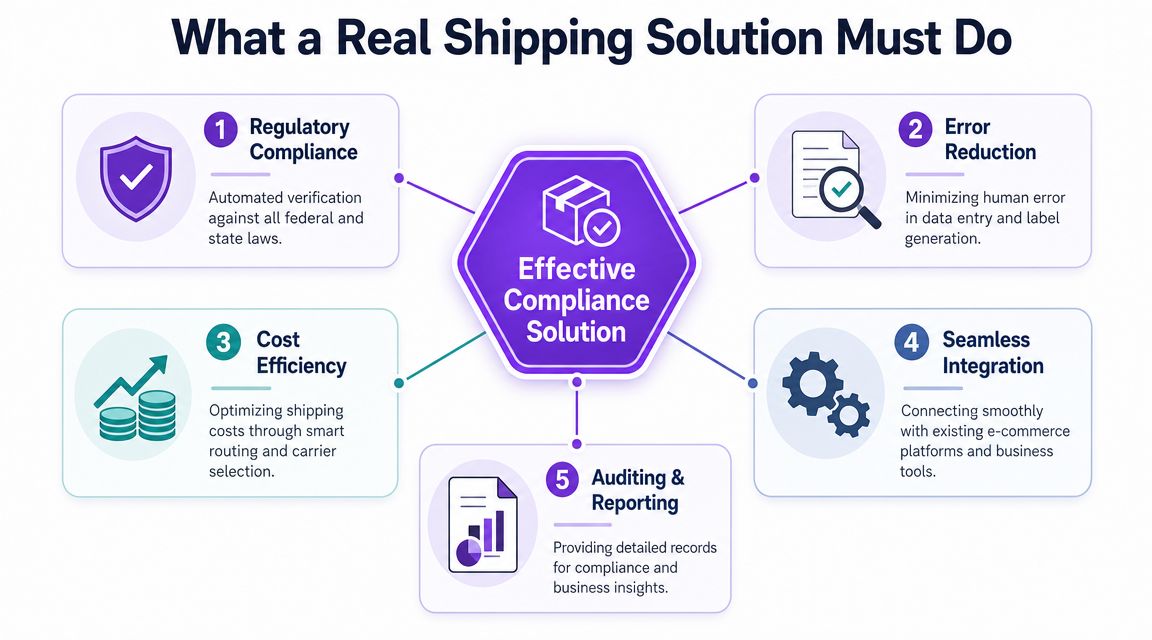
For firearms eCommerce, the job is clear. The system must evaluate order eligibility against granular geographic restrictions early in the checkout flow, log outcomes for auditability, and support rule updates as regulations change. That's the standard described in Purolator's shipping technology guidance.
Five non-negotiable requirements
Pre-checkout enforcement
This is the feature that separates a serious compliance workflow from a cosmetic plugin. The store must stop the order before payment if the destination or product combination is restricted.
That protects operations in three ways:
- It prevents bad orders from entering fulfillment
- It avoids after-the-fact cancellation work
- It gives the customer an immediate answer instead of a later apology
If the tool waits until after checkout, it's late.
Granular rule control
State-level blocking isn't enough. Firearms and regulated-product rules often require narrower control. You need logic that can act at the level of state, county, city, and ZIP when needed.
A blunt ruleset creates two kinds of damage. It can block legal orders unnecessarily, which hurts revenue and customer trust. Or it can allow restricted orders because the rule wasn't precise enough.
Audit visibility
When a store blocks an order, the system should log what happened. You need a record of the restriction applied, when it was applied, and how the system handled the attempted checkout.
That matters for internal reviews, staff training, and proving that compliance isn't being improvised. If you want to map that into fulfillment operations, this article on order fulfillment automation is useful because it treats validation as part of the full order workflow rather than a checkout add-on.
Key takeaway: If you can't explain why an order was blocked, you don't have a reliable compliance process.
Shipping logic still matters after compliance
Once an order passes validation, then shipping optimization becomes worth discussing. At that stage, the system should support practical cost control:
- Right-sized packaging: Dimensional weight can increase billed weight even when the item is light, so smaller package volume often reduces shipping cost, as explained in ShipperHQ's guidance on dimensional-weight exposure.
- Real-time carrier comparison: Rate shopping by package size, destination, and service level helps you avoid unnecessary spend.
- Automated label and tracking workflow: Staff shouldn't re-enter the same shipping data across disconnected tools.
That's where standard shipping software earns its keep. But it should only run after the order is proven valid.
Integration and performance aren't optional
A compliance tool that slows checkout, breaks WooCommerce updates, or requires constant babysitting creates a new problem. The best systems are fast, stable, and predictable. They run in the background and apply rules consistently without forcing staff into daily cleanup.
Look for operational fit, not just features on a sales page. A long feature list doesn't help if the plugin can't handle your catalog structure, location logic, or checkout flow.
Evaluating Your Options for Shipping Automation
Most stores end up choosing among three paths. They stay manual. They bolt on a basic plugin built for generic shipping tasks. Or they use a purpose-built automation layer that handles regulated-product restrictions before checkout.
The right choice depends less on sticker price and more on risk tolerance, operational complexity, and how much cleanup your team is absorbing behind the scenes.
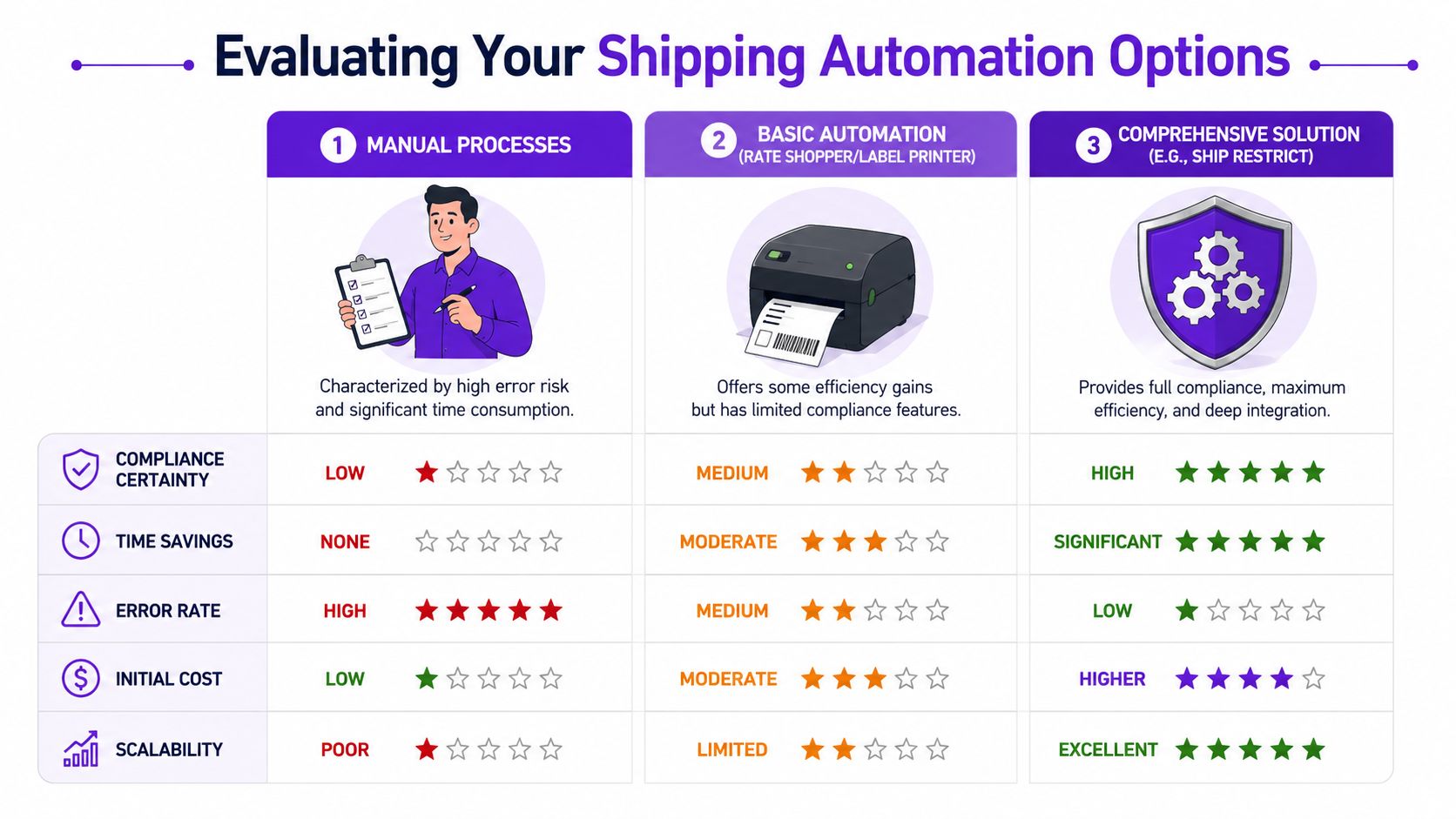
For generic shipping, USPS is often the cheapest option for packages up to 70 lb, especially for small, lightweight parcels. But that isn't enough for regulated goods. The better model is multi-carrier shipping where compliance checks happen before carrier selection, as explained in Rollo's small-business shipping guide.
Side-by-side comparison
| Criteria | Manual Process | Basic Plugin | Advanced Automation (e.g., Ship Restrict) |
|---|---|---|---|
| Compliance certainty | Low. Depends on staff memory and process discipline. | Medium. May catch broad restrictions but often lacks granular logic. | High. Built to apply destination-based rules before checkout. |
| Time savings | None. Every questionable order needs human review. | Moderate. Helps with routine shipping tasks but still leaves compliance gaps. | Significant. Reduces repetitive review and prevents invalid orders early. |
| Error rate | High. Staff fatigue and inconsistent rule interpretation create mistakes. | Medium. Some automation helps, but weak restriction logic still leaks risk. | Low. Rules are enforced consistently by the system. |
| Initial cost | Low. Usually just labor and existing tools. | Moderate. Lower upfront spend than a dedicated solution. | Higher. Requires a deliberate software investment. |
| Scalability | Poor. More orders create more manual review. | Limited. Works until your rule complexity outgrows the plugin. | Excellent. Handles larger catalogs and more destinations without linear labor growth. |
| Carrier flexibility | Inconsistent. Staff may default to one familiar carrier. | Better. Usually includes rate shopping or label support. | Strong. Supports cost optimization after compliance validation. |
| Checkout accuracy | Weak. Customers can place orders that later get canceled. | Mixed. Depends on whether restrictions are enforced before payment. | Strong. Customers get clear answers during checkout. |
What manual processing still gets wrong
Manual review gives store owners a false sense of control. It feels safer because a human is looking at each order. In reality, that model creates drift. Different employees interpret rules differently. Busy days lead to rushed decisions. Exception handling becomes the default process instead of the backup process.
That isn't sustainable if your store is growing or your catalog is expanding.
Why basic plugins often stall out
A basic plugin can be useful if your needs are simple. Rate shopping, label printing, and standard shipping rules are all valuable. If you're trying to think more broadly about workflow automation across an online store, this e-commerce automation guide is a solid resource because it frames automation as a business system, not a collection of isolated tasks.
But for firearms and other regulated goods, basic automation usually hits a wall. It might support broad zones or generic shipping classes, yet fail when you need product-specific restrictions tied to county, city, or ZIP-level logic.
Cheap automation often reduces labor in the wrong place. It speeds label creation while leaving compliance review manual.
How to make the decision
Ask these questions before you choose any tool:
- Does it block invalid orders before payment? If not, keep looking.
- Can it apply granular destination rules? State-only logic won't cover many regulated workflows.
- Will it fit your actual store operations? WooCommerce compatibility and checkout stability matter.
- Can your team trust it daily? If staff still double-check everything manually, automation hasn't delivered much value.
For regulated retailers, the best shipping solution for small business is rarely the cheapest software option. It's the one that removes the most preventable risk.
Deploying Ship Restrict A Step-by-Step Guide
Once you decide to automate compliance, implementation matters. A good tool can still fail if the rules are incomplete, the messages are confusing, or nobody tests checkout behavior before going live.
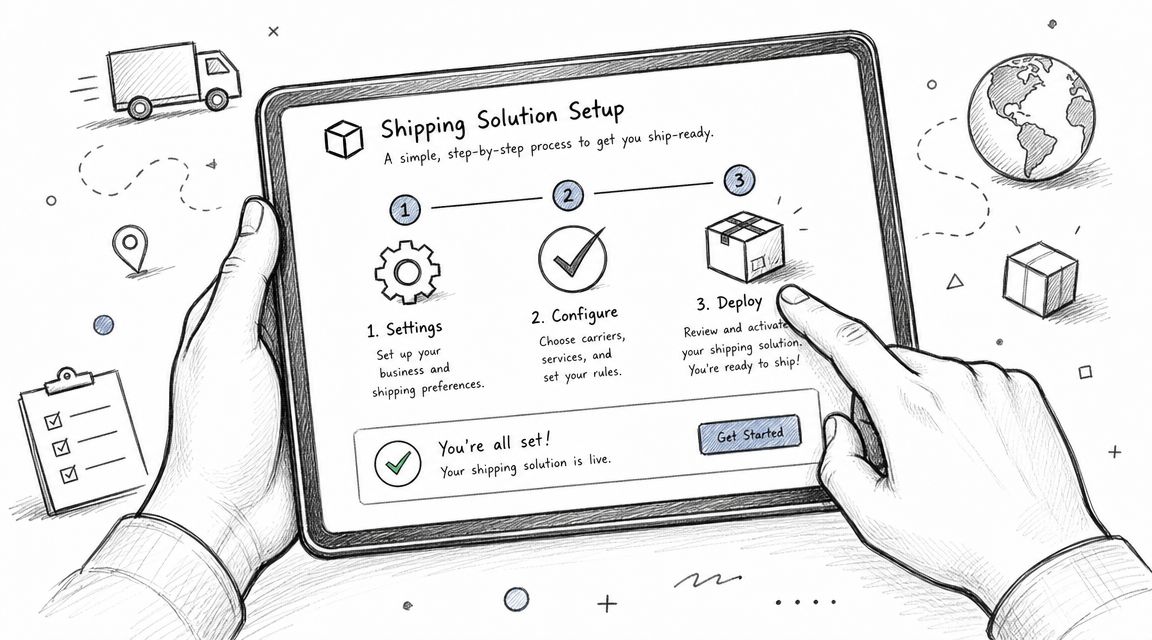
For regulated merchandise, the cheapest shipping option is often the wrong one because compliance and chargeback risks are higher. Carrier rules and surcharges also keep changing, which is one reason rules-based automation is safer than manual review or simple rate shopping, as discussed in Wise's small-business shipping tips.
Step 1: Install and connect it properly
Start with the basics. Install the plugin in WooCommerce, confirm compatibility with your checkout flow, and review how your products are categorized. The rule engine is only as good as the product and destination data it receives.
Use the official getting started documentation during setup rather than improvising the configuration. That reduces mistakes early.
At this stage, verify:
- Product mapping: Make sure restricted items are clearly identifiable in your catalog.
- Checkout behavior: Confirm when the plugin evaluates the shipping address and product mix.
- Environment choice: Test in staging first if your store has active traffic.
Step 2: Build rules around actual legal and operational boundaries
Don't start with vague rules like “block restricted states.” Build rules that match how your business ships and what your products require.
A solid rollout usually includes:
- Destination rules for states, counties, cities, or ZIP codes where restrictions apply.
- Product-specific logic so one category doesn't inherit the wrong rule from another.
- Carrier-aware thinking because legal eligibility comes before service selection.
Bulk rule tools are important. If your team has to create every restriction one by one, maintenance becomes painful fast. Bulk creation makes the system practical to manage over time, especially if you sell across many jurisdictions.
Step 3: Write customer-facing messages that reduce friction
A blocked cart without a clear explanation creates support tickets. A blocked cart with a precise, respectful message prevents them.
Bad message: “Shipping unavailable.”
Better message: “This product can't be shipped to the selected destination based on current shipping restrictions.”
Best message: Be specific enough to guide the customer, but not so long that checkout turns into a legal memo. If alternate actions exist, such as choosing a different destination where lawful, communicate that clearly.
Customers handle restrictions better when the store tells them immediately and plainly.
Step 4: Test the rule set before launch
Testing can't be an afterthought. Run valid and invalid orders through checkout. Try different product combinations. Test borderline ZIPs, mixed carts, and common staff assumptions.
Create a simple test matrix that covers:
- Allowed orders that should pass
- Blocked orders that should fail
- Mixed-product carts that trigger special handling
- Message display on cart and checkout pages
If the plugin works technically but the messaging is vague or the rule coverage is incomplete, you'll still create confusion.
Step 5: Train staff on the new workflow
Automation changes jobs. It doesn't remove the need for judgment. Staff still need to know how to handle exceptions, review logs, and respond when a customer asks why an order was blocked.
What changes is the daily pattern. Instead of reviewing every order manually, the team focuses on outliers.
That training should cover:
- What the system now handles automatically
- When manual intervention is still required
- How to confirm why a rule triggered
- How customer service should explain a blocked cart
Common rollout mistakes
These are the errors I see most often in regulated eCommerce deployments:
- Incomplete product coverage: One category gets protected while another slips through unclassified.
- Overbroad blocking: The rules are so blunt that legal orders get rejected.
- No staging test: The first real test happens on live customer traffic.
- Weak customer messaging: The system blocks correctly but leaves support to explain everything manually.
- No owner for rule maintenance: Everyone assumes someone else will update restrictions later.
A reliable deployment is boring in the best way. Orders that should pass move forward. Orders that shouldn't never make it through checkout. Staff stop spending the day checking the same destinations over and over.
The Payoff Automation Time Savings and Peace of Mind
A blocked shipment after payment is expensive. A blocked order before payment is a routine checkout event.
That difference changes the entire operation.
Once pre-checkout compliance rules are working, the shipping team is no longer stuck catching bad orders at the back end. Customer service stops spending half the day explaining reversals, destination denials, and refund delays. Fulfillment gets a cleaner queue, and management gets fewer surprises.
What improves first
The first payoff shows up in workload and error rates.
- Manual review drops: Staff stop checking the same state, product, and carrier combinations over and over.
- Invalid orders get stopped earlier: The store rejects restricted purchases before payment, pick-pack labor, and support time get attached to them.
- Checkout communication improves: Customers see what is blocked, and why, while they can still correct the order.
- Exception handling gets sharper: Staff can focus on edge cases instead of routine rule checks.
In regulated eCommerce, that is where significant time savings come from. Faster label creation helps. Preventing orders that should never have entered the system helps more.
Peace of mind also has an operational value. Teams work faster when they trust the rules. They do not keep pulling a senior employee into ordinary destination questions. They do not rely on memory or an old spreadsheet to decide whether an item can ship. They review exceptions, confirm documentation when needed, and move on.
I have seen this pattern repeatedly with firearms sellers. The stores that run cleanly are not the ones with the cheapest postage. They are the ones that stop bad orders before checkout, log the reason, and leave staff with fewer judgment calls during fulfillment.
The best shipping solution for small business in a regulated category prevents avoidable mistakes before they turn into refunds, support tickets, returned packages, or compliance exposure.
If your current process still depends on manual review after the order is placed, that is the first problem to solve. Rate shopping, packaging discipline, and carrier selection still matter. They just do not protect the business if the wrong order can still get paid, printed, and pushed into the queue.
If you're ready to stop invalid orders before they happen, Ship Restrict gives WooCommerce firearms retailers a practical way to automate shipping compliance with granular destination rules, cleaner checkout enforcement, and less manual review.
Automate Shipping Compliance
Stop worrying about restricted states. Ship Restrict handles it automatically.

Cody Yurk
Founder and Lead Developer of ShipRestrict, helping e-commerce businesses navigate complex shipping regulations for regulated products. Ecommerce store owner turned developer.
Automate Shipping Compliance
- Block restricted states
- No more cancellations
- Set and forget
3-day free trial · Card required