Shipping Software Integration: WooCommerce Setup Guide
Step-by-step shipping software integration for WooCommerce: connect rules, webhooks, testing and rollback for regulated products, with checklists and fixes.
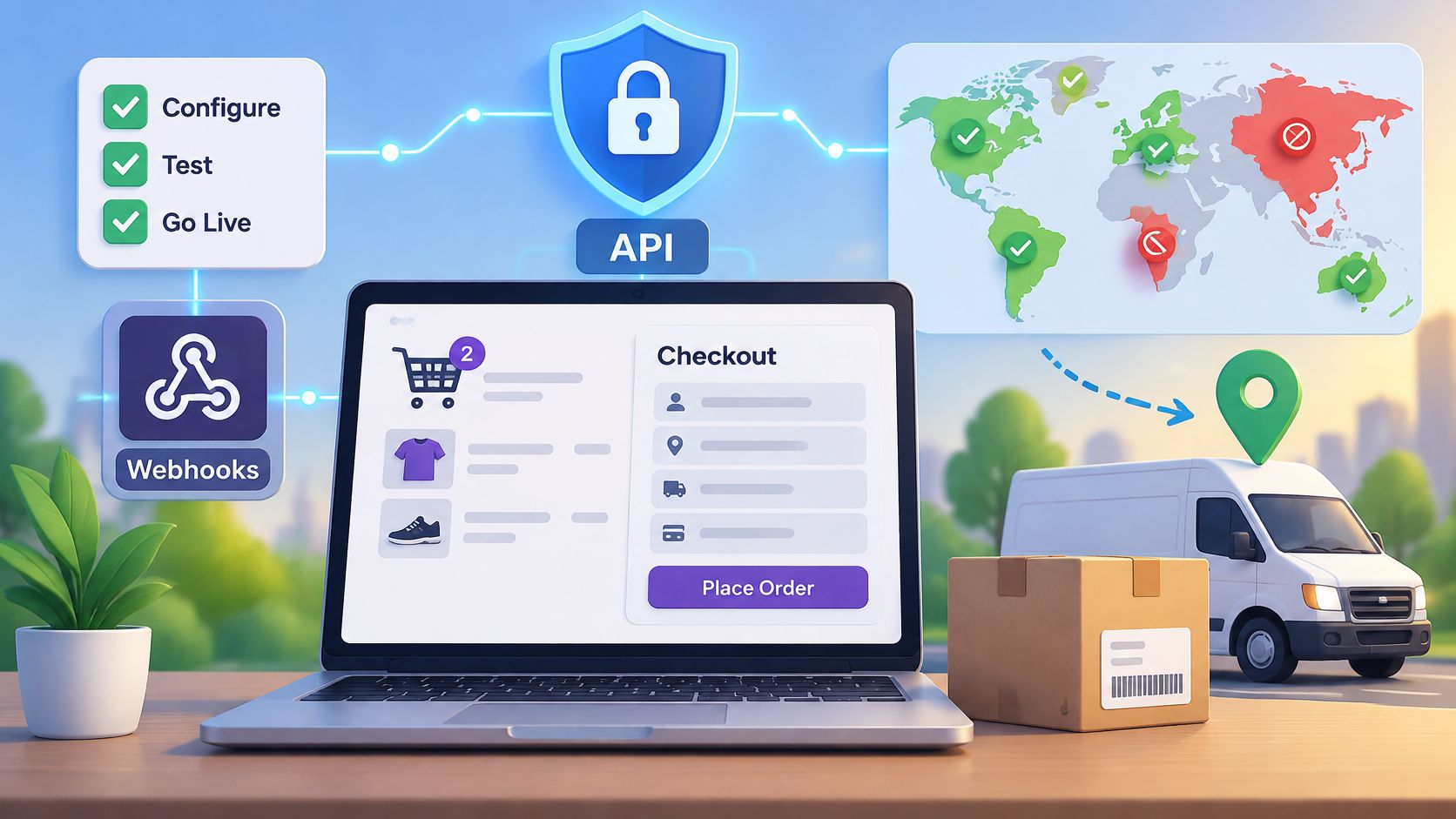
A restricted order comes in late Friday. The label prints, tracking syncs, the confirmation email goes out, and a case of product ships to a state where it can't legally be sold. Nobody notices until a customer complaint lands on Monday.
Every part of that pipeline did its job. The carrier connection authenticated, the rate lookup returned, the webhook fired on time. A working API connection proves that data moved, not that the right decision was made before payment, and that gap is where most shipping software integration projects fail.
Volume removes the manual safety net. Available industry estimates put global parcel volume at approximately 185 billion packages in 2023, rising to roughly 217 billion in 2026, about 17.3% growth over three years and nearly 5,900 parcels per second at the 2026 level, according to Swell's global shipping statistics.
So test the integration as a policy-decision service. Feed it a cart and a destination, confirm a blocked order never reaches payment, confirm an allowed order is untouched, and confirm the rule that made the call is the current one. Everything below follows from those four checks.
Automate Shipping Compliance
Block orders to restricted states automatically. 3-day free trial.
Start Free TrialWhat You Need Before Connecting Shipping Software
Three failures account for most broken first attempts at this. There is no staging copy, so the first test runs against live checkout. Regulated products are not tagged, so rules have nothing to bind to. The rule list lives in someone's spreadsheet, in a version nobody can date. Fix those three before you install anything, because the plugin will enforce exactly what you hand it, including the mistakes.
Automation is not the missing piece. In 2025, 66.7% of surveyed retailers reported relying on shipping automation to streamline processes, according to Starshipit's Evolving Expectations 2025 report. The failure mode is automation switched on before anyone confirmed what it enforces. A fast connection applying a stale rule is worse than no connection at all, because it passes orders nobody is checking anymore.
The table below is the short version of the pre-flight check. Each row has a name attached, because a prerequisite without an owner is the one that gets skipped at 11pm.
| Component | What to confirm | Why it matters | Owner |
|---|---|---|---|
| WooCommerce store | Admin access and a staging clone | Lets you test rules without affecting live orders | Store admin |
| Product catalog | Every regulated item tagged by product, category or tag | Rules target products through these tags | Catalog manager |
| Rule source | States, cities, ZIPs, dates and legal references in one file | Clean source makes import, export and audits possible | Compliance lead |
| Shipping methods | Carriers and methods in use | Restrictions check the address, not the rate, so methods do not change results | Operations |
| Webhook endpoint | An HTTPS address the provider can reach | Unreachable endpoints lose shipment events | Developer |
Two rows deserve extra scrutiny. The rule source is the one teams underinvest in, and it decides everything downstream: if the file cannot answer which jurisdictions block a product and when that answer last changed, no amount of plugin configuration will rescue it. The catalog row fails differently. Tagging is tedious, so it gets done to 90%, and the untagged 10% is exactly the stock that ships unrestricted.
Run one readiness test before you open the plugin directory. Ask a named person: for this hemp-derived SKU, which states block it, and when did that rule last change? If the answer takes longer than a minute, or needs a second person to confirm, the rule source isn't ready.
The same decision-before-commitment logic applies anywhere an address enters a system, not just at checkout. Enquiry capture is one example: CRM-connected enquiry forms for dealerships validate and route destination data before a sales record is created, rather than cleaning it up afterward. The principle is identical in both places. Decide against structured data at the moment of entry, because every record you fix later is one you already acted on.
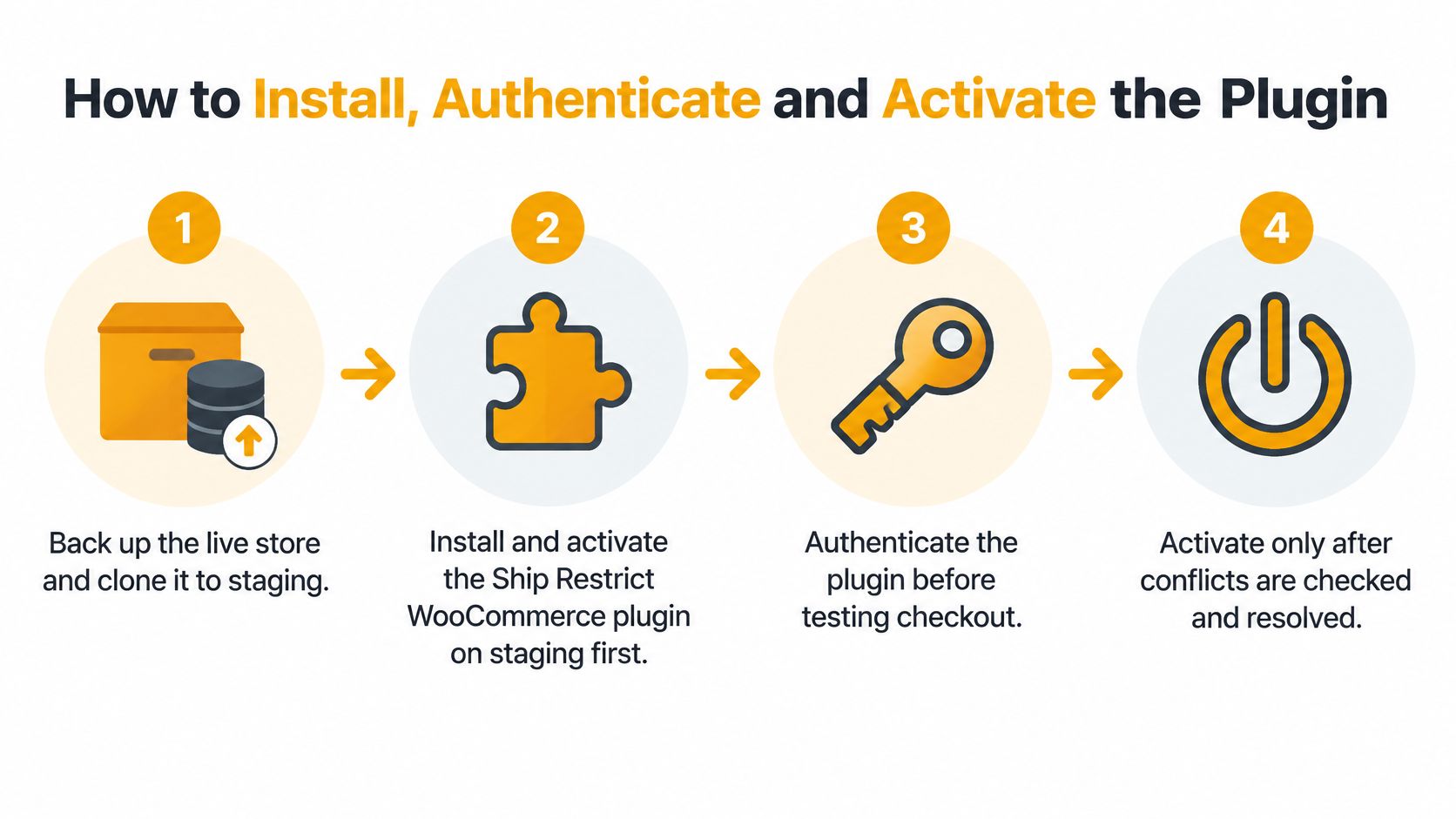
How to Install, Authenticate and Activate the Plugin
The first activation is the moment conflicts surface. Another plugin hooks the cart, a theme renders notices in its own markup, a shipping plugin filters the package rates. You want that discovery to happen on a clone with no traffic, not on a Tuesday afternoon with live orders arriving.
- Back up and clone the store. Take a full database and files backup, then restore it to a staging site on its own URL. Carrier plugins often validate a licence against the domain, so confirm the clone doesn't disable a carrier you need for testing.
- Install and activate the Ship Restrict WooCommerce plugin on staging first. Activation is where checkout and shipping conflicts appear, and a staging failure costs nothing while a production failure costs orders.
- Enter the licence key for your plan. Monthly, Yearly and Enterprise are the options, and Enterprise adds multi-store synchronization and API access, so don't plan around either feature on a lower tier. Licensing for multiple WooCommerce stores is handled by contacting support@shiprestrict.com.
- Open the settings screen and read it properly. Confirm it loads without PHP warnings and without duplicate admin notices from other plugins. A menu that renders twice usually means two plugins are registering the same slug.
- Create one restriction. One test product, one state, one rule. Narrow scope proves the mechanism; a full rule set hides which rule is doing the blocking.
- Test both places the shopper sees the message. Put the restricted product in a cart with a restricted address, load the product page, then walk to checkout. The message should appear at both points, not only at payment.
- Repeat the same steps on production after staging passes. Then check the split: the restricted address is stopped, and the allowed address reaches payment with order totals and shipping options unchanged.
On Enterprise, treat API access like any other credential. Create a scoped key in your account, store it server side in wp-config.php or a secret manager, send it only over HTTPS in an Authorization header, and rotate it when staff leave. A key pasted into theme JavaScript or a public checkout script is a key you'll be rotating under pressure.
Free Shipping Compliance Audit
We'll review your WooCommerce store's shipping compliance for free.
If a second storefront is part of the plan, the install sequence differs by platform before rule sets can be ported; building a Shopify website covers the platform side from theme to checkout so the two stores don't drift apart on day one.
How to Map Restriction Rules to Products and Locations
Every rule has two halves. One half targets something: a product, a variation, a category, a tag. The other half targets a place: a state, a city, a ZIP code, or a window of dates. Get either half wrong and the rule looks active in the admin while doing nothing at checkout.
| Rule layer | Scope it targets | Example for a regulated product | Where the shopper sees it |
|---|---|---|---|
| Product or variation | One SKU or variant | One size or strength of a product banned in one state | Product page and checkout |
| Category or tag | Every item in a group | All items tagged as hemp-derived | Product page and checkout for each tagged item |
| State | Whole state | A statewide ban | Blocked before payment |
| City | Named city | A local ordinance covering one city | Blocked for that city only |
| ZIP code | ZIP or ZIP range | An exception for specific ZIP codes | Blocked for those ZIP codes only |
| Carrier service | One carrier service level | Disable air service for aerosol SKUs, or a carrier that prohibits the product class | Checkout shipping options for the restricted cart |
| Schedule | Start and end dates | A temporary restriction during a legal review | Rule activates and expires automatically |
Method choice sits outside that logic, which surprises people. The plugin checks the shipping address rather than the shipping rates, so a flat-rate method, a live carrier quote and local pickup with a typed address all resolve against the same rule.
When the dropdown and the ZIP disagree
A shopper selects one state and types a ZIP whose first three digits belong to another. From that point the plugin uses the state of the ZIP code, so the restriction follows the address rather than the form field. That's the correct behaviour for compliance and the wrong one for anyone who assumes the dropdown wins. Test it deliberately with a border ZIP and confirm the log records the mismatch rather than guessing which rule fired.
The build order matters more than the number of rules:
- Tag every regulated product, including variations that are the only restricted form of an otherwise allowed item.
- Create category or tag rules for broad bans, so new SKUs inherit the restriction instead of needing their own rule next month.
- Add state rules as the default geographic layer, and put the legal reference in the rule name so an audit doesn't start with a search.
- Add city or ZIP exceptions only where a law names them. A ZIP exception invented to smooth a boundary case is a compliance gap with a friendly name.
- Set activation and expiry dates on anything temporary, so the rule closes itself instead of waiting for someone to remember it.
- Write the shopper message with the rule, not after it. A rule carrying the default message tells the customer nothing about what to do next.
Every rule should trace back to a row in the rule source, or nobody can explain it six months later. Structured machine-to-machine exchange has supported freight for decades, and its footprint is large: logistics held 26.1% of US EDI market share in 2021, and one analysis projected the global EDI software market growing from $1.88 billion in 2022 to $4.04 billion by 2029, according to Staedean's analysis of EDI in logistics. The lesson for a WooCommerce store isn't nostalgia for EDI. It's that a restriction is data, and data without a source row can't be audited.
Multi-platform operators feel that gap first. In 2025, 43% of surveyed mid-market U.S. retailers identified managing order fulfillment and logistics across multiple platforms as a leading operational challenge, according to Linnworks' State of Commerce Ops report. One JSON rule file imported into both stores closes most of it.
Carrier services are a separate eligibility layer from the compliance block. In WooCommerce shipping zones, hide any service level that can't legally carry the tagged product, such as air service for aerosols, and test that a restricted cart offers only the compliant methods. The block stays address-based; the carrier method remains the fulfilment choice among the options you leave visible. When state, city and ZIP entries overlap on one destination, the location restriction documentation is the reference for which entry resolves.
How to Configure Webhooks Without Duplicate Shipments
The failure starts with a timeout. Your store posts a shipment request, the carrier creates the label, then the connection drops before the response arrives. The provider retries, your code runs a second time, and now two labels exist for one order. One box ships, or two do.
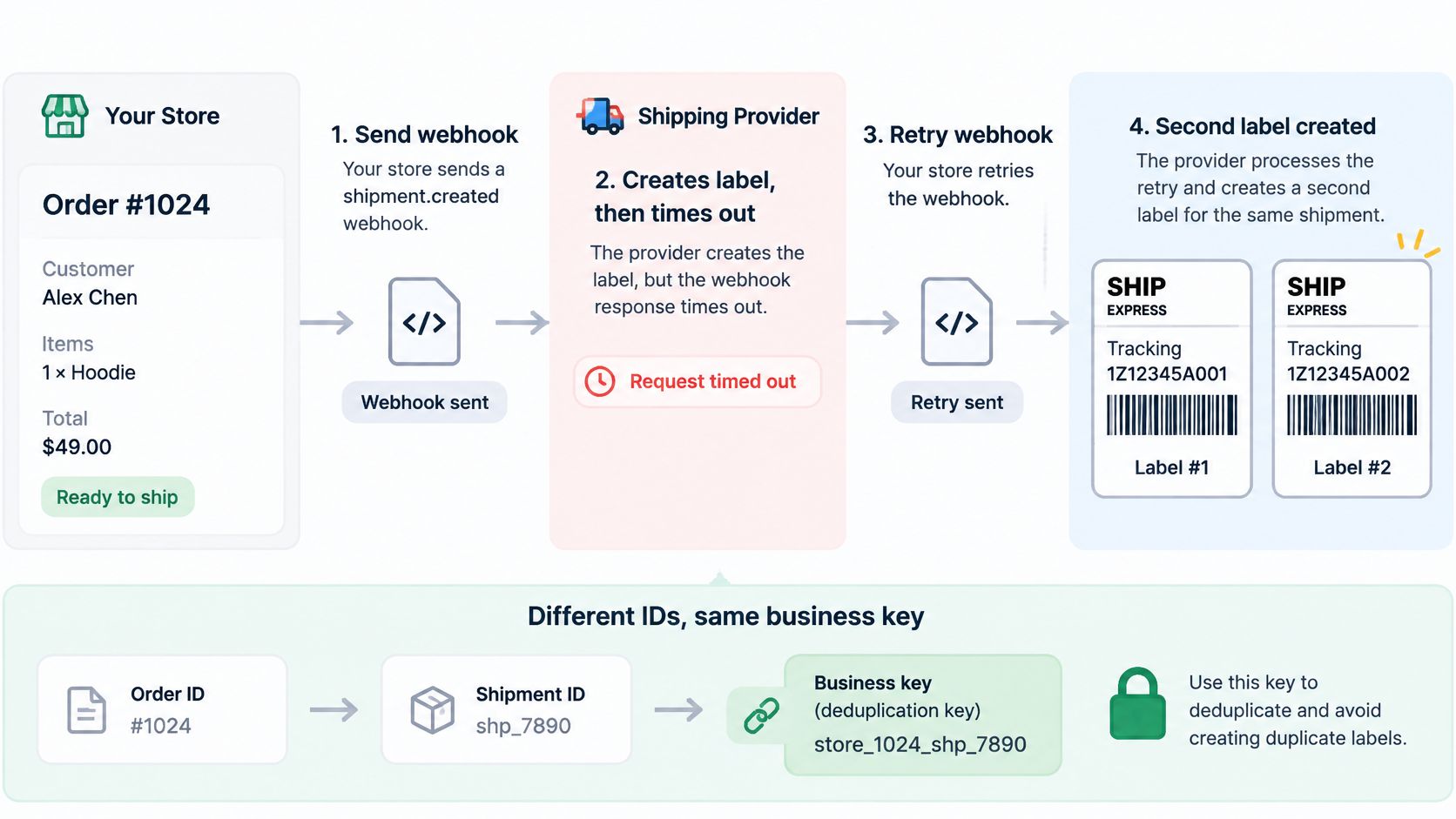
The fix is an idempotent, event-driven workflow:
- Assign a stable business key, such as order ID plus shipment number, and use it as the identity of the shipment everywhere downstream. Keys built from timestamps or request IDs change on retry and defeat the design.
- Validate the webhook signature before your code reads the payload. An endpoint that trusts any POST is a public way to create shipments in your name.
- Persist the event ID in an intake table with a uniqueness constraint, so a duplicate delivery fails the insert instead of starting a second job.
- Return HTTP 2xx immediately. Acknowledge first, work later. A slow response is exactly what triggers the retry you're trying to survive.
- Process rule evaluation, label creation and carrier calls asynchronously, off the request that acknowledged the event.
- Retry transient 429, 5xx and network failures with exponential backoff and jitter, and keep the same idempotency key on every attempt. A fresh key on retry is how duplicate labels get made.
- Run a reconciliation job that polls the provider for shipments whose expected events never arrived. Delivery isn't guaranteed, so the poller is a permanent part of the system, not a fallback.
Treat the timing target as a budget. Guidance commonly aims for webhook processing below 500 ms for 99% of requests, which is a p99 acknowledgment target rather than an average. Reported carrier webhook delivery rates of 95 to 98% mean a 2 to 5% missed-event recovery path is operationally necessary, and that is the reconciliation job's real workload, per Atoship's developer integration webhook reliability guide.
Keep the split clean. Evaluate product, variant, destination state, city and ZIP rules synchronously before payment, and log the decision with the rule version that produced it. Shipping events stay asynchronous. Calling a carrier API inside the checkout request turns a two-second carrier delay into an abandoned cart.
The pitfalls repeat across stores:
- Treating delivery as exactly once. Providers retry after timeouts and non-2xx responses, so assume at least two copies of every event.
- Doing slow work before acknowledging. A database join in the request path causes the retry you're trying to prevent.
- Retrying a POST with a new idempotency key. The provider reads it as a new request and creates another label.
- Confusing staleness with state. An older status arriving after a newer one must not roll a shipment backwards.
What this buys you: one business action per event, a documented path for the 2 to 5% that never arrives, and a log that shows why a shipment exists.
The walkthrough below shows the timeout and retry sequence in motion.
<iframe width="100%" style="aspect-ratio: 16 / 9;" src="https://www.youtube.com/watch?v=jYaxASKWH74" frameborder="0" allow="autoplay; encrypted-media" allowfullscreen></iframe>Durability is an ownership question as much as a code question. The Glanser piece on långsiktigt ansvar för integrationen treats integration as a long term responsibility rather than a launch project, which is the right frame for a retry policy you'll still be tuning a year from now.
How to Test Blocked and Allowed Orders Before Launch
A green API key test proves authentication and nothing else. The question that matters is whether a restricted order can reach payment, so benchmark the integration as a policy-decision service rather than a connection.
| Test case | Input | Expected result | Where to confirm |
|---|---|---|---|
| Restricted destination | Address in a banned state | Blocked before payment | Log shows the rule that matched |
| Permitted destination | Address in an allowed state | Checkout proceeds unchanged | No restriction entry in log |
| ZIP prefix mismatch | State chosen differs from the ZIP prefix state | ZIP's state applied | Log shows the mismatch |
| Mixed cart | One restricted and one allowed item | Cart blocked and restricted item named in message | Log shows the item and rule |
| Malformed address | Missing ZIP code | Fails closed with a clear message | Checkout message text |
| Duplicate event | Same webhook replayed twice | One business action | Event ID in intake table |
| Expired rule | Rule past its end date | Rule not applied | Scheduled rule status |
| Provider rate limit | Provider returns 429 | Retried with backoff | Retry count on dashboard |
Run those on staging against a payment sandbox, so a blocked cart is blocked at the payment step and not only at the cart page. Then move to load, which is where most implementations stop short.
Normalise cart items and destination fields into one canonical schema first, and precompile product and geographic rules into indexed structures. Without that prep, your latency numbers measure ad hoc lookups rather than rule decisions. Then benchmark a worst-case catalog with thousands of rules, including variant-level matches and overlapping state, city and ZIP conditions, and record p50, p95 and p99 decision latency under peak concurrent checkout. Inject malformed addresses, provider timeouts, duplicate events, rate limits and outdated rule versions on purpose, as the staged methodology in Hookdeck's guide to testing AfterShip webhooks sets out. Replay every event at least twice and confirm one business action, because duplicate processing is a condition you design for, not a bug you can prevent from your side.
What the log has to prove
When someone asks why an order was blocked, the answer has to come from the record rather than memory. The plugin log shows the address checked, the category and tag IDs found on each product, which rules matched, which rule restricted an item, and any ZIP code and state mismatch. A block you can't explain from that is a block you'll be reversing under pressure.
Watch rule-evaluation latency, block and allow ratios, provider error rates, retry counts, reconciliation recoveries and stale-rule incidents. A reconciliation hit rate above 5% signals that intake or downstream processing needs correction, not that the poller is earning its keep.
Missing destination data should fail closed. A cart with no ZIP code can't be checked, so it can't proceed, but the message should name the missing field. Exposing an internal error to a shopper turns a recoverable pause into an abandoned cart and a support ticket. The testing guide walks the staging sequence if you want the order of checks to match exactly.
Fixing Live Problems and Rolling Back Safely
The symptom merchants notice first is restricted orders still getting through. The instinct is that the rules aren't working. Usually the rule is correct and the scope is wrong: it was created but never activated, bound to a category no product carries, or scheduled to start next week.
Money is already pointed at reliability. In 2025, 45% of retailers planned to invest in technology and automation to streamline operations, reduce errors and improve customer satisfaction, according to Linnworks' Commerce Ops Insights report. That spending only pays off if a failure is diagnosable and reversible in minutes rather than days.
| Symptom | Likely cause | Fix |
|---|---|---|
| Restricted orders still get through | Rule inactive, wrong scope or missing product tag | Check activation date, scope and tags, then retest |
| Allowed shoppers blocked near a ZIP boundary | ZIP prefix maps to another state | Check the log for the mismatch and correct the ZIP rule |
| Duplicate labels or shipments | Retry sent without the same idempotency key | Enforce unique event IDs and a stable business key |
| Slow checkout | Many overlapping rules | Consolidate overlapping rules and rerun the latency benchmark |
| Missing shipment updates | Webhook missed in transit | Run reconciliation for the affected window |
| Shopper confusion or cancellations | Unclear restriction message | Rewrite the message at product and checkout |
The rollback is a sequence, not a switch:
- Export the current rules as a JSON backup using import and export, before changing anything.
- Set the failing rules to inactive instead of deleting them, so the audit history survives the fix.
- Pause webhook subscriptions for the affected events rather than the whole integration.
- Run reconciliation for every shipment created during the affected window.
- Check that the orders blocked during the incident are the ones that should have been blocked, because a bad rule can block good orders just as easily.
- Re-enable events and rules one group at a time, watching the block ratio and error rate after each step.
One group at a time matters. Re-enabling a hundred rules at once repeats the original fault at full scale, and you lose the ability to tell which rule did it.
Rollback isn't the opposite of automation. It's the part of it that stops one bad rule from becoming a bad month.
The shopper-facing message belongs in the fix, not the follow-up. A 2025 analysis of 57 leading U.S. retailers found that only 66% provided clear delivery expectations on product pages and checkout, according to parcelLab's U.S. ecommerce shipping study. Shoppers who learn about a restriction before they reach payment write in less often, and they cancel less often, than shoppers who hit a wall at the pay button. The troubleshooting documentation covers the diagnostics for each symptom above when the log doesn't answer it.
Confirm Rule Ownership Before You Go Live
Most integrations pass their tests and then decay. The code doesn't break; nobody owns the rules, so a legal change lands in an inbox and the store keeps shipping for three weeks.
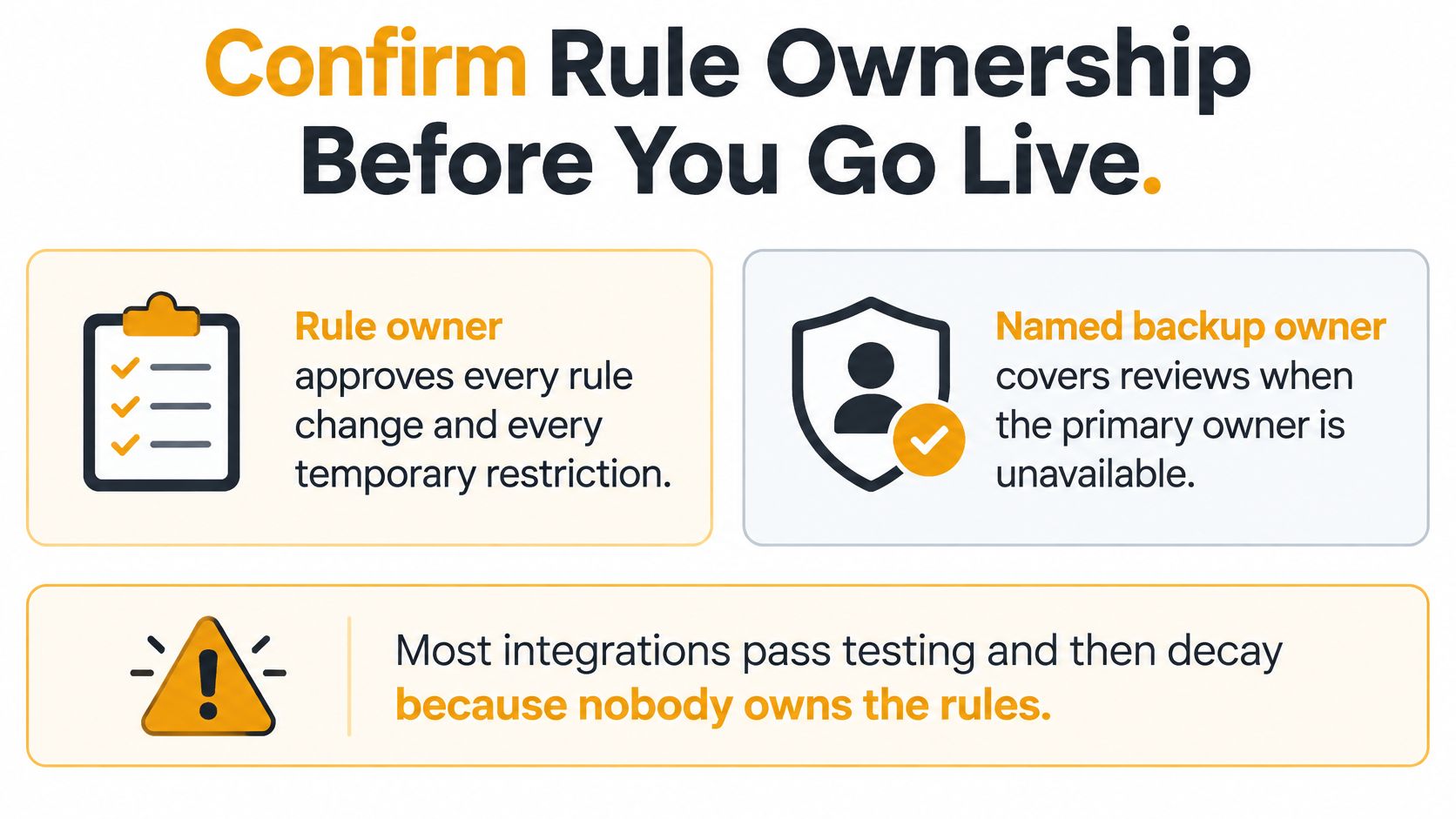
Name three people before launch: a rule owner who approves every change and every temporary restriction, a backup who covers reviews when the owner is away, and a rollback owner who can execute the sequence above without hunting for the export button. Roles assigned to a team instead of a person don't count.
Set the review cadence at once a month and within 24 hours of a legal change. Put every activation and expiry date on a shared calendar with the named recipient of the alert, then test that the alert arrives, because a warning nobody receives is decoration.
Keep the change record in the same JSON file as the rules. Rule ID, legal reference, effective date, approver and approval date give you a defensible answer when a customer or a regulator disputes a block. Without those five fields, the only account of why a rule exists is a conversation someone half-remembers.
One rule owner, one backup, one rollback owner. If any of the three is a group rather than a name, the setup isn't owned yet.
The go-live gate is an ownership decision, not another retest. The rule owner signs the current rule set, the backup executes a rollback drill on staging, and the escalation path for a blocked customer is written down. Mixed portfolios need one JSON rule set as the source for both WooCommerce and Shopify so the stores can't drift apart between imports.
If the setup is complex, send the rule list and the test address to support by emailing support@shiprestrict.com before launch. Industry-specific help is available the same way: email support@shiprestrict.com with what you sell and where you ship, and someone who has configured restrictions for that category will answer.
Ship Restrict blocks non-compliant orders at checkout in WooCommerce and Shopify by checking products, categories, tags, variants and destinations against state, city and ZIP rules before payment, with scheduled activation and expiry for rules that change. If you want a second opinion on your rule set before launch, send your rule list and the address you're testing to support@shiprestrict.com and we'll review it with you. Visit Ship Restrict to see the plans, the documentation and how the rule engine fits a regulated catalog.
Automate Shipping Compliance
Stop worrying about restricted states. Ship Restrict handles it automatically.

Cody Yurk
Founder and Lead Developer of ShipRestrict, helping e-commerce businesses navigate complex shipping regulations for regulated products. Ecommerce store owner turned developer.
Automate Shipping Compliance
- Block restricted states
- No more cancellations
- Set and forget
3-day free trial · Card required