Experian Address Search: A Guide for Regulated eCommerce
Learn how Experian Address Search validates addresses and how to use it with WooCommerce for automated shipping compliance on regulated goods.
If you run a firearms store on WooCommerce, you've probably felt this tension at checkout. A customer enters an address that looks close enough. Your staff can tell it's probably real. But “probably real” isn't the standard that matters when the shipment itself can trigger a compliance problem.
That's where many merchants get misled by address tools. They buy an address validation service expecting it to solve the shipping problem end to end. It won't. A tool like Experian Address Search can clean and standardize what the customer typed, which is a major step forward. But regulated commerce needs a second layer. You still have to decide whether that now-clean address is legally shippable for that product, under your licenses, and within the jurisdictions you serve.
Why Address Accuracy Is Non-Negotiable for Regulated Sales
The failure pattern is familiar. A customer types a city name with a local variation, leaves out a unit number, or enters a ZIP that belongs to a nearby area rather than the exact delivery location. In a normal retail store, that might mean a delayed package or an annoyed customer. In a firearms business, it can distort the location data your compliance rules depend on.
A small input error can become a legal problem
Many shipping restrictions for regulated products turn on jurisdiction. Not just the state. Sometimes the county, city, or ZIP matters. If your order review process relies on a messy, customer-entered address, your team ends up making decisions from unreliable data.
Automate Shipping Compliance
Block orders to restricted states automatically. 3-day free trial.
Start Free TrialThat's why address quality belongs at the front of the workflow, not at the end. The address captured during checkout becomes the input for every later decision: fraud review, shipping method availability, tax logic, transfer handling, and restriction screening.
Practical rule: Never let compliance logic run against raw customer input if you can validate and normalize it first.
Merchants often try to patch this manually. Staff members compare customer entries against maps, carrier tools, or internal spreadsheets. That works until volume rises or regulations tighten. Then the process becomes inconsistent, expensive, and risky. If you want a broader framework for reducing bad customer data before it causes downstream issues, these strategies for better lead data are a useful companion read because the same data-quality discipline applies to checkout addresses.
Address validation is foundational, not sufficient
Experian's role is best understood as infrastructure. It gives your checkout a cleaner, more trustworthy shipping address to work with. That matters because a standardized address gives your compliance workflow a stable target. Instead of evaluating “123 main st apt b, springfld,” your systems evaluate a canonical postal version of that destination.
Here's the distinction that matters:
- Deliverable address: The address exists and can be standardized.
- Compliant address: The order can legally ship there under your rules.
- Operationally approved address: Your business is willing and able to fulfill the order there.
Those are not the same thing.
The cost of confusing them is real, especially when merchants assume that “address validated” means “safe to ship.” If you've seen the downstream fallout from bad shipment decisions, this breakdown of the true cost of shipping compliance violations, fines, fees, and consequences captures why this issue deserves executive attention, not just a checkout tweak.
Understanding Experian Address Search and Its Core Features
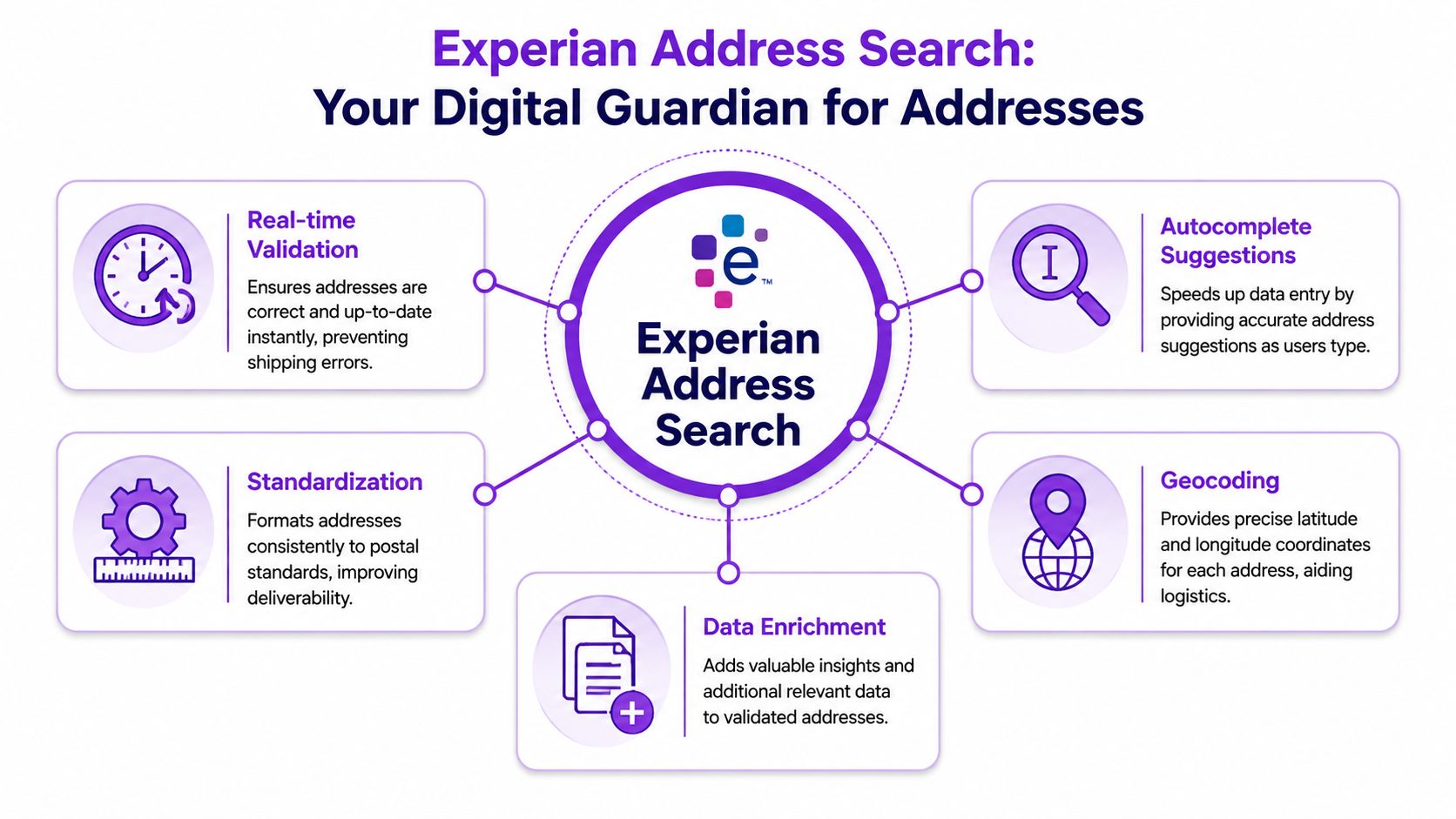
Think of Experian Address Search as a digital postmaster inside your checkout. It doesn't just check whether an address “looks right.” It helps convert inconsistent user input into a structured postal record your store can trust.
What it does well
Experian Address Validation provides global address search across more than 250 countries and territories in real time, using authoritative national postal and cadastral data, with address candidate lookup latency typically under one second through RESTful APIs for checkout use cases, according to Software Advice's Experian Address Verification profile.
Free Shipping Compliance Audit
We'll review your WooCommerce store's shipping compliance for free.
That matters in practice because checkout is intolerant of delay. If the customer types an address and the suggestions lag, they ignore the tool and finish the form manually. If the lookup is fast, the validated result becomes part of the buying flow instead of a friction point.
Three core capabilities make the service useful for eCommerce merchants:
- Real-time validation keeps the form responsive while checking what the customer enters against authoritative postal data.
- Standardization converts the address into a consistent format, which matters when your downstream systems need predictable fields.
- Enrichment helps fill in or confirm missing elements so the final address record is more complete than the original customer input.
Why standardization matters more than merchants think
Most checkout problems aren't caused by completely fake addresses. They come from variation. “Rd” versus “Road.” Alternate city names. Missing apartment details. Postcode and locality combinations that are close, but not exact.
A clean output solves several operational headaches at once:
| Problem in checkout | What a standardized address helps with |
|---|---|
| Inconsistent city names | More reliable shipping and restriction matching |
| Partial address entry | Better customer completion flow |
| Variant street formatting | Cleaner data in WooCommerce and downstream systems |
| Ambiguous location fields | Easier review by staff when an order needs escalation |
A validated address record is valuable because machines can use it consistently. Raw text forces people to interpret it.
Where merchants often overestimate it
Experian Address Search is excellent at fixing input quality. It is not a legal decision engine. It won't tell your store whether a destination falls inside a county-level restriction list you maintain for regulated products. It won't determine whether your business should block a specific category of firearm accessory based on local policy. It also won't substitute for your internal interpretation of licensing boundaries.
That's the right way to buy this kind of tool. Use it for what it's built to do. Then pass the cleaned address into a separate compliance layer.
The Technology Behind Accurate Address Lookup
A basic form validator checks whether a field looks plausible. A professional address system does much more. The difference matters because customer-entered shipping data is almost always messy in ways a simple regex can't fix.
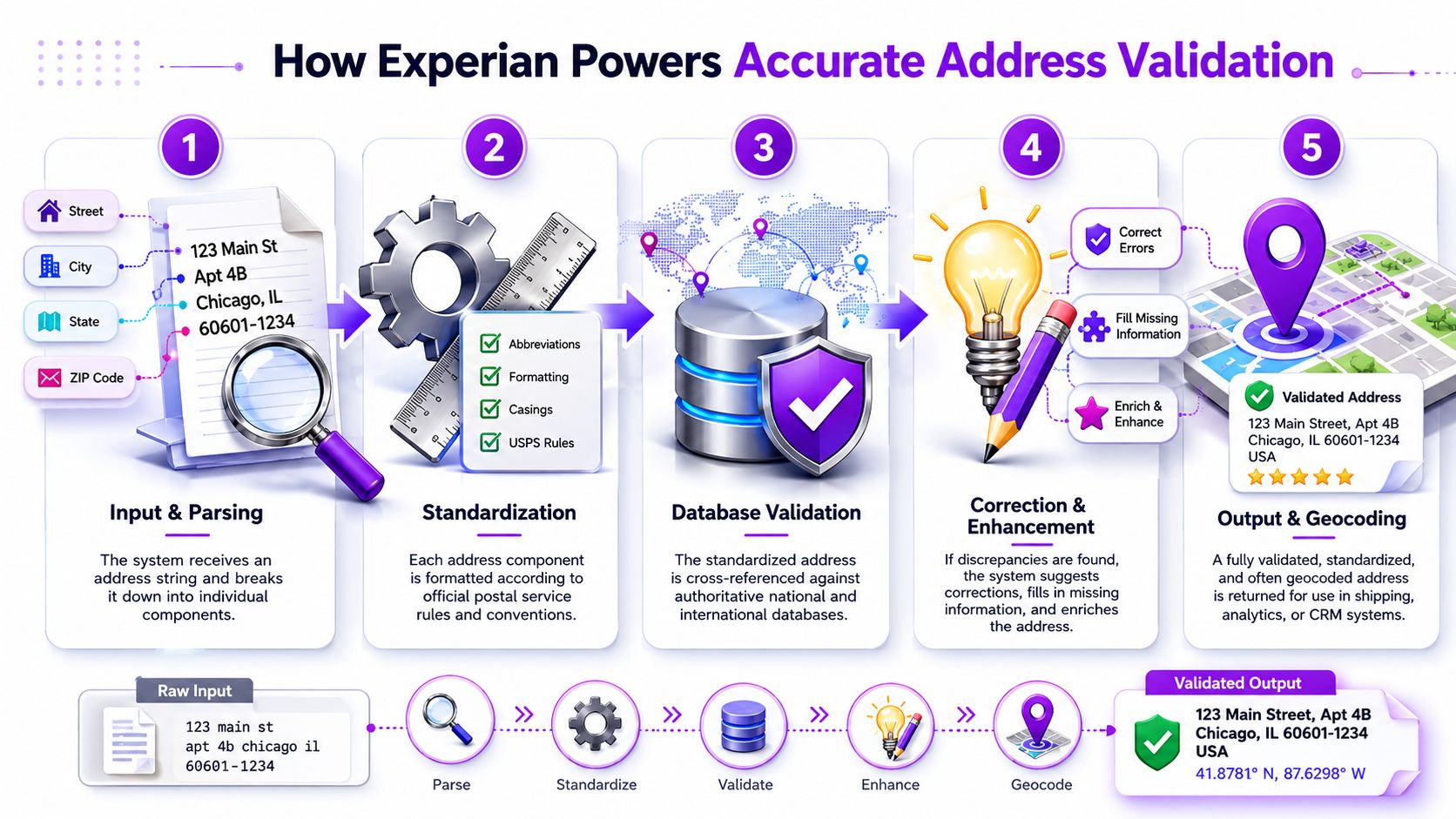
Parse
The first job is to break a single address string into meaningful parts. Street number, street name, unit, city, state, and postal code all need to be identified before the system can do anything intelligent with them.
That sounds simple until you deal with real customers. They combine fields, omit separators, misspell localities, and use shorthand. A usable system has to recognize structure even when the user doesn't provide it cleanly.
Standardize
Once the address is parsed, the next step is normalization. During normalization, inconsistent abbreviations, local naming conventions, and formatting variants get converted into a consistent postal model.
Standardization is where many internal tools fail. Developers often assume matching can happen directly against the customer's text. It usually can't, at least not reliably enough for regulated shipping. You need a canonical version first.
Match
Experian's address search uses a multi-pass matching architecture with phonetic algorithms and lexical normalization, and in the U.S. it integrates USPS CASS-certified reference data. Public Experian documentation states that match rates are often above 95% for major markets when sufficient input is present, and it describes a two-stage workflow in which Experian cleanses the address first and a plugin rule engine applies jurisdiction-specific restrictions second, as outlined in Experian Aperture's address validation documentation.
That matching layer is what separates a commercial-grade service from a checkout field with autocomplete bolted on.
Why this matters for firearms merchants
A firearms retailer doesn't just need a “good enough” address. The retailer needs a record stable enough to support rule enforcement. If your destination logic depends on state, county, city, or ZIP, then false matches and unresolved ambiguity create compliance exposure.
Here's a practical way to think about the stack:
- Customer input arrives dirty
- Address service interprets and normalizes it
- Your store stores the canonical result
- Compliance logic evaluates the canonical result
- Staff review only the exceptions
Don't ask your compliance engine to clean addresses. It should evaluate already-clean addresses.
This division of labor is what works. The address layer solves postal ambiguity. The restriction layer solves legal ambiguity. When merchants blur those jobs together, they usually end up with fragile custom code and too many manual exceptions.
Common Integration Methods and A Sample Checkout Flow
Most merchants encounter Experian address search through the checkout UI, but there are several ways to use it depending on how your WooCommerce stack is built.
The three integration patterns
The first is direct API integration. This is the most important model for regulated eCommerce because it validates addresses while the customer is still entering them. You capture better data before the order exists.
The second is SDK-based integration. This can simplify front-end implementation when your team doesn't want to manage every API interaction directly. It's useful when a developer wants faster deployment and fewer custom components.
The third is bulk list processing. That's valuable when your store already has years of customer address records in CSV exports or order histories and you want to clean them before using them in marketing, returns, or account updates.
What a strong WooCommerce checkout flow looks like
For firearms retailers, its primary value shows up in the live checkout flow:
-
The customer starts typing a shipping address.
The form sends partial input to the address service in real time. -
Suggested addresses appear in a dropdown.
The customer picks the closest verified result instead of finishing freehand. -
The checkout fields populate from the validated record.
Street, city, state, and ZIP are filled with structured values rather than copied from a single text blob. -
WooCommerce stores the cleaned destination data. This storage is where operational consistency begins. Support staff, shipping tools, and compliance logic all reference the same normalized record.
-
Restriction logic runs before the order proceeds.
If you want a model for that control point, this guide on how to block non-compliant orders before checkout in WooCommerce reflects the architecture regulated merchants should aim for.
What works and what usually fails
A fast, assisted checkout works well because it reduces customer typing and reduces interpretation later. Customers tend to cooperate when the form helps them finish faster.
By contrast, these patterns tend to break down:
- Free-text address fields with post-order review create too many exceptions.
- Validation after payment authorization catches problems too late.
- Manual correction by warehouse or support staff pushes compliance work to the least appropriate stage.
- Single-field “is this address valid?” checks miss the bigger issue, which is structured data quality.
A useful internal test is simple. Ask whether your checkout produces an address record that a rule engine can evaluate without human judgment. If the answer is no, the integration isn't complete yet.
Why the customer experience piece matters
Regulated merchants sometimes treat compliance and UX as competing priorities. In checkout architecture, they often support each other. Better address capture reduces staff intervention, customer follow-up, and cancellations caused by avoidable data problems.
That's why the address lookup should be presented as assistance, not suspicion. You're not interrogating the buyer. You're making it easier to provide an exact destination that your systems can process correctly.
The Critical Link Between Address Validation and Shipping Restrictions
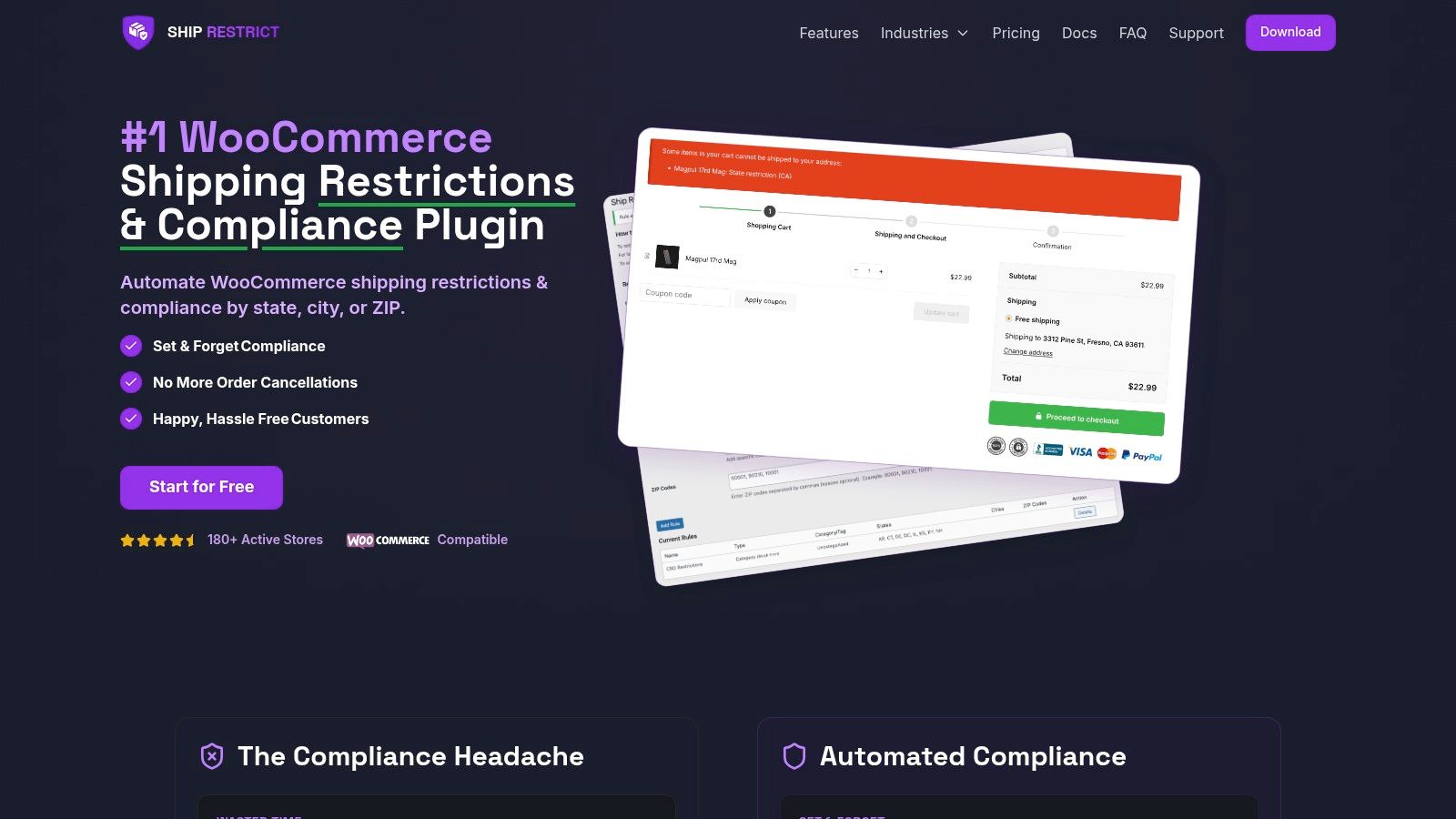
This is the point many regulated merchants miss. A validated address is not the same thing as an approved destination.
Deliverability and legality are separate decisions
Experian can confirm that an address is real, structured properly, and suitable for delivery workflows. That's useful. But legal restrictions for firearms and related products don't arise from postal formatting. They arise from laws, licensing constraints, and merchant policy.
An address can be perfectly valid and still unusable for your business.
That gap is especially important where restrictions operate below the state level. A merchant may need to block by county, city, or ZIP, not just by state. Public commentary around Experian's address search and validation notes a critical limitation here: even accurate global validation does not automatically expose legal-jurisdiction boundaries such as county or municipality, which means regulated retailers often have to add mapping logic to align validated postal addresses with restriction lists, as discussed in Experian's address search types documentation.
The missing layer is jurisdiction mapping
Once the address is clean, you still have to answer questions like these:
| Compliance question | Address validation alone can't answer it |
|---|---|
| Is this ZIP blocked for this product category? | No |
| Does this city have a local restriction my store honors? | No |
| Does this county fall outside my approved shipping footprint? | No |
| Is this dealer or transfer location acceptable under my process? | No |
Regulated merchants need a restriction engine. The engine consumes the normalized address, maps it to the jurisdictional data model your business uses, and enforces policy before fulfillment starts.
A postal address tells you where the package can go. A compliance engine tells you whether it should go there.
What bridging the gap actually looks like
In practice, the workflow should look like this:
- Step one: Validate and standardize the destination address.
- Step two: Extract the fields your compliance logic needs.
- Step three: Map those fields to the jurisdictions you use for restriction rules.
- Step four: Block, allow, or route the order for review based on product and destination.
The tricky part isn't usually address quality once Experian is in place. The tricky part is maintaining the rule structure that sits on top of the validated address. That includes your blocked ZIPs, city-specific exclusions, county logic, product-category conditions, and customer messaging.
Where merchants make expensive assumptions
The most common bad assumption is this: if the API says the address is valid, the order is safe.
That assumption causes trouble in returns, transfer flows, and edge cases where the “best postal address” is not the “approved compliance destination.” For regulated goods, address validation should be treated as an input control, not a final approval signal.
A better operating model is to separate responsibilities clearly:
- Address service: cleans, standardizes, and confirms deliverability
- Restriction layer: evaluates legality and merchant policy
- Human staff: reviews only edge cases that automation can't confidently resolve
That's the architecture serious merchants end up with after they've been burned by manual checks or overly generic checkout tooling.
A Practical Plan for Automating Regulated Shipping
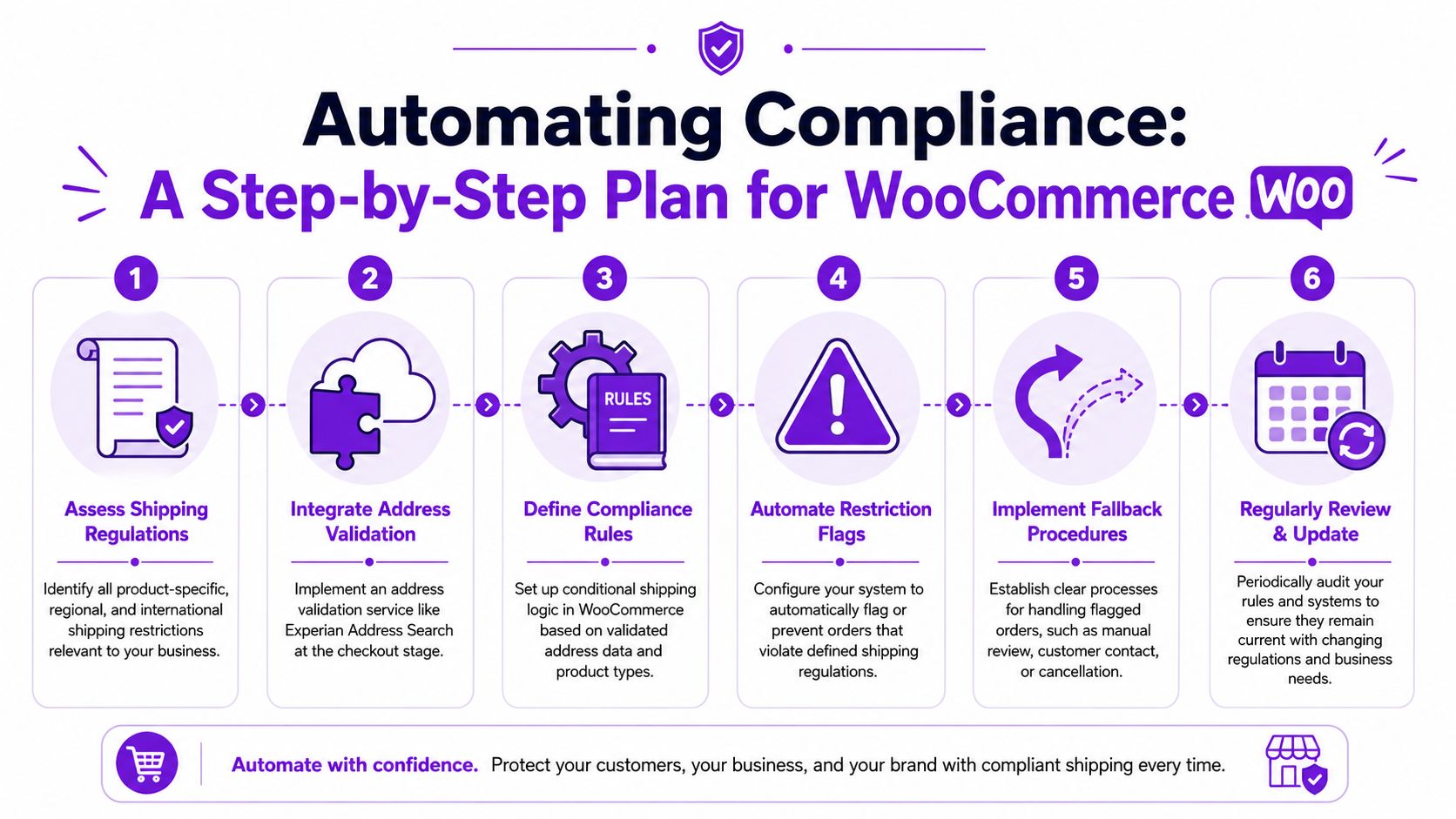
Merchants usually know they need better controls. The hesitation comes from not knowing how to assemble the workflow without creating another brittle process. The cleanest approach is to build in layers and assign one job to each layer.
The implementation path that holds up
Start with address capture. Put a validated lookup experience directly into checkout so every order begins with structured destination data instead of free-form text.
Next, define your restriction model carefully. Don't just think in terms of states. If your products or policies require finer control, structure the rules around county, city, and ZIP where needed. This is also where you decide which orders should be blocked outright and which should go to manual review.
Then connect the data flow:
- Use Experian Address Search to normalize what the customer enters.
- Store the returned fields consistently in WooCommerce.
- Run restriction checks against the validated destination, not against raw input.
- Show clear customer-facing messages when the store can't ship an item to that location.
- Maintain fallback procedures for exceptions such as dealer transfers, returns, or ambiguous destination scenarios.
Pros, trade-offs, and the reality of maintenance
The upside is straightforward. Automated validation plus automated restrictions reduces manual checking and gives your team a repeatable process. It also creates a cleaner audit trail than ad hoc staff judgment.
The trade-off is that this isn't a single-plugin magic trick. You're combining an address data service with a compliance rules layer, and both need configuration. Rules also need maintenance because your business footprint, product catalog, and risk tolerance can change.
Operational advice: Review blocked destinations and exception queues regularly. Automation works best when someone owns the rules behind it.
If you've looked at adjacent commerce operations, the same lesson shows up elsewhere. Teams that Automate Shopify store fulfillment usually discover that automation only pays off when the handoffs between systems are explicit. Regulated WooCommerce shipping is no different.
The manual alternative is worse
Some merchants still rely on order notes, staff memory, and after-the-fact review. That approach looks cheaper until volume rises or one bad shipment exposes the weakness in the process. Manual review also creates inconsistency. Two employees can look at the same borderline address and make different decisions.
If you need a practical model for replacing those ad hoc checks with a rules-based workflow, this overview of automated shipping compliance for WooCommerce stores is a useful reference point.
The strategic decision is simple. Use address validation to improve destination quality. Use a dedicated restrictions layer to decide whether the order can proceed. Don't ask one tool to do both jobs.
If your WooCommerce store sells regulated products, Ship Restrict helps turn validated addresses into enforceable shipping decisions. It gives firearms retailers a practical way to block restricted orders by state, county, city, or ZIP before checkout completion, so your team isn't left doing manual compliance triage after the order is already in motion.
Automate Shipping Compliance
Stop worrying about restricted states. Ship Restrict handles it automatically.

Cody Yurk
Founder and Lead Developer of ShipRestrict, helping e-commerce businesses navigate complex shipping regulations for regulated products. Ecommerce store owner turned developer.
Automate Shipping Compliance
- Block restricted states
- No more cancellations
- Set and forget
3-day free trial · Card required