Automated ID Verification: A Practical Guide for WooCommerce
Learn how automated ID verification works, the technologies behind it, compliance tips, and how to integrate it into a WooCommerce firearms store.
The checkout goes fine until the order hits the one line that matters. A buyer has picked a regulated item, entered an address, and clicked through the usual WooCommerce steps, but the store still needs to know whether that person is who they claim to be and whether the shipment can legally move to that location. That's where automated ID verification stops being an abstract compliance feature and becomes part of the actual order flow.
For a firearms storefront, that moment usually arrives after the customer has already done most of the work. If the store relies on a simple age checkbox or a manual email back-and-forth, the risk lands on staff, not on the system. Automated verification is the software workflow that checks a government-issued ID, compares a live biometric sample, and corroborates identity details against trusted data sources, all without a human reviewer in the middle.
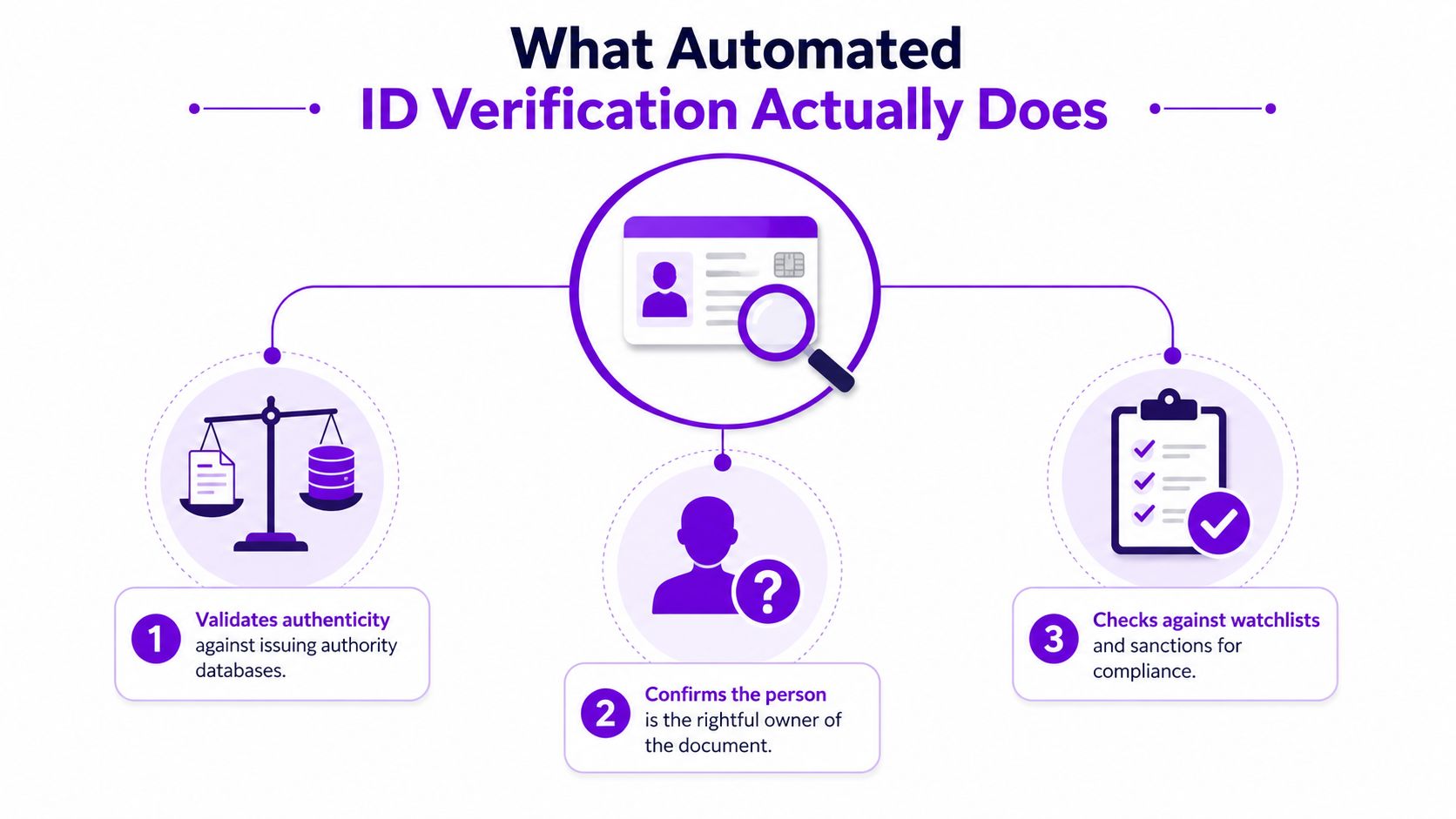
What Automated ID Verification Actually Does
The first time a regulated merchant really feels the need for automated ID verification is usually at checkout, when a buyer has already chosen an age-restricted product and the team realizes a date-of-birth gate won't hold up on its own. A checkbox tells you what someone typed. It doesn't prove that person is the rightful document holder, and it doesn't create a defensible trail if an audit or complaint lands later.
The basic job it performs
Automated ID verification is a software workflow that tries to answer three questions at once. Is the ID genuine, does the person holding the phone match the photo, and do outside records support the identity details? Modern systems usually combine document authentication, biometric face matching, and external data corroboration as a layered design, so one weak signal doesn't carry the entire decision Backbase on the standard IDV architecture.
Automate Shipping Compliance
Block orders to restricted states automatically. 3-day free trial.
Start Free TrialThat matters in regulated commerce because the store isn't just trying to be convenient. It's trying to prove it took a reasonable, repeatable step before accepting a sensitive order. One historical shift in the field is that verification moved away from slow manual review toward high-automation onboarding, because the operational pressure to process checks quickly at scale kept rising Pactvera's KYC and identity verification trends report.
What it can and can't replace
It can replace the clumsy parts of manual review, like a staff member squinting at an uploaded photo and comparing names by eye. It can't replace business rules. If a destination is restricted, the identity step alone doesn't make the order shippable, and if a buyer fails the check, the store still needs a path for review or appeal.
Practical rule: use ID verification to prove identity, not to override your shipping and product restrictions.
That distinction is the whole reason the process belongs inside the checkout flow, not as a disconnected afterthought. A regulated WooCommerce store needs both identity proof and jurisdiction control, because the buyer can be valid and the shipment can still be wrong for the address entered.
The Core Technologies Behind an IDV Check
A vendor pitch sounds tidy until you ask what runs underneath it. In a regulated WooCommerce store, the stack has to do more than accept an image and return a pass or fail. It has to read the document, test whether it looks legitimate, compare the face, and check supporting data against other sources before the order can move into the rest of the checkout flow.
Document capture and analysis
The first layer is document handling. The customer uploads a driver's license, passport, or similar ID, and the system uses OCR to extract fields from the image while also classifying the document type so it knows what format it is handling. A mobile camera shot in bad light is a very different input from a clean studio scan, which is why vendors keep emphasizing capture quality and document recognition Vouched's automated identity verification guide.
That same guide also gets one point right that too many product pages skip over, even strong systems are imperfect. Legitimate users get tripped up by glare, damaged corners, partial cropping, or a document that does not match the vendor's expected template closely enough. Those edge cases are where a store finds out whether the platform is built for real customers or only for polished demos. In practice, that matters just as much as raw accuracy, because a regulated checkout cannot afford to block every buyer who has a worn license or a poor phone camera.
Biometric matching and liveness
The second layer is biometric comparison. The buyer takes a selfie or short video frame, and the system checks that face against the photo on the document. Liveness detection sits beside that check to block obvious spoofing, like printed photos or low-effort replay attempts. If you want a non-compliance example of how face matching logic works, a plain-language guide to facial recognition in dating is a useful mental model, even though the use case is obviously different.
For a WooCommerce store selling regulated goods, that face match is not a cosmetic extra. It is part of the paper trail that shows the person placing the order is the person tied to the ID, which helps when shipping restrictions and age checks have to line up inside the same checkout.
Free Shipping Compliance Audit
We'll review your WooCommerce store's shipping compliance for free.
External corroboration
The third layer is external validation. The system compares identity attributes against trusted databases and screening sources, which helps catch mismatches that a document alone will not surface Trulioo's automated KYC verification explanation. That layered structure is why vendors can offer a stronger decision than a simple image upload. It is also why the better vendors still keep fallback logic, because no single signal is clean enough for every case.
A worked example makes the trade-off clearer. A customer uploads a state ID, the OCR engine reads the name and birth date, the face match confirms the selfie belongs to the document holder, and the external checks validate the attributes. If the image is blurry or the face capture fails, the flow should stop and route to review instead of forcing a bad decision. If the identity check passes but the destination is still restricted, the store still needs shipping logic and age controls to block the order, which is why merchants usually pair the IDV workflow with shipping restrictions and age verification rules for regulated sales.
How IDV Fits Into a Regulated WooCommerce Checkout
In a firearms or other regulated WooCommerce store, the identity check works best when it sits between address entry and payment capture. The customer adds the item, enters a shipping address, and then gets prompted to complete verification before the store finalizes the order. That keeps the store from authorizing a payment only to discover later that the address can't receive the product.
The checkout sequence that actually works
The cleanest sequence is cart review, address entry, IDV prompt, document and selfie capture, vendor response, then a final decision. If the buyer passes identity verification but the destination is restricted, the order still gets blocked on shipping rules. If the buyer fails IDV but the address is fine, the order moves to manual review or gets held depending on store policy.
That pairing matters because identity and destination solve different problems. One confirms the person, the other confirms the shipment lane. When I've seen stores try to collapse both into one step, they usually create confusion at support time because the customer can't tell whether they failed as a person or as an address.
For merchants already enforcing age checks and shipping restrictions, the better model is to treat IDV as one gate and jurisdiction rules as another. The shipping side can be tied to granular restriction logic by state, county, city, or ZIP, while the identity result determines whether the buyer is eligible to proceed at all. The buyer doesn't need to understand every rule, but the system does.
Timing and customer communication
A verification step that completes in under a minute still changes the rhythm of checkout. If the customer stares at a blank spinner or a vague “processing” message, they'll assume something broke. Clear copy matters more than people think, especially when the store is asking for a document and a selfie in the middle of a purchase.
Tell the buyer why the check exists before asking for the upload. People tolerate friction better when the next step is obvious.
For a practical shipping and age-verification example in a regulated setting, the best reference point is a store flow that blocks non-compliant orders before checkout, not after. The logic in age verification for online sales best practices for regulated products fits that same principle, identity and shipping controls need to work together, not compete for attention.
Choosing a Vendor for a WooCommerce Store
Vendor selection gets messy fast because most providers look similar in a sales deck. The difference shows up when a real customer uploads a damaged license, a browser session dies halfway through selfie capture, or a state rule needs to override an otherwise clean verification result. A regulated store should score vendors against operational reality, not just API features.
What to compare before you sign
The first criterion is documented accuracy and equity results. Ask for published performance details, demographic testing, and failure handling, because one 2024 evaluation found that some commercial products were equitable across demographics while others were not, and some didn't work well. If a vendor cannot explain how it behaves across groups and document conditions, that is a red flag.
The second is WooCommerce and PHP fit. The plugin or integration should work cleanly with checkout hooks, order states, and your theme's flow. If the vendor assumes a custom frontend for every store, you will spend too much time patching the customer journey.
The third is fallbacks. You need a manual review path, a clear rejection message, and a way to handle appeal cases without opening a new support nightmare. The fourth is audit logging, because compliance teams need to know what was checked, when it was checked, and which rule triggered the decision. The fifth is total cost, including per-check pricing and the internal labor cost of false rejections.
For a vendor-management lens, the structure used in the HireParalegals vendor management guide is a useful companion, because the job is ongoing control, not one-time purchase approval.
A second filter is how the vendor fits the rest of the checkout stack. If your store already uses shipping restriction logic, age gates, or order rules, the IDV tool has to cooperate with those controls instead of sitting on top of them and creating duplicate customer prompts. The practical test is simple, can the vendor let a clean identity result pass through while still blocking an order that violates a shipping rule? If the answer is unclear, the integration will be harder to run than it looked in the demo. The workflow patterns used in Ship Restrict for WooCommerce are a good benchmark here, because the checkout has to reflect store policy without turning the buyer path into a support case.
A simple scorecard
| Criterion | What to Look For | Red Flag |
|---|---|---|
| Accuracy and equity | Clear testing evidence, edge-case handling, demographic transparency | Vague claims with no deployment data |
| WooCommerce fit | Native plugin support or clean hooks | Heavy custom work for basic checkout use |
| Fallbacks | Manual review, appeals, rejection messaging | Hard fail with no customer path forward |
| Audit logs | Time-stamped decisions and rule traceability | Black-box outcomes with no detail |
| Cost | Predictable per-check pricing and support scope | Hidden fees or unclear billing triggers |
The scorecard helps, but it does not replace a live test. Run the vendor against your own checkout flow, your own device mix, and your own shipping rules before you commit. A product that looks fine in a sandbox can still fail when a customer uploads from a low-end phone or hits a restriction tied to location.
Where Automated IDV Fails and What to Do About It
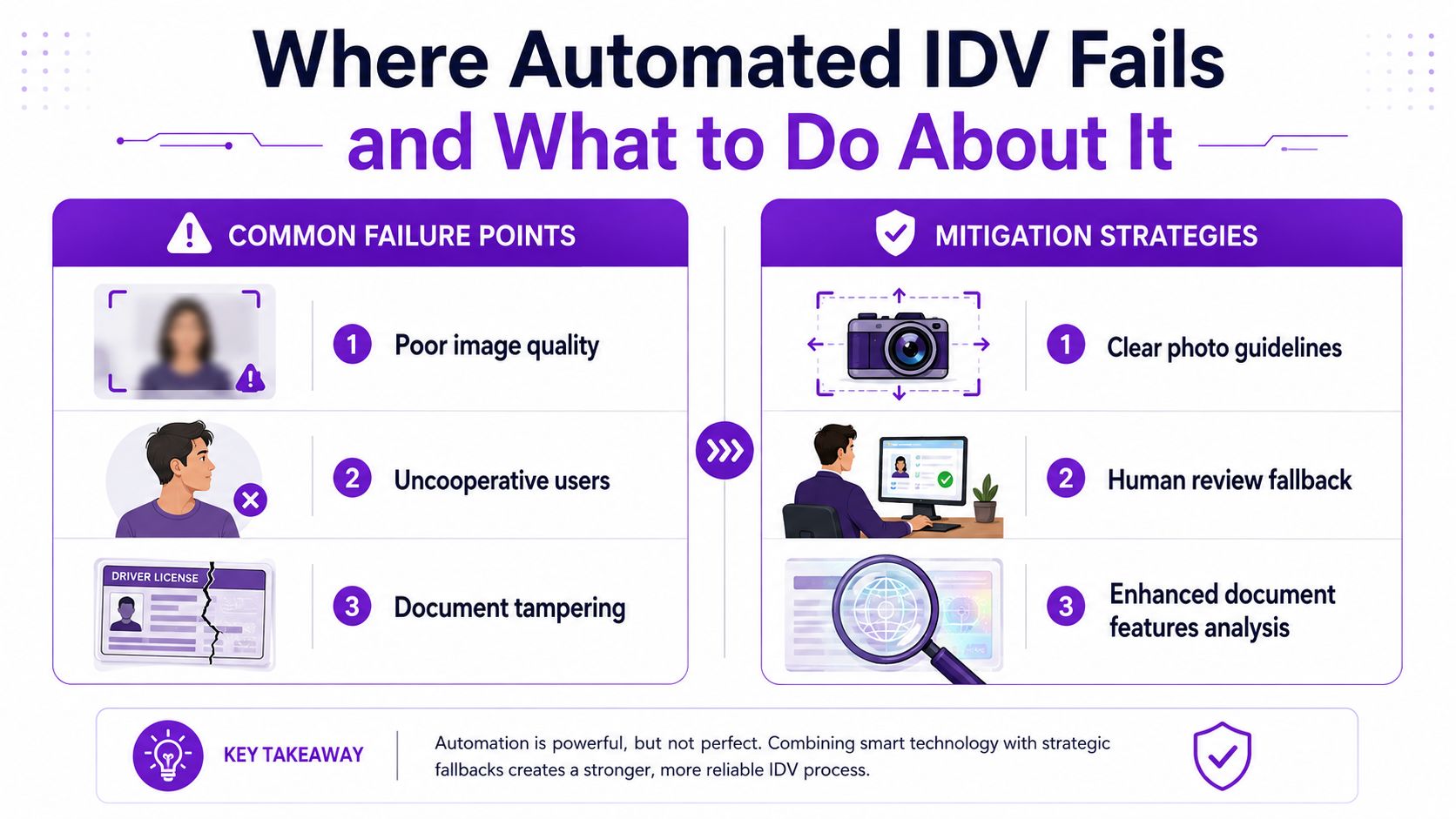
A checkout can look clean in a demo and still fail in production the moment a real buyer uploads a dim photo, uses an older phone, or has a document the vendor's model does not handle well. In a regulated WooCommerce store, that failure is more than a nuisance. It can block a valid order, create a support ticket, and leave the merchant guessing whether the problem was fraud or just a bad capture.
The failure modes that matter
The first problem is false rejections. A legitimate buyer gets blocked because the image is dark, the document is worn, or the selfie angle is awkward. The second is accessibility and equity, which the NELP's analysis on ID verification inequities describes as a real issue when systems assume technology access, stable credit history, English fluency, or a conventional appearance. The third is document diversity, because some customers will not present the kind of ID the vendor expects.
That concern is not theoretical. Independent testing found that some commercial digital ID verification products performed well across demographics, while others were inequitable or did not work well. For a merchant, that shows up as uneven approval rates, more manual review, and more customers who believe the store rejected them for no clear reason.
A failure path is part of the product. If the vendor does not have one, the merchant ends up building it under pressure.
What to require before launch
Ask for configurable thresholds, clear error handling, and an auditable appeal process. Ask how the platform handles poor lighting, damaged documents, and non-standard capture conditions. Ask whether manual review can be triggered automatically when confidence is low, instead of rejecting the order outright.
The goal is not to remove every point of friction. The goal is to keep verification from becoming a dead end for buyers who are valid but hard to classify. In a WooCommerce firearms storefront, that matters because the store still has to enforce age and identity checks while also honoring shipping restrictions and checkout rules. If the vendor cannot support that balance, the store pays for it in abandonment, support load, and fairness complaints.
Privacy, Data Handling, and Compliance Basics
Identity checks bring in sensitive data, so the store's privacy posture has to be deliberate. If you're handling regulated goods, the risk isn't just a bad order. It's keeping more personal data than you need, for longer than you should, in places the customer never agreed to.
Design choices that reduce exposure
The simplest rule is data minimization. Collect only what the verification step needs, keep it separate from the order record where possible, and delete it on a schedule instead of treating it as permanent customer history. Consent should be explicit at checkout, not hidden inside a generic terms link, because the buyer needs to know why the ID and selfie are being requested.
Encryption and logging matter too. Data should be protected in transit and at rest, and the store should keep an audit trail showing what the vendor decided, when it happened, and which order or rule triggered the action. That trail is often what compliance staff ask for first when they want to understand a blocked sale or a disputed approval.
For a broader identity-policy context, the Identity verification resource at VolunteerBadge is a useful reminder that verification programs live inside a wider screening and recordkeeping mindset, even when the business model is very different from a nonprofit or volunteer setting.
Compliance pressure in the real world
The operational environment is getting stricter. Industry reporting tied to identity verification found that 82% of organizations saw increased regulatory pressure in 2023, driven mainly by GDPR and CCPA Juniper Research's identity verification market statistics. That kind of pressure is why merchants can't treat privacy as a policy page only. The workflow itself has to respect retention, consent, and access controls.
A practical privacy checklist is short: define what you store, define how long you store it, define who can access it, and define how it gets deleted. If the vendor can't support those controls cleanly, the integration will create more legal exposure than it removes.
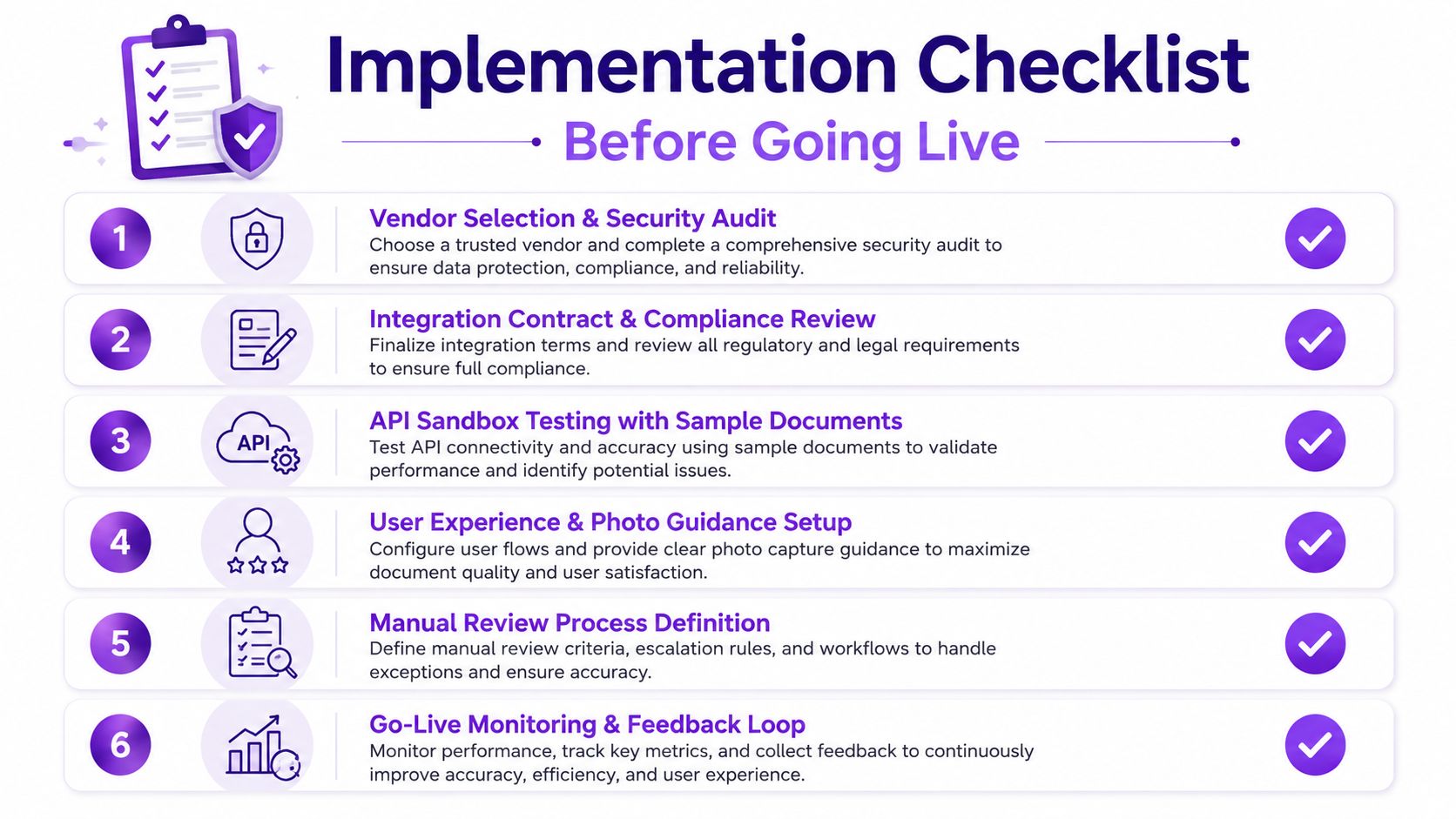
Implementation Checklist Before Going Live
A live regulated store needs more than a vendor account and a plugin install. The launch plan should be treated like a control rollout, with owners, test cases, and rollback steps written down before the first buyer sees the flow.
The pre-launch checklist
- Vendor selection and security review: confirm the platform's audit logs, fallback paths, and documentation.
- Contract and compliance review: verify retention, deletion, support boundaries, and data handling terms.
- Sandbox testing with real document types: test damaged IDs, low-light selfies, and device differences.
- Photo guidance and UX setup: write clear upload instructions and explain why the check exists.
- Manual review routing: define who handles exceptions and how fast they respond.
- Go-live monitoring: track pass rates, review volume, checkout abandonment, and support tickets.
The checkout-blocking workflow for non-compliant orders in WooCommerce is a good companion reference when you're wiring the final decision, because identity and shipping controls should fail closed in a predictable way.
What to watch in the first 30 days
Watch for sudden spikes in manual review, repeated failures from one device type, and customer confusion around the ID prompt. If the vendor goes down during a rush, the store needs a temporary fallback that doesn't let restricted orders slip through. The safest stores are the ones that assume something will break and prepare the response before it does.
Common Questions From Store Owners
How long does a typical IDV check take? In practice, it should feel close to real time for the buyer, but the exact experience depends on the vendor, the device, and the quality of the capture.
What happens when a check fails? The best setup routes the order to manual review or gives the buyer a clear retry path. A hard rejection with no explanation usually creates more support work than it saves.
Can I require IDV only for certain SKUs or jurisdictions? Yes. That's usually the sensible approach in regulated retail, because not every product or destination needs the same friction.
How do pricing models usually work? Vendors commonly charge per verification or by usage tier, so total cost depends on volume and how many checks succeed versus need review.
What if a regulator asks for records? Keep the decision trail, the timestamp, and the rule that triggered the outcome. If you can't show that quickly, the workflow wasn't really compliant enough.
If you're building a regulated WooCommerce checkout, Ship Restrict helps you enforce shipping rules before bad orders ever get too far. Pair that with identity controls, and you get a cleaner compliance flow that protects the checkout experience as well as the business. Visit Ship Restrict to see how it supports firearms retailers and other regulated stores that need shipping enforcement to work without manual guesswork.
Automate Shipping Compliance
Stop worrying about restricted states. Ship Restrict handles it automatically.

Cody Yurk
Founder and Lead Developer of ShipRestrict, helping e-commerce businesses navigate complex shipping regulations for regulated products. Ecommerce store owner turned developer.
Automate Shipping Compliance
- Block restricted states
- No more cancellations
- Set and forget
3-day free trial · Card required